
1. Introduktion
This user manual provides detailed instructions for the Temtop LKC-1000S 2nd and M10+ Air Quality Monitoring Bundle. This bundle offers a comprehensive solution for monitoring various indoor air pollutants and environmental factors. The LKC-1000S 2nd focuses on particulate matter (PM2.5, PM10) and formaldehyde, while the M10+ expands monitoring to include carbon dioxide (CO2) and volatile organic compounds (VOCs), along with app connectivity for real-time data and analysis. Please read this manual thoroughly before using your devices to ensure proper operation and accurate readings.
2. Produktet er slutview
2.1 Temtop LKC-1000S 2nd Air Quality Monitor
The LKC-1000S 2nd is designed for detailed environmental monitoring, providing insights into particulate matter and formaldehyde levels. It features a clear display and intuitive controls.
- Monitorer: PM2.5, PM10, Formaldehyde (HCHO), Temperature, and Humidity.
- Vise: Real-time readings for all measured parameters.
- Sensorer: Equipped with DART Electrochemical HCHO Sensor, SENSIRION Temp & Humi Sensor, and Temtop Laser PM2.5 Sensor (3rd Gen).
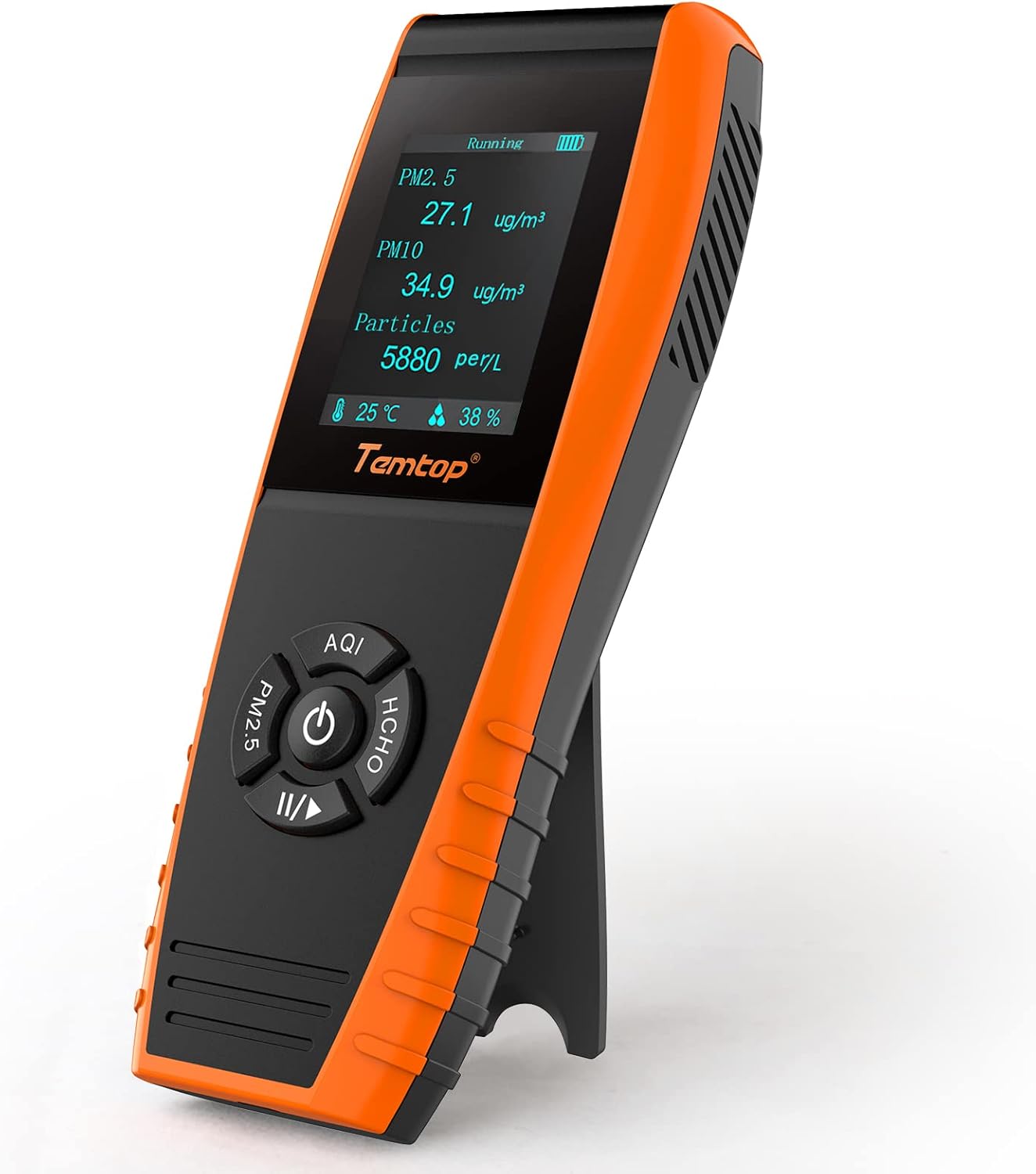
Image: Temtop LKC-1000S 2nd displaying various air quality parameters.

Image: Internal components of the LKC-1000S 2nd, showing its advanced sensors.
2.2 Temtop M10+ Air Quality Monitor
The M10+ is a smart monitor that enhances your air quality insights with CO2 and VOCs detection, along with convenient app connectivity for remote monitoring and data analysis.
- Monitorer: CO2, VOCs, PM2.5, Temperature, and Humidity.
- Forbindelse: Bluetooth Low Energy (BLE) for app synchronization.
- Vise: Eye-Care E-Ink Display with integrated alarm system and visual indicator bar (Poor, Fair, Good).
- Udholdenhed: Op til 60 dage på en enkelt opladning.
- Sensorer: Features World-Leading Sensirion Sensors for CO2/TVOC/Temp/Hum and Temtop's In-House Particle Sensor for PM2.5/AQI.
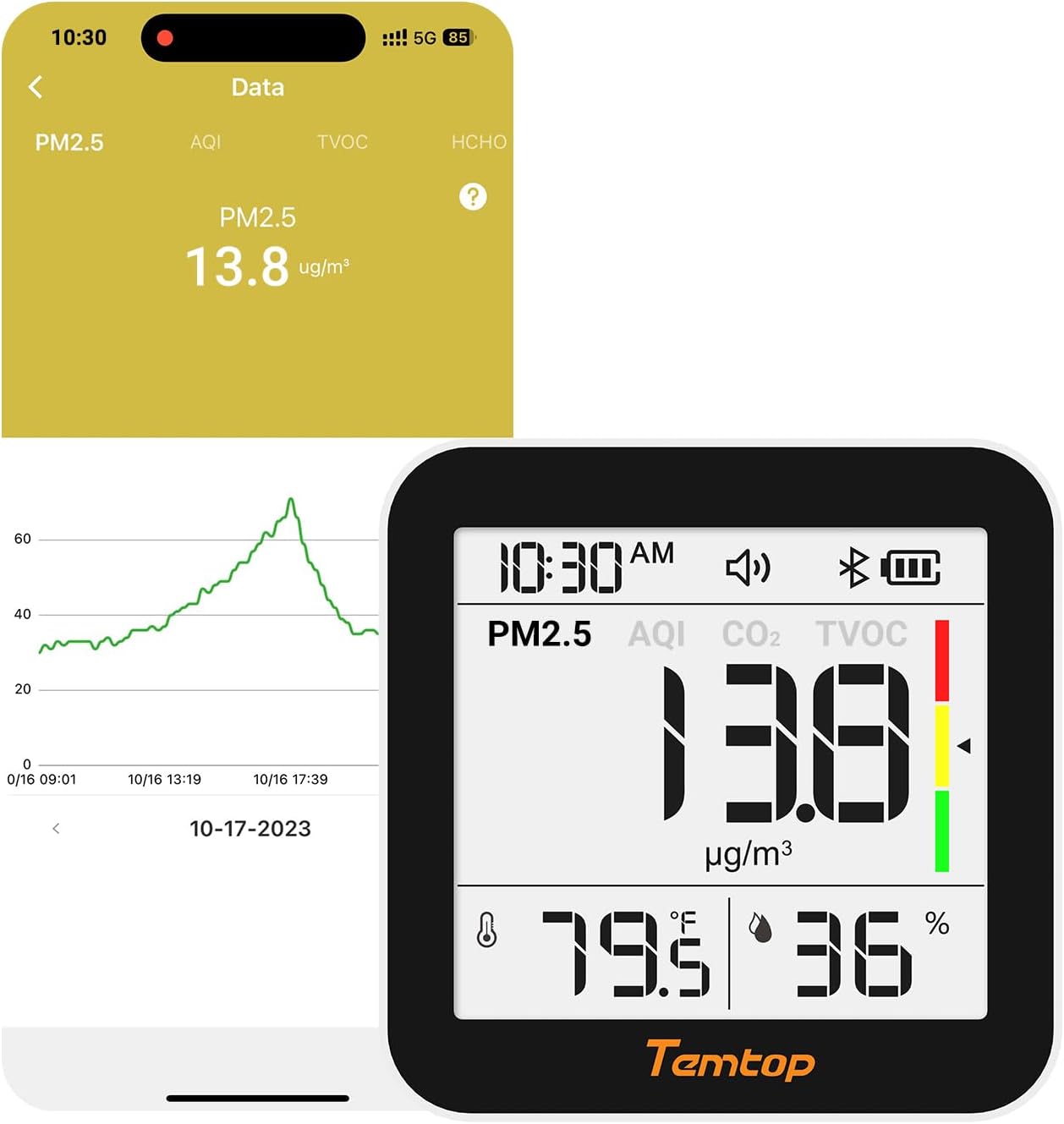
Image: Temtop M10+ highlighting its key features and display.

Image: Internal components of the M10+, showcasing its advanced sensor technology.
3. Pakkens indhold
Upon opening your Temtop Air Quality Monitoring Bundle, please verify that all items are present and in good condition. The bundle includes:
- 1 x Temtop LKC-1000S 2nd Air Quality Monitor
- 1 x Temtop M10+ Air Quality Monitor
- 2 x USB ladekabler
- 2 x User Manuals (one for each device)
- 1 x Storage Box (for LKC-1000S 2nd)
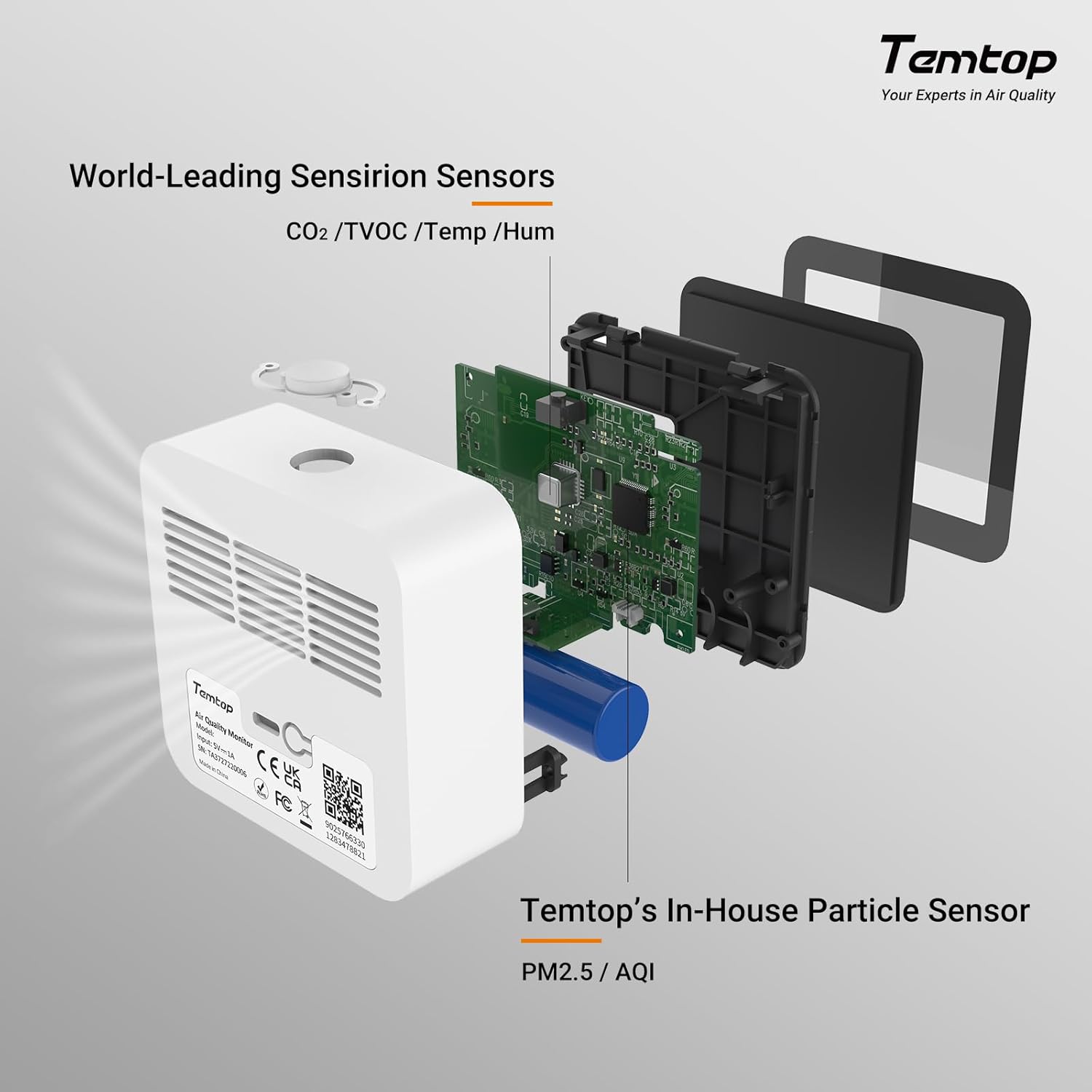
Image: Typical package contents for the LKC-1000S 2nd monitor.
4. Opsætning
4.1 Indledende opladning
Both the LKC-1000S 2nd and M10+ are battery-powered. Before first use, fully charge each device using the provided USB charging cables and a standard USB power adapter (not included). A full charge typically takes a few hours. The battery indicator on the display will show charging status.
4.2 Tænd/sluk
To power on each device, press and hold the power button for a few seconds until the display illuminates. To power off, press and hold the power button again until the display turns off.
4.3 M10+ App Connectivity
The M10+ monitor can connect to the Temtop app via Bluetooth for real-time data and historical analysis.
- Download the "Temtop" app from your smartphone's app store (iOS or Android).
- Sørg for, at Bluetooth er aktiveret på din smartphone.
- Open the Temtop app and follow the on-screen instructions to add your M10+ device. You may need to keep the M10+ close to your phone during the initial pairing process.
- Once connected, the app will display real-time readings and allow access to historical data.
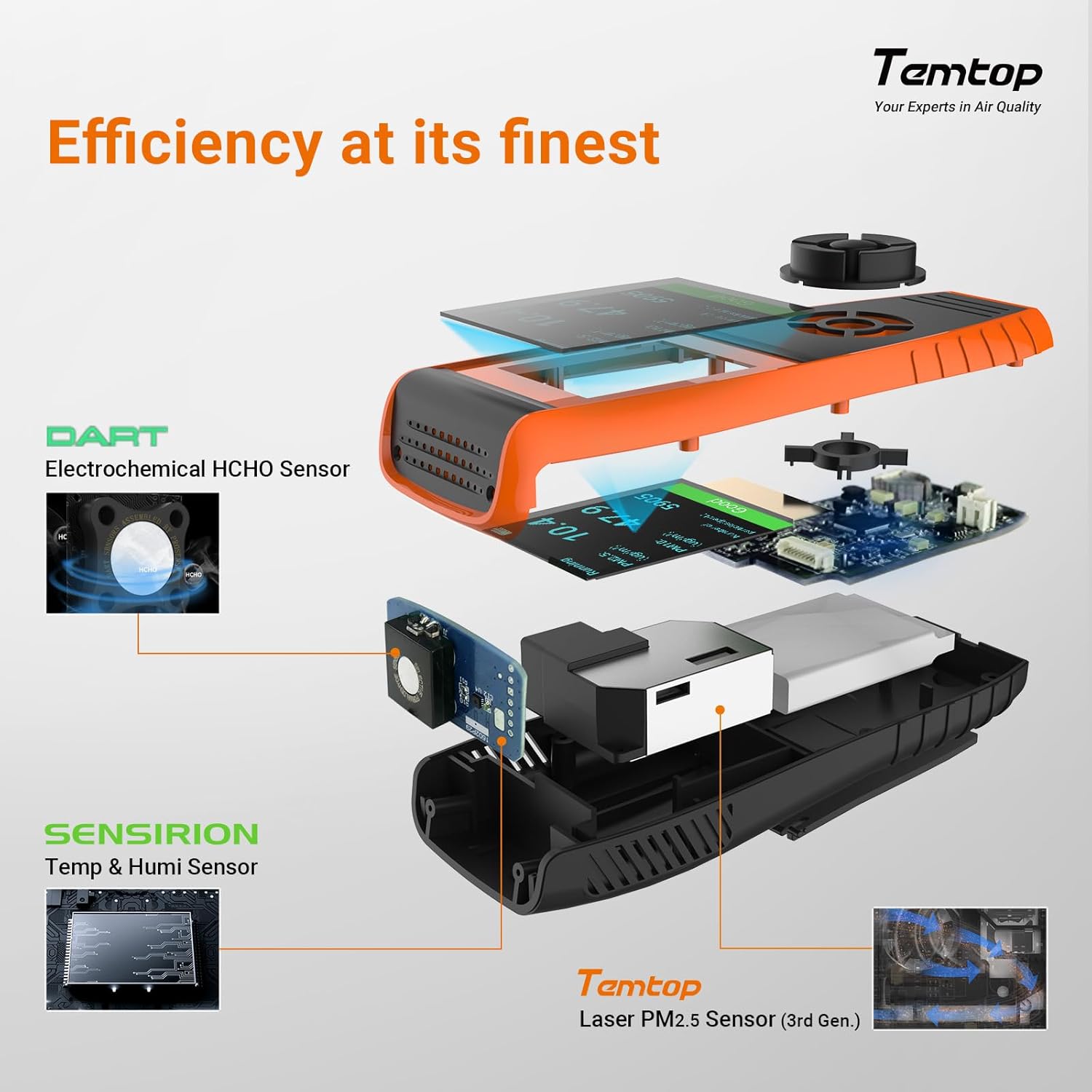
Image: M10+ display and companion app interface.
5. Betjeningsvejledning
5.1 LKC-1000S 2nd Basic Operation
The LKC-1000S 2nd typically features a few buttons for navigation and mode selection. Refer to the specific manual for the LKC-1000S 2nd for detailed button functions.
- Power knap: Tryk og hold for at tænde/slukke.
- Mode Button (HCHO/AQI): Cycle through different display modes or parameters.
- AQI Button: View the Air Quality Index.
- PM2.5 knap: Display PM2.5 readings.
Allow the device a few minutes after powering on to stabilize its readings.
5.2 M10+ Basic Operation
The M10+ is designed for ease of use with minimal buttons.
- Power knap: Tryk og hold for at tænde/slukke.
- Funktionsknap: Short press to cycle through different display screens (e.g., PM2.5, CO2, TVOC, Temperature/Humidity).
The M10+ display includes a visual indicator bar (green, yellow, red) to quickly assess air quality levels: Green for Good, Yellow for Fair, and Red for Poor.
5.3 Understanding Readings
Each device displays various air quality parameters. Consult official air quality guidelines for recommended safe levels of PM2.5, PM10, Formaldehyde, CO2, and VOCs to interpret your readings effectively.
6. Vedligeholdelse
To ensure the longevity and accuracy of your Temtop air quality monitors, follow these maintenance guidelines:
- Rensning: Gently wipe the device's exterior with a soft, dry cloth. Do not use abrasive cleaners, solvents, or immerse the device in water.
- Sensorpleje: Avoid blocking the air inlets/outlets on the devices. Do not attempt to clean the internal sensors directly.
- Opbevaring: When not in use for extended periods, store the devices in a cool, dry place, away from direct sunlight and extreme temperatures. Ensure they are fully charged before storage.
- Batteri: Recharge the devices when the battery indicator is low to prevent deep discharge, which can affect battery life.
7. Fejlfinding
If you encounter issues with your Temtop air quality monitors, refer to the following common troubleshooting steps:
| Problem | Mulig årsag | Løsning |
|---|---|---|
| Enheden tænder ikke. | Lavt batteri. | Charge the device for at least 2-3 hours. |
| Unøjagtige eller svingende aflæsninger. | Device not stabilized; environmental interference. | Allow 5-10 minutes after power-on for stabilization. Ensure no strong air currents or chemical fumes are near the device. |
| M10+ cannot connect to app. | Bluetooth off; device too far; app issue. | Ensure M10+ is on and Bluetooth is enabled on your phone. Keep devices close. Restart app and M10+. |
| Skærmen er svag eller reagerer ikke. | Lavt batteri; enhedfejl. | Oplad enheden. Kontakt kundesupport, hvis problemet fortsætter. |
If these steps do not resolve the issue, please contact Temtop customer support for further assistance.
8. Specifikationer
8.1 General Specifications (Bundle)
- Mærke: Temtop
- Stil: Temtop Smart Air Quality & CO2 Kit
- Strømkilde: Batteridrevet
- Varens vægt: Approximately 1.5 pounds (for the bundle)
8.2 LKC-1000S 2nd Specifics
- Monitorer: PM2.5, PM10, Formaldehyde, Temperature, Humidity
8.3 M10+ Specifics
- Monitorer: CO2, VOCs, PM2.5, Temperature, Humidity
- Forbindelse: Bluetooth app
- Batterilevetid: Op til 60 dage
9. Garanti og support
For warranty information, product registration, and technical support, please refer to the official Temtop webwebstedet eller garantikortet, der fulgte med dit produkt. Gem din købskvittering som købsbevis i tilfælde af garantikrav.
Temtop Official Webwebsted: www.temtop.com