
1. Introduktion
XTOOL TP150 TPMS-programmeringsværktøjet er en omfattende enhed designet til vedligeholdelse og service af dæktrykovervågningssystemer (TPMS). Dette værktøj, ofte bundlet med XTOOL TS100 TPMS-sensorer, tilbyder en komplet række funktioner for at sikre, at dit køretøjs dæktryksystem fungerer korrekt og sikkert.
Nøglefunktioner omfatter:
- Overvågning og reparation af TPMS-systemet.
- Kontrol af dæktryk, temperatur og batterilevetid.
- Aflæsning af sensor-ID'er og diagnosticering af problemer.
- Aflæsning og sletning af diagnostiske fejlkoder (DTC'er).
- Nulstilling af TPMS for at slukke advarselslamperne.
- Aktivering, programmering og genindlæring af sensorer efter udskiftning.
- Bred kompatibilitet med 99% af amerikanske, asiatiske og europæiske køretøjer.
- Ubegrænset trådløs programmering til TS100 sensorer.

Figur 1.1: XTOOL TP150 TPMS-programmeringsværktøjet vist sammen med to XTOOL TS100 TPMS-sensorer og en stak dæk, der illustrerer dets primære funktion i forbindelse med dækvedligeholdelse.
2. Opsætning
2.1 Første opstart og opladning
Før første brug skal du sørge for, at XTOOL TP150-enheden er fuldt opladet. Tilslut det medfølgende opladningskabel til enheden og en passende strømkilde. Opladningsindikatoren viser opladningsstatus.
2.2 Enhed overview

Figur 2.1: Forside view af XTOOL TP150-enheden, fremhævet dens display og navigationsknapper, med et stiliseret dækikon.
Gør dig bekendt med enhedens brugerflade. Hovedskærmen viser muligheder for TPMS-funktioner, seneste test, indstillinger og opgraderinger. Navigation udføres typisk ved hjælp af navigationsknappen og knappen 'OK'.
2.3 Installation af TS100-sensor (hvis relevant)
Hvis du installerer nye XTOOL TS100-sensorer, skal du sørge for, at de er korrekt monteret i dækket. Disse sensorer er designet til nem installation og er kompatible med både 315 MHz- og 433 MHz-systemer.

Figur 2.2: Nærbillede view af to XTOOL TS100 TPMS-sensorer, der viser deres design og specifikationer.
3. Betjeningsvejledning
XTOOL TP150 tilbyder forskellige funktioner til at styre dit køretøjs TPMS. Følg disse trin for almindelige handlinger.
3.1 Aktivering/udløsning af TPMS-sensor
Denne funktion giver dig mulighed for at aktivere alle OEM/Universal TPMS-sensorer for at starte genindlæringsprocessen og overvåge deres aktuelle status. Dette sikrer, at sensorerne er korrekt tilsluttet og fungerer, og leverer data i realtid.
- Vælg indstillingen "TPMS" i hovedmenuen.
- Vælg indstillingen "Aktiver/udløs sensorer".
- Følg anvisningerne på skærmen for at placere værktøjet i nærheden af hver dæksensor.
- Værktøjet viser sensor-ID, tryk, temperatur og batteristatus efter vellykket aktivering.

Figur 3.1: XTOOL TP150 viser aktiverede sensordata, inklusive ID, tryk og temperatur, med et dæk i baggrunden.
3.2 Programmering af TPMS-sensor (til XTOOL TS100-sensorer)
TP150 kan programmere XTOOL TS100 universalsensorer. Dette er eksklusivt for TS100-sensorer og tilbyder flere programmeringsmetoder.
- Vælg "TPMS" og derefter "Programmering" i menuen.
- Vælg en af følgende programmeringsmetoder:
- Metode 1: Automatisk ID-generering - Genererer et nyt, unikt ID til sensoren.
- Metode 2: Manuel ID-indtastning - Giver dig mulighed for manuelt at indtaste et eksisterende sensor-ID.
- Metode 3: Kopier ID ved aktivering - Kopierer ID'et fra en aktiveret original sensor.
- Metode 4: Kopier ID via OBD - Kopierer ID'et fra køretøjets ECU via OBD-porten.
- Følg instruktionerne på skærmen for den valgte metode.
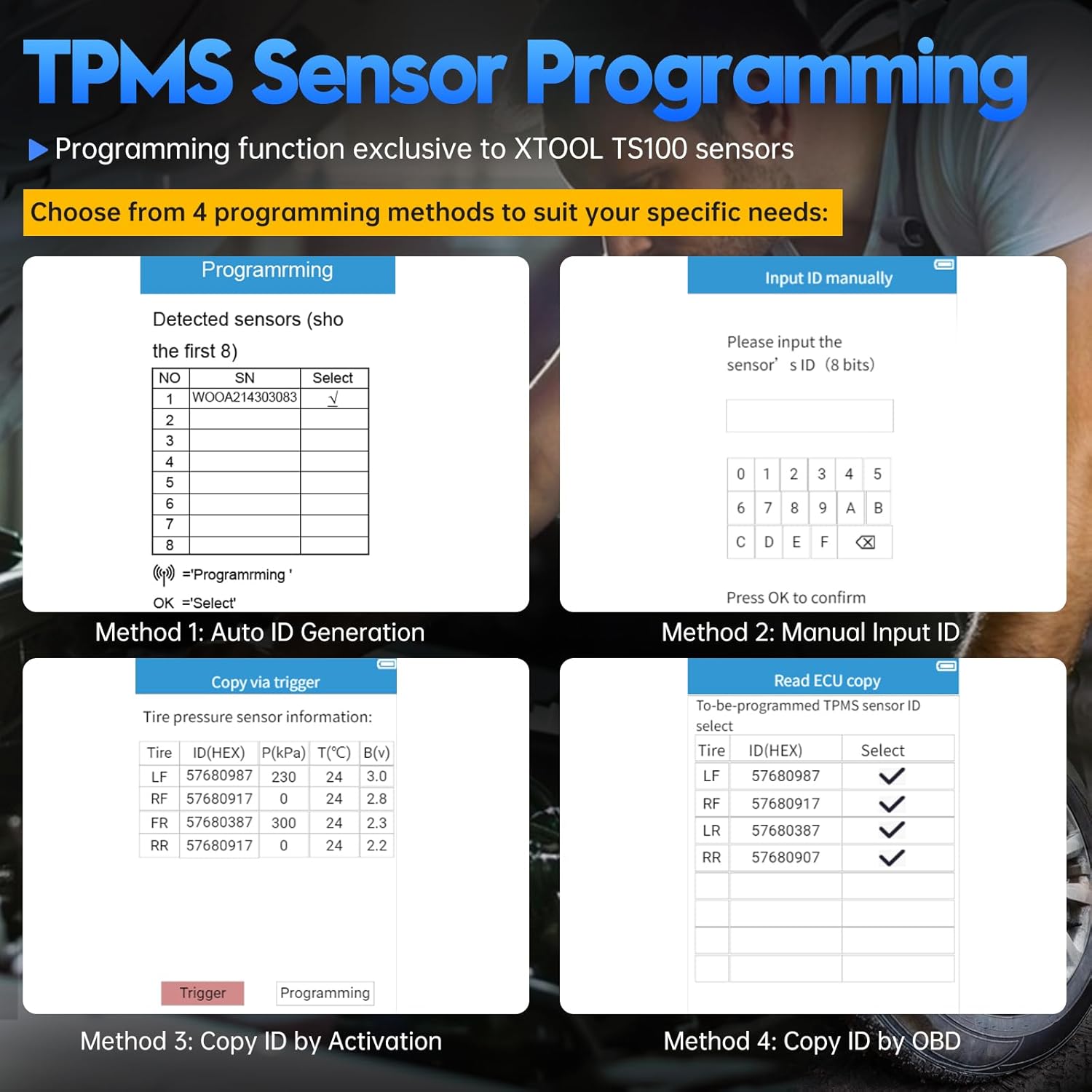
Figur 3.2: XTOOL TP150 viser de fire programmeringsmetoder til TS100-sensorer: Automatisk ID-generering, Manuel ID-indtastning, Kopier ID ved aktivering og Kopier ID via OBD.
3.3 Genindlæring/nulstilling af TPMS
Efter udskiftning eller rotation af dæk skal sensorer genindlæres i køretøjets system. TP150 understøtter forskellige genindlæringstilstande.
- Vælg "TPMS" og derefter "Genindlær/nulstil" i menuen.
- Vælg den passende genindlæringstype til dit køretøj:
- OBD genlære: Forbindes til køretøjets OBD-II-port for at skrive nye sensor-ID'er til ECU'en.
- Manuel genindlæring: Guider dig gennem en køretøjsspecifik procedure, der ofte involverer specifikke handlinger som hornlyd eller nøglecyklusser.
- Automatisk genindlæringNogle køretøjer genlærer automatisk sensorer efter kørsel i et bestemt tidsrum.
- Følg instruktionerne på skærmen for at fuldføre genindlæringsprocessen.

Figur 3.3: XTOOL TP150 viser muligheder for TPMS-genindlæringstyper: OBD-genindlæring, automatisk genindlæring og stationær genindlæring.
3.4 TPMS-systemdiagnostik
Denne funktion hjælper med effektivt at diagnosticere og fejlfinde TPMS-problemer, herunder aflæsning og sletning af DTC'er og udførelse af TPMS-nulstillinger for at slukke advarselslamperne.
- Tilslut TP150 til køretøjets OBD-II-port (hvis det er nødvendigt til diagnosticering).
- Vælg "TPMS" og derefter "Diagnose" i menuen.
- Værktøjet scanner TPMS-systemet for fejlkoder.
- Review de viste DTC'er og deres beskrivelser.
- Hvis det er relevant, skal du vælge "Ryd koder" for at slette fejlkoder og "Udfør TPMS-nulstilling" for at slukke advarselslampen efter reparationer.

Figur 3.4: XTOOL TP150 tilsluttet et køretøj, der viser processen med at diagnosticere og slukke en TPMS-advarselslampe på instrumentbrættet.
4. Vedligeholdelse
4.1 Softwareopdateringer
Regelmæssige softwareopdateringer sikrer, at dit TP150-værktøj har den nyeste køretøjsdækning og -funktioner. Tilslut enheden til en computer med internetadgang, og brug XTOOL-opdateringssoftwaren (hvis den medfølger), eller vælg "Opgrader"-funktionen på enheden, hvis den understøtter Wi-Fi-opdateringer.
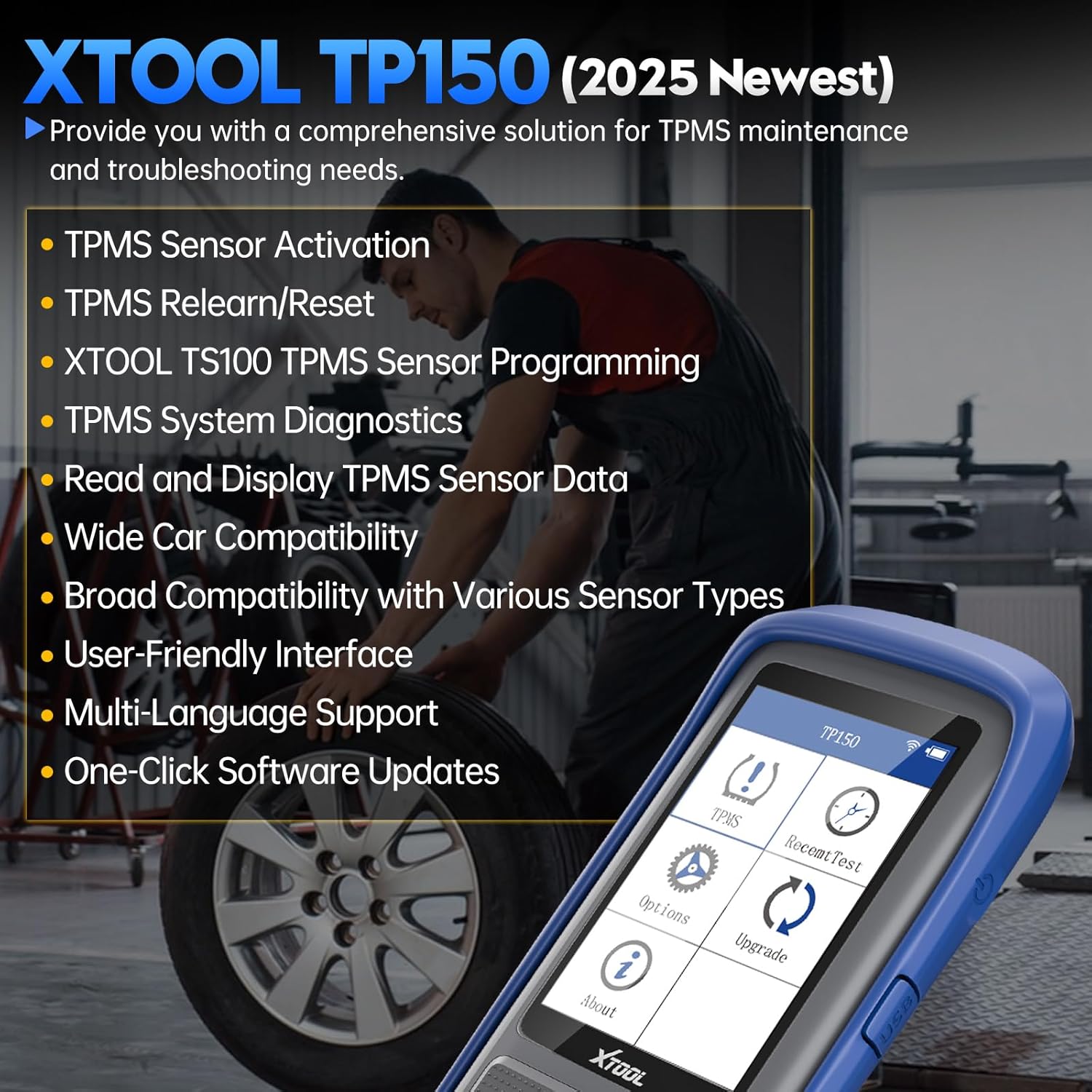
Figur 4.1: XTOOL TP150's hovedskærm, der viser muligheden "Opgradering" blandt andre funktioner, og som angiver tilgængeligheden af softwareopdateringer.
4.2 Generel pleje
- Hold enheden ren og fri for støv og fugt.
- Opbevar enheden på et køligt, tørt sted, når det ikke er i brug.
- Undgå at tabe enheden eller udsætte den for kraftige stød.
5. Fejlfinding
Hvis du støder på problemer med din XTOOL TP150, kan du se følgende almindelige fejlfindingstips:
- Enheden tænder ikke: Sørg for, at enheden er fuldt opladet. Prøv at tilslutte den til en strømkilde og vent et par minutter, før du forsøger at tænde den igen.
- Sensoren aktiveres ikke:
- Sørg for, at værktøjet er placeret korrekt i nærheden af dækkets ventilstamme.
- Kontrollér sensorens batterilevetid (hvis den er synlig på værktøjet).
- Bekræft, at sensortypen er kompatibel med køretøjet og TP150-værktøjet.
- Genindlæringsprocessen mislykkes:
- Bekræft den korrekte genindlæringsprocedure for din specifikke køretøjsmodel. Se køretøjets servicehåndbog.
- Sørg for, at alle sensorer er aktiveret og sender korrekt, før du starter genindlæringen.
- Sørg for en stabil forbindelse til køretøjets OBD-II-port for at genindlære OBD-systemet.
- Softwareproblemer/frysning: Prøv at genstarte enheden. Hvis problemet fortsætter, skal du udføre en softwareopdatering som beskrevet i afsnit 4.1.
Ved vedvarende problemer eller specifikke spørgsmål om køretøjskompatibilitet bedes du kontakte XTOOLs kundesupport med din enheds serienummer (S/N).
6. Specifikationer
| Feature | Detalje |
|---|---|
| Mærke | XTOOL |
| Model | TP150 |
| ASIN | B0DMF2GFJZ |
| Først tilgængelig | 5. august 2021 |
| Sensorkompatibilitet | OEM/Universelle TPMS-sensorer (315 MHz og 433 MHz) |
| Programmering (TS100) | Automatisk ID-generering, manuel ID-indtastning, kopiering af ID ved aktivering, kopiering af ID via OBD |
| Genindlæringstilstande | OBD-genindlæring, manuel genindlæring, automatisk genindlæring |
7. Garanti og support
For garantioplysninger og teknisk support henvises til den officielle XTOOL webwebstedet eller kontakt deres kundeservice direkte. Når du kontakter support, bedes du have din produktmodel (TP150) og serienummer klar, så du kan få hurtigere hjælp.
Du kan besøge den officielle XTOOL-butik på Amazon for at få flere oplysninger: XTOOL Officiel Butik