
Produkt overview
This document provides instructions for the ZWP NS-RCFNA-21 Rev F Replacement Voice Remote Control. This remote is designed for use with Insignia F20 Series and F30 Series Smart TVs, including models NS-43F301NA23, NS-50F301NA23, and NS-55F301NA23, specifically those with DirecTV and Peacock shortcut buttons. It features voice control capabilities and is made of high-quality, wear-resistant ABS material for comfortable handling and durability.

Image: The ZWP NS-RCFNA-21 Rev F Replacement Voice Remote Control, showcasing dens design og knaplayout.
Opsætning og installation
Installation af batteri
Fjernbetjeningen kræver to AAA-batterier (medfølger ikke). Følg disse trin for at installere dem:
- Find batterirummet på bagsiden af fjernbetjeningen.
- Skub batteridækslet nedad for at åbne det.
- Isæt to AAA-batterier, og sørg for, at de positive (+) og negative (-) poler er justeret korrekt med markeringerne inde i batterirummet.
- Skub batteridækslet tilbage på plads, indtil det klikker sikkert.

Billede: Forside view of the remote control alongside two AAA batteries, illustrating the battery type required.
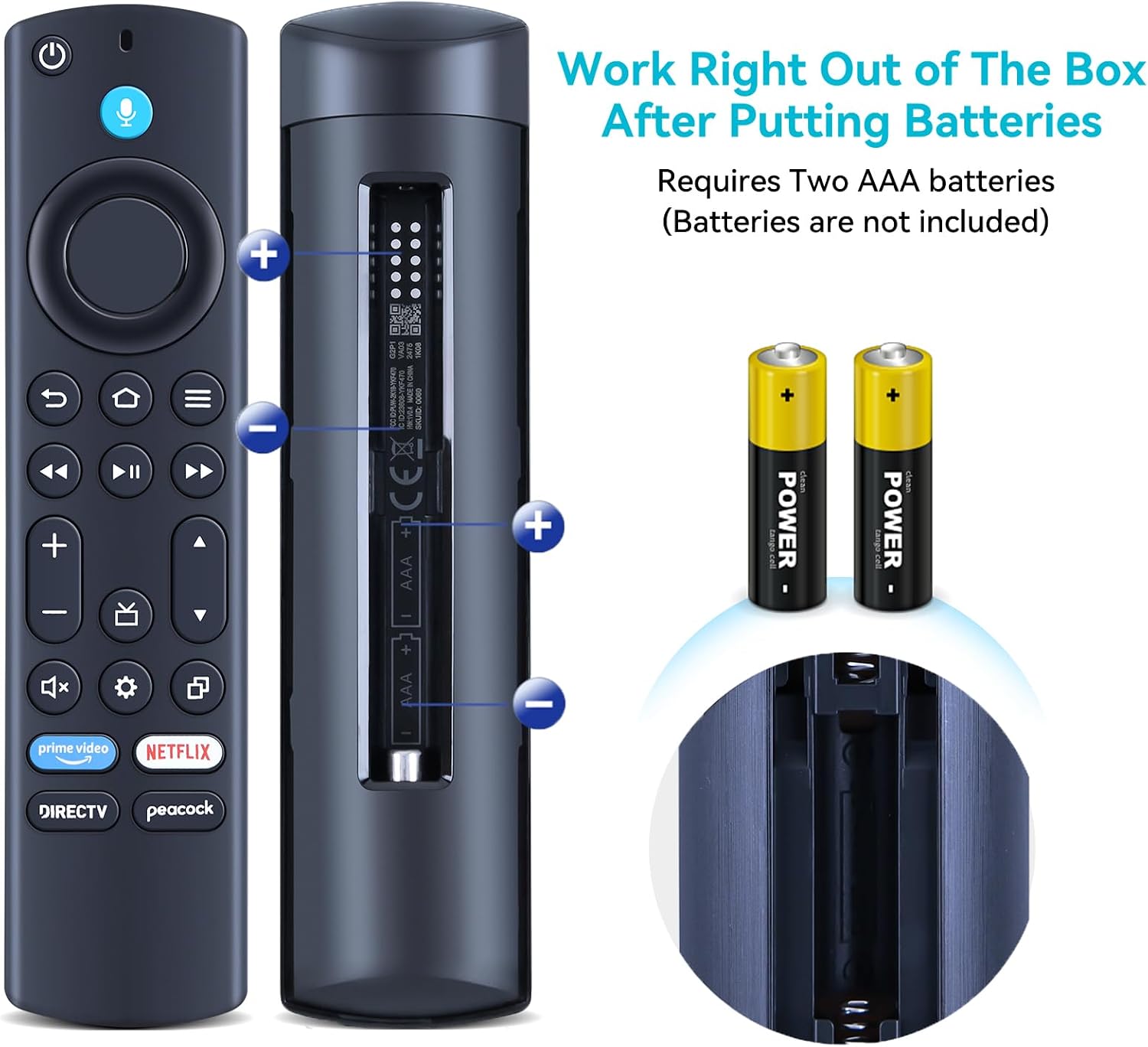
Billede: Bagside view of the remote control with the battery cover removed, showing the correct orientation for inserting AAA batteries.
Parringstrin
To ensure proper functionality, the remote control must be paired with your Insignia Smart TV. Please ensure your TV's shortcut buttons are DirecTV and Peacock for compatibility. Follow these steps:
- Place the remote control approximately 10 feet (3 meters) from your TV device.
- Tryk og hold på Venstre, Menu, og Tilbage keys simultaneously for more than 10 seconds. Wait for 60 seconds after releasing.
- Fjern batterierne fra fjernbetjeningen.
- Unplug the power cord from your TV equipment and wait for 60 seconds.
- Reconnect the power cord to your TV equipment and wait for the main screen to display.
- Reinsert the batteries into the remote control.
- Tryk og hold på Hjem knappen på fjernbetjeningen i 40 sekunder.
- Wait for an additional 60 seconds for the pairing process to complete.
Betjeningsvejledning
This voice remote control offers intuitive navigation and voice command capabilities for your Insignia Smart TV.
Nøglefunktioner
- Power knap: Tænder eller slukker for tv'et.
- Stemmeknap (mikrofonikon): Tryk og hold nede for at aktivere stemmekommandoer. Tal tydeligt ind i fjernbetjeningen.
- Navigation Ring (Directional Pad): Bruges til at navigere gennem menuer og vælge elementer.
- Select Button (Center of Navigation Ring): Bekræfter valg.
- Tilbage knap: Vender tilbage til den forrige skærm.
- Hjemknappen: Vender tilbage til tv'ets startskærm.
- Menuknap (tre vandrette linjer): Giver adgang til kontekstafhængige menuer.
- Volume Up/Down Buttons (+/-): Justerer tv-lydstyrken.
- Channel Up/Down Buttons (Triangle Icons): Skifter tv-kanaler.
- Mute-knap (højttaler med X): Slår lyden fra eller til for TV-lyden.
- Indstillingsknap (tandhjulsikon): Giver adgang til tv-indstillinger.
- App Shortcut Buttons (Prime Video, Netflix, DirecTV, Peacock): Direkte adgang til disse streamingapplikationer.

Image: Illustration demonstrating the use of the voice command feature by holding the voice button and speaking commands such as "look up stock prices" or "show me the hot movies."
Stemmekontrol
To use voice control, press and hold the microphone button on the remote. Speak clearly and concisely into the remote. Release the button when you are finished speaking. ExampFølgende kommandoer inkluderer:
- "Åbn Netflix"
- "Søg efter actionfilm"
- "Go to channel 5"
- "Volume up"
Opretholdelse
Udskiftning af batteri
When the remote control's performance degrades or it stops responding, it is likely time to replace the batteries. Follow the battery installation steps outlined in the "Setup and Installation" section.
Vigtig: Always replace both batteries at the same time with new AAA batteries. Do not mix old and new batteries, or different types of batteries.
Rensning
Brug en blød, tør klud til at rengøre fjernbetjeningen. Ved genstridigt snavs, tør letampen the cloth with water. Do not use abrasive cleaners, solvents, or alcohol, as these can damage the remote's surface or internal components.
Fejlfinding
Hvis du oplever problemer med din fjernbetjening, kan du se følgende almindelige fejlfindingstrin:
- Fjernbetjeningen reagerer ikke:
- Kontroller, om batterierne er korrekt isat og har tilstrækkelig opladning. Udskift dem om nødvendigt.
- Sørg for, at der ikke er nogen forhindringer mellem fjernbetjeningen og tv'ets infrarøde modtager.
- Re-pair the remote control with the TV using the "Pairing Steps" in the Setup section.
- Stemmestyring virker ikke:
- Ensure you are pressing and holding the voice button while speaking.
- Tal tydeligt og med normal lydstyrke.
- Check your TV's internet connection, as voice commands often require online processing.
- Remote Consistently Unpairs:
- This can sometimes indicate a weak battery or interference. Try replacing batteries and re-pairing.
- Ensure the remote is within the recommended operating distance from the TV.
- Shortcut Buttons (DirecTV, Peacock) Not Working:
- Verify that your TV model is compatible with these specific shortcut buttons as mentioned in the product description.
- Ensure the respective applications are installed and updated on your Smart TV.
Hvis problemet fortsætter efter at have prøvet disse trin, bedes du kontakte kundesupport for yderligere assistance.
Specifikationer
| Feature | Detalje |
|---|---|
| Modelnummer | NS-RCFNA-21 Rev F |
| Mærke | ZWP |
| Kompatible tv-modeller | Insignia F20 Series, F30 Series Smart TV (NS-43F301NA23, NS-50F301NA23, NS-55F301NA23) with DirecTV Peacock Buttons |
| Speciel funktion | Stemmesøgning |
| Farve | Sort |
| Maks. antal understøttede enheder | 1 |
| Varens vægt | 0.81 ounce |
| Pakkedimensioner | 6.3 x 1.62 x 0.75 tommer |
| Strømkilde | 2 x AAA batterier (medfølger ikke) |
| Materiale | ABS af høj kvalitet |

Image: Dimensional diagram of the remote control, indicating its length, width, and thickness.
Garanti og support
For warranty information or technical support, please contact the manufacturer, ZWP, directly. Refer to the product packaging or the manufacturer's official webwebsted for kontaktoplysninger.
For general inquiries or assistance, you may also refer to the product's listing page on Amazon or contact Amazon customer service.
- Fabrikant: ZWP
- Sælger: ZWP-STORE (on Amazon)
- Amazon produktside: https://www.amazon.com/dp/B0DMDGLWYW