
Indledning
Welcome to the GOBOULT Mirage Smart Watch user manual. This guide provides detailed instructions on how to set up, operate, and maintain your new smartwatch. Please read this manual thoroughly to ensure optimal performance and longevity of your device.
Produkt overview
The GOBOULT Mirage Smart Watch is a feature-rich device designed to enhance your daily life with advanced health monitoring, communication, and fitness tracking capabilities. It features a vibrant 1.39-inch HD display, Bluetooth calling, and a durable zinc alloy frame.
Nøglefunktioner:
- 1.39-tommer HD-skærm: Bright and clear screen with 500 nits brightness and 360x360 pixel resolution.
- Bluetooth-opkald: Make and receive calls directly from your wrist with a built-in speaker and microphone.
- Omfattende sundhedsovervågning: Includes SpO2, heart rate, blood pressure, sleep tracking, breath training, and menstrual cycle tracking.
- 120+ sportstilstande: Track a wide range of physical activities with detailed metrics.
- AI Voice Assistant: Hands-free control and access to features.
- IP67 Vandtæthed: Designed to withstand splashes and dust.
- Tilpasbare urskiver: Over 300 cloud-based watch faces to personalize your device.
- Smarte meddelelser: Modtag advarsler om opkald, beskeder og app-notifikationer.
- Lang batterilevetid: Op til 7 dages normal brug.
Hvad er der i æsken:
- GOBOULT Mirage Smart Watch (Coal Black)
- Ladekabel
- Brugermanual
- Garantikort

Billede: Overview of the GOBOULT Mirage Smart Watch highlighting its main features.
Opsætningsvejledning
1. Opladning af smarturet
- Connect the magnetic charging cable to the charging pins on the back of your smartwatch.
- Sæt USB-enden af kablet i en standard USB-strømadapter (5V/1A anbefales) eller en computers USB-port.
- The watch display will show a charging indicator. A full charge takes approximately 120 minutes.
- Sørg for, at opladningsbenene er rene og tørre inden opladning for at forhindre korrosion.
2. Tænd/sluk
- Tænd: Press and hold the side button (digital crown) for a few seconds until the GOBOULT logo appears.
- Sluk: From the watch face, swipe down to access quick settings, or navigate to the settings menu. Select "Power Off" and confirm. Alternatively, press and hold the side button until the power off option appears.
3. Parring med din smartphone
- Download the official GOBOULT companion app from your smartphone's app store (available for iOS and Android).
- Sørg for, at Bluetooth er aktiveret på din smartphone.
- Åbn GOBOULT-appen, og følg instruktionerne på skærmen for at oprette en konto eller logge ind.
- In the app, select "Add Device" or a similar option to search for your smartwatch.
- Select "GOBOULT Mirage" from the list of available devices.
- Bekræft parringsanmodningen på både din smartphone og smartwatch.
- Når uret er parret, synkroniserer det data med din telefon, og du kan tilpasse indstillingerne via appen.
Betjeningsvejledning
Grundlæggende navigation:
- Touchskærm: Stryg til venstre/højre, op/ned for at navigere gennem menuer og notifikationer. Tryk for at vælge elementer.
- Digital Crown (Side Button):
- Tryk én gang: Return to the watch face from any screen, or wake the screen.
- Tryk og hold: Power on/off, or access the AI Voice Assistant (configurable).
- Rotere: Rul gennem menuer, lister eller juster indstillinger.
- Genvejsknap: The second physical button on the side can be customized for quick access to specific functions, such as launching sports modes.

Image: Digital crown and button functionalities for navigation and quick access.
Sundhedsovervågning
The GOBOULT Mirage Smart Watch offers a comprehensive suite of health tracking features. For accurate readings, ensure the watch is worn snugly on your wrist, about one finger's width from your wrist bone.
- Heart Rate Monitoring: Uret måler kontinuerligt din puls. View realtidsdata på uret eller detaljerede trends i appen.
- SpO2 (blodilt) overvågning: Measure your blood oxygen levels on demand. Navigate to the SpO2 function on your watch and remain still for accurate results.
- Blodtryksovervågning: Access the blood pressure feature on your watch for readings.
- Søvnovervågning: Wear your watch to bed to track your sleep patterns, including deep sleep, light sleep, and awake times. Data is available in the app.
- Breath Training Mode: Follow guided breathing exercises to help reduce stress and improve relaxation.
- Aktivitetssporing: Måler skridt, distance og forbrændte kalorier i løbet af dagen.
- Påmindelse om drikkevand: Set reminders in the app to ensure you stay hydrated.
- Stillesiddende påmindelse: Modtag advarsler, når du har været inaktiv i for lang tid, og opmuntr dig til at bevæge dig.
- Sporing af menstruationscyklus: For female users, track and predict menstrual cycles through the companion app.

Image: The watch's health sensors and a summary of its health monitoring capabilities.
Sportstilstande
The GOBOULT Mirage Smart Watch supports over 120 sports modes to accurately track your workouts. From running to yoga, you can monitor your performance and progress.
Using Sports Modes:
- Access the sports mode menu from the watch's main interface or by using the dedicated shortcut button.
- Scroll through the list and select your desired activity (e.g., Running, Cycling, Yoga, Cricket, Badminton, Basketball).
- Tap to start the activity. The watch will begin recording data such as duration, heart rate, calories burned, and distance (where applicable).
- To pause or end an activity, swipe right or press the side button and follow the on-screen prompts.
- Review your workout summaries on the watch or in detail within the companion app.

Image: The watch interface showing various sports modes and quick access options.
Bluetooth-opkald og smarte notifikationer
With Bluetooth 5.3 connectivity, your GOBOULT Mirage Smart Watch allows you to manage calls and receive notifications directly on your wrist.
Bluetooth-opkald:
- Sørg for, at dit ur er parret med din telefon via Bluetooth.
- Foretage opkald: Få adgang til tastaturet eller kontaktlisten på dit ur for at starte et opkald.
- Modtagelse af opkald: When a call comes in, the watch will display the caller ID. You can answer or reject the call directly from your wrist using the built-in speaker and microphone.
- Kontaktsynkronisering: Synchronize your phone contacts with the watch through the companion app for easy access.
Smarte meddelelser:
- Enable app notifications in the GOBOULT companion app on your smartphone.
- Your watch will display incoming messages, social media alerts, and other app notifications.
- Swipe up or down on the watch face to view din notifikationshistorik.

Image: Bluetooth calling features and interface on the smartwatch.

Image: Smart notifications and other quick access features like calculator and voice assistant.
Tilpasning
Se ansigter:
Personalize your GOBOULT Mirage Smart Watch with over 300 cloud-based watch faces. You can change the watch face directly from the device or through the companion app.
- På vagten: From the watch face, press and hold the screen. Swipe left or right to browse available watch faces and tap to select.
- Via app: Open the GOBOULT app, navigate to the watch face section, and explore a wider selection of designs. Download and apply your preferred watch face.

Billede: Eksamples of customizable watch faces available for the smartwatch.
Yderligere funktioner
AI Voice Assistant:
Activate the AI Voice Assistant (compatible with Hey Siri and Ok Google) by long-pressing the digital crown or through a dedicated menu option. Use voice commands to perform various tasks hands-free.
Find min telefon:
If your paired smartphone is misplaced, use the "Find My Phone" feature on your watch to make it ring or vibrate, helping you locate it quickly.
- Go to the watch menu.
- Select the "Find Phone" option.
- The connected phone will ring or vibrate.
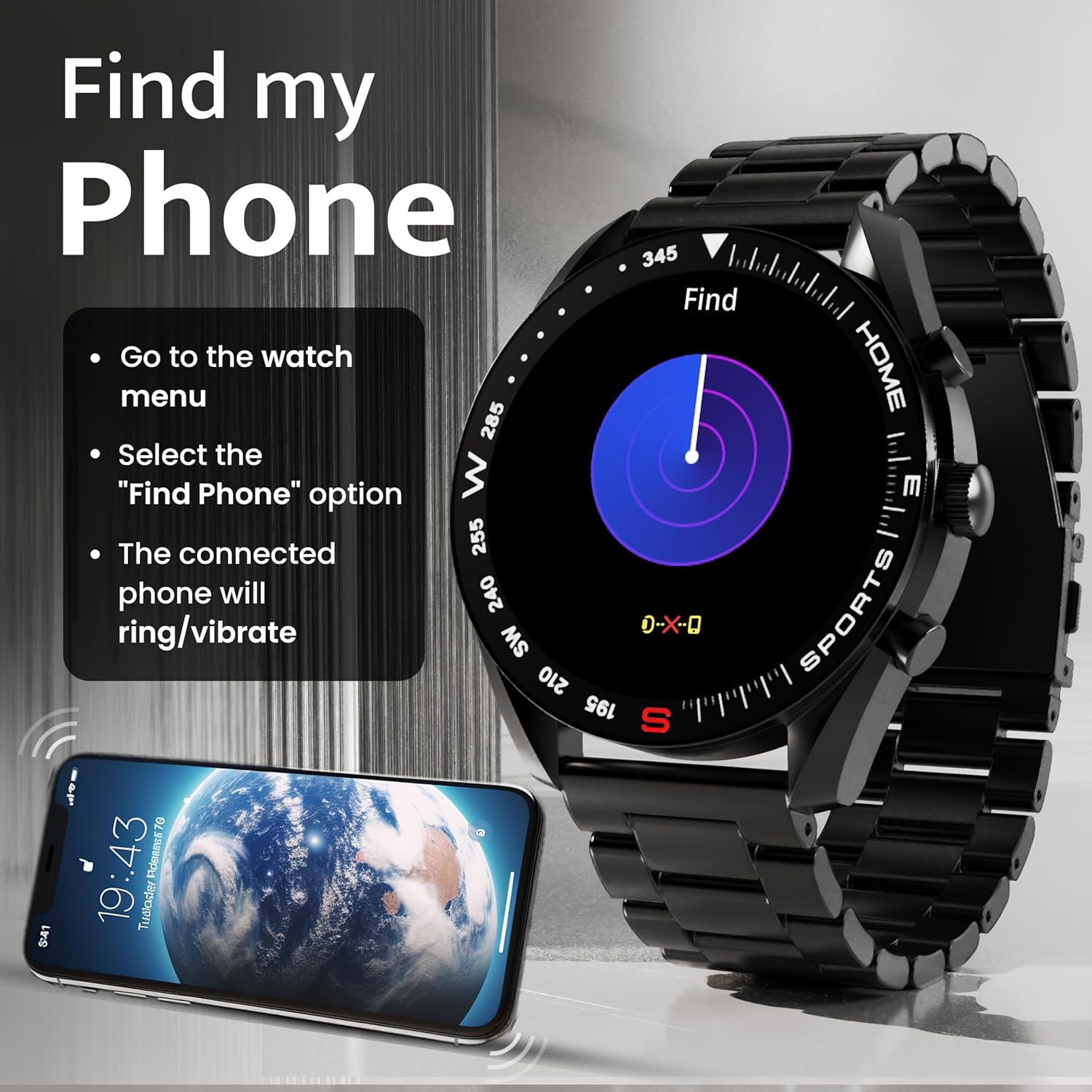
Image: How to use the 'Find My Phone' feature on the smartwatch.
Minispil:
The watch includes several mini-games for entertainment, such as 2048, Battleship, Hamster, and Young Bird.

Billede: Eksamples of mini-games available on the smartwatch.
Opretholdelse
Cleaning Your Smart Watch:
- Tør urets skærm og kabinet af med en blød, fnugfri klud.
- Til genstridigt snavs, let dampRengør kluden med vand. Undgå at bruge skrappe kemikalier eller slibende materialer.
- Clean the charging pins regularly with a dry cloth or cotton swab to ensure proper charging.
Vandtæthed (IP67):
The GOBOULT Mirage Smart Watch is IP67 water-resistant, meaning it is protected against dust ingress and can withstand immersion in water up to 1 meter for up to 30 minutes. However, it is not suitable for swimming, showering with hot water, or diving. Avoid exposure to high-pressure water or corrosive liquids.

Image: Information regarding the IP67 water and dust resistance of the smartwatch.
Remjustering:
The watch comes with a metallic strap adjustment tool. Refer to the included instructions or a professional for adjusting the strap length to ensure a comfortable and secure fit.

Image: The watch's zinc alloy frame and the metallic strap adjustment tool.
Fejlfinding
- Uret tænder ikke: Ensure the watch is fully charged. Connect it to the charging cable and allow it to charge for at least 30 minutes before attempting to power it on again.
- Kan ikke parres med telefonen:
- Sørg for, at Bluetooth er aktiveret på din telefon og uret.
- Ensure the watch is within the Bluetooth range (up to 10 meters).
- Genstart både din telefon og smartwatch.
- Ryd Bluetooth-cachen på din telefon, eller glem enheden, og prøv at parre igen.
- Ensure the GOBOULT companion app is updated to the latest version.
- Unøjagtige sundhedsdata: Sørg for, at uret sidder tæt på dit håndled, ikke for stramt eller for løst. Rengør sensorerne på bagsiden af uret. Undgå overdreven bevægelse under målingerne.
- Notifikationer vises ikke:
- Check if notifications are enabled for the specific apps in the GOBOULT companion app.
- Ensure your phone's notification settings allow the GOBOULT app to display alerts.
- Bekræft, at uret er korrekt forbundet til din telefon via Bluetooth.
- Kort batterilevetid: Reduce screen brightness, disable unnecessary features like continuous heart rate monitoring if not needed, and limit the number of active notifications. Ensure the watch is fully charged.
- Berøringsskærmen reagerer ikke: Genstart uret. Hvis problemet fortsætter, skal du sørge for, at skærmen er ren og tør.
Specifikationer
| Feature | Detalje |
|---|---|
| Modelnavn | Mirage |
| Skærmstørrelse | 1.39 tommer HD |
| Skærmopløsning | 360 x 360 pixels |
| Lysstyrke | 500 Nits Peak Brightness |
| Forbindelse | Bluetooth 5.3 |
| Vandmodstand | IP67 |
| Rammemateriale | Zinklegering |
| Batteritype | Lithium polymer |
| Gennemsnitlig batterilevetid | Op til 7 dage |
| Opladningstid | Cirka 120 minutter |
| Operativsystemkompatibilitet | iOS, Android |
| Varens vægt | 106 g |
| Inkluderede komponenter | Smartwatch, opladningskabel, brugermanual, garantikort |
Garanti og support
Garantioplysninger:
Your GOBOULT Mirage Smart Watch comes with a manufacturer's warranty. Please refer to the included Warranty Card for specific terms, conditions, and duration of the warranty. Keep your purchase receipt as proof of purchase.
Kundesupport:
If you encounter any issues or have questions not covered in this manual, please contact GOBOULT customer support. Contact details can typically be found on the Warranty Card or the official GOBOULT webwebsted.