
Indledning
This manual provides detailed instructions for the GOBOULT Mirage Smart Watch. Please read this guide thoroughly to ensure proper setup, operation, and maintenance of your device. This smartwatch features a 1.39-inch HD display, Bluetooth calling, comprehensive health monitoring, and various sports modes.
Hvad er der i æsken
- GOBOULT Mirage Smart Watch
- Ladekabel
- Brugermanual
- Garantikort
Opsætning
1. Opladning af enheden
Before initial use, fully charge your GOBOULT Mirage Smart Watch. Connect the provided charging cable to the charging port on the back of the watch and to a standard USB power adapter (not included). The watch typically charges within 120 minutes.

Image: GOBOULT Mirage Smart Watch displaying its features, including charging capability.
2. Parring med din smartphone
- Download the official GOBOULT companion app from your smartphone's app store (available for iOS and Android).
- Sørg for, at Bluetooth er aktiveret på din smartphone.
- Open the app and follow the on-screen instructions to search for and connect to your GOBOULT Mirage Smart Watch.
- Bekræft parringsanmodningen på både dit ur og din smartphone.
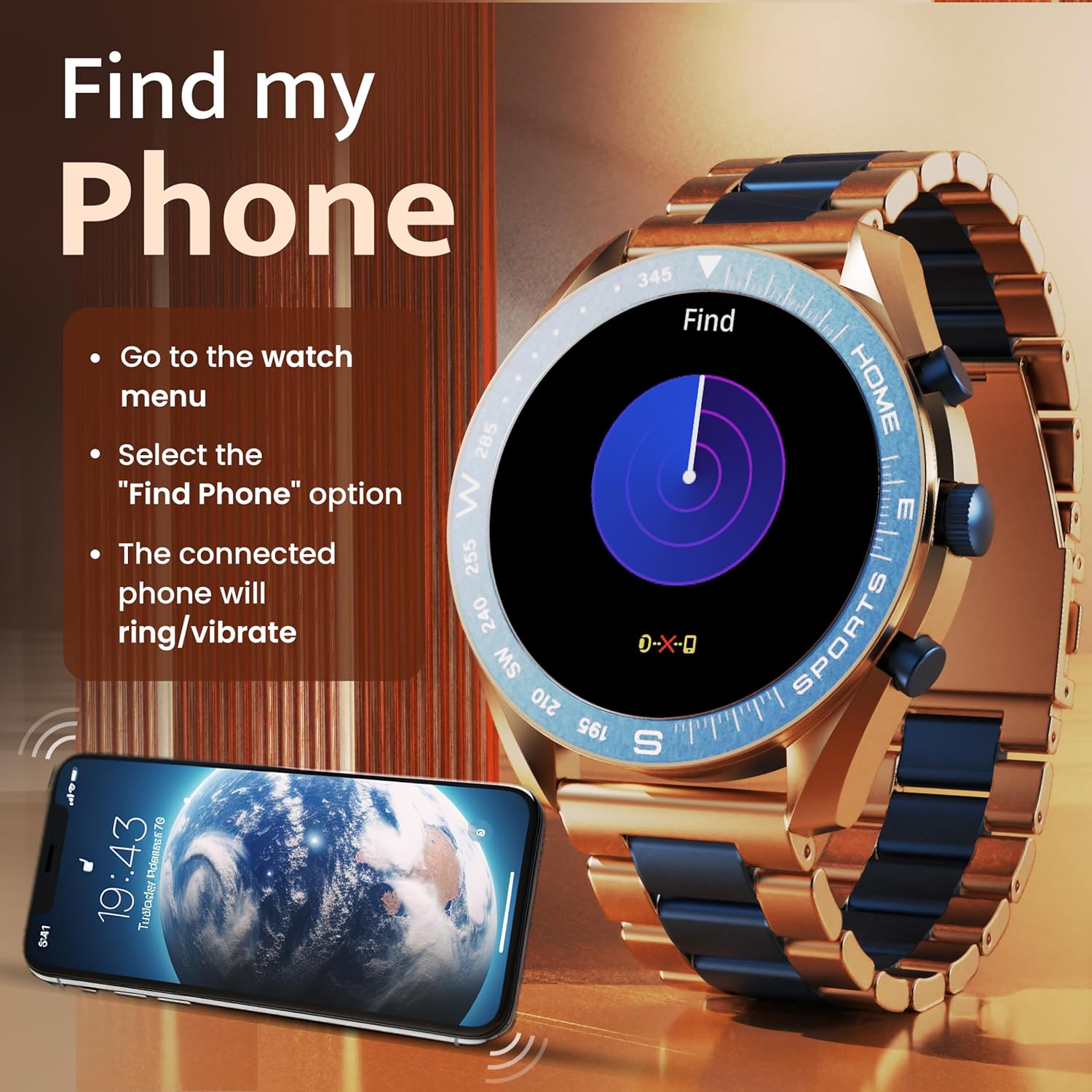
Image: The GOBOULT Mirage Smart Watch connected to a smartphone, illustrating connectivity.
Betjeningsvejledning
1. Display og navigation
The GOBOULT Mirage features a 1.39-inch HD display with 360x360 pixels resolution and 500 nits peak brightness for clear visibility. Navigate the watch interface using touch gestures and the digital crown.
- Digital krone: Press to power on/off, switch UIs, and navigate menus. Rotate to scroll through options.
- Sideknapper: Use for quick access to specific functions, such as launching sports modes.

Image: GOBOULT Mirage Smart Watch highlighting the digital crown and its various functions.
2. Bluetooth-opkald
With the built-in speaker and microphone, you can make and receive calls directly from your wrist once paired with your smartphone via Bluetooth 5.3.
- To answer a call, tap the green icon on the watch screen.
- To reject a call, tap the red icon.
- To make a call, access the dial pad or contacts through the watch menu.
Image: GOBOULT Mirage Smart Watch showing an incoming call notification.
3. Sundhedsovervågning
The GOBOULT Mirage provides comprehensive health tracking features:
- SpO2 Blood Oxygen Monitor: Måler iltniveauet i blodet.
- Pulsmåler: 24/7 heart rate tracking.
- Søvnmonitor: Sporer søvnmønstre og -kvalitet.
- Breath Training Mode: Guides you through breathing exercises.
- Påmindelse om drikkevand: Beder dig om at holde dig hydreret.
- Stillesiddende påmindelse: Alerts you after periods of inactivity.
- Aktivitetssporing: Registrerer skridt, distance og forbrændte kalorier.
- Sporing af menstruationscyklus: Helps monitor menstrual cycles.

Image: GOBOULT Mirage Smart Watch showcasing its complete health suite on the display.
4. Sportstilstande
Track your performance across over 120 sports modes. Access these modes quickly using the shortcut buttons.
- Examples include Running, Cycling, Yoga, Cricket, Badminton, and Basketball.

Image: GOBOULT Mirage Smart Watch showing the selection of over 120 sports modes.
5. Urskiver
Personalize your watch with over 300 cloud-based watch faces. You can also customize the dial to match your style.

Image: GOBOULT Mirage Smart Watch illustrating the variety of 300+ cloud watch faces.
6. Smarte notifikationer
Receive SMS and other smart notifications directly on your watch. Ensure your watch is connected to your phone via Bluetooth for this feature to function.

Image: GOBOULT Mirage Smart Watch showing a push notification from a messaging app.
7. AI-stemmeassistent
Access an intelligent AI voice assistant for hands-free control. Long press the designated button or use the voice assistant icon on the screen to activate.
8. Find min telefon
If you misplace your connected smartphone, use the 'Find My Phone' feature on your watch:
- Go to the watch menu.
- Select the "Find Phone" option.
- The connected phone will ring or vibrate, helping you locate it.
Image: GOBOULT Mirage Smart Watch showing the 'Find My Phone' interface.
9. Vandafvisende
The GOBOULT Mirage Smart Watch is IP67 water-resistant, offering protection against dust and temporary immersion in water. It is suitable for daily wear and activities like hand washing or light rain.

Image: GOBOULT Mirage Smart Watch demonstrating its IP67 water resistance.
10. Mini Games
The watch includes several mini-games for entertainment during leisure time.
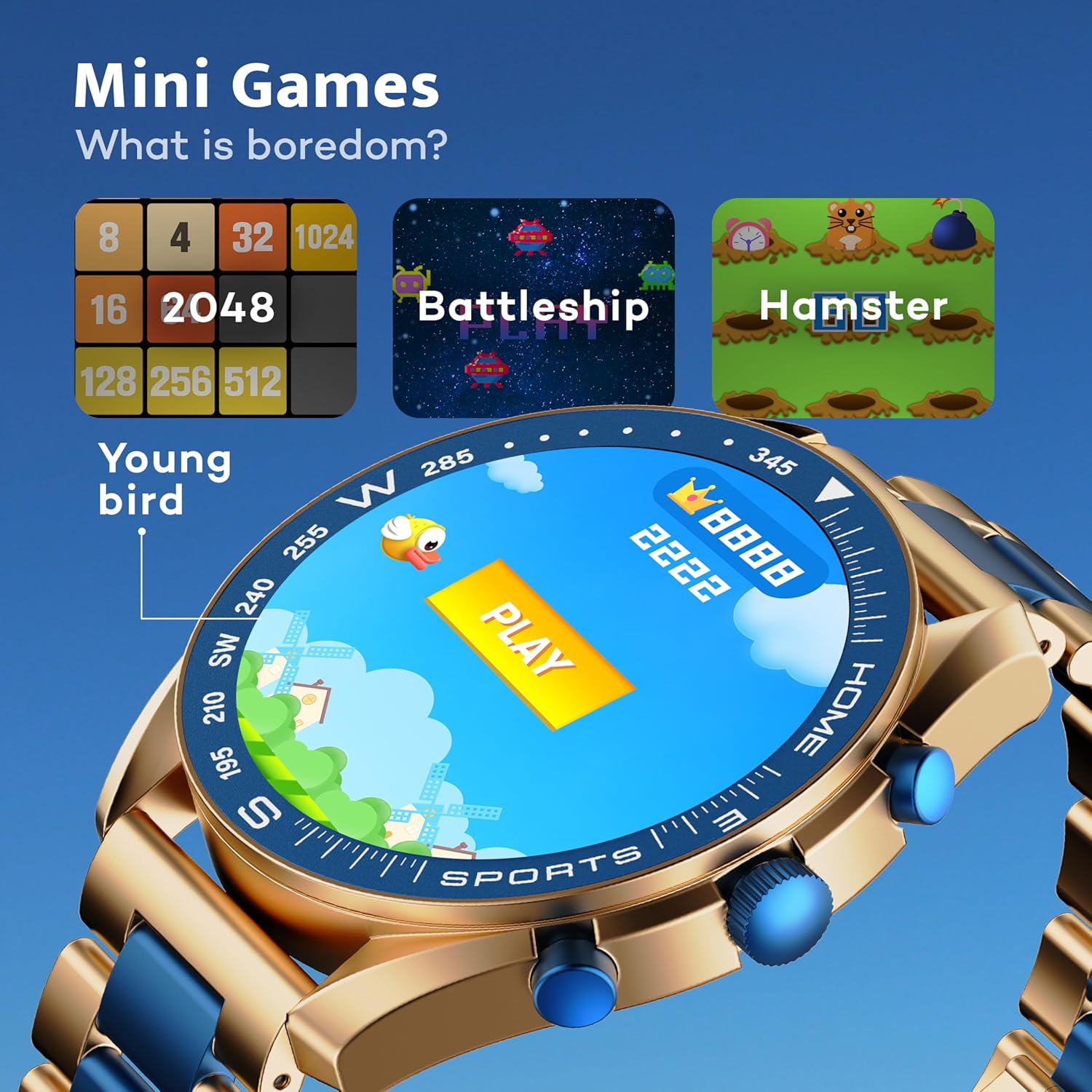
Image: GOBOULT Mirage Smart Watch showing the selection of mini-games.
Opretholdelse
1. Rensning
- Tør urets skærm og kabinet af med en blød, tør klud.
- For genstridigt snavs, brug en let damp cloth and immediately dry the watch.
- Undgå at bruge skrappe kemikalier eller slibende materialer, da disse kan beskadige overfladen.
2. Retningslinjer for vandtæthed
- The IP67 rating means the watch is protected from dust and can withstand immersion in water up to 1 meter for 30 minutes.
- Do not use the watch for swimming, showering with hot water, or diving.
- Undgå at udsætte uret for vand eller damp under højt tryk.
- If the watch gets wet, dry it thoroughly before charging or using any buttons.
Fejlfinding
- Uret tænder ikke: Sørg for, at uret er fuldt opladet. Tilslut det til opladeren i mindst 30 minutter.
- Kan ikke parres med telefon: Sørg for, at Bluetooth er aktiveret på din telefon, og at uret er inden for rækkevidde. Genstart begge enheder, og prøv at parre igen.
- Unøjagtige sundhedsdata: Sørg for, at uret sidder tæt på dit håndled, ikke for stramt eller for løst. Rengør sensorerne regelmæssigt.
- Kort batterilevetid: Reducer skærmens lysstyrke, deaktiver unødvendige notifikationer, og begræns kontinuerlig pulsmåling, hvis det ikke er nødvendigt.
- Problemer med skærm: Restart the watch. If the problem persists, contact customer support.
Specifikationer
| Feature | Detalje |
|---|---|
| Mærke | GOBOULT |
| Modelnummer | 8906133853464 |
| Skærmstørrelse | 1.39 tommer |
| Lysstyrke | 500 nit |
| Rammemateriale | Zinklegering |
| Trådløs type | Bluetooth 5.3 |
| Operativsystem | iOS, Android |
| Vandmodstand | IP67 |
| Batteriopladningstid | 120 minutter |
| Batteritype | Lithium polymer |
| Varens vægt | 106 g |
Garanti og support
Your GOBOULT Mirage Smart Watch comes with a warranty card included in the box. Please refer to this card for details regarding warranty coverage and terms.
For technical support, troubleshooting assistance, or warranty claims, please contact GOBOULT customer service through their official webwebstedet eller kontaktoplysningerne på dit garantikort.