
1. Introduktion
This manual provides comprehensive instructions for the installation, operation, and maintenance of your Volteck CTV-30W WiFi Robotic Camera. This 3 MP camera offers advanced surveillance features, including motion detection, two-way audio, and remote control via a mobile application. Please read this manual carefully before using the product to ensure proper functionality and safety.
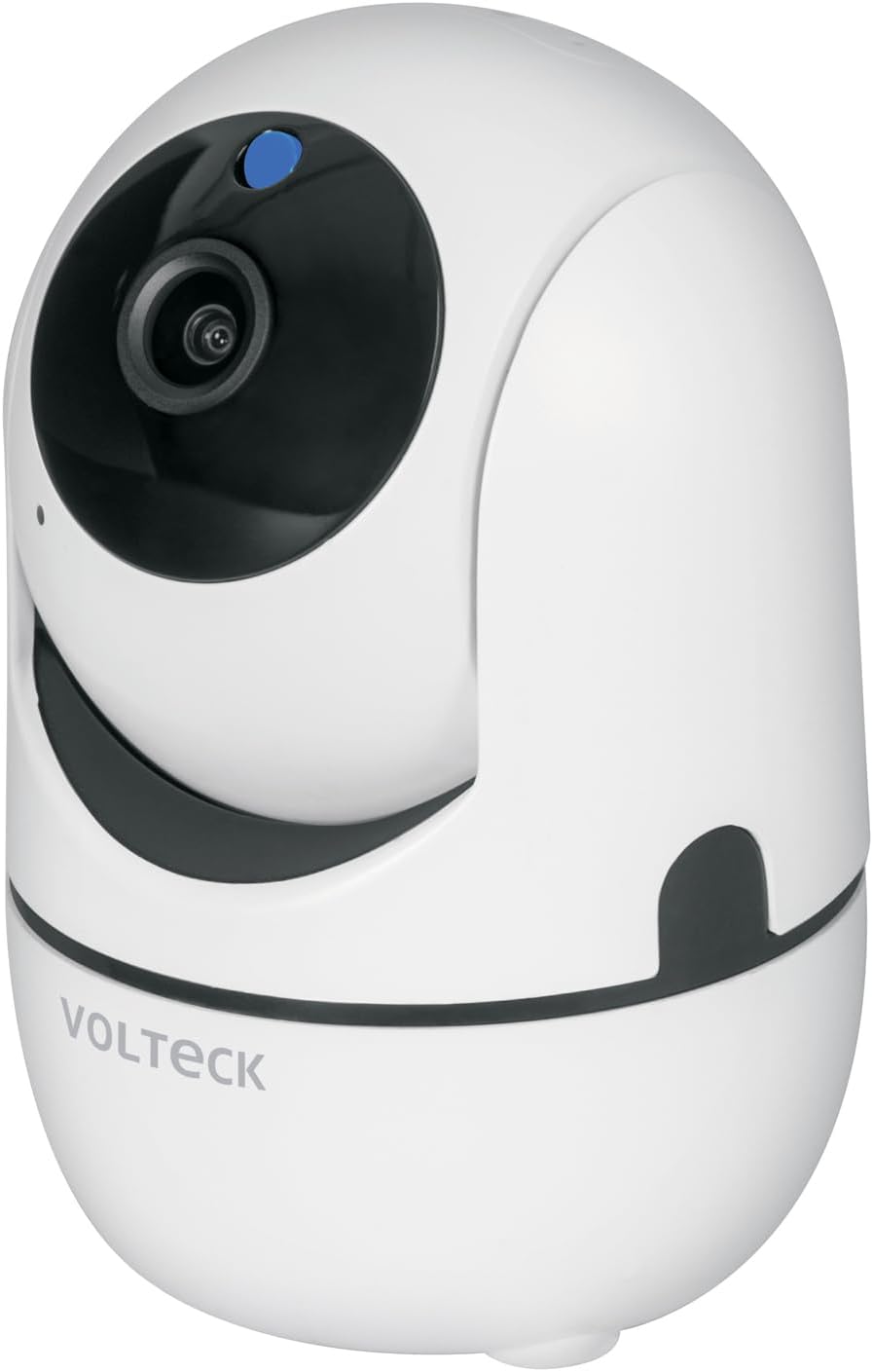
Image 1.1: Volteck CTV-30W WiFi Robotic Camera. This image shows the camera's sleek white design with its lens and a blue indicator light.
2. Pakkens indhold
Bekræft, at alle følgende varer er inkluderet i din pakke:
- Volteck CTV-30W WiFi Robotic Camera
- 1 USB-oplader
- 1 USB-kabel
- 1 vægmonteringsplade
- 2 vægankre
- 2 skruer
- Brugervejledning (dette dokument)

Image 2.1: Included accessories. This image displays the USB charger and USB cable that come with the camera.
3. Produktet er slutview
Familiarize yourself with the main components and features of your Volteck CTV-30W camera.

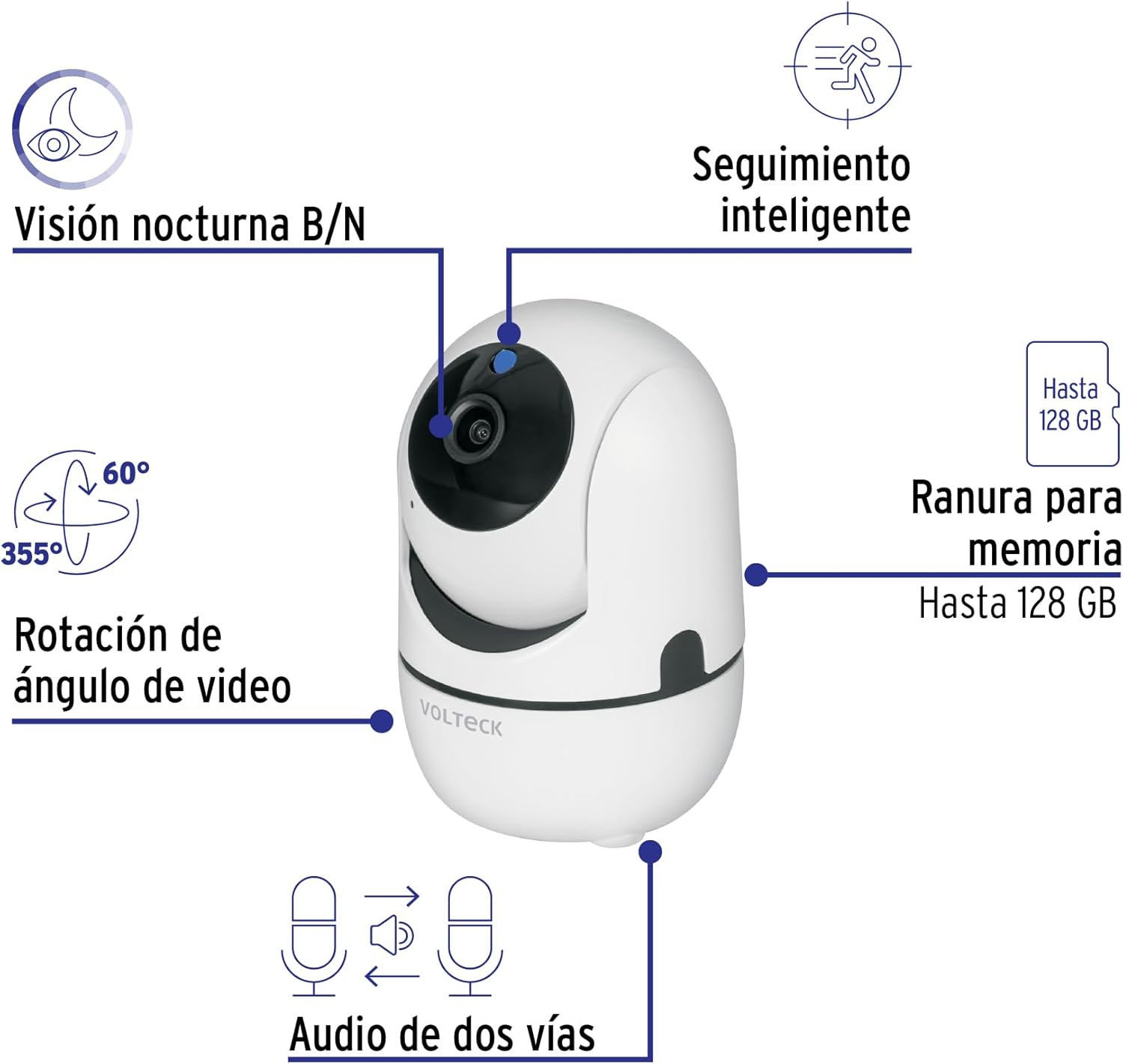
Image 3.1: Key Camera Features. This diagram highlights the camera's capabilities: Black/White Night Vision, Smart Tracking, 355° Pan and 60° Tilt video angle rotation, a memory card slot supporting up to 128 GB, and Two-Way Audio.
- Kameraobjektiv: Optager video footage.
- Indikatorlys: Shows camera status (e.g., power, connection).
- Mikrofon: Til lydindgang og tovejskommunikation.
- Højttaler: Til lydudgang og tovejskommunikation.
- MicroSD -kortplads: Insert a microSD card (up to 128 GB, not included) for local video storage.
- Strømport: Tilslut USB-strømkablet.
- Nulstil knap: Used to reset the camera to factory settings (usually a small pinhole button).
Billede 3.2: Forside ViewDette billede giver en klar view of the camera's front, including the lens and indicator light.

Billede 3.3: Bagside View. This image shows the rear of the camera, typically where the power port and reset button are located.
4. Opsætning
4.1 Fysisk installation
- Vælg en placering: Select a suitable indoor or outdoor location for your camera. Ensure it has a stable surface or wall for mounting and is within range of your Wi-Fi network.
- Strømtilslutning: Connect the provided USB cable to the camera's power port and the USB charger. Plug the charger into a standard electrical outlet. The camera will power on, and the indicator light will activate.
- Valgfri vægmontering: If mounting on a wall, use the included wall mounting plate, anchors, and screws. Mark the drilling points, drill holes, insert anchors, and secure the plate. Then, attach the camera to the mounting plate.
4.2 Appinstallation og parring
The Volteck CTV-30W camera uses the Tuya Smart app for remote control and monitoring.
- Download appen: Download appen "Tuya Smart" fra Apple App Store (til iOS-enheder) eller Google Play Store (til Android-enheder).
- Registrer/Log ind: Åbn appen, og opret en ny konto, eller log ind, hvis du allerede har en.
- Tilføj enhed: Follow the in-app instructions to add a new device. Select "Security & Video Surveillance" and then "Smart Camera (Wi-Fi)".
- Opret forbindelse til Wi-Fi: Ensure your mobile device is connected to a 2.4 GHz Wi-Fi network. The app will guide you through connecting the camera to your Wi-Fi network, often by displaying a QR code for the camera to scan.
- Parring fuldført: Once successfully paired, the camera's indicator light will change, and you will see the camera feed in the app.
Image 4.1: App Control Interface. This image illustrates the process of downloading, linking, and viewing the camera feed through the Tuya Smart application, available on both the App Store and Google Play.
5. Betjening
5.1 Live View og panorering/tilt-kontrol
Once connected, open the Tuya Smart app to access the live video feed. You can control the camera's pan (horizontal) and tilt (vertical) movements directly from the app interface to adjust the viewing angle. The camera supports 355° pan and 60° tilt rotation.
5.2 Bevægelsesdetektion og notifikationer
The camera features intelligent motion detection. When movement is detected, the camera can automatically record video and send instant notifications to your linked mobile device. You can customize motion detection sensitivity and notification settings within the app.
5.3 Tovejslyd
Utilize the built-in microphone and speaker for two-way communication. This allows you to listen to the camera's surroundings and speak through the camera from your mobile device.
5.4 Nattesyn
The Volteck CTV-30W is equipped with black and white night vision, enabling clear video monitoring even in low-light or complete darkness conditions.
5.5 Videooptagelse og -lagring
Insert a microSD card (up to 128 GB, not included) into the camera's slot for local storage of recorded video footage. Du kan genview recordings directly through the Tuya Smart app. Cloud storage options may also be available through the app (subscription may be required).
6. Vedligeholdelse
- Rensning: Tør forsigtigt kameralinsen og huset af med en blød, tør klud. Brug ikke skrappe kemikalier eller slibende rengøringsmidler.
- Strømforsyning: Ensure the camera is always connected to the specified power supply (5V DC, 1.5A).
- Firmwareopdateringer: Regularly check the Tuya Smart app for any available firmware updates for your camera to ensure optimal performance and security.
- Miljøforhold: While suitable for indoor and outdoor use, avoid exposing the camera to extreme temperatures, direct water immersion, or excessive humidity.
7. Fejlfinding
| Problem | Mulig årsag | Løsning |
|---|---|---|
| Kameraet tænder ikke. | Power cable disconnected; faulty adapter/cable; power outlet issue. | Check power connections. Try a different USB cable or adapter. Test the power outlet with another device. |
| Kan ikke oprette forbindelse til Wi-Fi. | Incorrect Wi-Fi password; camera too far from router; 5 GHz Wi-Fi network selected; router issues. | Ensure correct 2.4 GHz Wi-Fi password. Move camera closer to router. Restart router. Reset camera and try pairing again. |
| Ingen videofeed i appen. | Camera offline; poor Wi-Fi signal; app glitch. | Check camera's indicator light. Verify Wi-Fi connection. Restart the app. Restart the camera. |
| Bevægelsesdetektering virker ikke. | Detection settings disabled; sensitivity too low; network issues. | Check motion detection settings in the app. Increase sensitivity. Ensure stable internet connection. |
| Two-way audio not functioning. | Mikrofon/højttaler blokeret; apptilladelser; lydstyrkeindstillinger. | Ensure nothing is obstructing the microphone or speaker. Check app permissions for microphone access. Adjust volume settings in the app and on your phone. |
If you encounter issues not listed here, please refer to the support section of the Tuya Smart app or contact Volteck customer support.
8. Specifikationer
| Feature | Detalje |
|---|---|
| Mærke | Volteck |
| Modelnavn | CTV-30W |
| Product Model Number (Internal) | 49556 |
| Opløsning | 3 MP |
| Kamera Voltage | 5 V DC |
| Camera Current | 1.5 A |
| Adapter Voltage | 100 V AC - 240 V AC |
| Adapter Current | 200 mA - 120 mA |
| Adapter Frequency | 50 Hz / 60 Hz |
| Forbindelsesprotokol | Wi-Fi (2.4 GHz) |
| Særlige funktioner | Night Vision, Motion Detection, Two-Way Audio, Pan/Tilt Rotation, Smart Tracking |
| Pan/Tilt Rotation | 355° Pan, 60° Tilt |
| Opbevaring | MicroSD-kort op til 128 GB (medfølger ikke) |
| Indendørs/Udendørs brug | Indendørs, Udendørs |
| Monteringstype | Table Mount, Wall Mount (accessories included) |
| Farve | Hvid |
| Produktmål (H x D) | 11 x 7 cm (omtrentlig) |
| Varedimensioner (L x B x H) | 9.98 x 10.64 x 18.31 cm |
| Varens vægt | 280 g |
| Oprindelsesland | Mexico |

Image 8.1: Camera Dimensions. This image shows the approximate height (11 cm) and diameter (7 cm) of the camera.
9. Garanti og support
9.1 Garantioplysninger
The Volteck CTV-30W WiFi Robotic Camera comes with a 1 års garanti fra købsdatoen. Denne garanti dækker fabrikationsfejl og funktionsfejl ved normal brug. Gem venligst din købsbevis til garantikrav.

Image 9.1: Product Packaging. The packaging box confirms the 1-year warranty and highlights key features like 3MP resolution, Pan/Tilt, motion tracking, two-way audio, and B/W night vision.
9.2 Kundesupport
For technical assistance, troubleshooting, or warranty inquiries, please contact Volteck customer support. Refer to the Volteck website or the Tuya Smart app for the most up-to-date contact information.
Volteck Official Webwebsted: www.volteck.com (Bemærk: Dette er en pladsholder URLSe venligst den faktiske produktdokumentation for korrekt webwebsted.)