
Volteck CTV-31W
Volteck CTV-31W WiFi Robotized Dome Camera
Brugervejledning
Indledning
This manual provides detailed instructions for the installation, operation, and maintenance of your Volteck CTV-31W WiFi Robotized Dome Camera. Please read this manual thoroughly before using the product to ensure proper functionality and safety. Keep this manual for future reference.
Vigtige sikkerhedsoplysninger
- Sørg for, at strømforsyningen voltage matches the camera's requirements (12 V DC, 1 A).
- Do not expose the camera to extreme temperatures, humidity, or direct water immersion.
- Undgå at placere kameraet i nærheden af stærke elektromagnetiske felter.
- Håndter kameraet forsigtigt for at undgå fysisk skade.
- Brug kun den medfølgende strømadapter.
Pakkens indhold
Kontroller venligst pakken for at sikre, at alle varer er til stede:
- 1x Volteck CTV-31W WiFi Robotized Dome Camera
- 1x AC Charger (Power Adapter)
- 1x Wall Mounting Plate
- 2x vægstik
- 2 x skruer
- 1x strømkabel
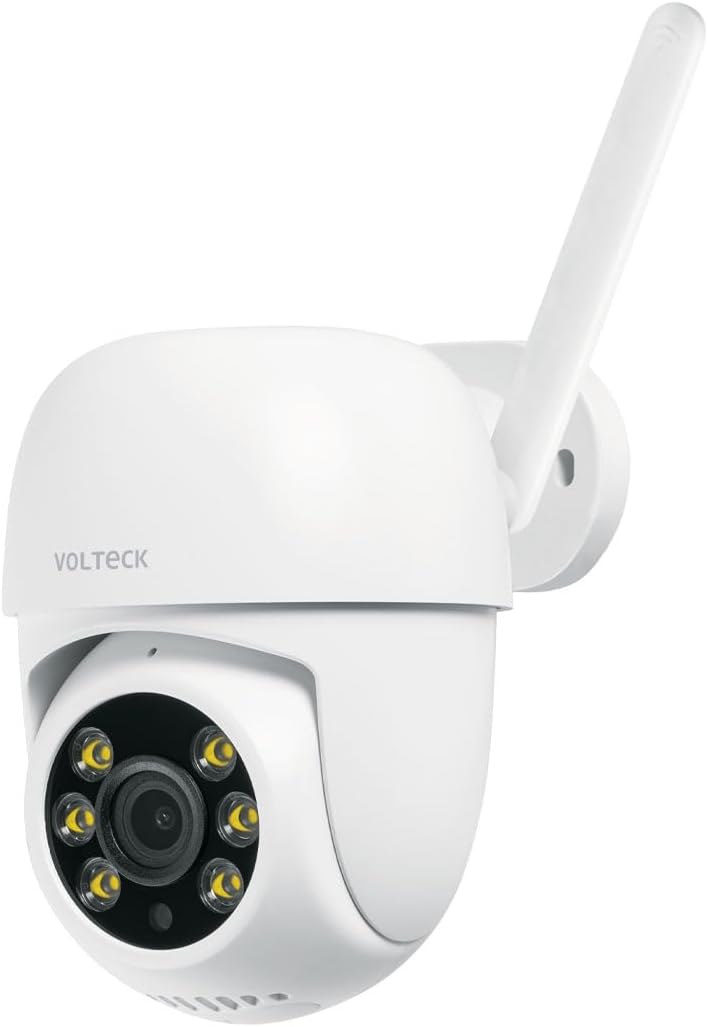
Image: The Volteck CTV-31W WiFi Robotized Dome Camera, showing its white dome design and antenna.

Image: The included AC power adapter with its cable, essential for powering the camera.
Produktegenskaber
The Volteck CTV-31W camera offers a range of advanced features for comprehensive surveillance:
- Høj billedkvalitet: Captures video in 3 MP resolution for clear and detailed footage.
- Mobil enheds kompatibilitet: Easily connect and control the camera via your smartphone or tablet.
- Motion Detection Notifications: Receive instant alerts on your mobile device when motion is detected.
- Tovejs lyd: Communicate through the camera with built-in microphone and speaker.
- Video Angle Rotation (Pan/Tilt): Nyd et bredt viewing area with 355° horizontal rotation and 60° vertical tilt.
- Hukommelseskortslot: Supports local storage with a microSD card up to 128 GB (card not included).
- Nattesyn i fuld farve: Giver klare, farvede billeder selv under svagt lys.
- Intelligent sporing: Følger automatisk registreret bevægelse inden for sit felt view.
- Indendørs/udendørs brug: Designed for versatile placement in both indoor and outdoor environments.

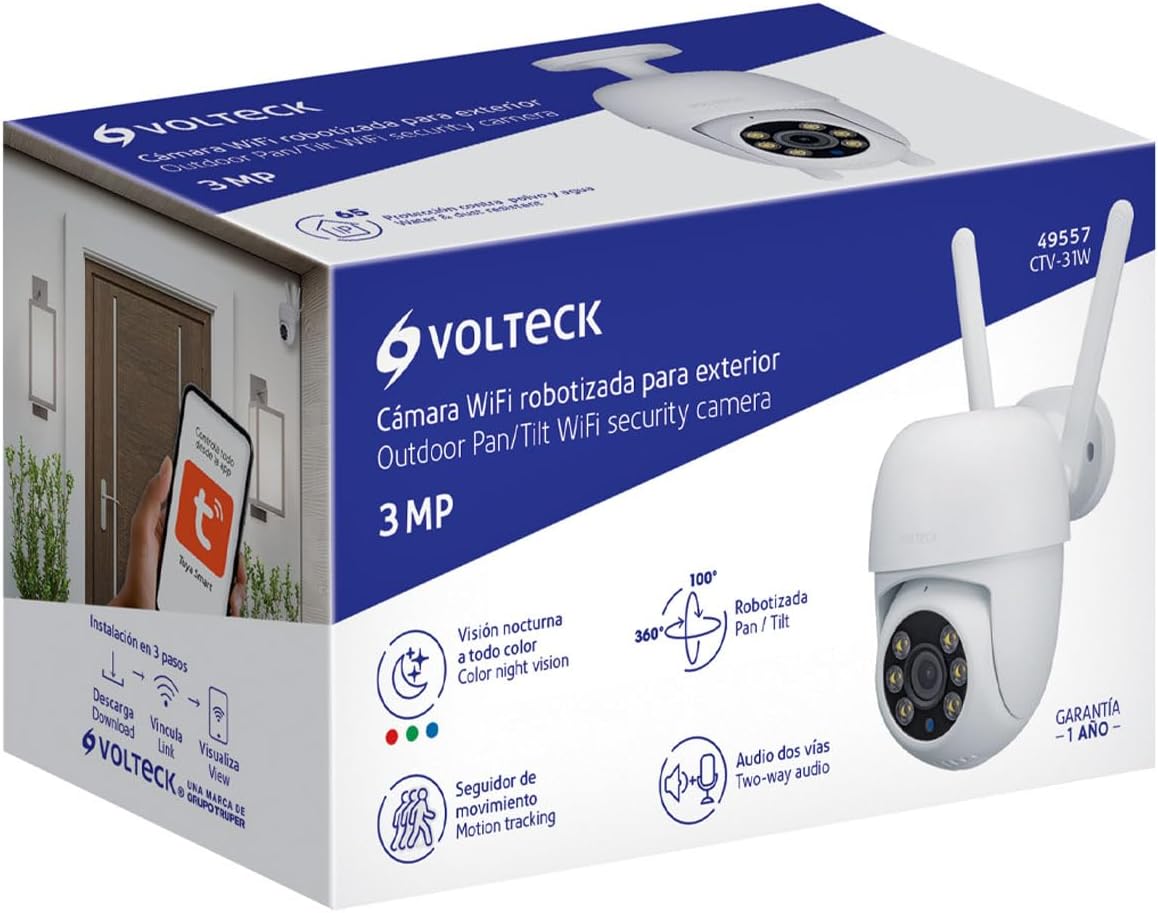
Image: Diagram highlighting key features of the Volteck CTV-31W camera, including two-way audio, video rotation, memory card slot, full-color night vision, and intelligent tracking.
Opsætningsvejledning
1. Fysisk installation
- Vælg en placering: Vælg en passende placering til dit kamera indendørs eller udendørs. Sørg for, at der er frit view and is within range of your Wi-Fi network.
- Montering:
- Position the wall mounting plate on the desired surface.
- Marker skruehullerne.
- Bor forhuller og isæt vægdyvlerne.
- Fastgør monteringspladen med de medfølgende skruer.
- Fastgør kameraet til monteringspladen.
- Strømtilslutning: Connect the power cable to the camera and then plug the AC adapter into a power outlet. The camera will power on and initiate its startup sequence.
Billede: En eksample of the Volteck CTV-31W camera mounted on an exterior wall, demonstrating a typical outdoor installation.
2. Appinstallation og parring
- Download appen: Søg efter "Tuya Smart" or "Smart Life" in your mobile device's app store (App Store for iOS, Google Play Store for Android) and download it.
- Registrer/Log ind: Åbn appen og opret en ny konto eller log ind, hvis du allerede har en.
- Tilføj enhed:
- Tryk på ikonet "+" eller "Tilføj enhed" i appen.
- Vælg "Sikkerhed og videoovervågning" og derefter "Smartkamera (Wi-Fi)".
- Follow the on-screen instructions to connect the camera to your Wi-Fi network. This typically involves scanning a QR code displayed on your phone with the camera lens.
- Ensure your Wi-Fi network is 2.4 GHz, as 5 GHz networks are generally not supported by these devices.
- Enhed klar: Once successfully paired, the camera will appear in your app's device list. You can now access its live feed and control its functions.

Image: Illustration showing a hand interacting with a mobile app interface, indicating control of the camera via the Tuya Smart app, available on App Store and Google Play.
Betjeningsvejledning
Levende View og kontrol
- Adgang til livefeed: Open the app and tap on your CTV-31W camera from the device list to view live-videostreamen.
- Panorer og vip: Use the directional controls within the app to remotely rotate the camera horizontally (pan) and vertically (tilt) to adjust the viewvinkel.
- Tovejs lyd: Tryk på mikrofonikonet i appen for at tale gennem kameraets højttaler og lytte til lyd fra kameraets mikrofon.
- Snapshot and Record: Use the dedicated buttons in the app to take still images or record video clips of the live feed.
Bevægelsesdetektering og advarsler
- Aktivér bevægelsesdetektion: Navigate to the camera settings in the app and enable motion detection. You can often adjust sensitivity levels.
- Modtag meddelelser: When motion is detected, your mobile device will receive a push notification.
- Intelligent sporing: If enabled, the camera will automatically follow moving objects within its range.
Videolagring
- MicroSD Card Recording: Insert a microSD card (up to 128 GB) into the camera's slot for continuous or event-triggered recording. The app allows you to manage recordings.
- Cloud Storage: Tjek appen for tilgængelige cloud-lagringsmuligheder, som muligvis kræver et abonnement.
Nattesyn
- The camera automatically switches to night vision mode in low-light conditions, providing full-color images for enhanced visibility.
Opretholdelse
- Rensning: Brug en blød, tør klud til at rengøre kameralinsen og huset. Brug ikke skrappe kemikalier eller slibende rengøringsmidler.
- Firmwareopdateringer: Regularly check the app for firmware updates to ensure optimal performance and security.
- Miljøforhold: While designed for outdoor use, avoid direct exposure to extreme weather conditions if possible to prolong the product's lifespan.
Fejlfinding
| Problem | Mulig årsag | Løsning |
|---|---|---|
| Kameraet tænder ikke | Strømadapteren er ikke tilsluttet eller defekt. | Ensure the power adapter is securely plugged into the camera and a working power outlet. Check the adapter for damage. |
| Kan ikke oprette forbindelse til Wi-Fi | Incorrect Wi-Fi password; Camera too far from router; 5 GHz Wi-Fi network. | Verify Wi-Fi password. Move camera closer to the router. Ensure you are connecting to a 2.4 GHz Wi-Fi network. |
| Dårlig billedkvalitet | Snavset linse; Utilstrækkelig belysning; Problemer med netværksbåndbredde. | Clean the camera lens with a soft cloth. Ensure adequate lighting or check night vision settings. Verify your internet connection speed. |
| Bevægelsesdetektion virker ikke | Motion detection disabled; Sensitivity too low; Incorrect detection zone. | Enable motion detection in the app settings. Adjust sensitivity. Configure detection zones correctly. |
| Tovejslyd fungerer ikke | Microphone/speaker muted in app; Network issues. | Check app settings to ensure audio is enabled and not muted. Verify stable network connection. |
Tekniske specifikationer
| Feature | Specifikation |
|---|---|
| Modelnummer | CTV-31W (Manufacturer Model: 49557) |
| Opløsning | 3 MP (720p video capture resolution) |
| Kamera Voltage | 12 V DC |
| Camera Current | 1 A |
| Adapter Voltage | 100 V AC - 240 V AC |
| Adapter Current | 200 mA - 150 mA |
| Adapter Frequency | 50 Hz / 60 Hz |
| Dimensioner (højde x diameter) | 21 cm x 10 cm (Product: 10.49 x 20.24 x 12.65 cm) |
| Vægt | 480 g |
| Forbindelsesteknologi | Kabelbaseret (strøm), Wi-Fi (data) |
| Speciel funktion | Night Vision (Full-Color) |
| Brugsmiljø | Udendørs, Indendørs |
| Monteringstype | Vægmontering |
| Farve | Hvid |
| Max. MicroSD Card Capacity | 128 GB |

Image: Diagram illustrating the dimensions of the Volteck CTV-31W camera, showing a height of 21 cm and a depth of 10 cm.
Garanti og support
Your Volteck CTV-31W camera comes with a 1 års garanti fra købsdatoen, dækker fabrikationsfejl. Gem venligst din købsbevis i tilfælde af garantikrav.
For technical support, troubleshooting assistance, or warranty inquiries, please contact Volteck customer service through their official webwebstedet eller de kontaktoplysninger, der følger med din produktemballage.
Ask a question about this manual
Ask about setup, troubleshooting, compatibility, parts, safety, or missing instructions. Manuals+ will review the question and use this page’s manual context to help answer it.