
1. Introduktion
The MECCANIXITY MPPT Solar Charge Controller is designed to optimize the energy utilization efficiency of photovoltaic systems. It features a built-in maximum power tracking program to ensure your solar panels operate at their peak output point. This intelligent regulator is suitable for 12V/24V auto-adaptive systems and includes an LCD display for monitoring and configuration, along with dual USB ports for convenience.
2. Sikkerhedsoplysninger
- Sørg for, at batteriet har tilstrækkelig spændingtage for the controller to recognize the correct battery type during first use.
- Only use photovoltaic panels as a charging source. Do not connect DC or other power sources.
- Always connect the battery to the charge controller first, then connect the solar panel. When disconnecting, disconnect the solar panel first, then the battery.
- Ensure all wiring connections are secure and properly insulated to prevent short circuits or damage to equipment.
- Avoid touching bare wires. If necessary, use electrical tape to cover exposed wire ends.
3. Produktet er slutview

Figur 3.1: Forside view of the MECCANIXITY MPPT Solar Charge Controller 100A, showing the LCD display, control buttons, and dual USB ports.

Figur 3.2: Detaljeret view of the controller's features, including the LCD display, Menu, Page Up, Page Down/Manual buttons, and 2 USB ports.
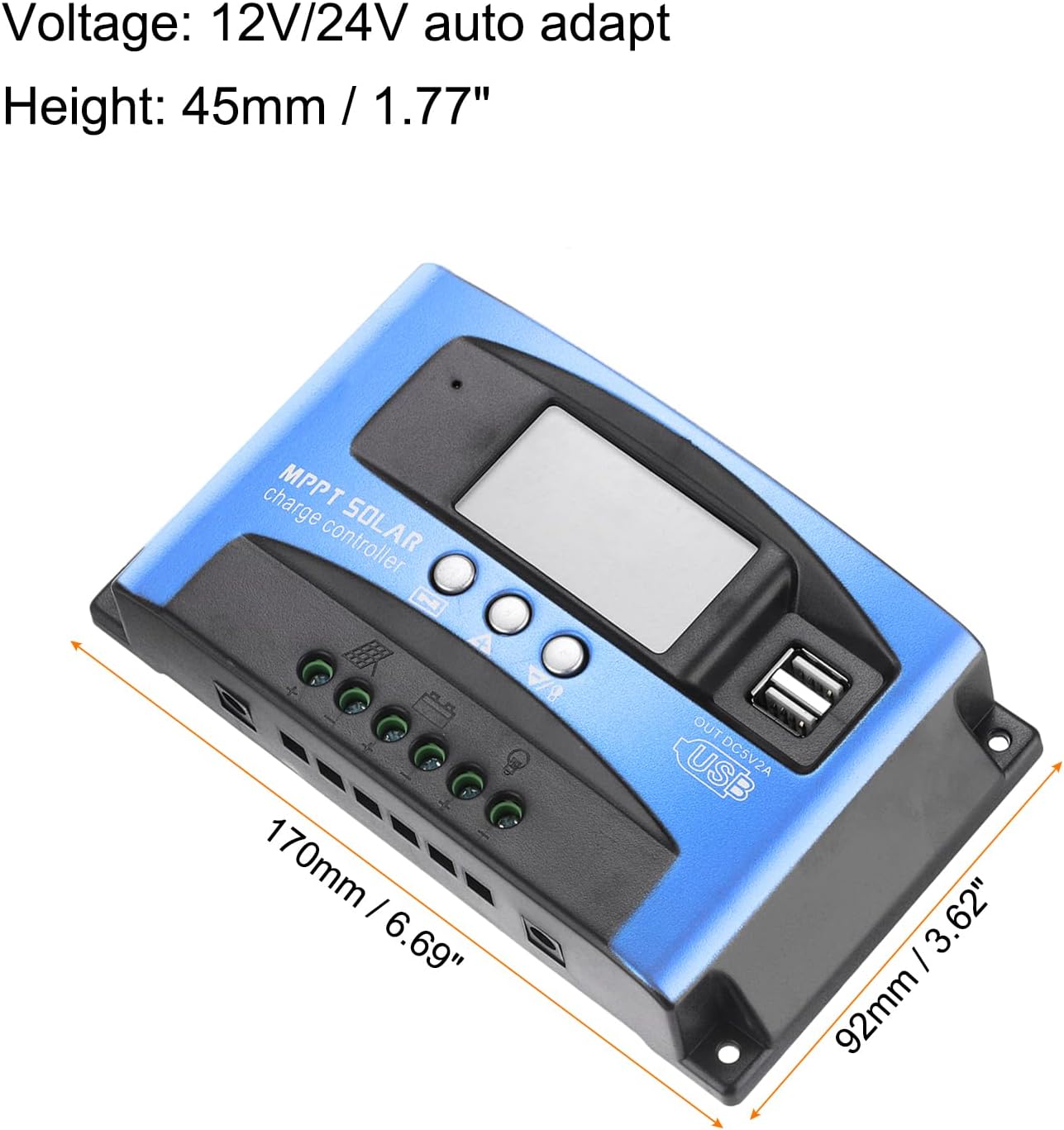
Figure 3.3: Dimensions of the MECCANIXITY MPPT Solar Charge Controller 100A, measuring 170mm (6.69") in length, 92mm (3.62") in width, and 45mm (1.77") in height.
Nøglefunktioner:
- MPPT-teknologi: Maksimerer energiudnyttelsen fra solpaneler.
- LCD-skærm: Provides real-time status and data, allowing for easy mode switching and parameter configuration.
- Dual USB-porte: 5V/2A Max output for charging external devices.
- Automatisk voltage Adaptation: Supports 12V/24V systems.
- Omfattende beskyttelse: Inkluderer over-voltage, short circuit, overload, over-charge, and over-discharge protection.
4. Opsætning og installation
Ledningsdiagram:

Figure 4.1: Wiring diagram illustrating connections for solar panel, battery, load, and inverter.
Installationstrin:
- Tilslut batteriet: Connect the battery to the charge regulator's positive and negative terminals first. Ensure correct polarity.
- Tilslut solpanelet: Connect the photovoltaic module (solar panel) to the charge regulator's positive and negative terminals.
- Tilslut belastningen: Connect the consumer (load) to the charge regulator's positive and negative terminals.
Important: Always connect the battery first and disconnect the solar panel first to prevent damage to the controller.
Installationsvideo:
Video 4.1: This video demonstrates the proper installation sequence for the solar charge controller, emphasizing the importance of connecting the battery before the solar panel and disconnecting the solar panel first. It shows how to secure wiring and check connections.
5. Betjeningsvejledning
LCD-display og knapfunktioner:
The LCD display provides real-time information about your solar system. The control buttons (Menu, Page Up, Page Down/Manual) allow you to navigate through different screens and adjust parameters.
- Hoveddisplay: Viser det aktuelle batteriniveautage og ladestatus.
- Float Voltage: Viser voltage at which the battery is maintained after full charge (e.g., 13.7V for 12V systems).
- Genopladning af decharge: Voltage at which the load will be reconnected after being disconnected due to low battery (e.g., 12.6V for 12V systems).
- Afladestop: Voltage at which the load will be disconnected to protect the battery from over-discharge (e.g., 10.7V for 12V systems).
- Batteritype: Allows selection of battery type (e.g., Sealed, Gel, Flooded).
- Arbejdstilstand: Configures load output modes (e.g., 24-hour output, dusk-to-dawn, timed output).
Press the 'Menu' button to cycle through different display interfaces. Use the 'Page Up' and 'Page Down/Manual' buttons to adjust settings when in configuration mode (typically by long-pressing the 'Menu' button to enter setting mode).
6. Vedligeholdelse
- Kontrollér regelmæssigt alle ledningsforbindelser for tæthed og korrosion.
- Keep the controller clean and free from dust and debris to ensure proper heat dissipation.
- Sørg for tilstrækkelig ventilation omkring controlleren.
- Overvåg LCD-displayet for fejlkoder eller usædvanlige aflæsninger.
7. Fejlfinding
Almindelige problemer og løsninger:
- Intet display/Ingen strøm: Kontroller batteriforbindelser og voltage. Ensure the battery has sufficient charge.
- Batteri oplades ikke: Verify solar panel connections and ensure adequate sunlight. Check for shading on solar panels. Confirm correct battery type setting.
- Indlæsning virker ikke: Check load connections. Ensure the battery voltage is above the discharge reconnect voltage. Verify load work mode settings.
- Over-voltage/Overstrømsbeskyttelse: The controller will automatically disconnect to protect the system. Identify the cause (e.g., too many solar panels, incorrect battery voltage) and rectify it before restarting.

Figure 7.1: The controller features a 7-point security protection system, including short circuit, open circuit, over current, over charge, over voltage, over load, and over discharge protection.
8. Specifikationer
| Parameter | Værdi |
|---|---|
| Voltage | 12V/24V automatisk tilpasning |
| Nominel opladningsstrøm | 100A |
| Udledningsstrøm | 30A |
| Størrelse | 170*92*45 mm (6.69 x 3.62 x 1.77 inches) |
| Driftstemperatur | -35-80℃ / -31°F-176°F |
| Float Charge Voltage (12V/24V) | 13.8V / 27.6V |
| USB udgang | 5V / 2A Maks |
| Varens vægt | 10.1 ounce |
9. Garanti og support
For warranty information and technical support, please refer to the product packaging or contact MECCANIXITY customer service directly. Keep your purchase receipt for warranty claims.