
1. Introduktion
Tak for købetasing the Andoer 4K 30fps Tiny Action Camera. This compact and versatile camera is designed to capture your adventures in stunning 4K resolution. With its wide-angle lens, built-in WiFi, and various mounting options, it is ideal for a wide range of outdoor activities, including diving, surfing, and skiing.
This manual provides detailed instructions on how to set up, operate, and maintain your camera to ensure optimal performance and longevity. Please read this manual thoroughly before using the product and keep it for future reference.
2. Sikkerhedsoplysninger
Overhold følgende sikkerhedsforanstaltninger for at forhindre personskade eller beskadigelse af enheden:
- Udsæt ikke kameraet for ekstreme temperaturer, direkte sollys i længere perioder eller høj luftfugtighed.
- Opbevar kameraet og dets tilbehør utilgængeligt for børn og kæledyr.
- Brug kun det specificerede opladningskabel og strømadapter.
- Do not attempt to disassemble, repair, or modify the camera yourself. Contact authorized service personnel for assistance.
- Ensure the waterproof case is properly sealed before submerging the camera in water.
- Undgå at tabe kameraet eller udsætte det for kraftige stød.

Advarsel: To avoid suffocation hazard, keep plastic bags away from babies and children.
3. Pakkens indhold
Bekræft, at alle nedenstående varer er inkluderet i din pakke:
- 1 x Andoer 4K Tiny Action Camera
- 1 x bagklip
- 1 x Magnetic Lanyard
- 1 x Camera Frame
- 1 x vandtæt etui
- 2 x Mounting Bases
- 1 x Buckle Mount
- 1 x Long Screw Mount
- 1 x styrmontering
- 1 x Mount Adapter
- 1 x rem
- 1 x Type-C ladekabel
- 1 x Brugermanual (dette dokument)
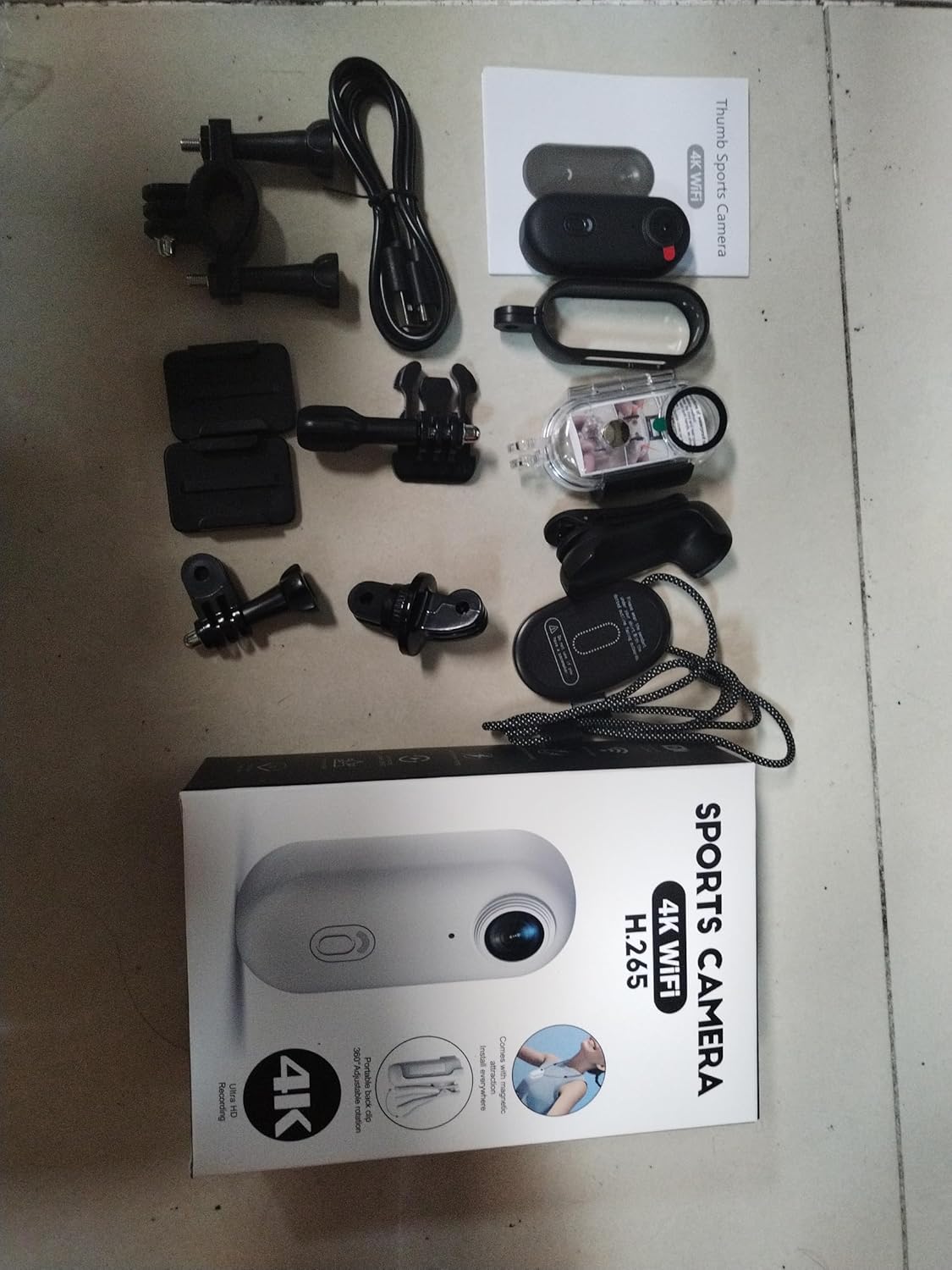
Illustration of the complete package contents.

Detaljeret view of the camera and its included accessories.
4. Produktet er slutview
The Andoer Tiny Action Camera is designed for portability and ease of use. Familiarize yourself with its main components:

Front view of the Andoer Tiny Action Camera.
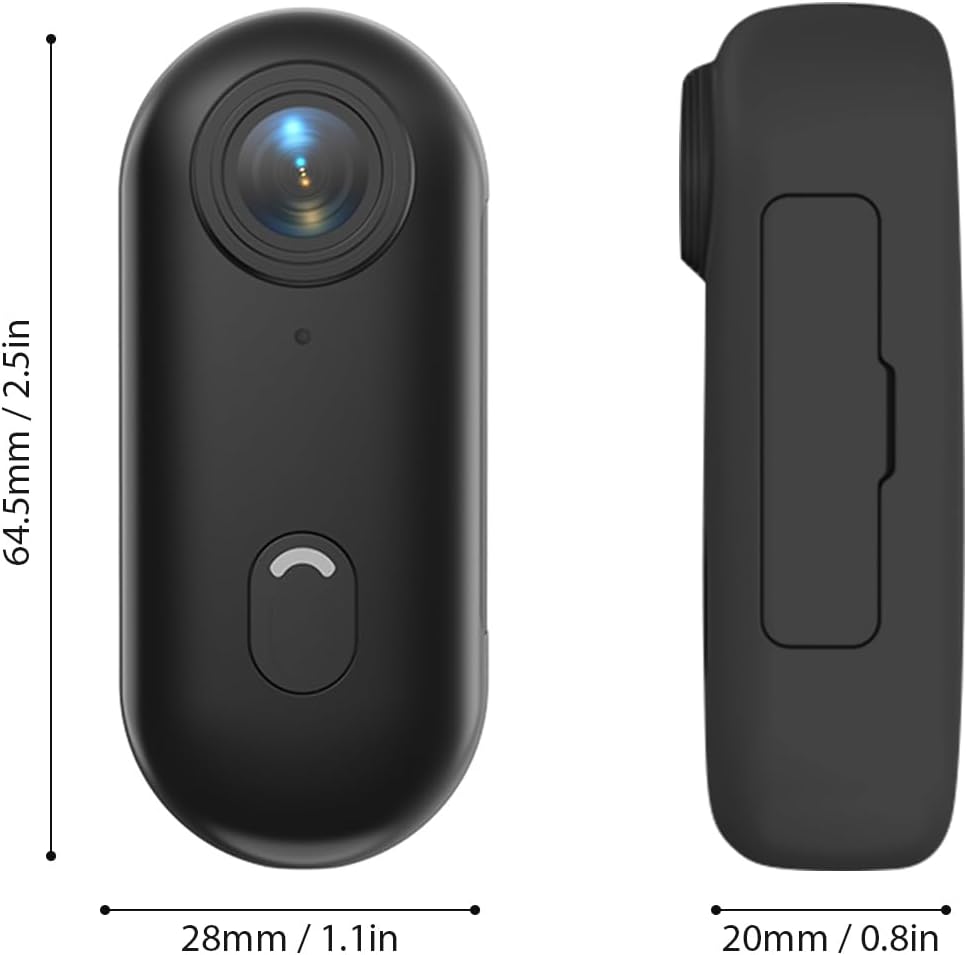
Kameraets fysiske dimensioner.
- Linse: 120° wide-angle lens for expansive shots.
- Tænd/sluk-knap: Used for powering on/off and switching modes.
- Indikatorlys: Displays camera status (recording, charging, WiFi connection).
- Mikrofon: Optager lyd.
- USB-C-port: Til opladning og dataoverførsel.
- MicroSD -kortplads: Til isætning af hukommelseskort.
5. Opsætning
5.1 Opladning af batteriet
The camera has a built-in 800mAh lithium battery. Before first use, fully charge the camera.
- Connect the included Type-C charging cable to the camera's USB-C port.
- Tilslut den anden ende af kablet til en 5V/2A USB-strømadapter (medfølger ikke) eller en USB-port på computeren.
- The indicator light will show charging status (refer to the camera's light indicator guide for specific colors/patterns).
- En fuld opladning tager cirka 120 minutter.
5.2 Indsættelse af et hukommelseskort
A MicroSD (TF) card (not included) is required for recording videos and photos. The camera supports cards up to 256GB.
- Find MicroSD-kortstikket på kameraet.
- Indsæt MicroSD-kortet med kontakterne nedad, indtil det klikker på plads.
- For at fjerne det skal du forsigtigt skubbe kortet ind, indtil det springer ud.
Note: It is recommended to format the MicroSD card in the camera before first use to ensure compatibility and optimal performance. Refer to the app or camera settings for formatting options.
5.3 Monteringsmetoder
The camera offers multiple versatile mounting options:
- Indbyggede magneter: The camera has built-in magnets, allowing direct attachment to any iron surface.
- Magnetic Lanyard: Attach the camera to the magnetic lanyard to wear it around your neck for convenient hands-free recording.

Using the magnetic lanyard for hands-free recording.
- Bagside klip: Use the included back clip to securely attach the camera to your collar, pocket, or backpack strap.
- Vandtæt etui: For underwater activities or protection from harsh elements, enclose the camera in the waterproof case. This case allows the camera to be submerged up to 30 meters. Ensure the case is properly sealed before use.
- Monteringstilbehør: Utilize the camera frame, mounting bases, buckle mount, long screw mount, handlebar mount, and mount adapter to attach the camera to helmets, bicycles, and other equipment.

Examples of multiple installation methods for the camera.
6. Betjeningsvejledning
6.1 Tænd/sluk
- Tænd: Tryk på tænd/sluk-/tilstandsknappen, og hold den nede i et par sekunder, indtil indikatorlampen lyser.
- Sluk: Press and hold the Power/Mode button again for a few seconds until the indicator light turns off.
6.2 Videooptagelse
The camera records videos in 4K resolution at 30 frames per second (4K 30fps) in MP4 format.
- Sørg for, at kameraet er tændt, og at der er isat et MicroSD-kort.
- Press the Power/Mode button once to start video recording. The indicator light will change to indicate recording is in progress (e.g., flashing red).
- Press the Power/Mode button again to stop recording. The indicator light will return to standby mode.
6.3 Fototagning
The camera captures photos at 3840x2160 resolution in JPEG format.
- Sørg for, at kameraet er tændt, og at der er isat et MicroSD-kort.
- (If in video mode, short press the Power/Mode button to switch to photo mode if applicable, or use the app).
- Press the Power/Mode button briefly to take a photo. The indicator light may flash once to confirm the capture.
6.4 WiFi-forbindelse og app-brug
The camera supports WiFi connection, allowing you to control it and view/share content via a smartphone application.
- Download the dedicated smartphone application (refer to the product packaging or manufacturer's website for the app name and download links).
- Tænd for kameraet.
- Activate WiFi on the camera (usually by a long press or specific button combination, refer to camera's light indicator guide). The camera will broadcast a WiFi network.
- On your smartphone, go to WiFi settings and connect to the camera's WiFi network (SSID and password typically found on the camera or in the app instructions).
- Open the app. You should now be able to see a live preview, styre optagelse, justere indstillinger og overføre files.
6.5 Loop-optagelse
Kameraet understøtter loop-optagelse, som automatisk overskriver den ældste filenår hukommelseskortet er fuldt, hvilket sikrer kontinuerlig optagelse.
- This feature is typically enabled by default or can be configured via the smartphone app.
- When the memory card reaches its capacity, the camera will automatically delete the oldest video segments to make space for new recordings.
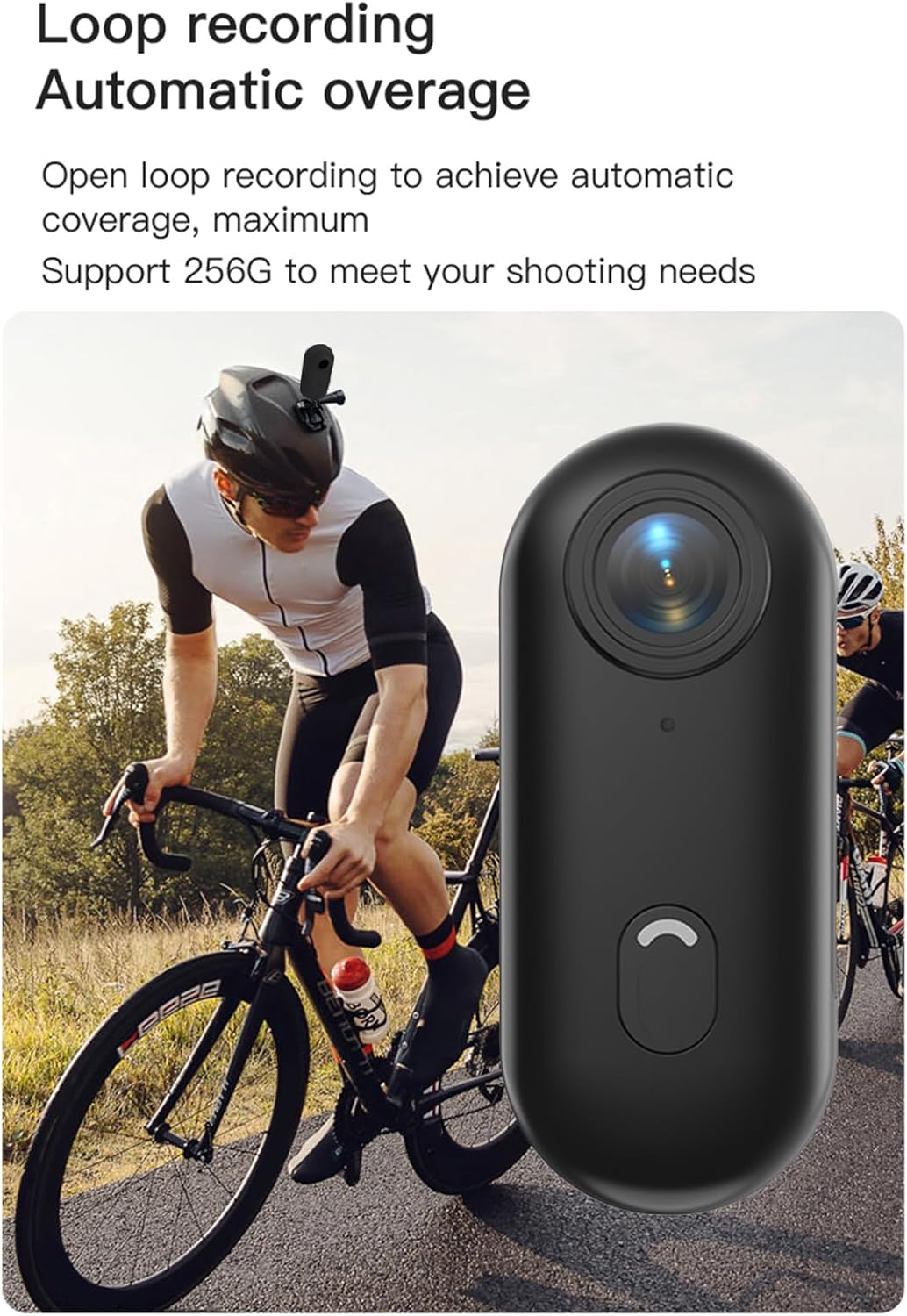
Loop recording functionality ensures continuous capture.
7. Vedligeholdelse
- Rensning: Use a soft, dry cloth to clean the camera body. For the lens, use a specialized lens cleaning cloth and solution. Do not use harsh chemicals or abrasive materials.
- Opbevaring: When not in use, store the camera in a cool, dry place, away from direct sunlight and extreme temperatures.
- Batteripleje: For long-term storage, charge the battery to about 50% every few months to maintain its health.
- Vandtæt etui: After using the waterproof case in saltwater, rinse it thoroughly with fresh water and allow it to air dry. Check the O-ring seal regularly for any debris or damage.
8. Fejlfinding
| Problem | Mulig årsag | Løsning |
|---|---|---|
| Kameraet tænder ikke. | Lavt batteri; defekt batteri; problem med tænd/sluk-knap. | Charge the camera fully. If issue persists, contact support. |
| Kan ikke oprette forbindelse til WiFi. | WiFi not enabled on camera; incorrect password; app issue. | Ensure camera WiFi is active. Re-enter password. Restart camera and phone. Reinstall app. |
| Optagelsen stopper uventet. | Memory card full; slow memory card; battery low. | Check memory card space. Use a high-speed (Class 10 or U3) MicroSD card. Charge battery. |
| Dårlig video-/fotokvalitet. | Snavset objektiv; dårlige lysforhold; forkerte indstillinger. | Clean the lens. Ensure adequate lighting. Check resolution settings in the app. |
| Vandlækage i vandtæt hus. | Forkert forseglet hus; beskadiget O-ring. | Ensure case is securely latched. Check O-ring for debris or damage and replace if necessary. |
9. Specifikationer
| Feature | Detalje |
|---|---|
| Video opløsning | 4K 30 fps |
| Foto opløsning | 3840x2160 |
| Videoformat | MP4 |
| Fotoformat | JPEG |
| Linsevinkel | 120° vidvinkel |
| Forbindelse | WiFi |
| Batterikapacitet | 800mAh lithium batteri |
| Opladningstid | Ca. 120 minutter |
| Opladning Voltage | 5V/2A |
| Understøttelse af hukommelseskort | TF-kort, op til 256GB |
| Interface Type | Type-C |
| Vandtæt dybde (med etui) | Op til 30 mio |
| Produktdimensioner | 64.5 x 28 x 20mm (2.54 x 1.1 x 0.8 inches) |
| Varens vægt | Approx. 11.3 ounces (camera only) |
| Driftstemperatur | -10°C til 60°C (14°F til 140°F) |
| Opbevaringstemperatur | -10°C til 60°C (14°F til 140°F) |
10. Garanti og support
Andoer products are manufactured to the highest quality standards. This product is covered by a limited warranty against defects in materials and workmanship from the date of purchase. Please retain your proof of purchase for warranty claims.
For technical support, troubleshooting assistance, or warranty inquiries, please contact Andoer customer service through the retailer where you purchased the product or visit the official Andoer webwebsted for kontaktoplysninger.
Webwebsted: Andoer Official Store on Amazon