
1. Introduktion
The ZJchao WZ5005 is a high-power, high-accuracy DC regulated power supply designed for laboratory equipment and electronic testing. It features a 1.8-inch high-definition LCD display, constant voltage and constant current output modes, and comprehensive protection mechanisms. This manual provides essential information for the safe and efficient operation of your WZ5005 power supply.

Figur 1: Forside view of the WZ5005 DC Regulated Power Supply.
2. Sikkerhedsoplysninger
Læs og forstå alle sikkerhedsinstruktioner, før du bruger enheden. Manglende overholdelse af disse instruktioner kan resultere i elektrisk stød, brand eller beskadigelse af produktet.
- Strømkilde: Sørg for, at input voltage is within the specified range of DC 6-55V. Using an incorrect power source can damage the unit.
- Ventilation: Bloker ikke ventilationsåbningerne. Sørg for tilstrækkelig luftgennemstrømning omkring enheden for at forhindre overophedning.
- Miljø: Operate the device in a dry, well-ventilated area, away from direct sunlight, high temperatures, and corrosive gases.
- Forbindelser: Always ensure proper polarity when connecting input and output terminals. Incorrect connections can cause damage.
- Opretholdelse: Forsøg ikke selv at skille enheden ad eller reparere den. Overlad al service til kvalificeret personale.
- Beskyttelsesfunktioner: The unit includes over-voltage (OVP), over-current (OCP), over-temperature (OTP), and under-voltage (LVP) protection. Do not bypass these safety features.
3. Produktet er slutview
3.1 Nøglefunktioner
- Constant Voltage (CV) and Constant Current (CC) output modes.
- 1.8-inch high-definition color LCD display with 4-digit precision.
- Justerbar output voltage (0-50V) and current (0-5A).
- Output power up to 250W.
- Indbygget over-voltage (OVP), over-current (OCP), over-temperature (OTP), and under-voltage (LVP) protection.
- Support for PC upper computer software and Android APP for remote control (requires optional USB to TTL or RS485 to TTL module).
- Convenient data storage and recall functions.
- Key lock function to prevent accidental parameter changes.
- Compact and lightweight design with flame-retardant material.
3.2 Komponenter og kontroller

Figur 2: Vinklet view of the WZ5005 showing main components.
- LCD-skærm: Viser realtidsvolumentage, current, power, and protection settings.
- V-SET-knap: Bruges til at indstille udgangsvolumentage.
- I-SET-knap: Used to set the output current limit.
- P-SET Button: Used to set protection parameters (OVP, OCP).
- ON/OFF knap: Toggles the output power.
- Rotary Encoder (MENU): Used for navigating menus and adjusting values. Press to confirm.
- Directional Buttons (M1-M4, OK/LOCK): Used for navigation, data storage/recall, and locking the panel.
- Output Terminals (+/-): Connect your load here. Ensure correct polarity.

Figure 3: WZ5005 with included clip lines.
4. Specifikationer
The following table details the technical specifications of the ZJchao WZ5005 DC Regulated Power Supply:

Figure 4: WZ5005 with detailed specifications.
| Parameter | Værdi |
|---|---|
| Model | WZ5005 |
| Input bindtagRækkevidde | DC 6-55V |
| Udgang VoltagRækkevidde | DC 0-50V |
| Udgangsstrømområde | 0-5A |
| Udgangseffektområde | 0-250W |
| Skærmvisning | 1.8 tommer farve LCD |
| Input bindtage Opløsning | 0.01V |
| Udgang Voltage Opløsning | 0.01V |
| Output Current Resolution | 0.001A |
| Udgang Voltage Nøjagtighed | ± (0.3% + 3 cifre) |
| Udgangsstrøm nøjagtighed | ± (0.5% + 5 cifre) |
| Typisk output-ripple | 150mV peak-to-peak |
| Normal Working Temperature Range | -10°C til 40°C |
| Produktmål (H x B x D) | Ca. 120 x 74 x 35 mm / 4.7 x 2.9 x 1.4 tommer |
5. Opsætning
- Udpakning: Carefully remove the WZ5005 power supply and any accessories from its packaging. Verify that all components are present (WZ5005 unit, 2 x Clip Lines).
- Placering: Place the unit on a stable, flat surface with adequate ventilation. Ensure there is enough space around the unit for heat dissipation.
- Indgangsstrømforbindelse: Connect a DC power source (6-55V) to the input terminals of the WZ5005. Observe correct polarity: positive to '+' and negative to '-'.
- Udgangsforbindelse: Connect your load to the output terminals using the provided clip lines or other suitable cables. Ensure correct polarity: positive to '+' (red) and negative to '-' (black).
- Første gang tændt: Once connections are secure, apply power to the input. The LCD screen should illuminate.
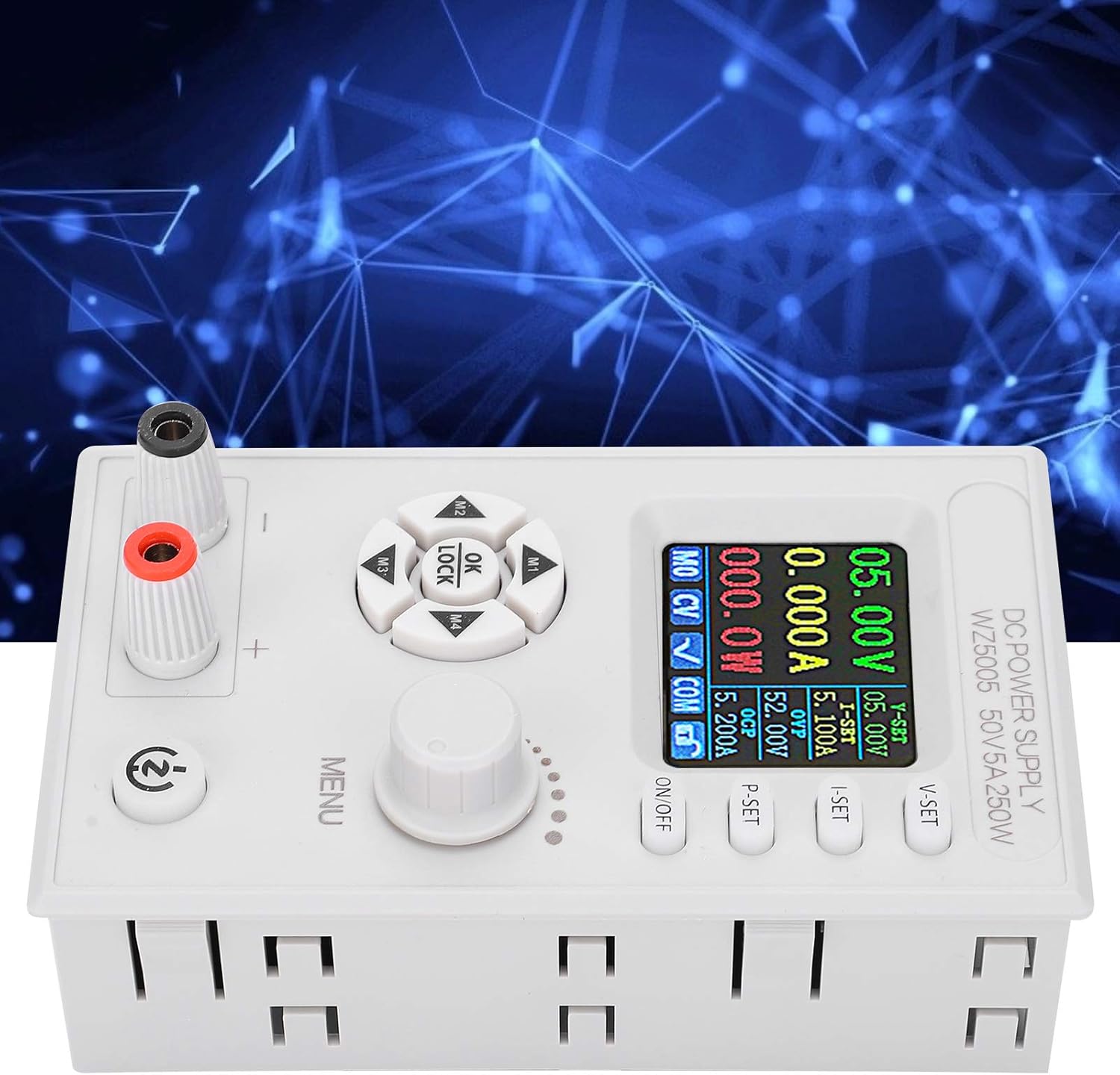
Figur 5: Øverst view viser indgangs- og udgangsterminaler.
6. Betjeningsvejledning
6.1 Powering On/Off Output
Tryk på ON/OFF button to enable or disable the output power. When the output is off, the display will show 0.00V and 0.000A.
6.2 Indstilling af udgangsvolumentage (CV Mode)
- Tryk på V-SET knappen. Lydstyrkentage value on the LCD will start blinking.
- Drej på MENU knap til at justere den ønskede lydstyrketage. Press the knob to confirm the setting.
- Alternatively, use the directional buttons (M1-M4) to select digits for finer adjustment.
6.3 Setting Output Current Limit (CC Mode)
- Tryk på I-SET button. The current value on the LCD will start blinking.
- Drej på MENU knob to adjust the desired current limit. Press the knob to confirm the setting.
- This sets the maximum current the power supply will deliver. If the load draws more current, the unit will switch to Constant Current (CC) mode and maintain the set current.
6.4 Setting Protection Parameters (OVP/OCP)
The WZ5005 includes Over-Voltage Protection (OVP) and Over-Current Protection (OCP) to safeguard your equipment.
- Tryk på P-SET button. The OVP value will blink.
- Drej på MENU knob to set the desired OVP threshold. Press the knob to confirm and move to OCP setting.
- Drej på MENU knob to set the desired OCP threshold. Press the knob to confirm.
- Hvis output voltage or current exceeds these set values, the power supply will automatically shut off the output to protect the connected device.
6.5 Tastlåsfunktion
To prevent accidental changes to settings, the WZ5005 features a key lock function.
- Tryk og hold på OK/LÅS button for a few seconds to activate or deactivate the key lock.
- When locked, a lock icon will appear on the display, and most buttons will be unresponsive.
6.6 Datalagring og -genkaldelse
The unit allows for convenient storage and recall of frequently used voltage og aktuelle indstillinger.
- Til butik a setting: Adjust the desired voltage and current. Then, press and hold one of the memory buttons (M1, M2, M3, M4) until the display indicates the setting has been saved.
- Til minde om a setting: Briefly press one of the memory buttons (M1, M2, M3, M4) to load the saved voltage og nuværende.
6.7 Fjernbetjening (valgfrit)
The WZ5005 supports remote control via PC software or an Android application. This functionality requires an optional USB to TTL module (U2T) or RS485 to TTL module (T485), which are sold separately. Refer to the documentation provided with these modules for connection and software setup instructions.
7. Vedligeholdelse
- Rensning: Disconnect the power supply from all power sources and loads before cleaning. Use a soft, dry cloth to wipe the exterior of the unit. Do not use abrasive cleaners or solvents.
- Opbevaring: When not in use for extended periods, store the power supply in a cool, dry place, away from dust and direct sunlight.
- Inspektion: Periodically inspect the input and output cables for any signs of damage or wear. Replace damaged cables immediately.
8. Fejlfinding
| Problem | Mulig årsag | Løsning |
|---|---|---|
| Intet display/Enheden tænder ikke | No input power or incorrect input voltage. | Check input power source and ensure it is within DC 6-55V. Verify input cable connections. |
| Ingen output voltage/aktuel | Output is turned off. OVP/OCP/OTP/LVP protection triggered. Incorrect output connections. | Press the ON/OFF button to enable output. Check if any protection (OVP, OCP, OTP, LVP) is active on the display. Verify output cable connections and load. |
| Udgang voltage/strøm ustabil | Poor connections. Load characteristics. | Ensure all connections are secure. Check the load for intermittent behavior. |
| Knapperne reagerer ikke | Tastelås er aktiv. | Press and hold the OK/LOCK button to deactivate the key lock. |
| Enheden overophedes | Blokeret ventilation. For stor belastning. | Ensure adequate airflow around the unit. Reduce the load or operating time. The unit has built-in over-temperature protection (OTP). |
9. Garanti og support
For warranty information or technical support, please refer to the documentation provided at the time of purchase or contact your vendor. You may also visit the official ZJchao store on Amazon for product information and support resources.
ZJchao Store Link: Visit the ZJchao Store