
1. Introduktion
Tak for købetasing the Generic APAYADO-M70 Wired Mini Low Profile Keyboard. This manual provides essential information for setting up, operating, and maintaining your new keyboard. Please read this manual thoroughly before use to ensure proper function and longevity of your device.
2. Produktet er slutview
2.1 Nøglefunktioner
- Kompakt størrelse: Slim and lightweight design (29×12×3.5cm; 220g) with a 78-key mini layout, saving desk space and enhancing portability.
- Lav Profile Design: Keys feature a short travel distance for responsive keystrokes and a comfortable typing experience.
- Chocolate Keycaps: Alphanumeric translucent keycaps ensure letters and numbers are clearly visible.
- RGB-baggrundsbelysning: Integrated LED backlighting for enhanced visibility and aesthetics.
- Stille taster: Bass buttons are designed for quiet operation, reducing typing noise.
2.2 Pakkens indhold
Tjek venligst pakken for følgende varer:
- APAYADO-M70 Wired Mini Low Profile Tastatur
- USB-kabel (integreret)
- Brugervejledning (dette dokument)
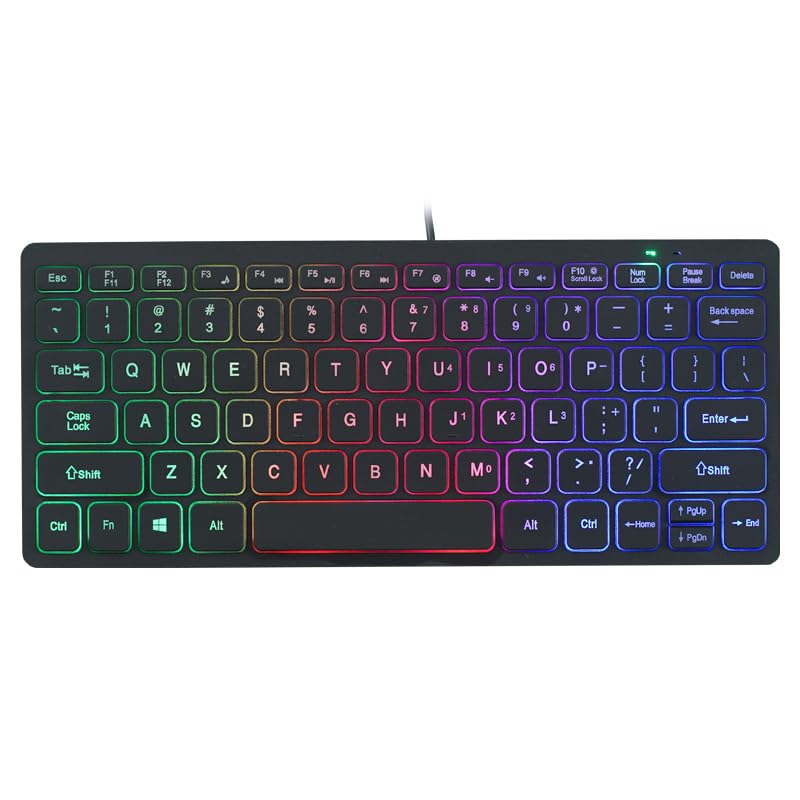
Image: The APAYADO-M70 Wired Mini Low Profile Keyboard, illustrating its compact form factor and illuminated keys.
3. Opsætningsvejledning
- Pak tastaturet ud: Tag forsigtigt tastaturet ud af emballagen.
- Tilslut til computer: Locate an available USB port on your computer (PC or Laptop). Insert the USB connector of the keyboard into the USB port.
- Driver installation: Tastaturet er plug-and-play. Dit operativsystem (Windows, macOS, Linux) burde automatisk registrere og installere de nødvendige drivere. Der kræves typisk ingen yderligere softwareinstallation.
- Bekræft funktionalitet: Open a text editor or word processor and type to ensure the keyboard is functioning correctly.
4. Betjeningsvejledning
4.1 Grundlæggende skrivning
The APAYADO-M70 functions as a standard US English layout keyboard. Simply press the desired keys to input characters.
4.2 RGB-baggrundsbelysningskontrol
The keyboard features integrated RGB backlighting. To control the backlighting:
- Turn On/Off Backlighting: Tryk på FN nøglen samtidig med F10 nøgle (FN + F10) for at tænde eller slukke LED-lysene.
- Note: Specific RGB modes or brightness adjustments are not detailed in the product information. The FN+F10 combination is for basic on/off functionality.
5. Vedligeholdelse
Korrekt vedligeholdelse sikrer dit tastaturs levetid og ydeevne.
- Rensning:
- Frakobl tastaturet fra computeren, før du rengør det.
- Brug en blød, fnugfri klud lidt damprengøres med vand eller en mild rengøringsopløsning til at tørre tasterne og overfladen af.
- Undgå at bruge skrappe kemikalier, slibende rengøringsmidler eller opløsningsmidler.
- Brug trykluft til at fjerne støv og snavs mellem tasterne.
- Opbevaring: Opbevar tastaturet et rent, tørt sted, væk fra ekstreme temperaturer og direkte sollys.
- Håndtering: Avoid dropping the keyboard or exposing it to liquids. Do not attempt to disassemble the keyboard, as this will void any warranty.
6. Fejlfinding
| Problem | Mulig årsag | Løsning |
|---|---|---|
| Tastaturet reagerer ikke | Løs USB-forbindelse, defekt USB-port, driverproblem. |
|
| Baggrundsbelysningen virker ikke | Baggrundsbelysningen er slukket, strømproblem. |
|
| Tasterne er klæbrige eller reagerer ikke | Rester under tastaturer, væskespild. |
|
7. Specifikationer
| Model | APAYADO-M70 |
| Fabrikant | APAYADO |
| Mærke | Generisk |
| Forbindelsesteknologi | Kablet USB |
| Tastaturbeskrivelse | Membrane, Low-Profile |
| Særlige funktioner | Backlit, Lightweight, Low-Profile Nøgle |
| Dimensioner (L x B x H) | 29 × 12 × 3.5 cm (approx.) |
| Vægt | 220 g (ca.) |
| Kompatible enheder | Laptop, PC |
| Color/Backlight | Mixed Light (RGB) |
8. Garanti og support
This product is covered by a standard manufacturer's warranty. Please refer to the retailer's return policy or contact the seller for specific warranty terms and conditions. For technical support or inquiries, please contact your point of purchase or the manufacturer directly.
Gem din købskvittering som købsbevis i tilfælde af garantikrav.


