
Teendow V16STRONG001
Teendow V16STRONG001 Cordless Vacuum Cleaner User Manual
Model: V16STRONG001 | Brand: Teendow
1. Introduktion
Thank you for choosing the Teendow V16STRONG001 Cordless Vacuum Cleaner. This powerful 500W stick vacuum is engineered for efficient home cleaning, featuring a specialized pet hair brush, multiple power settings, and an intelligent LED display. This manual provides essential information for the safe and effective operation and maintenance of your new vacuum cleaner.

Figure 1: Teendow V16STRONG001 Cordless Vacuum Cleaner and included accessories.
2. Pakkens indhold
Sørg for, at alle dele er til stede, før monteringen påbegyndes:
- 1 x Vakuumhus
- 1 x lang pind
- 1 x Gulvbørste
- 1 x 2-in-1 Little Flat Suck
- 1 x slange
- 1 x Pet Brush
- 1 x Pet Brush Button
- 1 x Vægmontering
- 1 x Bed Brush
- 1 x oplader
- 1 x brugermanual

Figure 2: All components as received in the package.
3. Opsætning og montering
3.1 Batteriinstallation og -opladning
The vacuum comes with a rechargeable battery. Before first use, fully charge the battery. The battery pack is easily removable for convenient charging.
- Insert the battery pack into the main vacuum body until it clicks securely into place.
- Connect the charger to the battery pack or directly to the vacuum body.
- Plug the charger into a power outlet. The LED display will indicate charging status.
3.2 Samling af støvsugeren
The modular design allows for various configurations:
- For Stick Vacuum Mode: Attach the Long Stick to the main vacuum body. Then, attach the Floor Brush to the end of the Long Stick. Ensure all connections click securely.
- For håndholdt tilstand: Attach desired accessories (e.g., 2-in-1 Little Flat Suck, Bed Brush) directly to the main vacuum body.

Figure 3: Teendow V16STRONG001 in typical stick vacuum configuration.
4. Betjeningsvejledning
4.1 Tænd/sluk og sugefunktioner
The intelligent LED display provides real-time information and control:
- Tænd/sluk: Press the power button on the LED display to turn the vacuum on or off.
- Juster sugetilstande: The vacuum offers three adjustable cleaning modes (High, Medium, Low). Press the mode button on the LED display to cycle through these settings. The display will show the current suction level.
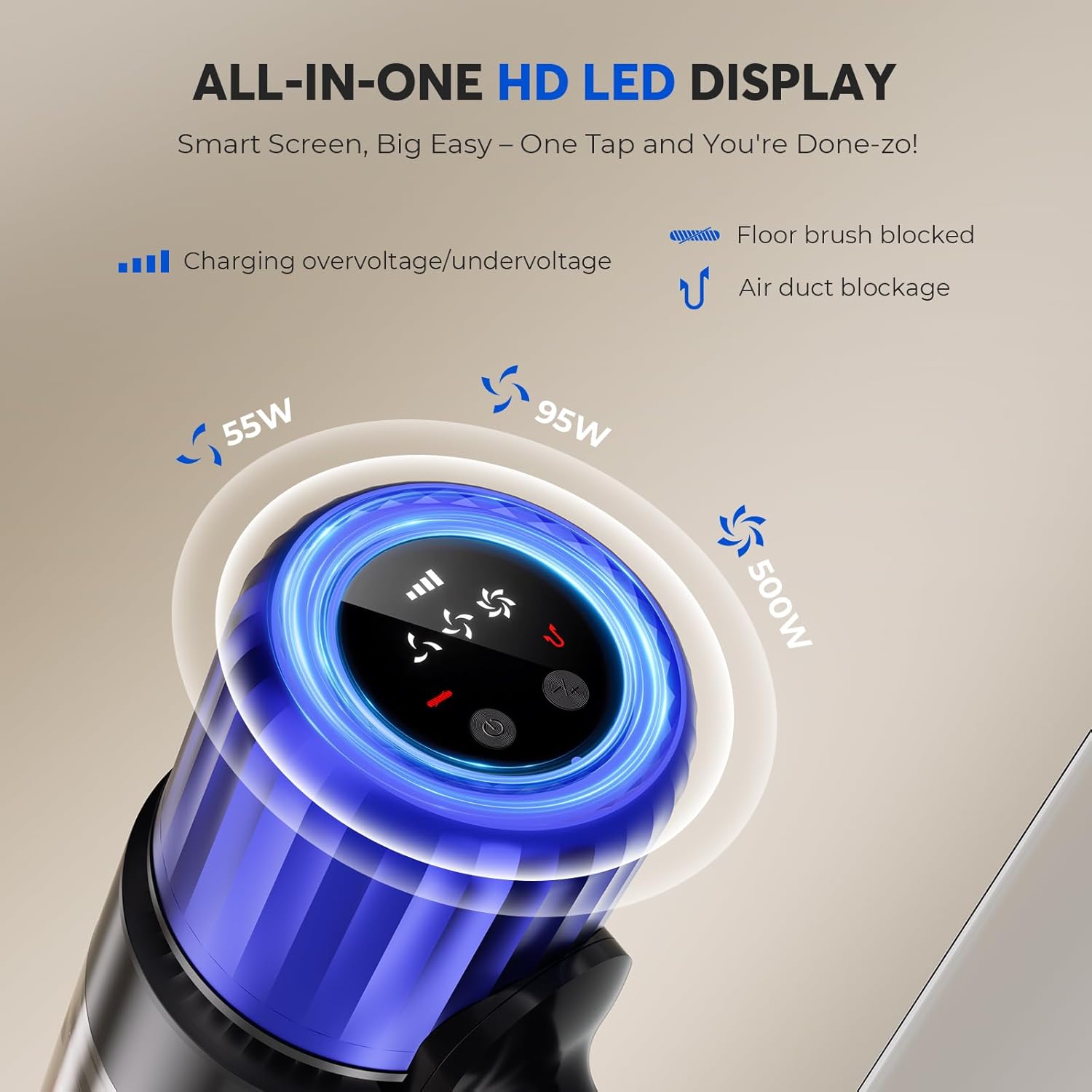
Figure 4: Close-up of the intelligent HD LED display.
4.2 Using Specialized Attachments
The Teendow V16STRONG001 includes several attachments for versatile cleaning:
- Kæledyrsbørste: Designed to effectively remove loose fur and dander from pets. Connect the Pet Brush to the hose, then attach the hose to the main vacuum body.
- 2-in-1 Little Flat Suck: Ideal for narrow spaces, corners, and delicate surfaces.
- Bed Brush: Specifically designed for cleaning mattresses and upholstery.
Video 1: Demonstration of the Teendow Cordless Vacuum Cleaner's Pet Hair Brush attachment in use.
The powerful suction and high-speed brushless motor (90,000 RPM) ensure thorough cleaning on various surfaces, from carpets to hard floors.
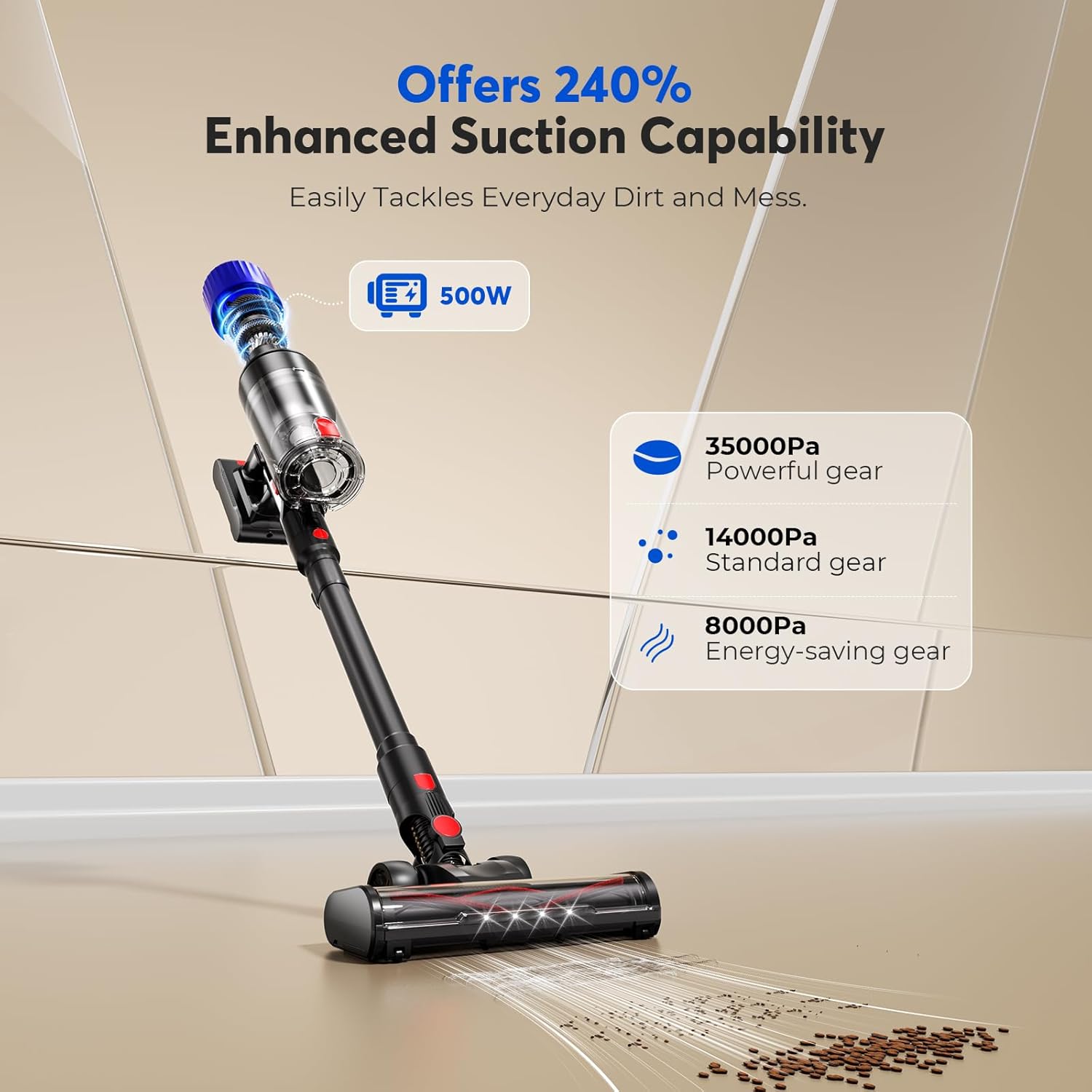
Figure 5: Illustration of the vacuum's powerful suction capabilities.
5. Vedligeholdelse
5.1 Tømning af skraldespanden
To maintain optimal suction, empty the dustbin regularly. The dustbin is designed for effortless disposal without getting your hands dirty.
- Locate the dustbin release button on the main vacuum body.
- Tryk på knappen for at afmontere støvbeholderen.
- Hold the dustbin over a trash receptacle and open the bottom flap to release debris.
- Close the flap and reattach the dustbin to the vacuum body until it clicks.
5.2 Rengøring af filtre
Multi-stage filtration system captures fine dust and allergens. Regular cleaning of the filters is crucial for performance and air quality.
- Fjern støvbeholderen som beskrevet ovenfor.
- Carefully remove the filter components from the dustbin.
- Tap filters gently to remove loose dust. For thorough cleaning, rinse filters under running water (ensure they are completely dry before reinstallation).
- Reassemble the filters and dustbin once dry.
5.3 Vedligeholdelse af børstehoved
The anti-hair wrap technology minimizes tangles, but occasional cleaning of the brush head may be necessary.
- Detach the floor brush from the long stick.
- Inspect the brush roll for any tangled hair or debris.
- Use scissors or a tool to carefully cut and remove any wrapped hair.
- Sørg for, at børsterullen drejer frit, før du sætter den på igen.
6. Fejlfinding
If you encounter issues with your Teendow V16STRONG001, please refer to the following common solutions:
- Ingen strøm: Ensure the battery is fully charged and properly installed. Check the charger connection.
- Reduceret sugning: Empty the dustbin. Clean or replace the filters. Check the brush head for obstructions or tangles. Ensure all connections are secure.
- Usædvanlig støj: Check for blockages in the hose, brush head, or main unit. Ensure all parts are correctly assembled.
For persistent issues, please contact Teendow customer support.
7. Specifikationer
| Feature | Specifikation |
|---|---|
| Mærke | Teendow |
| Modelnavn | V16STRONG |
| Varemodelnummer | V16STRONG001 |
| Wattage | 500 watt |
| Runtime | Op til 55 minutter |
| Kapacitet | 0.65 liter |
| Filtertype | Foam (Multi-stage filtration system) |
| Støjniveau | 70 dB |
| Kontrolmetode | Touch (HD LED touchscreen) |
| Antal hastigheder | 3 |
| Varens vægt | 9 pund |
| Produktdimensioner | 17.1 cm L x 12.8 cm B x 7.1 cm H |
8. Garanti og support
For warranty information, technical support, or any inquiries regarding your Teendow V16STRONG001 Cordless Vacuum Cleaner, please refer to the contact details provided in the original product packaging or visit the official Teendow webwebsted. Gem din købskvittering for garantikrav.
Relaterede dokumenterV16STRONG001


Ask a question about this manual
Ask about setup, troubleshooting, compatibility, parts, safety, or missing instructions. Manuals+ will review the question and use this page’s manual context to help answer it.