
1. Introduktion
Thank you for choosing the Sharkoon AK6 RGB ATX PC Case. This manual provides essential information for the proper installation, operation, and maintenance of your new PC case. Please read this guide thoroughly before beginning the assembly process to ensure optimal performance and longevity of your components.
2. Sikkerhedsoplysninger
- Frakobl altid strømforsyningen fra stikkontakten, før du installerer eller fjerner komponenter inde i pc-kabinettet.
- Håndter hærdede glaspaneler forsigtigt. De er skrøbelige og kan gå i stykker, hvis de tabes eller udsættes for stød.
- Avoid exposing the case to extreme temperatures, humidity, or direct sunlight.
- Hold små dele og skruer utilgængeligt for børn.
- Sørg for korrekt jordforbindelse for at forhindre elektrostatisk udladning (ESD) på følsomme elektroniske komponenter.
3. Pakkens indhold
Kontroller venligst, at alle varer er til stede i din pakke:
- Sharkoon AK6 RGB ATX PC-taske
- Tilbehørsæske (indeholder skruer, kabelbindere og andre små dele)
- Brugervejledning (dette dokument)
4. Produktet er slutview
The Sharkoon AK6 RGB ATX PC Case is designed with a modern glass aesthetic, featuring seamless integration of tempered glass on the front and side panels. It includes four pre-installed 120mm addressable RGB PWM fans for optimal airflow and visual appeal. The case supports a wide range of components, including BTF motherboards, and offers ample space for high-performance hardware.

Figure 4.1: Front interior view of the Sharkoon AK6 RGB PC case, showcasing the pre-installed addressable RGB fans and the spacious main chamber.

Figur 4.2: Vinklet view of the Sharkoon AK6 RGB PC case, highlighting the tempered glass side panel and the top mesh for ventilation.

Figur 4.3: Bagside view of the Sharkoon AK6 RGB PC case, showing the I/O shield cutout, rear exhaust fan mount, and expansion slots.
Front I/O panel
The front I/O panel is located on the side of the case and includes:
- Power knap
- Nulstil knap
- 2 x USB Ports (Type-A)
- 1 x USB Type-C-port
- Audio Jacks (TRRS)
5. Opsætning og installation
Follow these steps to install your components into the Sharkoon AK6 RGB PC Case.
5.1 Forberedelse af sagen
- Placer etuiet på en flad, stabil overflade.
- Carefully remove the tempered glass side panel by unscrewing the thumb screws at the rear and gently pulling the panel away.
- Remove the rear metal side panel by unscrewing the thumb screws.
5.2 Installation af bundkort
The AK6 RGB supports Mini-ITX, Micro-ATX, ATX, and BTF motherboards.
- Install the I/O shield into the cutout at the rear of the case (if not pre-installed on your motherboard).
- Align your motherboard with the standoffs inside the case. Ensure all standoffs match the motherboard's mounting holes.
- Fastgør bundkortet med de passende skruer fra tilbehørsæsken.
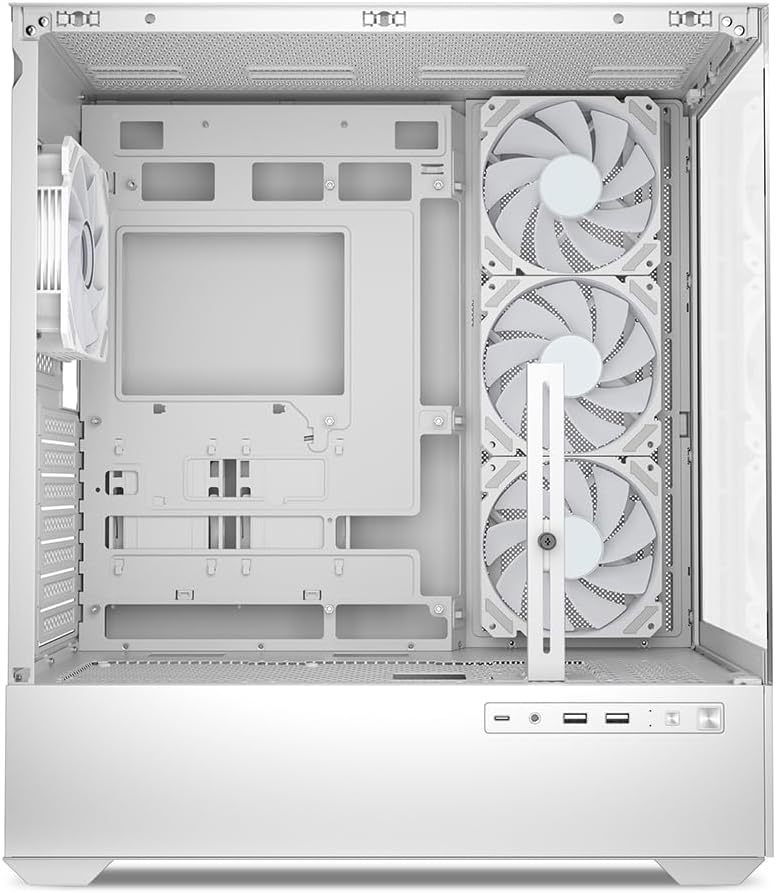
Figur 5.1: Interiør view of the Sharkoon AK6 RGB PC case, illustrating the motherboard tray, cable management cutouts, and front fan mounting points.
5.3 Installation af strømforsyning
The case features a bottom-mount power supply design.
- Slide the power supply unit (PSU) into the dedicated compartment at the bottom rear of the case.
- Juster strømforsyningen med skruehullerne bag på kabinettet.
- Fastgør strømforsyningen med de medfølgende skruer.
5.4 Installation af lagerenhed
The AK6 RGB supports up to two 3.5" HDDs or four 2.5" SSDs.
- For 3.5" harddiske: Locate the drive cages beneath the PSU shroud. Slide the HDD into a drive tray and secure it with screws.
- For 2.5" SSD'er: SSDs can be mounted on the dedicated brackets behind the motherboard tray or on the 3.5" drive trays using adapter screws.
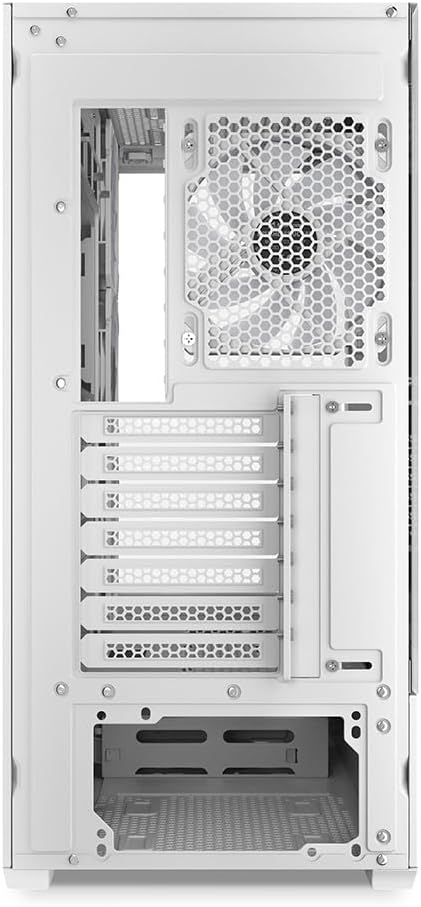
Figur 5.2: Bageste interiør view of the Sharkoon AK6 RGB PC case, detailing the drive cages for 3.5-inch HDDs and 2.5-inch SSDs, and the power supply shroud area.
5.5 Installation af grafikkort og udvidelseskort
- Fjern de nødvendige dæksler til udvidelsespladserne på bagsiden af kabinettet.
- Indsæt dit grafikkort eller andre udvidelseskort i de relevante PCIe-stik på dit bundkort.
- Secure the cards with screws. The case includes a rubberized graphics card support for larger cards.
5.6 CPU Cooler and Radiator Installation
The case supports CPU coolers up to 17 cm in height and allows for extensive liquid cooling setups.
- Installer din CPU-køler i henhold til producentens anvisninger.
- For liquid cooling, the case can accommodate a 360mm radiator at the top and an additional 280mm radiator.
5.7 Kabelstyring
Brug kabeludskæringerne og fastgørelsespunkterne bag bundkortbakken til at føre og fastgøre kabler. Dette forbedrer luftgennemstrømningen og æstetikken.
6. Betjeningsvejledning
6.1 Tænd
After all components are installed and cables are connected, replace the side panels. Connect the power cable to your PSU and a wall outlet, then press the power button on the front I/O panel to start your system.
6.2 RGB-blæserstyring
The AK6 RGB comes with four pre-installed addressable RGB PWM fans. These fans are connected to an RGB controller which also provides connections for up to four LED elements and four PWM fans. The RGB lighting can typically be controlled via your motherboard's RGB software (if compatible) or through a dedicated button on the case (if present and connected).
6.3 Optimering af luftstrøm
The case is designed for ideal airflow, with three inverted fans drawing air from the side into the case. The top and rear fan mounts allow for additional exhaust fans. Ensure proper fan orientation for optimal cooling performance.

Figur 6.1: Eksample of a fully assembled system within the Sharkoon AK6 RGB PC case, featuring various components and active RGB lighting.
7. Vedligeholdelse
Regular maintenance helps ensure the longevity and performance of your PC components.
- Støvfiltre: Periodically clean the removable dust filters (e.g., on the top and bottom) to maintain optimal airflow and prevent dust buildup inside the case. Use compressed air or a soft brush.
- Glaspaneler: Clean tempered glass panels with a soft, lint-free cloth and a glass cleaner. Avoid abrasive materials that could scratch the surface.
- Indvendig rengøring: Brug trykluft til at fjerne støv fra interne komponenter og ventilatorer. Sørg for, at systemet er slukket og frakoblet, før rengøring.
8. Fejlfinding
If you encounter issues with your PC case, refer to the following common troubleshooting steps:
- Ingen strøm: Ensure the power supply is properly connected to the wall outlet and the motherboard. Check all internal power cables (24-pin ATX, 8-pin CPU, PCIe power).
- Ventilatorer drejer ikke/RGB virker ikke: Verify that all fan and RGB cables are correctly connected to the motherboard or the included RGB controller. Check your motherboard's BIOS/UEFI settings or RGB software for fan speed and lighting control.
- Front I/O-porte fungerer ikke: Confirm that the front panel connectors (USB, audio, power/reset switches) are correctly plugged into the corresponding headers on your motherboard.
- Overophedning: Ensure all fans are spinning correctly and oriented for proper airflow. Clean dust filters and internal components. Verify CPU cooler installation.
For further assistance, please contact Sharkoon support.
9. Specifikationer
| Feature | Specifikation |
|---|---|
| Mærke | Sharkoon |
| Modelnavn | AK6 RGB |
| Modelnummer | C-AK6W |
| Sagstype | ATX tårn |
| Farve | Hvid |
| Materiale | Hærdet glas |
| Bundkort kompatibilitet | Mini ITX, Micro ATX, ATX, BTF |
| Strømforsyningsmonteringstype | Bundmontering |
| Afkølingsmetode | Luft |
| Forudinstallerede ventilatorer | 4 x 120mm Addressable RGB PWM Fans |
| Max CPU kølerhøjde | 17 cm |
| Max grafikkortlængde | 41 cm (with rubberized support) |
| Max PSU-længde | 23.5 cm |
| Radiatorstøtte | Top: up to 360mm, Additional: up to 280mm |
| Drive Bays | 2 x 3.5" HDD or 4 x 2.5" SSD |
| Front I / O-porte | 2 x USB Type-A, 1 x USB Type-C, Audio (TRRS) |
| Varens vægt | 6.1 kilo |
| Særlige funktioner | RGB Lighting, Unique Glass Appearance, BTF Motherboard Support |
10. Garanti
Sharkoon products are manufactured to high quality standards. For detailed warranty information, please refer to the warranty card included with your product or visit the official Sharkoon webGarantien dækker typisk defekter i materialer og udførelse under normal brug.
11. Support
If you require technical assistance or have questions regarding your Sharkoon AK6 RGB ATX PC Case, please visit the official Sharkoon website for support resources, FAQs, and contact information. You may also find updated drivers or software for the RGB controller there.
Webwebsted: www.sharkoon.com