
Indledning
This manual provides instructions for the Allimity AKB73975615 replacement infrared remote control, designed for use with various LG AC Air Conditioner models. This remote functions as a direct replacement and does not require programming. Please read this manual carefully before use to ensure proper operation.
Opsætning
1. Batteriinstallation
Fjernbetjeningen kræver to AAA alkaline-batterier (medfølger ikke). Følg disse trin for at installere dem:
- Find batterirummets dæksel på bagsiden af fjernbetjeningen.
- Skub dækslet nedad for at åbne rummet.
- Isæt to nye AAA alkaline-batterier, og sørg for, at de positive (+) og negative (-) poler stemmer overens med diagrammerne i batterirummet.
- Skub batteridækslet tilbage på plads, indtil det klikker sikkert.
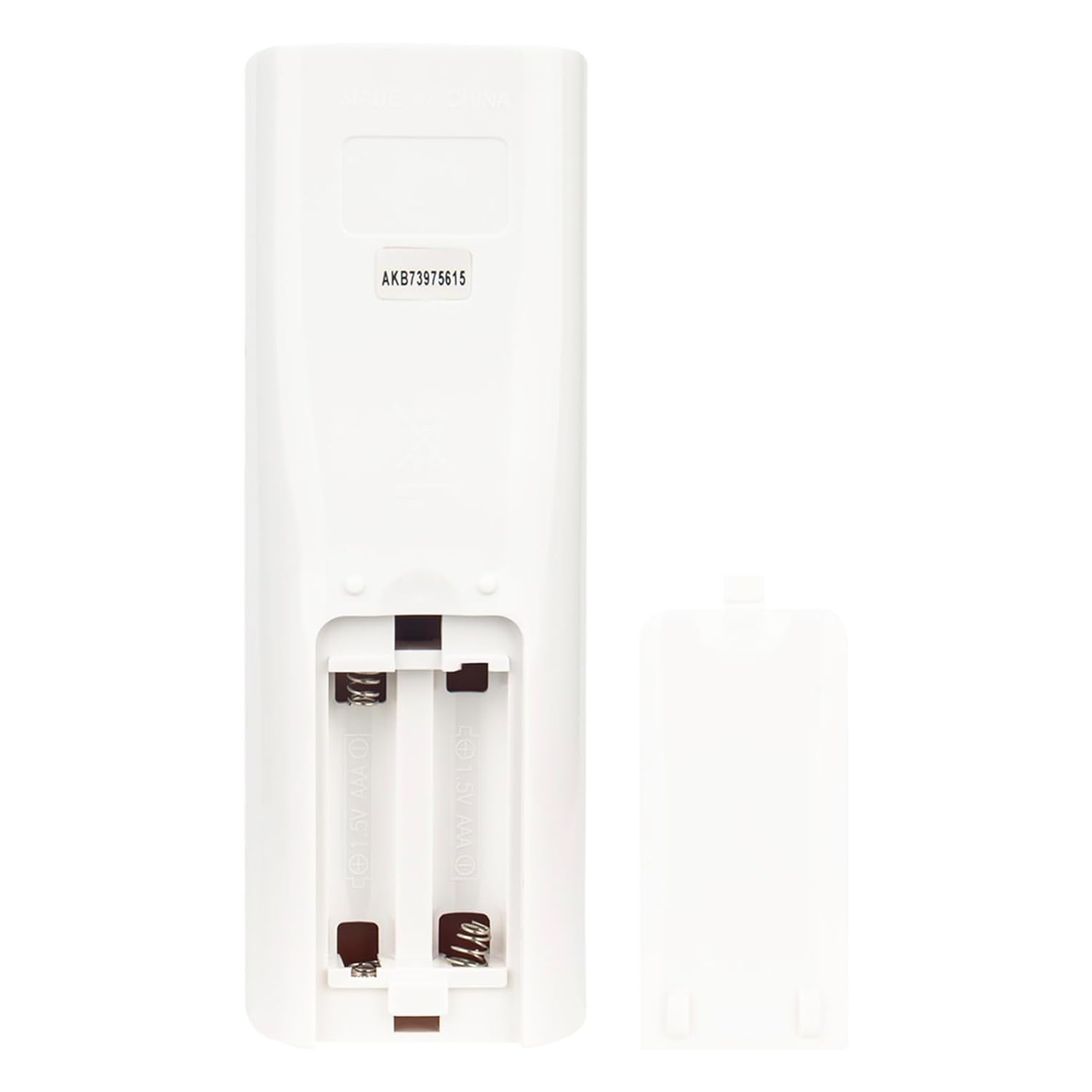
Image: Open battery compartment showing where to insert AAA batteries.
2. Førstegangsbrug
After installing the batteries, the remote is ready for use. No pairing or programming is required. Simply point the remote control directly towards the infrared sensor on your LG AC Air Conditioner unit.
Betjeningsvejledning
Ensure there are no obstacles between the remote control and the air conditioner unit's sensor for optimal performance. The remote operates using infrared technology.

Billede: Forside view of the remote control, highlighting its buttons and general layout.
Knap funktioner:
- POWER (Red Button): Tænder eller slukker klimaanlægget.
- ENERGY SAVING (Yellow Button): Activates or deactivates energy-saving mode.
- M'SOON: Likely activates a specific 'Monsoon' or dehumidification mode.
- MODE: Cycles through operating modes (e.g., Cool, Fan, Dry, Heat - depending on AC unit features).
- TEMP ▲ / ▼: Adjusts the temperature setting upwards or downwards.
- BLÆSERHASTIGHED: Justerer ventilatorhastigheden (f.eks. Lav, Mellem, Høj, Auto).
- H'COOL: Activates a 'High Cool' or powerful cooling mode.
- SWING (Vertical): Controls the vertical louver swing.
- SWING (Horizontal): Controls the horizontal louver swing.
- RUMTEMP: Displays the current room temperature.
- TIMER TIL/FRA: Sets or cancels the timer for automatic power ON/OFF.
- SOVE: Activates sleep mode for quiet operation and adjusted temperature curves.
- SET / CLEAR: Used for setting or clearing timer functions.
- LIGHT / TIME [3SEC] / A/C CLEAN:
- Press briefly for display light (if applicable).
- Press and hold for 3 seconds to set the time.
- Activates the A/C clean function (if supported by the unit).
- NULSTIL: Resets the remote control settings.
Opretholdelse
Rengøring af fjernbetjeningen
Fjernbetjeningen rengøres ved forsigtigt at tørre den af med en blød, tør klud. Brug ikke flydende rengøringsmidler, slibende rengøringsmidler eller kemiske opløsningsmidler, da disse kan beskadige fjernbetjeningens overflade eller interne komponenter.
Udskiftning af batteri
Replace batteries when the remote's range decreases or if the display becomes dim. Always replace both batteries at the same time with new AAA alkaline batteries. Remove batteries if the remote will not be used for an extended period to prevent leakage.
Fejlfinding
- Fjernbetjeningen virker ikke:
- Sørg for, at nye AAA alkaliske batterier er korrekt isat med den korrekte polaritet.
- Point the remote directly at the air conditioner's infrared receiver.
- Remove any obstacles between the remote and the AC unit.
- Verify that the remote control sensor on the AC unit is clean and unobstructed.
- Fjernbetjeningen fungerer periodisk:
- Udskift batterierne med nye.
- Ensure you are within the effective operating range (approximately 10 meters).
- Nogle funktioner virker ikke:
- This remote is a replacement and may not support all advanced features of your specific LG AC model if those features were unique to the original remote.
- Ensure your AC unit supports the specific function you are trying to use (e.g., A/C Clean, specific swing modes).
- Remote is not compatible with my AC model:
- This remote is compatible with specific LG AC models listed in the product description. If your model is not listed, it may not be fully compatible.
- Refer to the "Compatible Models" section or contact support for assistance.
Specifikationer
| Mærke | alliance |
| Modelnavn | AKB73975615 |
| Kompatible enheder | LG AC Air Conditioners (Specific models: AKB73456104, AKB73315611, AKB74515420, A12AW1NF2, A4UW246FA4, AD0121, ASNW126F1G2, AMNH09GAF11, AMNH12GAF11, AMNW36GNJA0, AMNW24GECA0, APNH2433LAE, ASNH18G8RU3, APNH423TLAE, ASNH24G8RU3, USNW096H4A0, LC097HV4, LC127HV4, LCN097HV4, LCM427HV, LCN246HV, LCN127HV4, LCN187HV, LCN247HV, LCN367H, LMCN077HV, LMCN097HV, LCN426HV, LMCN125HV, LMCN185HV, MA12AH1, MU4M25, MA09AH1) |
| Forbindelsesteknologi | Infrarød |
| Farve | Sort |
| Speciel funktion | Ergonomisk |
| Maksimal rækkevidde | 10 meter |
| Varens vægt | 75 gram |
| Varedimensioner (L x B x H) | 15L x 5W x 1H Centimeter |
| Oprindelsesland | Kina |
Kompatible modeller:
This remote control is compatible with the following LG AC Air Conditioner models:
- AKB73456104
- AKB73315611
- AKB74515420
- A12AW1NF2
- A4UW246FA4
- AD0121
- ASNW126F1G2
- AMNH09GAF11
- AMNH12GAF11
- AMNW36GNJA0
- AMNW24GECA0
- APNH2433LAE
- ASNH18G8RU3
- APNH423TLAE
- ASNH24G8RU3
- USNW096H4A0
- LC097HV4
- LC127HV4
- LCN097HV4
- LCM427HV
- LCN246HV
- LCN127HV4
- LCN187HV
- LCN247HV
- LCN367H
- LMCN077HV
- LMCN097HV
- LCN426HV
- LMCN125HV
- LMCN185HV
- MA12AH1
- MU4M25
- MA09AH1
Note: If your specific model number is not listed, please contact customer support to verify compatibility before purchase.
Garantioplysninger
This Allimity remote control comes with a 30 dages garanti from the date of purchase. This warranty covers manufacturing defects. It does not cover damage caused by misuse, accidents, unauthorized modifications, or normal wear and tear. Please retain your proof of purchase for warranty claims.
Kundesupport
For any questions, troubleshooting assistance, or warranty claims, please contact Allimity customer support:
- E-mail: indcandy2023@126.com
- Fabrikant: allimity inc
- Producentens adresse: RM B11-43, FL 11, Niulanqian, Minzhijiedao, Longhua, Shenzhen, Guangdong 518109, CN
When contacting support, please provide your product model number (AKB73975615) and a detailed description of the issue.