
ANFIER M3
ANFIER M3 AI Translation Earbuds User Manual
Model: M3 | Brand: ANFIER
Indledning
Welcome to the world of seamless communication with your ANFIER M3 AI Translation Earbuds. Designed to break down language barriers, these earbuds offer real-time translation for a wide range of languages and accents, both online and offline. This manual provides essential information on setting up, operating, and maintaining your device to ensure optimal performance.
Hvad er der i æsken
- AI Translator Earbuds (M3)
- Brugermanual
- Offline redemption card (for offline package variants)
- Earbuds cleaning brush

Nøglefunktioner
- Offline oversættelse: Supports 8 major languages (Chinese, English, Japanese, Korean, Russian, German, French, Spanish) without Wi-Fi.
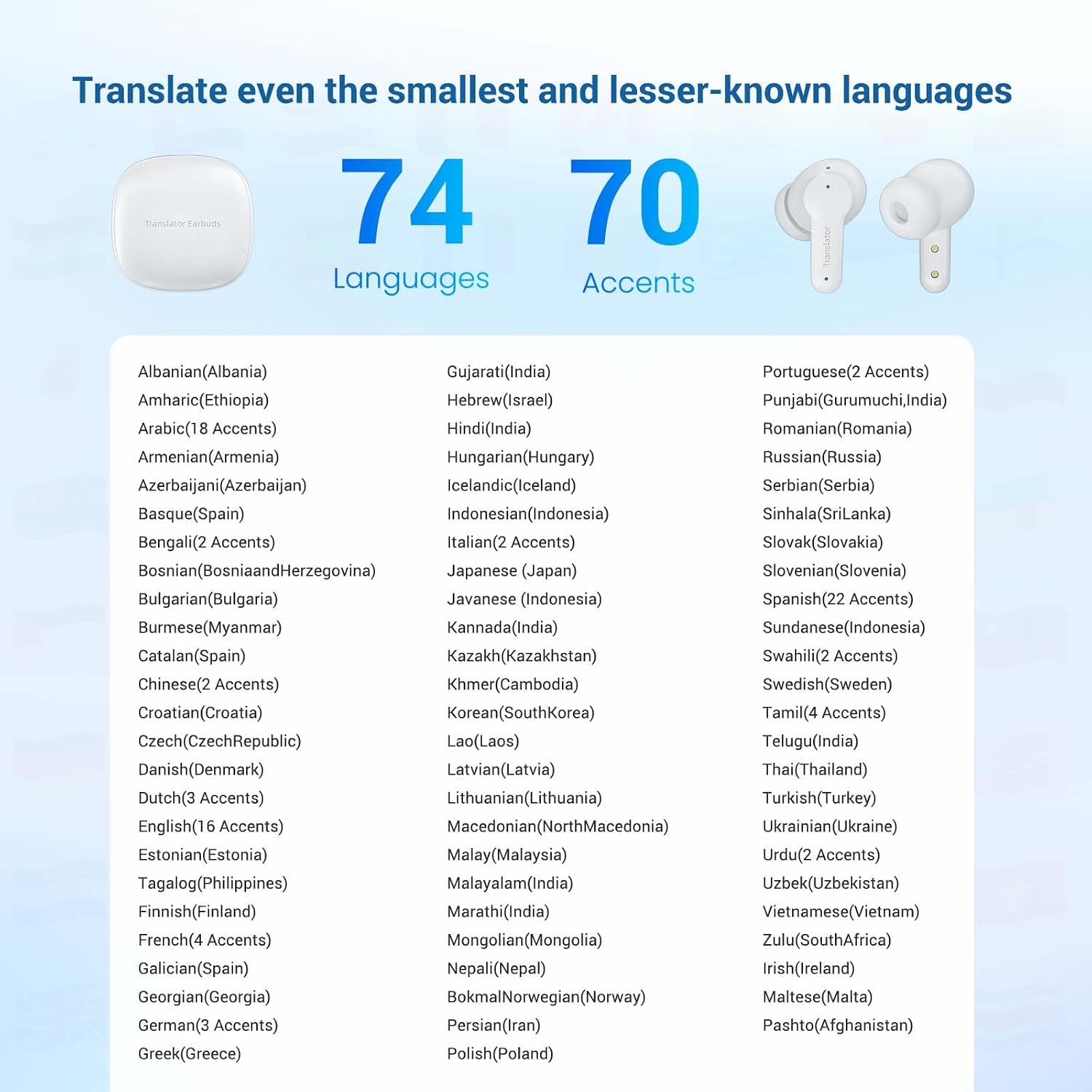
- Omfattende sprogstøtte: Translates across 144 languages and accents with online connectivity.
- Rapid Simultaneous Translation: Achieves translation in approximately 0.5 seconds with up to 98% accuracy.
- Alsidig brug: Suitable for meetings, travel, and personal assistance, facilitating real-time conversations and written translations.
- Bluetooth 5.3: Ensures improved audio quality, lower latency, and better battery efficiency.



Opsætningsvejledning
1. Opladning af øretelefonerne
Before first use, ensure your ANFIER M3 earbuds are fully charged. Place both earbuds into the charging case. Connect the charging case to a power source using a Type-C USB cable. The indicator lights on the case will show the charging status. A full charge takes approximately 90 minutes.
2. Download af appen
To unlock the full potential of your M3 earbuds, download the official ANFIER translation app from your device's app store (available for iOS and Android). Søg efter "ANFIER" or "M3 Translator Earbuds App".

3. Parring med din enhed
- Open the ANFIER app on your smartphone.
- Sørg for, at Bluetooth er aktiveret på din smartphone.
- Tag ørepropperne ud af opladningsetuiet. De vil automatisk gå i parringstilstand.
- In the app, follow the on-screen instructions to connect to your M3 earbuds.
- Once connected, the app will display the battery levels of both earbuds.
4. Offline Language Package (Optional)
If your M3 earbuds came with an offline redemption card, scratch to reveal the code. Enter this code within the ANFIER app to download the lifetime-free offline language package for 8 major languages. This allows translation without an internet connection.
Driftstilstande
The ANFIER M3 earbuds offer four distinct translation modes to suit various communication scenarios:
- Fri taletilstand: Ideal for natural, flowing conversations. Both users wear an earbud, and the system translates in real-time as they speak.
- Højttalertilstand: Designed for situations where only one person wears an earbud. The wearer speaks, and the translation is played aloud through the smartphone's speaker, allowing others to hear without sharing earbuds.
- Berøringstilstand: For quick, controlled translations. Tap the earbud to speak, and tap again to hear the translation. This mode provides precise control over when translation occurs.
- Fotooversættelse: Use your smartphone's camera through the app to translate written text from signs, menus, or documents.

Batterilevetid og opladning
The ANFIER M3 earbuds are equipped with long-lasting batteries to support extended use.
- Continuous Translation: Op til 5 timer på en enkelt opladning.
- Samlet batterilevetid (med opladningsetui): Op til 19 timer.
- Opladningstid: Approximately 90 minutes for a full charge via Type-C port.

Opretholdelse
To ensure the longevity and optimal performance of your ANFIER M3 earbuds, regular cleaning is recommended. A 5-in-1 cleaning kit is included with your purchase.
- Brug High-Density Soft Brush Head to gently remove dust and debris from the earbud grilles and charging contacts.
- De Nano Cleaning Brush Head is suitable for intricate areas and crevices.
- Keep the charging case clean and free of foreign objects.
- Opbevar ørepropperne i deres opladningsetui, når de ikke er i brug, for at beskytte dem mod støv og skader.

Fejlfinding
| Problem | Mulig årsag/løsning |
|---|---|
| Øretelefoner parrer/forbinder ikke. |
|
| Translation accuracy is low or delayed. |
|
| Offline translation not working. |
|
| Øretelefonerne oplader ikke. |
|
Specifikationer
- Model: M3
- Mærke: ANFIER
- Dimensioner: 4.92 x 4.13 x 1.65 tommer (pakke)
- Varens vægt: 7.8 ounce
- Batterier: 3 lithium-ion-batterier (medfølger)
- Forbindelse: Bluetooth 5.3
- Online oversættelse: 144 sprog og accenter
- Offline oversættelse: 8 major languages (Chinese, English, Japanese, Korean, Russian, German, French, Spanish)
- Oversættelsesnøjagtighed: Op til 98 %
- Oversættelseshastighed: 0.5 sekunder
- Kontinuerlig oversættelsestid: 5 timer
- Samlet batterilevetid (med etui): 19 timer
- Opladningsport: Type-C
Garanti & Support
ANFIER products are designed for reliability and performance. For warranty information and technical support, please refer to the official ANFIER website or contact their customer service directly. Details can typically be found on the product packaging or within the ANFIER app.
For yderligere hjælp, besøg ANFIER Store on Amazon.
Ask a question about this manual
Ask about setup, troubleshooting, compatibility, parts, safety, or missing instructions. Manuals+ will review the question and use this page’s manual context to help answer it.