
1. Introduktion
The MESTEK CBF01 is a dual-purpose electrical tool designed to accurately and quickly identify the correct circuit breaker or fuse for a specific electrical outlet, and to test GFCI (Ground Fault Circuit Interrupter) outlets for proper wiring and functionality. This device enhances safety and efficiency for electrical work by simplifying the process of locating circuits and verifying outlet integrity.
2. Sikkerhedsoplysninger
Overhold altid grundlæggende sikkerhedsforanstaltninger ved brug af elektrisk testudstyr for at reducere risikoen for brand, elektrisk stød og personskade.
- Læs alle instruktioner før brug.
- Brug ikke enheden, hvis den ser ud til at være beskadiget eller ikke fungerer korrekt.
- Sørg for, at driftsmængdentage (AC 90V~135V) and frequency (50Hz~60Hz) are within the specified range for your electrical system.
- Wear appropriate personal protective equipment, such as insulated gloves and safety glasses, when working with electrical circuits.
- This device is intended for use on North American 3-wire 120V electrical outlets only.
- Never attempt to open or modify the device. There are no user-serviceable parts inside.
- Hold enheden væk fra vand og fugt.
3. Pakkens indhold
Bekræft at alle varer er til stede i pakken:
- MESTEK CBF01 Circuit Breaker Finder Receiver
- MESTEK CBF01 GFCI Outlet Tester (Transmitter)
- 2 x AAA-batterier (til modtager)
- Brugermanual
- Bæretaske
- Lille skruetrækker

4. Produktet er slutview
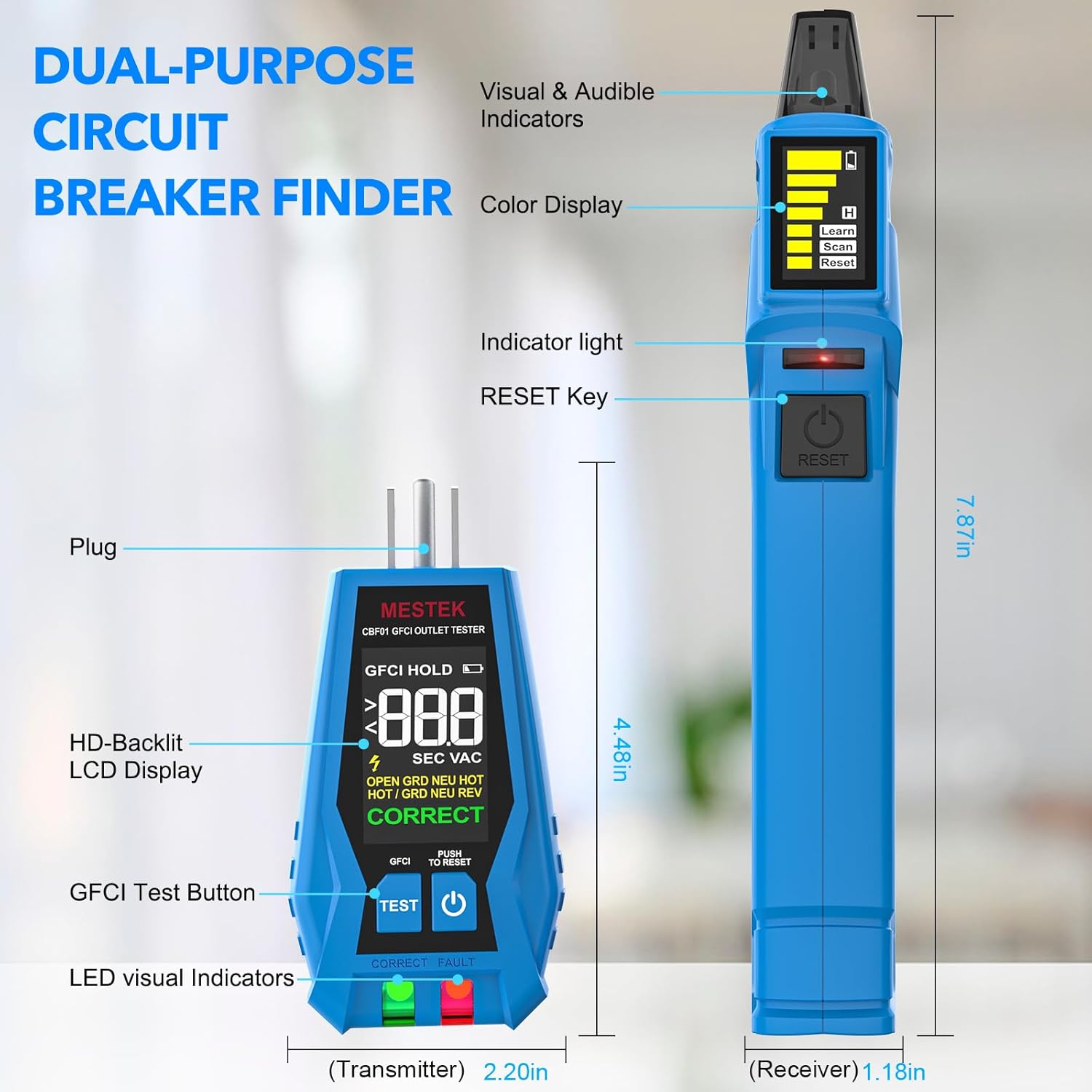
The MESTEK CBF01 consists of two main components: the Receiver and the Transmitter (GFCI Outlet Tester).
4.1. Receiver (Circuit Breaker Finder)
- Sensing Probe: Detects the signal from the transmitter.
- Detection Indicator Light (Green): Illuminates when a signal is detected.
- Vise: Shows signal strength, battery level, and operating mode (Learn, Scan, Reset).
- Detection Signal Indicator Light (Red): Indicates a strong signal or the correct breaker.
- Afbryder/testknap: Turns the device on/off and initiates scanning/resetting.
4.2. Transmitter (GFCI Outlet Tester)
- Prop: Connects to the electrical outlet.
- HD-Backlit LCD Display: Viser voltage, ledningsstatus og GFCI-testresultater.
- GFCI-testknap: Initiates the GFCI trip test.
- LED Visual Indicators: Green for correct wiring, Red for fault.
5. Opsætning
5.1. Batteriinstallation (modtager)
- Locate the battery compartment on the back of the Receiver.
- Brug den medfølgende skruetrækker til at åbne batteridækslet.
- Isæt to (2) AAA-batterier, og sørg for at polerne vender korrekt (+/-).
- Sæt batterirummets dæksel på igen og fastgør det med skruen.
The Transmitter does not require separate batteries as it draws power directly from the outlet.
6. Betjeningsvejledning
6.1. Circuit Breaker Finding
This function helps you identify which circuit breaker controls a specific outlet or fixture.
- Step 1: Connect the Transmitter. Plug the Transmitter (outlet tester) into the electrical outlet or fixture you wish to identify the circuit for. Ensure the Transmitter's display shows a correct wiring indication (e.g., "CORRECT" and green LED).
- Step 2: First Scan (Learn Mode). Turn on the Receiver. The screen will display "Learn". Scan all the circuit breakers in your electrical panel by slowly moving the Receiver's sensing probe over each breaker. The Receiver will emit an audible beep and the green indicator light will flash as it detects signals. This step allows the device to learn the unique signal pattern of each breaker.
- Step 3: Second Scan (Scan Mode). After completing the first scan, press the "RESET" button on the Receiver. The screen will now display "Scan". Slowly scan the circuit breakers again. When the Receiver identifies the correct circuit breaker, it will emit a continuous loud beep, the red indicator light will illuminate, and the signal strength bars on the display will maximize.
- Step 4: Verify. To confirm, turn off the identified circuit breaker. The Transmitter should lose power, and its display should turn off.

6.2. GFCI Outlet Testing
The Transmitter can be used independently to test the wiring of an outlet and the functionality of a GFCI outlet.
- Step 1: Plug in the Transmitter. Insert the Transmitter into the 3-prong electrical outlet you wish to test.
- Step 2: Read Wiring Status. Observe the HD-Backlit LCD display and the LED indicators. The display will show the voltage and the wiring condition (e.g., "CORRECT", "OPEN GROUND", "OPEN NEUTRAL", "OPEN HOT", "REVERSED HOT/GROUND", "REVERSED HOT/NEUTRAL", "DUAL OPEN", "NEUTRAL & GROUND"). The green LED indicates correct wiring, while the red LED indicates a fault.
- Step 3: Perform GFCI Test. If the wiring is correct, press the "TEST" button on the Transmitter. A working GFCI outlet should trip (turn off power) immediately.
- Step 4: Reset GFCI. If the GFCI trips, press the "RESET" button on the GFCI outlet to restore power. If the GFCI does not trip, the outlet is faulty and should be serviced by a qualified electrician.


7. Vedligeholdelse
- Rensning: Tør enheden af med en tør, blød klud. Brug ikke slibende rengøringsmidler eller opløsningsmidler.
- Opbevaring: Opbevar enheden i dens bærepose på et køligt, tørt sted, væk fra direkte sollys og ekstreme temperaturer.
- Udskiftning af batteri: Replace batteries in the Receiver when the low battery indicator appears on the display to ensure accurate readings.
8. Fejlfinding
| Problem | Mulig årsag | Løsning |
|---|---|---|
| Receiver does not turn on. | Døde eller forkert installerede batterier. | Kontroller batteripolariteten, eller udskift med nye AAA-batterier. |
| Receiver cannot find the correct breaker. | Transmitter not properly connected or signal interference. | Ensure Transmitter is securely plugged into a live outlet. Repeat the "Learn" and "Scan" steps slowly. Minimize other electrical activity during scanning. |
| GFCI test button does not trip the outlet. | Defekt HFI-stikkontakt eller forkert ledningsføring. | Verify outlet wiring with the Transmitter's display. If wiring is correct, the GFCI outlet may be faulty and requires professional inspection. |
| Inkonsekvente aflæsninger. | Low battery in Receiver or external interference. | Replace Receiver batteries. Ensure no other strong electromagnetic fields are nearby. |
9. Specifikationer
- Model: CBF01
- Operation Voltage: AC 90V~135V
- Driftsfrekvens: 50Hz~60Hz
- Målenøjagtighed: ±0.1
- Strømkilde (modtager): 2 x AAA batterier (medfølger)
- Strømkilde (sender): Battery Powered (from outlet)
- Varens vægt: 177 g (0.39 pund)
- Pakkedimensioner: 21.89 x 13.31 x 4.6 cm
- Arbejdshøjde: Op til 2000m
- Sikkerhedsniveau: KAT III 135V
- Øvre temperaturvurdering: 122 grader Fahrenheit
- Måltype: Circuit Breaker Finder, Outlet Tester with GFCI
10. Garanti og support
For warranty information or technical support, please refer to the contact details provided with your purchase documentation or visit the official MESTEK webwebsted. Gem din købskvittering som købsbevis i tilfælde af garantikrav.
