
1. Introduktion
This manual provides detailed instructions for the setup, operation, and maintenance of your Beelink SER5 MAX Mini PC. This compact desktop computer is equipped with an AMD Ryzen 7 7735HS processor, 24GB LPDDR5 RAM, and a 1TB NVMe PCIe 4.0 SSD, designed for efficient performance in various applications including home entertainment, office tasks, and light gaming. It supports 4K triple screen display, WiFi 6, and Bluetooth 5.2 connectivity.

2. Pakkens indhold
Bekræft at alle varer er til stede i pakken:
- 1 x Beelink SER5 MAX Mini-pc
- 1 x HDMI kabel
- 1 x Power Adapter (Type A - 2 pin, North American)
- 1 x Brugermanual (dette dokument)
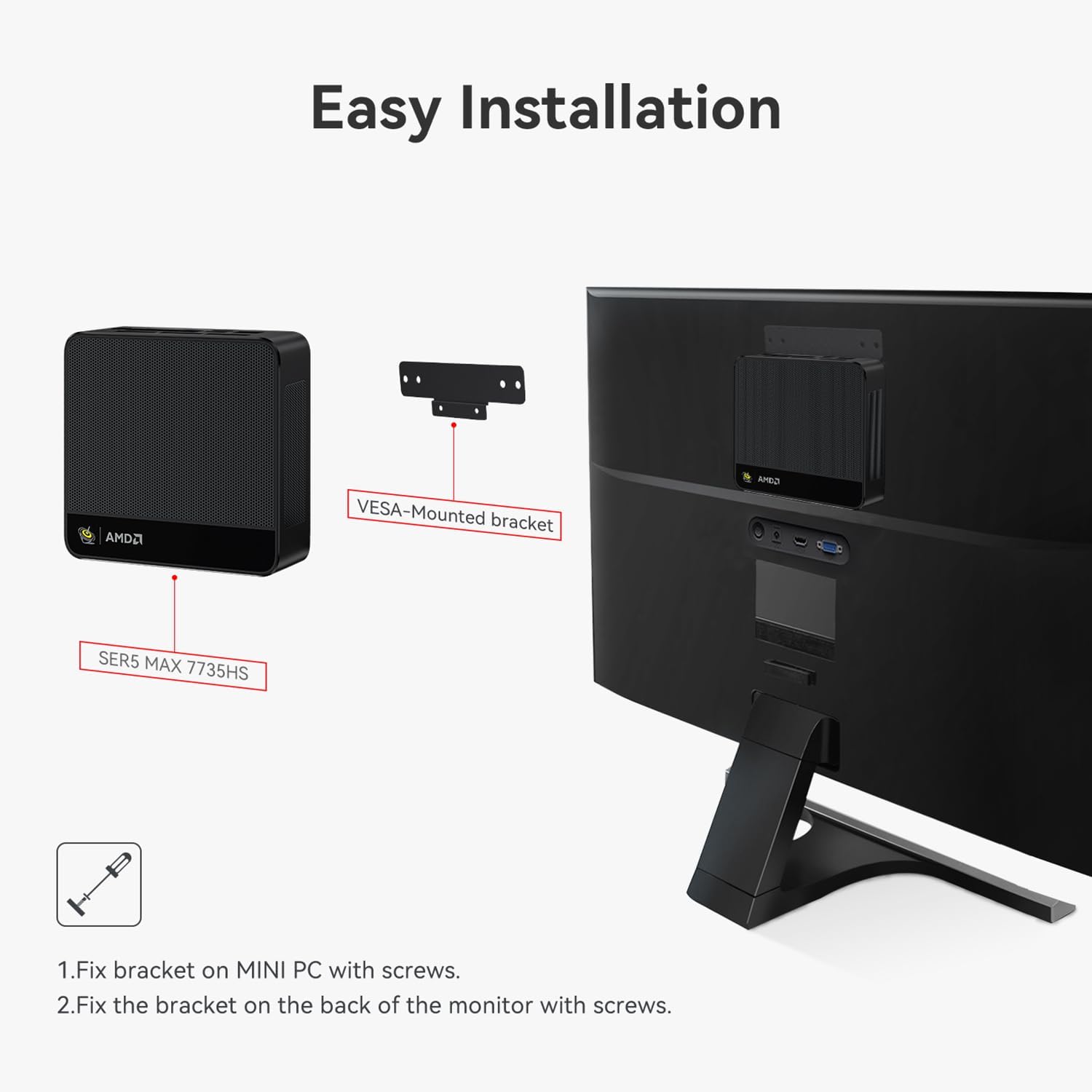
- 1 x VESA-mounted bracket with screws

3. Produktet er slutview
The Beelink SER5 MAX Mini PC features a compact design with various ports for connectivity and an efficient cooling system.
3.1 Forreste porte
- 1 x Power knap
- 1 x RTC Key (CLR CMOS)
- 2 x USB 3.2 Gen2 (10Gbps) ports
- 1 x USB 2.0 port
- 1 x Type-C port (Data & Video output)
- 1 x Headphone Jack (HP&MIC)

3.2 Bagporte
- 1 x RJ45 2.5G LAN port
- 1 x USB 3.2 Gen2 (10Gbps) port
- 1 x USB 2.0 port
- 1 x DP 1.4 port (4K 144Hz)
- 1 x HDMI 2.0 port (4K 60Hz)
- 1 x DC Jack port (Power Input)

3.3 Interne komponenter
The internal structure includes a motherboard, CPU, M.2 PCIe SSD slots, and a cooling system with a heat pipe, silent fan, and heat fins for efficient heat dissipation.

4. Opsætningsvejledning
Follow these steps to set up your Beelink SER5 MAX Mini PC:
- Tilslut ydre enheder: Connect your monitor(s) to the HDMI, DP, or Type-C ports. Connect your keyboard, mouse, and other USB devices to the available USB ports.
- Tilslut strøm: Plug the power adapter into the DC Jack port on the rear of the Mini PC, then plug the adapter into a power outlet.
- Tænd: Press the power button located on the front panel. The power LED will illuminate.
- Første opstart: The system will boot into Windows 11 Pro. Follow the on-screen instructions for initial setup, including language, region, and network configuration.
4.1 Installation af VESA-beslag
The Mini PC can be mounted to the back of a compatible monitor using the included VESA bracket.
- Fix the VESA bracket to the Mini PC using the provided screws.
- Fix the assembled Mini PC and bracket to the VESA mounting holes on the back of your monitor using the appropriate screws.

5. Betjeningsvejledning
5.1 Grundlæggende betjening
- Tænd/sluk: Tryk på tænd/sluk-knappen for at tænde enheden. For at slukke den skal du bruge Windows' nedlukningsfunktion eller trykke på tænd/sluk-knappen og holde den nede i 5 sekunder.
- Genstart: Brug Windows genstartsmuligheden.
- Sove mode: Brug Windows' slumrefunktion, eller tryk kort på tænd/sluk-knappen.
5.2 Lagerudvidelse
The Beelink SER5 MAX Mini PC supports dual M.2 2280 PCIe 4.0 SSD slots, allowing for storage expansion up to 4TB per slot. Refer to the video below for instructions on how to add an additional hard drive.

5.3 Auto Power On Feature
The Mini PC supports an auto power-on feature. Consult the following video for guidance on enabling and configuring this setting.
5.4 System Reinstallation (Windows 11)
If you need to reinstall the operating system, follow the instructions provided in the video below. This process typically involves creating a bootable USB drive and accessing the boot menu.
5.5 Triple Screen Display Configuration
The Beelink SER5 MAX Mini PC supports connecting up to three monitors simultaneously via HDMI, DP, and Type-C ports, enabling enhanced multitasking and productivity. Configure your display settings within Windows to extend or duplicate your desktop across multiple screens.
6. Vedligeholdelse
To ensure optimal performance and longevity of your Mini PC, consider the following maintenance tips:
- Rensning: Regularly clean the exterior of the Mini PC with a soft, dry cloth. Ensure ventilation holes are free from dust and obstructions.
- Softwareopdateringer: Hold dit operativsystem og dine drivere opdateret til de nyeste versioner for at forbedre sikkerhed og ydeevne.
- Ventilation: Place the Mini PC in a well-ventilated area to prevent overheating. Avoid blocking the air vents.
- Strømstyring: Use the recommended power adapter. Unplug the device during electrical storms or when not in use for extended periods.
7. Fejlfinding
If you encounter issues with your Beelink SER5 MAX Mini PC, try the following basic troubleshooting steps:
- Ingen strøm:
- Sørg for, at strømadapteren er korrekt tilsluttet både mini-pc'en og en fungerende stikkontakt.
- Kontroller, at stikkontakten fungerer ved at tilslutte en anden enhed.
- Ingen visning:
- Kontroller, at skærmen er tændt, og at den korrekte inputkilde er valgt.
- Ensure display cables (HDMI, DP, Type-C) are securely connected to both the Mini PC and the monitor.
- Prøv at tilslutte til en anden skærm eller bruge et andet kabel.
- System reagerer ikke:
- Tryk på tænd/sluk-knappen og hold den nede i 5-10 sekunder for at gennemtvinge en nedlukning, og genstart derefter enheden.
- If the issue persists, consider reinstalling the operating system (refer to Section 5.4).
- Periferiudstyr ikke fundet:
- Ensure the peripheral is properly connected to a functional USB port.
- Prøv at tilslutte den eksterne enhed til en anden USB-port.
- Update or reinstall the drivers for the peripheral.
- Bluetooth/Wi-Fi Issues:
- Sørg for, at Wi-Fi og Bluetooth er aktiveret i Windows-indstillingerne.
- Genstart Mini PC'en og din router/Bluetooth-enhed.
- Check for updated wireless drivers on the Beelink support webwebsted.
For further assistance, please contact Beelink customer support.
8. Specifikationer
| Feature | Detalje |
|---|---|
| Mærke | Beelink |
| Modelnavn | Beelink SER5 MAX |
| Operativsystem | Windows 11 Pro |
| CPU model | AMD Ryzen 7 7735HS |
| CPU hastighed | Up to 4.75 GHz (Max. Boost Clock) |
| Processorkerner/tråde | 8 kerner / 16 tråde |
| Cache størrelse | 16 MB |
| Grafik coprocessor | AMD Radeon 680M (12core 2200 MHz) |
| Installeret RAM-hukommelsesstørrelse | 24 GB LPDDR5 |
| Hukommelseshastighed | 5600 MHz |
| Harddisk beskrivelse | 1 TB M.2 2280 NVMe PCIe 4.0 x4 SSD |
| Udvidelse af lager | Dual M.2 2280 PCIe 4.0 x4 SSD slots (up to 4TB each) |
| Video Output Interface | HDMI 2.0, DisplayPort 1.4, Type-C (Data & Video) |
| Skærmopløsning Maksimal | 3840x2160 (4K UHD) |
| Trådløs forbindelse | Wi-Fi 6, Bluetooth 5.2 |
| LAN | 2.5G RJ45 Ethernet |
| USB-porte | 3 x USB 3.2 Gen2, 2 x USB 2.0 |
| Yderligere havne | 1 x Type-C (Data & Video), 1 x Audio Jack (HP&MIC), 1 x DC Jack |
| Afkølingsmetode | Air (Heat pipe, silent fan, heat fins) |
| Farve | Grå |
| Dimensioner | 126 x 113 x 42 mm (omtrentligt) |
9. Garanti og support
The Beelink SER5 MAX Mini PC comes with a 3-year manufacturer's warranty. For technical assistance, troubleshooting, or warranty claims, please contact Beelink customer service. Online support is available 7 days a week, 24 hours a day.
For the most up-to-date support information and driver downloads, please visit the official Beelink webwebsted.