
Indledning
This manual provides comprehensive instructions for the safe and efficient use of your Hello Kitty Wireless Bluetooth Light-Up Headphones. Please read this manual thoroughly before operating the device and retain it for future reference.

Billede: Forside view of the Hello Kitty Wireless Bluetooth Light-Up Headphones in white, featuring the iconic Hello Kitty face on the earcups and light-up cat ears on the headband.
Hvad er der i æsken
Bekræft at alle varer er til stede ved udpakning:
- Hello Kitty Wireless Bluetooth Light-Up Headphones
- USB opladningskabel
- Brugervejledning (dette dokument)
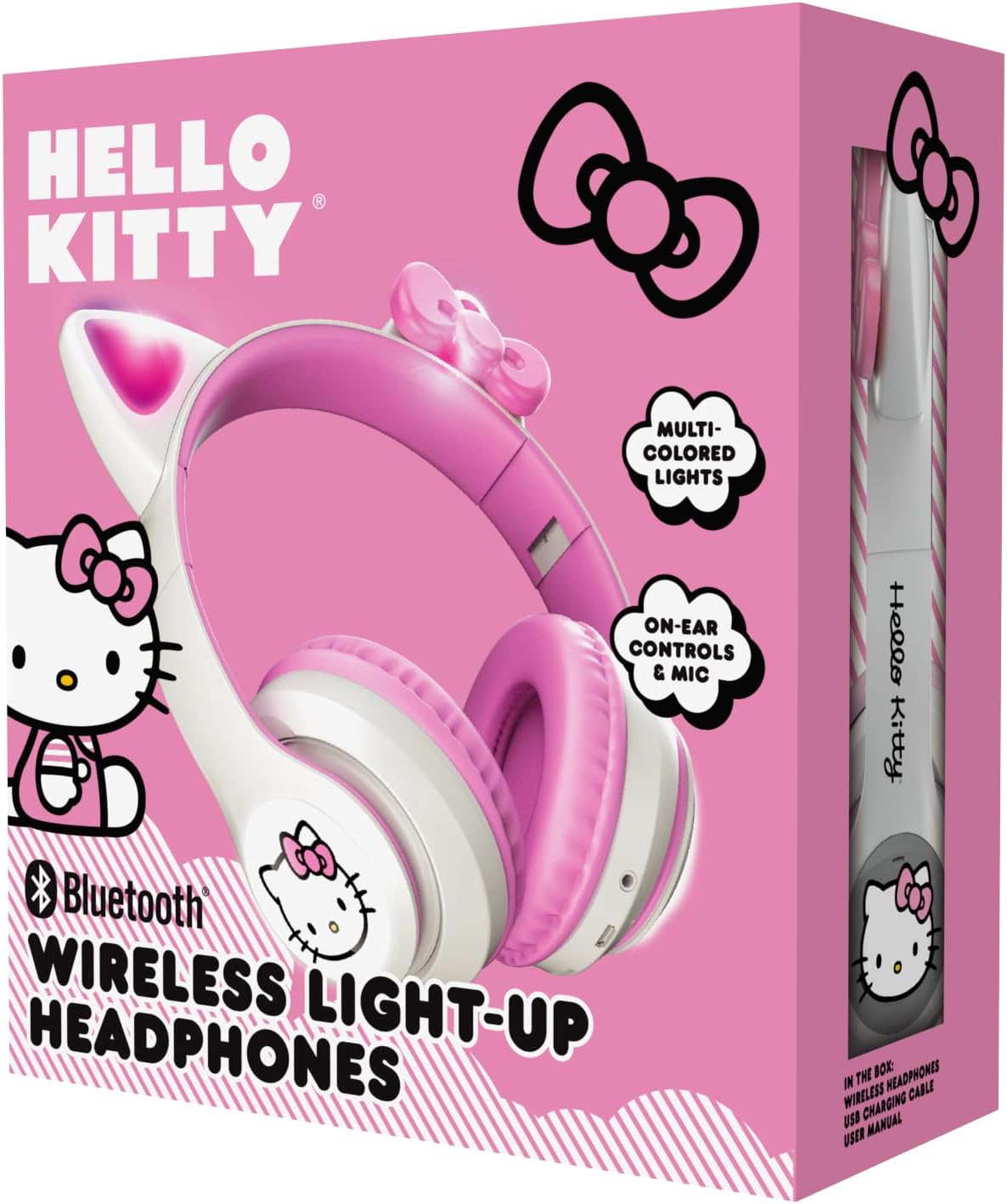
Image: The retail packaging for the Hello Kitty Wireless Bluetooth Light-Up Headphones, illustrating the headphones and the USB charging cable.
Produktegenskaber
- Bluetooth-forbindelse: Seamless wireless pairing with compatible devices.
- Light-Up LED Earcups & Cat Ears: Features Hello Kitty graphics on earcups and colorful LED lights in the ears. Lights can change with music or be turned on/off as desired.
- Sammenklappeligt og bærbart design: Easy to store and carry, ideal for travel.
- Indbygget mikrofon: Enables hands-free calls, voice chats, and gaming communication.
- Justerbart pandebånd: Provides a custom and comfortable fit for various head sizes.
Opsætning
1. Opladning af hovedtelefonerne
Before first use, fully charge the headphones. Connect the included USB charging cable to the charging port on the headphones and to a USB power source (e.g., computer, wall adapter). The LED indicator will show charging status and turn off or change color when fully charged.
2. Bluetooth-parring
- Sørg for, at hovedtelefonerne er slukket.
- Tryk på tænd/sluk-knappen, og hold den nede, indtil LED-indikatoren blinker blåt og rødt, hvilket angiver parringstilstand.
- Aktiver Bluetooth på din enhed (smartphone, tablet, bærbar computer), og søg efter tilgængelige enheder.
- Select "Hello Kitty Headphones" from the list of devices.
- Når den er parret, vil LED-indikatoren typisk vise et konstant blåt lys eller blinke langsomt.
Note: If prompted for a password, enter "0000".
Betjeningsvejledning
Tænd/sluk
- For at tænde: Tryk og hold tænd/sluk-knappen nede i cirka 3 sekunder.
- For at slukke: Tryk og hold tænd/sluk-knappen nede i cirka 5 sekunder.
Lydstyrkekontrol
- Lydstyrke op: Tryk på '+'-knappen.
- Skrue ned for lyden: Tryk på '-' knappen.
Musikafspilning
- Afspil/pause: Press the Multi-function button (often the Power button when not powering on/off).
- Næste nummer: Tryk på '+'-knappen og hold den nede.
- Forrige nummer: Tryk på '-'-knappen og hold den nede.
Opkaldsstyring
- Besvar/afslut opkald: Tryk på multifunktionsknappen.
- Afvis opkald: Tryk og hold multifunktionsknappen nede.
- Genopkald sidste nummer: Tryk to gange på multifunktionsknappen.
LED-lysstyring
The LED lights on the earcups and cat ears can be controlled independently. Locate the dedicated light button (refer to the diagram in the included quick start guide if available). Press the button to cycle through light modes (e.g., blinking, solid, off).
Adjusting and Folding
- Juster pandebånd: Gently slide the earcups up or down along the headband to achieve a comfortable fit.
- Fold til opbevaring: The earcups can be folded inwards towards the headband for compact storage and portability.

Image: The Hello Kitty Wireless Bluetooth Light-Up Headphones shown in their folded position, demonstrating their portability.
Opretholdelse
- Rensning: Wipe the headphones with a soft, dry cloth. Do not use abrasive cleaners or immerse in water.
- Opbevaring: Store the headphones in a cool, dry place away from direct sunlight and extreme temperatures. Utilize the foldable design for compact and safe storage.
- Batteripleje: For at forlænge batterilevetiden skal du oplade hovedtelefonerne regelmæssigt, selvom de ikke bruges hyppigt. Undgå at aflade batteriet helt i længere perioder.
Fejlfinding
| Problem | Mulig løsning |
|---|---|
| Hovedtelefonerne tændes ikke. | Sørg for, at hovedtelefonerne er fuldt opladet. Tilslut dem til en strømkilde, og prøv igen. |
| Kan ikke parres med enheden. |
|
| Ingen lyd eller lav lydstyrke. |
|
| LED-lysene virker ikke. | Press the dedicated light control button to cycle through modes or turn them on. Ensure headphones have sufficient battery. |
Specifikationer
- Modelnavn: Hello Kitty Wireless Bluetooth Light-Up Headphones with Built-in Microphone, Foldable Design, Adjustable Headband, 8 Hours Playtime, LED Kitty Earcups, for Kids & Adults (White)
- Modelnummer: HKLEDBTHP2-WH-MFN
- Forbindelse teknologi: Trådløs (Bluetooth)
- Bluetooth version: 5.0
- Ørestykke form: On Ear
- Materiale: Plast
- Varens vægt: 0.27 kilo (9.6 ounce)
- Batteri: 1 ikke-standard batteri (inkluderet)
- Særlige funktioner: Adjustable Headband, Foldable, Lightweight, Light-Up LED Earcups & Cat Ears, Built-in Microphone
- Kompatible enheder: Smartphones, tablets, bærbare computere
- Fabrikant: Southern Telecom
- UPC: 680079035358
Garanti og support
For warranty information and technical support, please refer to the contact details provided on the product packaging or visit the official Hello Kitty or Southern Telecom webwebsted. Gem din købsbevis til garantikrav.