
Indledning
Thank you for choosing the SUNITEC BH880 Wireless Headset. This manual provides detailed instructions for setting up, operating, and maintaining your headset to ensure optimal performance and longevity. The BH880 headset is designed for clear communication and comfortable use in various environments, featuring advanced noise-cancelling technology and multiple connectivity options.

Image: SUNITEC BH880 Wireless Headset, showcasing its design with an adjustable microphone boom.
Hvad er der i æsken
Bekræft at alle varer er til stede i pakken:
- 1 x SUNITEC BH880 Bluetooth Computer Headset with Microphone
- 1 x Type-C ladekabel
- 1 x Bluetooth Audio USB-A Dongle Adapter
- 1 x 3.5 mm lydkabel
- 1 x Brugermanual (dette dokument)

Image: The SUNITEC BH880 headset, USB-C charging cable, USB-A dongle, and 3.5mm audio cable, illustrating the package contents.
Produkt overview
Familiarize yourself with the components and controls of your SUNITEC BH880 headset.
Nøglefunktioner:
- AI Noise Cancelling Microphone: Blocks 99% of ambient noise for clear voice transmission.
- Qualcomm QCC3034 chipsæt: Provides stable and fast Bluetooth transmission with aptX HD and aptX LL support.
- Komfortabelt design: Soft dual ear pads and an adjustable headband for extended wear.
- 270° Rotatable Boom Microphone: Can be positioned on either the left or right side.
- Lang batterilevetid: Op til 45 timers taletid på en enkelt opladning.
- Flere tilslutningsmuligheder: Bluetooth, USB Dongle, and 3.5mm wired connection.

Image: Close-up of the memory foam earpads, highlighting the comfort feature of the headset.

Image: Detail of the individual mute button located on the microphone boom.

Billede: En intern view highlighting the Qualcomm QCC3034 chipset, responsible for stable and fast connections.
Opsætning
1. Opladning af headsettet
Before first use, fully charge the headset. Connect the Type-C charging cable to the headset's charging port and the other end to a USB power source (e.g., computer USB port, wall adapter). The LED indicator will show charging status. A full charge takes approximately 2 hours and provides up to 45 hours of talk time or 400 hours of standby time.
2. Tænd/sluk
- Tænd: Tryk på tænd/sluk-knappen og hold den nede i et par sekunder, indtil LED-indikatoren lyser.
- Sluk: Tryk på tænd/sluk-knappen og hold den nede i et par sekunder, indtil LED-indikatoren slukker.
3. Tilslutningsmuligheder
The SUNITEC BH880 offers three ways to connect to your devices:
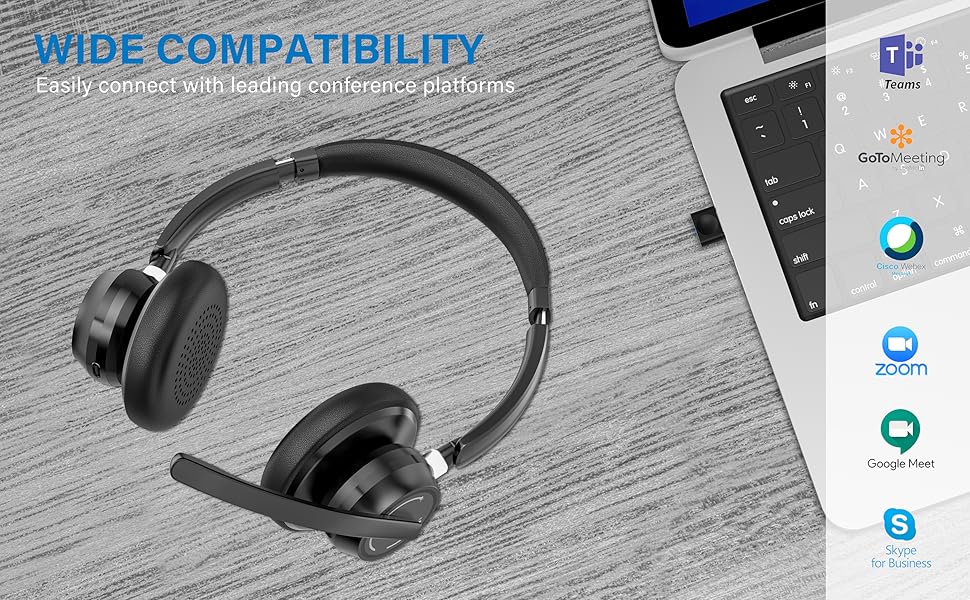
Image: Visual representation of Bluetooth, USB Dongle, and Wired connection methods for the headset.
Bluetooth-forbindelse:
- Sørg for, at headsettet er slukket.
- Tryk på tænd/sluk-knappen, og hold den nede, indtil LED-indikatoren blinker skiftevis blåt og rødt, hvilket angiver parringstilstand.
- Aktiver Bluetooth på din enhed (smartphone, tablet, computer) og søg efter nye enheder.
- Select "SUNITEC BH880" from the list of available devices.
- Når den er tilsluttet, blinker LED-indikatoren langsomt blåt.
USB-dongleforbindelse:
This method is ideal for computers without built-in Bluetooth or for a more stable connection.
- Plug the USB-A Dongle Adapter into an available USB port on your computer.
- Power on the SUNITEC BH880 headset. It will automatically attempt to connect to the dongle.
- The LED indicator on the dongle and headset will show a solid blue light once connected.
- You may need to select the "SUNITEC BH880" as the audio input/output device in your computer's sound settings.

Image: A USB dongle being inserted into a laptop's USB port, demonstrating the dongle connection method.
Kablet forbindelse:
Use the included 3.5mm audio cable to connect the headset directly to devices with a 3.5mm audio jack. Note that the microphone function is not available when using the 3.5mm wired connection; the headset will function as headphones only.

Image: The headset shown with logos of popular communication platforms like Teams, Zoom, Google Meet, and Skype, indicating wide compatibility.
Betjeningsvejledning
Grundlæggende funktioner:
- Lydstyrke op/ned: Use the dedicated volume buttons on the earcup.
- Afspil/pause: Tryk én gang på multifunktionsknappen.
- Næste nummer: Tryk og hold på lydstyrke op-knappen.
- Forrige nummer: Tryk og hold lydstyrke ned-knappen.
Opkaldsfunktioner:
- Besvar/afslut opkald: Tryk én gang på multifunktionsknappen.
- Afvis opkald: Tryk og hold multifunktionsknappen nede i 2 sekunder.
- Genopkald sidste nummer: Tryk to gange på multifunktionsknappen.
Mikrofon mute funktion:
The headset features an individual mute button on the microphone boom for quick privacy control.
- Slå lyden fra/til: Press the mute button on the microphone boom. The LED indicator on the microphone will show red when muted.
- Note: For PC platforms, microphone mute functionality may also be controlled via the software application (e.g., Zoom, Teams).
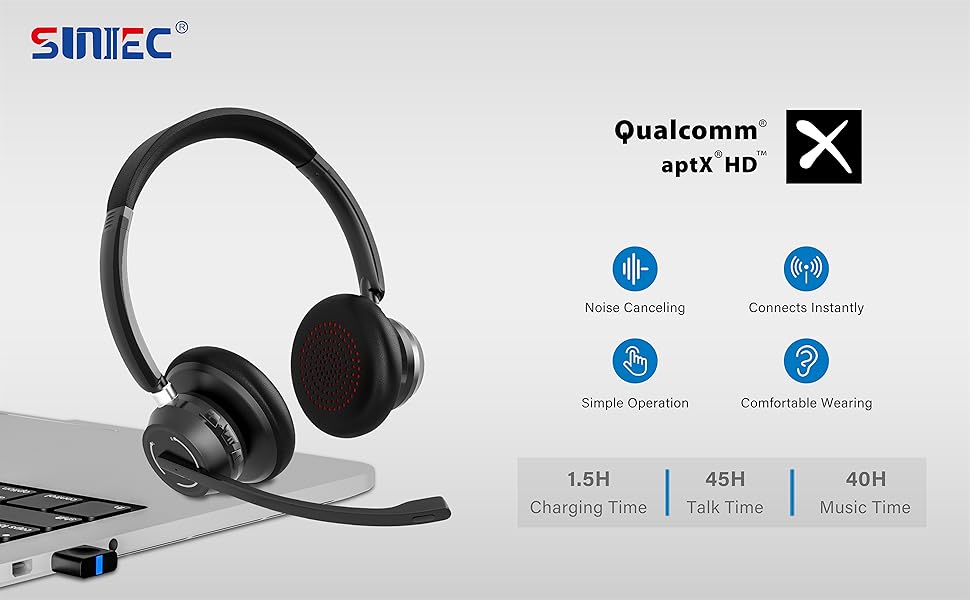
Image: A graphic demonstrating how the noise-cancelling microphone filters out background noise for clearer audio output.
Opretholdelse
Proper care ensures the longevity of your SUNITEC BH880 headset.
- Rensning: Brug en blød, tør klud til at rengøre headsettet. Brug ikke slibende rengøringsmidler eller opløsningsmidler.
- Opbevaring: Opbevar headsettet et køligt, tørt sted væk fra direkte sollys og ekstreme temperaturer.
- Batteripleje: For at spare på batteriet, undgå at aflade headsettet helt ofte. Oplad det regelmæssigt, selvom det ikke er i brug i længere perioder.
- Undgå fugt: The headset is not water-resistant. Keep it away from liquids and high humidity.
Fejlfinding
If you encounter issues with your SUNITEC BH880 headset, refer to the following common solutions:
| Problem | Løsning |
|---|---|
| Headsettet tænder ikke. | Sørg for, at headsettet er opladet. Tilslut det til en strømkilde med Type-C-kablet. |
| Kan ikke parres via Bluetooth. |
|
| Ingen lyd eller dårlig lydkvalitet. |
|
| Mikrofon virker ikke. |
|
| USB Dongle not connecting. |
|
Specifikationer
| Feature | Detalje |
|---|---|
| Modelnavn | BH880 |
| Forbindelsesteknologi | Wireless (Bluetooth), Wired (3.5mm), USB Dongle |
| Trådløs kommunikationsteknologi | Bluetooth 5.1 |
| Bluetooth rækkevidde | Op til 15 meter (49 fod) |
| Støjkontrol | Adaptiv støjreduktion (mikrofon) |
| Audio driver størrelse | 40 millimeter |
| Audio driver type | Dynamisk Driver |
| Impedans | 32 Ohm |
| Ørestykke form | Over-Ear |
| Batterilevetid (taletid) | Op til 45 timer |
| Opladningstid | Approximately 2 Hours (Type-C) |
| Varens vægt | 280 gram (9.9 ounce) |
| Produktdimensioner | 5.91 x 3.94 x 1.96 tommer |
| Materiale | Plast |
| Kompatible enheder | Computers, Communication Software (Skype, Zoom, MS Teams, Google Meet) |
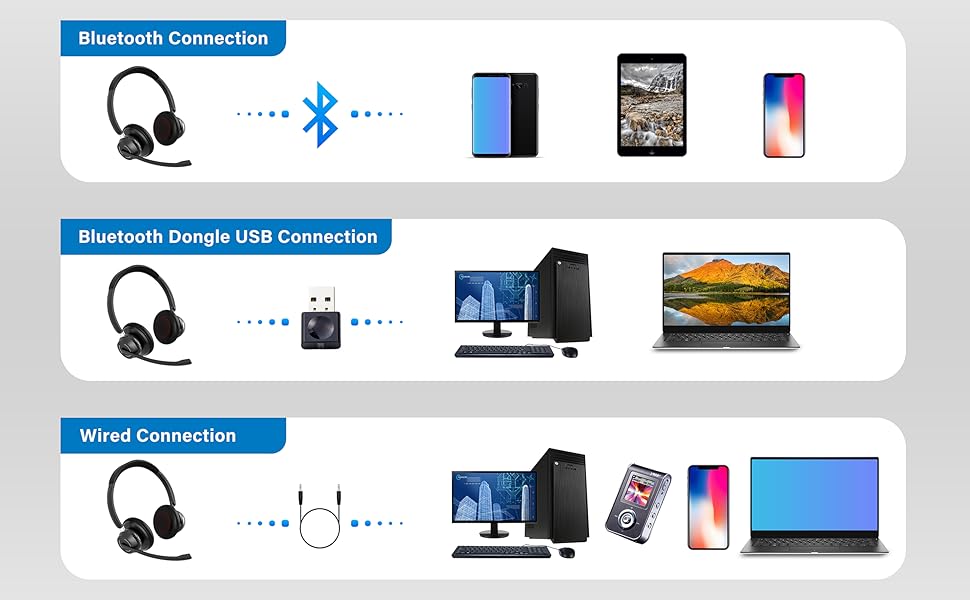
Image: An illustration highlighting the headset's battery performance, indicating up to 45 hours of wireless talk time.
Garanti og support
SUNITEC products are designed for reliability and performance. For warranty information or technical support, please refer to the contact details provided with your purchase or visit the official SUNITEC webwebsted. Behold din købskvittering som købsbevis i tilfælde af garantikrav.
For further assistance, you may contact SUNITEC customer service through their official channels.