1. Introduktion
This manual provides comprehensive instructions for the setup, operation, and maintenance of your EWEADN X87 Wireless Mechanical Keyboard. Designed for versatility and performance, the X87 features tri-mode connectivity, a gasket structure, hot-swappable switches, and customizable RGB backlighting. Please read this manual thoroughly before using the keyboard to ensure optimal performance and longevity.

Figure 1.1: EWEADN X87 Wireless Mechanical Keyboard. This image shows the keyboard from an elevated angle, highlighting its gradient green keycaps and compact layout.
2. Nøglefunktioner
The EWEADN X87 keyboard is equipped with advanced features to enhance your typing and gaming experience:
- Tri-Mode-forbindelse: Supports Bluetooth 5.0, 2.4GHz wireless, and USB-C wired connections for maximum flexibility.
- Five-Layer Gasket Structure: Incorporates sound-absorbing foam, IXPE switch bottom pad, FR4 PCB, PET film, and silicone bottom pad for reduced noise and enhanced typing feel.
- 10,000mAh batteri med stor kapacitet: Provides extended usage, up to 460 hours with RGB off and 40-46 hours with RGB on.
- Hot-swap-design: Compatible with 3-pin or 5-pin mechanical switches, allowing for easy customization without soldering.
- 16.8 Million RGB Backlit: Offers 19 dynamic RGB lighting effects with a full spectrum of colors.
- Sidetrykte PBT-taster: Durable, fade-resistant, and soft-to-touch keycaps with a classic Cherry profile for ergonomisk komfort.
- N-nøgleoverførsel (NKRO): Ensures all simultaneous key presses are registered accurately, crucial for gaming.
- Makrotilpasning: Supports programmable keys and macro recording via dedicated software.
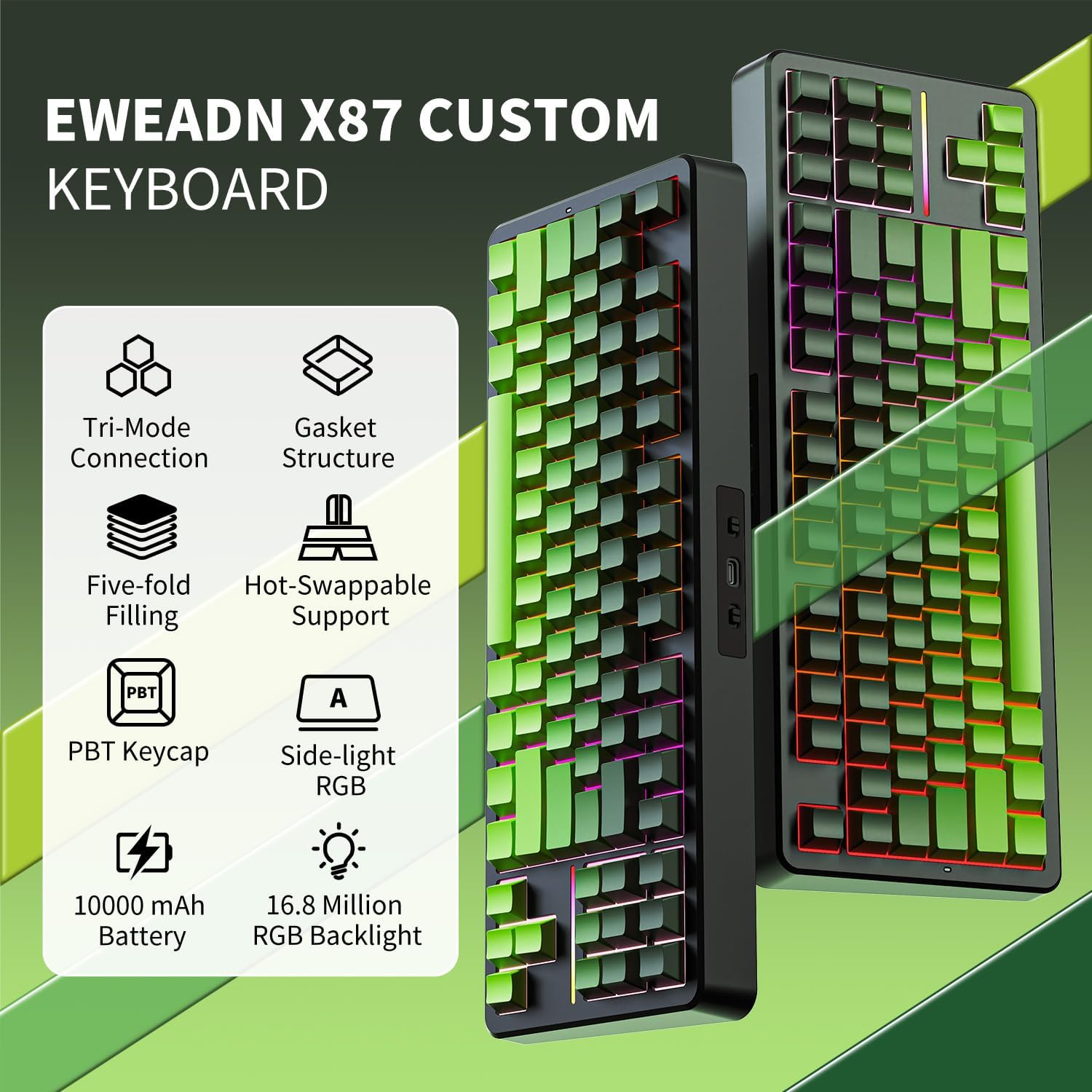
Figur 2.1: Overview of EWEADN X87 Custom Keyboard features, including Tri-Mode Connection, Gasket Structure, Five-fold Filling, Hot-Swappable Support, PBT Keycap, Side-light RGB, 10000 mAh Battery, and 16.8 Million RGB Backlight.
3. Pakkens indhold
Kontroller venligst, at alle varer er til stede i din pakke:
- EWEADN X87 trådløst mekanisk tastatur
- USB-C til USB-A-kabel
- 2.4 GHz USB-modtager
- Keycap aftrækker
- Aftrækker
- Brugervejledning (dette dokument)

Figure 3.1: Contents of the EWEADN X87 keyboard package, showing the keyboard, USB cable, 2.4G receiver, keycap puller, switch puller, and quick guide.
4. Opsætning
Follow these steps to set up your EWEADN X87 keyboard:
4.1 Opladning af batteriet
Before first use, it is recommended to fully charge the keyboard. Connect the provided USB-C cable to the keyboard's USB-C port and the other end to a USB power source (e.g., computer USB port, wall adapter). The charging indicator will show the charging status.
4.2 Forbindelsestilstande
The X87 supports three connection modes: Wired (USB-C), 2.4GHz Wireless, and Bluetooth. Use the switch located on the top edge of the keyboard to select your desired mode.

Figure 4.1: Close-up of the keyboard's side, showing the Bluetooth/Wired/2.4G switch, Type-C charging port, and WIN/MAC switch.
4.2.1 Wired Mode (Type-C)
- Set the mode switch to "Line" (or Wired).
- Tilslut USB-C-kablet til tastaturet og din computer.
- Tastaturet vil automatisk blive genkendt og klar til brug.
4.2.2 2.4 GHz trådløs tilstand
- Set the mode switch to "2.4G".
- Sæt 2.4 GHz USB-modtageren i en ledig USB-port på din computer.
- Tastaturet vil automatisk oprette forbindelse.
4.2.3 Bluetooth-tilstand
- Set the mode switch to "BT".
- Tryk og hold FN + Q, FN + W., eller FN + E i 3 sekunder for at aktivere parringstilstand for henholdsvis BT1, BT2 eller BT3. Indikatorlampen blinker hurtigt.
- On your device (PC, laptop, tablet, smartphone), search for Bluetooth devices and select "EWEADN X87".
- Once connected, the indicator light will stop flashing. You can connect up to three Bluetooth devices and switch between them using FN + Q/W/E.

Figure 4.2: Visual guide for Tri-Mode Connection: Type-C wired, 2.4G wireless, and Bluetooth. Shows the keyboard connected to a laptop, phone, and tablet.
4.3 Operativsystemkompatibilitet
The X87 keyboard includes a switch to optimize compatibility between Windows and Mac operating systems. Locate the WIN/MAC switch on the top edge of the keyboard and slide it to the appropriate position for your system.

Figure 4.3: The keyboard is compatible with Windows, Mac, and Android operating systems, indicated by respective logos.
5. Betjeningsvejledning
5.1 Batteristyring
The X87 keyboard is equipped with a 10,000mAh battery. To maximize battery life:
- Turn off RGB lighting when not needed (see Section 5.2).
- Connect via USB-C when possible for continuous power and charging.
- The keyboard can last up to 460 hours with RGB off and approximately 40-46 hours with RGB on. Full recharge takes 10-12 hours.

Figure 5.1: Battery life details for the 10,000 mAh battery, showing 460 hours with RGB off and 46 hours with RGB on, with 10-12 hours for fast charging.
5.2 RGB-baggrundsbelysningskontrol
The X87 features 16.8 million color RGB backlighting with 19 lighting effects. Use the following FN key combinations to control the lighting:
- FN + ESC (hold 3 seconds): Gendan fabriksindstillingerne.
- FN + Tilbage: Slå RGB-belysning til/fra.
- FN + \|: Switch lighting effect mode.
- FN + SLUT: Switch light bar function mode.
- FN + DEL: Switch the light color.
- FN + Hjem: Switch the light bar color.
- FN + ↑: Øg lysstyrken.
- FN + ↓: Reducer lysstyrken.
- FN + →: Speed up light effect.
- FN + ←: Slow down light effect.

Figure 5.2: Visual representation of FN key combinations for controlling RGB lighting effects, brightness, and color on the EWEADN X87 keyboard.

Figure 5.3: A monitor displaying the 16.8 Million RGB Backlight feature, with a list of FN key shortcuts for controlling lighting effects, brightness, and color.
5.3 Hot-swap-kontakter
The X87 keyboard features a hot-swappable PCB, allowing you to change mechanical switches without soldering. This supports both 3-pin and 5-pin switches.
5.3.1 Udskiftning af afbrydere
- Fjern forsigtigt tastaturet ved hjælp af den medfølgende tastaturaftrækker.
- Brug afbrydertrækkeren til forsigtigt at gribe fat i afbryderen i dens øverste og nederste klips.
- Træk kontakten lige op for at fjerne den fra printkortet.
- Juster stifterne på den nye kontakt med hullerne på printkortet. Sørg for, at stifterne er lige.
- Tryk forsigtigt den nye kontakt ned, indtil den klikker på plads. Tving den ikke.
- Udskift tastaturdækslet.

Figure 5.4: Close-up of a Kailh Dark Horse Switch with light guide, showing its specifications (Conduction Stroke, Total Travel, Operating Force) and a switch puller tool.

Figure 5.5: Detailed specifications for the Kailh Dark Horse Switch, including it being a linear switch, factory lubed, with an operating force of 45±5gf, conduction stroke of 2.0±0.5mm, and total travel of 3.6±0.4mm.

Figure 5.6: Detailed specifications for the WUMEIZI Switch, including it being a linear switch with a 22MM extended spring, factory lubed, with an operating force of 38±7gf, conduction stroke of 2.0±0.5mm, and total travel of 3.3mm.
5.4 Side-Printed PBT Keycaps
The X87 features durable double-shot, side-printed PBT keycaps. These keycaps are resistant to fading and wear, and their Cherry profile provides an ergonomic typing experience.

Figure 5.7: Illustration of Double-Shot PBT Keycaps and a Force-Travel diagram for the Dark Horse Switch, showing conduction stroke, total travel, and operating force.
5.5 Programmable Software and NKRO
The X87 supports macro customization and key remapping through dedicated software. This allows for personalized key functions and lighting effects. Additionally, the keyboard features N-Key Rollover (NKRO), ensuring that every key press is registered, even during rapid, simultaneous inputs, which is beneficial for gaming.

Figure 5.8: Screenshot of the programmable software interface for the EWEADN X87, showing options for Macro Manage, Lighting Mode, System Settings, Music Rhythm, DIY Lighting, and Custom Configuration.

Figure 5.9: Illustration demonstrating the N-Key Rollover (NKRO) feature, showing multiple simultaneous key presses being registered, ensuring full anti-ghosting for an improved gaming experience.
6. Vedligeholdelse
Korrekt vedligeholdelse sikrer dit tastaturs levetid og ydeevne:
- Rensning: Brug en blød, tør klud til at tørre tastaturoverfladen af. Fjern tasterne og brug trykluft til at fjerne snavs mellem knapperne for at opnå en grundigere rengøring.
- Rengøring af tastatur: Keycaps can be washed with mild soap and water. Ensure they are completely dry before reattaching.
- Opbevaring: Opbevar tastaturet et køligt, tørt sted væk fra direkte sollys og ekstreme temperaturer.
- Undgå væsker: Udsæt ikke tastaturet for væsker. I tilfælde af spild skal du straks frakoble tastaturet og lade det tørre helt, før du tilslutter det igen.
7. Fejlfinding
If you encounter issues with your EWEADN X87 keyboard, refer to the following common solutions:
| Problem | Mulig årsag | Løsning |
|---|---|---|
| Tastaturet svarer ikke (kablet) | Løs kabelforbindelse, forkert tilstand. | Ensure USB-C cable is securely connected. Set mode switch to "Line". Try a different USB port or cable. |
| Tastaturet svarer ikke (2.4 GHz) | Receiver not plugged in, incorrect mode, low battery. | Ensure 2.4GHz receiver is plugged in. Set mode switch to "2.4G". Charge the keyboard. Try a different USB port for the receiver. |
| Tastaturet svarer ikke (Bluetooth) | Not paired, incorrect mode, low battery, device Bluetooth off. | Set mode switch to "BT". Re-enter pairing mode (FN+Q/W/E). Ensure device Bluetooth is on and keyboard is selected. Charge the keyboard. |
| RGB-belysning virker ikke | Lighting turned off, low battery. | Trykke FN + Tilbage to toggle lighting. Charge the keyboard. |
| Keys not registering / Double input | Defekt kontakt, snavs under tastaturet. | Remove keycap and clear debris. If issue persists, replace the switch (see Section 5.3.1). |
| Keyboard not recognized by Mac/Windows | Forkert indstilling af OS-switch. | Ensure the WIN/MAC switch is set to the correct operating system. |
8. Specifikationer
| Feature | Detalje |
|---|---|
| Modelnummer | EWEADN-X87 |
| Forbindelsesteknologi | Bluetooth 5.0, 2.4 GHz trådløs, USB-C kablet |
| Tastaturbeskrivelse | Mekanisk |
| Layout | 80% (87-tangenter) |
| tasterne | Double-shot, Side-Printed PBT, Cherry Profile |
| Afbrydere | Kailh Dark Horse Switch (Hot-Swappable 3-pin/5-pin) |
| Baggrundsbelysning | 16.8 millioner RGB, 19 effekter |
| Batterikapacitet | 10,000mAh Lithium Ion |
| Batterilevetid (RGB slukket) | Op til 460 timer |
| Batterilevetid (RGB tændt) | Op til 40-46 timer |
| Opladningstid | 10-12 hours (Fast Charging) |
| Produktdimensioner | 14.4 x 5.5 x 1.77 tommer (36.6 x 14 x 4.5 cm) |
| Varens vægt | 2.42 pund (1.1 kg) |
| Kompatible enheder | Bærbar computer, pc, spillekonsol, tablet, smartphone |
| Operativsystemer | Windows, macOS, Android |
Bemærk: Specifikationerne kan ændres uden forudgående varsel.
9. Garanti og support
The EWEADN X87 keyboard comes with a standard manufacturer's warranty. For specific warranty terms and conditions, please refer to the product packaging or contact SEUNKWANG customer support. If you require technical assistance or have questions not covered in this manual, please reach out to our support team via the contact information provided on the official SEUNKWANG webwebsted eller din købsplatform.