
1. Introduktion og overview
The Meliconi TLC EVO.5 is a pre-programmed infrared remote control designed for seamless operation with all Thomson and TCL televisions that feature integrated DTT (Digital Terrestrial Television). This remote is ready to use right out of the box, requiring no complex programming before accessing 100% of the original remote control functions.
It includes dedicated direct access keys for popular streaming services such as Netflix, YouTube, and Amazon Prime Video, making it ideal for controlling modern smart televisions. The SMART HOME button provides quick access to your TV's application menu. Secondary functions can be accessed via the "M" key. The remote features a wide-angle, long-range infrared signal for reliable control and retains its configuration even when batteries are removed.
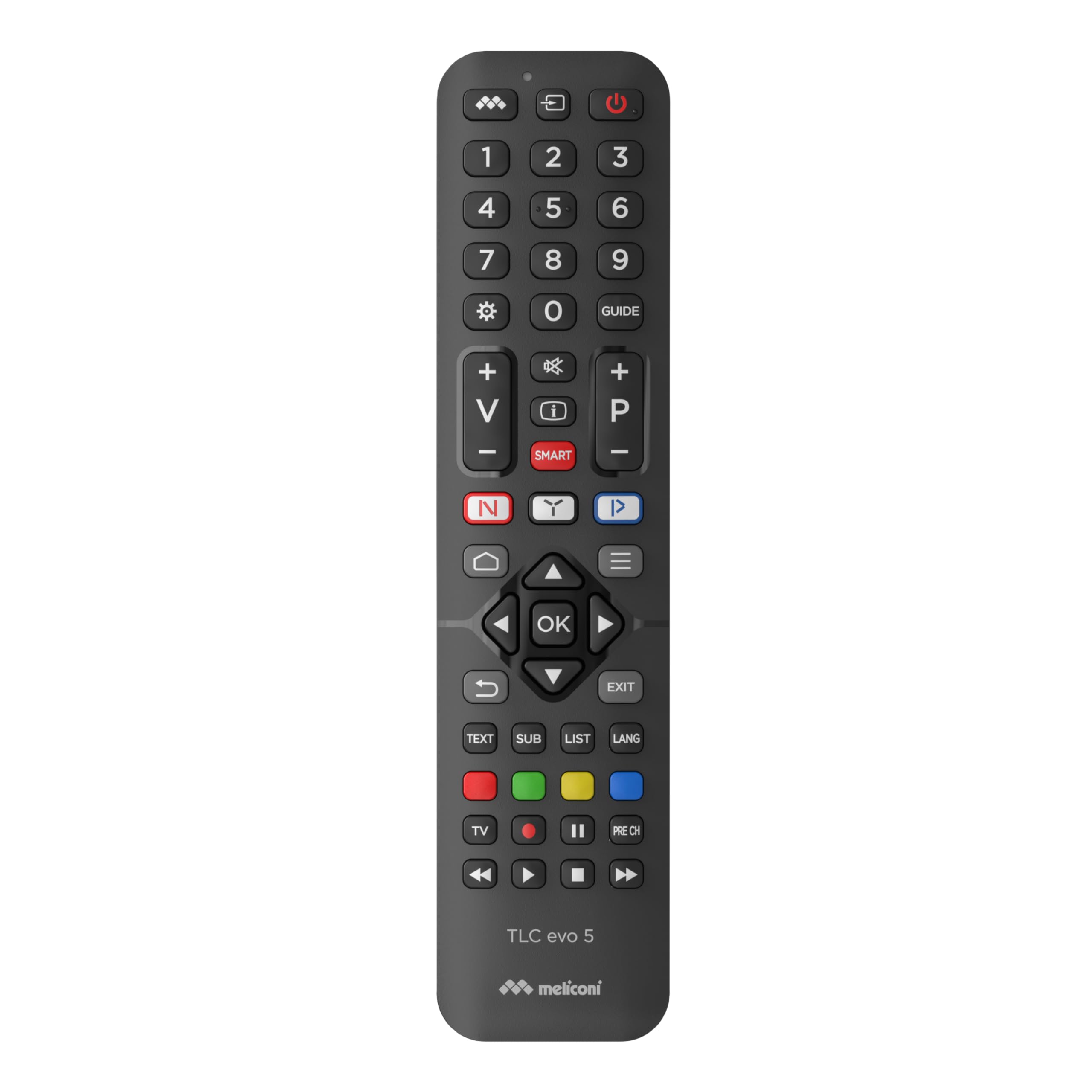
Billede 1: Vinklet view of the Meliconi TLC EVO.5 remote control, showcasing dens ergonomiske design og knaplayout.
2. Opsætning
2.1. Batteriinstallation
- Find batterirummets dæksel på bagsiden af fjernbetjeningen.
- Skub dækslet nedad, eller tryk på låsen (hvis den er monteret) for at åbne rummet.
- Insert two (2) 1.5V AAA/LR03 alkaline batteries, ensuring the correct polarity (+ and -) as indicated inside the compartment. The remote features mechanical anti-inversion protection for batteries.
- Sæt dækslet til batterirummet på igen, og skub det på plads, indtil det klikker sikkert.
Note: Batteries are not included with the remote control. Always use new, high-quality alkaline batteries for optimal performance. The remote retains its configuration even without batteries.

Billede 2: Top-down view of the remote control, showing the full button layout, useful for identifying the battery compartment on the reverse side.
2.2. First Use (No Programming Required)
The Meliconi TLC EVO.5 remote control is pre-programmed for Thomson and TCL televisions. After installing the batteries, it is ready for immediate use. Simply point the remote at your television and begin operating it as you would with your original remote control.
3. Betjeningsvejledning
This section details the primary functions of the Meliconi TLC EVO.5 remote control.

Image 3: The remote control positioned next to a television, illustrating its intended use.
3.1. Grundlæggende funktioner
- Tænd/sluk-knap (⏻): Tænder eller slukker for fjernsynet.
- Nummerknapper (0-9): Selects TV channels directly.
- Lydstyrke op/ned (+/-): Justerer fjernsynets lydstyrke.
- Kanal op/ned (P+/P-): Skifter tv-kanaler sekventielt.
- Mute knap (🔇): Slår fjernsynets lyd fra eller til.
- Navigation Arrows (▲ ▼ ◄ ►) and OK Button: Bruges til at navigere i menuer og bekræfte valg.
- Afslut-knap: Afslutter den aktuelle menu eller funktion.
- Back/Return Button (↶): Vender tilbage til den forrige skærm eller menu.
3.2. Smart Functions and Direct Access Keys
- Netflix-knap (N): Giver direkte adgang til Netflix-streamingtjenesten.
- YouTube Button (▶): Provides direct access to the YouTube video platform.
- Amazon Prime Video-knap (▶): Provides direct access to the Amazon Prime Video streaming service.
- SMART HOME Button (⌂): Opens the television's smart home or application menu.
- "M" Key: Accesses secondary functions, which may vary depending on your television model. Refer to your TV's original manual for specific secondary functions.

Image 4: A user holding the remote control, demonstrating its comfortable grip and ease of use for accessing smart TV features.
3.3. Infrared Signal
The remote control utilizes a wide-angle, long-range infrared signal. For optimal performance, ensure there is a clear line of sight between the remote control's emitter and the television's infrared receiver. An indicator light on the remote confirms signal transmission.
4. Vedligeholdelse
4.1. Udskiftning af batteri
When the remote control's response becomes sluggish or inconsistent, it is time to replace the batteries. Follow the steps outlined in Section 2.1. Battery Installation. Always replace both batteries simultaneously with new ones.
4.2. Rensning
For at rengøre fjernbetjeningen skal du forsigtigt tørre den af med en blød, tør klud. Ved genstridigt snavs skal du let tørre den af med enampRengør kluden med vand eller et mildt, ikke-slibende rengøringsmiddel. Undgå at bruge skrappe kemikalier, opløsningsmidler eller slibende materialer, da disse kan beskadige fjernbetjeningens overflade eller interne komponenter.
4.3. Opbevaring
Opbevar fjernbetjeningen et køligt og tørt sted væk fra direkte sollys, ekstreme temperaturer og høj luftfugtighed. Hvis fjernbetjeningen ikke skal bruges i længere tid, anbefales det at fjerne batterierne for at forhindre lækage og potentiel skade.
5. Fejlfinding
- Fjernbetjeningen svarer ikke:
- Kontroller, om batterierne er isat korrekt med den korrekte polaritet.
- Udskift batterierne med nye.
- Sørg for, at der ikke er nogen forhindringer mellem fjernbetjeningen og tv'ets infrarøde modtager.
- Kontroller, at fjernbetjeningen er rettet direkte mod tv'et.
- Specifikke funktioner virker ikke:
- While the remote is designed to work with 100% of original functions, some advanced or TV-specific features might require the original TV remote or specific TV settings.
- Ensure your TV is a Thomson or TCL model with infrared capability.
- Indikatorlampen blinker ikke:
- This usually indicates dead or incorrectly inserted batteries. Replace or reinsert batteries.
6. Specifikationer
| Modelnavn: | TLC Evo.5 |
| Mærke: | Meliconi |
| Kompatible enheder: | Thomson and TCL Televisions |
| Forbindelse teknologi: | Infrarød |
| Speciel funktion: | Smart (Direct access to streaming services) |
| Farve: | Sort |
| Antal knapper: | Multiple, including 3 direct access keys |
| Controller type: | Tactile Control |
| Strømkilde: | 2 x 1.5V AAA/LR03 Alkaline Batteries (not included) |
7. Support
For further assistance or inquiries regarding your Meliconi TLC EVO.5 remote control, please refer to the official Meliconi website or contact their customer support. Keep your purchase receipt for any warranty-related claims.
Du kan besøge Meliconi Store on Amazon for mere produktinformation.


