
Indledning
This manual provides detailed instructions for the installation, operation, and maintenance of your MONTECH GF120 ARGB PWM 120mm Fan 3-in-1 pack. Please read this manual thoroughly before installation and use to ensure proper function and longevity of your product.
The MONTECH GF120 ARGB PWM fan is designed to deliver efficient cooling and vibrant ARGB lighting for your computer system. It features a hydraulic bearing for quiet operation and extended durability.
Pakkens indhold
- 3 x MONTECH GF120 ARGB PWM 120mm Fans
- 1 x 6x6 Fan Hub
- Mounting Screws (for case and radiator mounting)
- Brugervejledning (dette dokument)
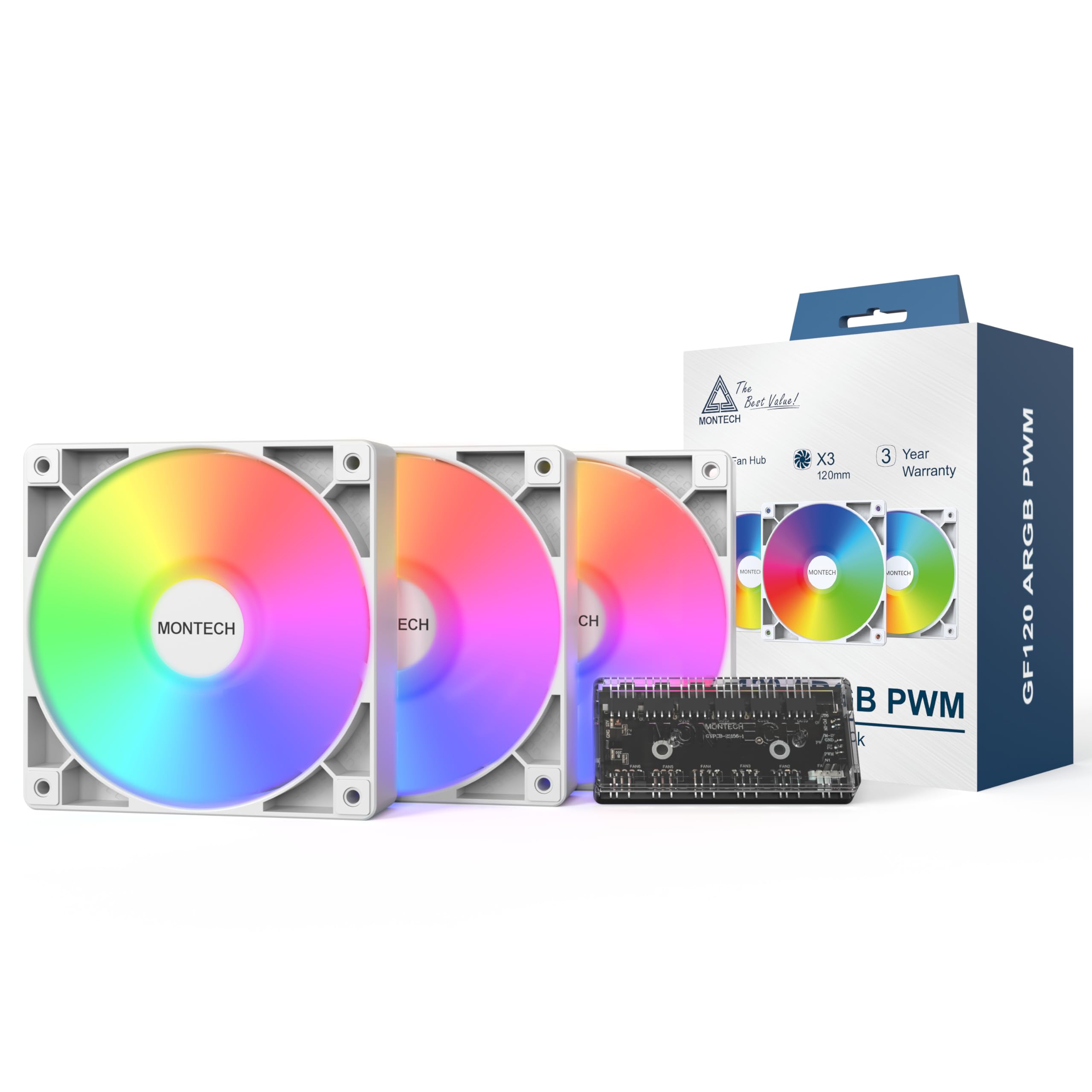
Image: Contents of the MONTECH GF120 ARGB PWM 120mm Fan 3-in-1 pack, showing three fans and the fan hub.
Sikkerhedsoplysninger
- Sørg for, at dit computersystem er slukket og taget stikket ud af stikkontakten inden installation.
- Håndter komponenterne forsigtigt for at undgå skader.
- Refer to your motherboard manual for specific fan header locations and ARGB controller compatibility.
- Do not force connectors. Ensure correct orientation before plugging in.
- Opbevares utilgængeligt for børn.
Opsætning og installation
1. Forbered dit system
Before beginning installation, power off your computer and disconnect it from the power source. Open your computer case to access the fan mounting locations.
2. Mount the Fans
Identify the desired mounting locations for your fans (e.g., front, top, rear, bottom of the case, or on a radiator). Use the provided mounting screws to secure each fan. Ensure the fan's airflow direction (indicated by arrows on the fan frame) is appropriate for your system's cooling strategy.

Image: Diagram illustrating the airflow direction of the fan, typically indicated by arrows on the fan frame.

Image: Multiple GF120 fans installed within a computer case, showcasing deres ARGB-lyseffekter.
3. Connect the Fans to the Hub
Connect each GF120 fan's 4-pin PWM cable and 3-pin ARGB cable to the corresponding ports on the included 6x6 Fan Hub. The hub allows for centralized control of fan speed and lighting.
4. Connect the Hub to the Motherboard
- PWM-forbindelse: Connect the 4-pin PWM cable from the fan hub to an available 4-pin fan header on your motherboard (e.g., "CPU_FAN", "SYS_FAN"). This allows your motherboard to control the fan speed.
- ARGB-forbindelse: Connect the 3-pin ARGB cable from the fan hub to an available 5V 3-pin ARGB header on your motherboard (e.g., "D_LED", "ARGB_HEADER"). Do not connect to a 12V 4-pin RGB header, as this will damage the LEDs.
- Strømtilslutning: Connect the SATA power cable from the fan hub to an available SATA power connector from your power supply unit (PSU).
Refer to your motherboard manual for the exact location of these headers.
5. Kabelforvaltning
Route all cables neatly to ensure proper airflow within your case and for a clean aesthetic. Close your computer case and reconnect the power.
Betjeningsvejledning
Ventilatorhastighedskontrol (PWM)
The GF120 fans utilize Pulse Width Modulation (PWM) technology, allowing your motherboard to precisely control their rotational speed between 800 and 1600 RPM. This enables dynamic adjustment of cooling performance based on system temperature, optimizing for either maximum airflow or quiet operation.
- Access your motherboard's BIOS/UEFI settings or use compatible software provided by your motherboard manufacturer to configure fan curves.
- Set fan speeds to increase with CPU or GPU temperature for effective cooling during heavy loads, and decrease for quieter operation during light tasks.
Image: Performance specifications including 66.3 CFM airflow, 1.55 mm H2O static pressure, 25.5 dBA noise level, and 800-1600 RPM fan speed.
ARGB-lysstyring
The GF120 fans feature Addressable RGB (ARGB) lighting with 8 vibrant LEDs. The lighting effects are controlled via your motherboard's ARGB software (e.g., ASUS Aura Sync, MSI Mystic Light Sync, GIGABYTE RGB Fusion, ASRock Polychrome Sync) or a dedicated ARGB controller connected to the hub.
- Installer den relevante ARGB-kontrolsoftware til dit bundkort.
- Use the software to customize lighting colors, patterns, and synchronization with other ARGB components in your system.
Opretholdelse
Rensning
Regelmæssig rengøring hjælper med at opretholde optimal ydeevne og forlænger dine ventilatorers levetid.
- Frekvens: Clean fans every 3-6 months, or more frequently in dusty environments.
- Procedure:
- Power off your computer and unplug it from the wall.
- Åbn computerkabinettet.
- Use compressed air to blow dust off the fan blades and frame. Hold the fan blades gently to prevent them from spinning rapidly during cleaning, which can damage the bearings.
- For stubborn dust, use a soft, dry cloth or a cotton swab.
- Ensure all dust is removed from the fan and surrounding areas before closing the case.
Hydraulic Bearings
The GF120 fans feature durable hydraulic bearings designed for long-term reliability and quiet operation. These bearings are pre-lubricated and generally do not require user maintenance or re-lubrication.

Billede: Eksploderet view of the fan showing the hydraulic bearing components, highlighting its durable design for quiet operation and extended lifespan.
Fejlfinding
| Problem | Mulig årsag | Løsning |
|---|---|---|
| Fans roterer ikke |
|
|
| ARGB-belysningen virker ikke |
|
|
| Overdreven støj |
|
|
Specifikationer
| Feature | Specifikation |
|---|---|
| Produktdimensioner | 120 mm x 25 mm x 120 mm (4.73" L x 0.99" B x 4.73" H) |
| Mærke | Montech |
| Strømstik type | 4-Pin PWM |
| Voltage | 12 volt (DC) |
| Afkølingsmetode | Luft |
| Kompatible enheder | Desktop, Graphic Cards |
| Støjniveau | 25.5 decibel (maks.) |
| Materiale | Acrylonitrile Butadiene Styrene, Plastic, Rubber |
| Maksimal rotationshastighed | 1600 RPM |
| Luftmængde kapacitet | 66.3 kubikfod pr. minut (CFM) |
| Statisk tryk | 1.55 mm H2O |
| Varemodelnummer | GF120W3IN1 |
| Antal genstande | 3 (fans) + 1 (hub) |
Garanti og support
Garantioplysninger
The MONTECH GF120 ARGB PWM 120mm Fan 3-in-1 pack is backed by a 3 års garanti fra købsdatoen. Denne garanti dækker materiale- og fabrikationsfejl ved normal brug. Gem venligst din købsbevis i tilfælde af garantikrav.
For detailed warranty terms and conditions, please refer to the official Montech webwebsted eller kontakt kundesupport.
Kundesupport
If you encounter any issues or have questions regarding your MONTECH GF120 ARGB PWM fans, please visit the official Montech webwebsted for supportressourcer, ofte stillede spørgsmål og kontaktoplysninger.
Montech Official Webwebsted: www.montechpc.com