
1. Produktet er slutview
The Awei Y525 is a portable Bluetooth 5.3 speaker designed for wireless audio playback. It features True Wireless Stereo (TWS) functionality for pairing two speakers, Hifi sound, and integrated RGB lighting effects. The speaker supports multiple input methods including Bluetooth, USB, and TF card, making it suitable for various outdoor and indoor listening environments.
2. Pakkens indhold
Tjek venligst pakken for følgende varer:
- Awei Y525 Bluetooth Speaker
- Opladningskabel (USB-C)
- Brugermanual
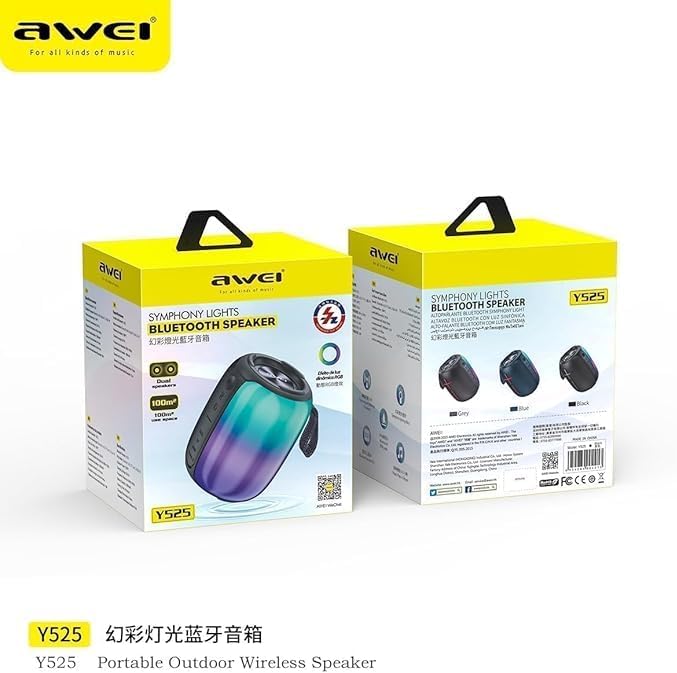
Image: Awei Y525 speaker packaging. The image displays two Awei Y525 speakers in their retail boxes, highlighting the product's branding and model number.
3. Kontroller og indikatorer
Familiarize yourself with the speaker's controls and indicators:
- Power knap: Tryk og hold nede for at tænde/slukke. Kort tryk for afspil/pause.
- Lydstyrke op (+): Kort tryk for at øge lydstyrken. Langt tryk for næste nummer.
- Skrue ned for lyden (-): Kort tryk for at sænke lydstyrken. Langt tryk for forrige nummer.
- Mode-knap (M): Tryk kort for at skifte mellem Bluetooth-, USB-, TF-kort- og AUX-tilstande.
- RGB-lysknap: Short press to cycle through light modes or turn off lights.
- Opladningsport: USB-C port til opladning.
- LED-indikator: Shows charging status and Bluetooth connection status.

Image: Awei Y525 speaker controls. This image displays several Awei Y525 speakers in various colors, providing a clear view of the control buttons and input ports on the side of the device.
4. Opladning af højttaleren
Oplad højttaleren helt før første brug.
- Tilslut det medfølgende USB-C-opladerkabel til højttalerens opladningsport.
- Tilslut den anden ende af kablet til en USB-strømadapter (medfølger ikke) eller en computers USB-port.
- LED-indikatoren lyser under opladning og slukker, når den er fuldt opladet.
5. Opsætning og parring
5.1 Bluetooth -parring
- Sørg for, at højttaleren er opladet og tændt.
- Højttaleren går automatisk i Bluetooth-parringstilstand, hvilket indikeres af et blinkende LED-lys.
- Aktiver Bluetooth på din enhed (smartphone, tablet osv.) og søg efter tilgængelige enheder.
- Vælg "Awei Y525" fra listen over enheder.
- Once paired, the LED indicator will stop flashing and remain solid, and you will hear a confirmation tone.
5.2 True Wireless Stereo (TWS) Interconnection
To achieve a stereo sound experience, you can pair two Awei Y525 speakers together.
- Ensure both Awei Y525 speakers are powered on and not connected to any other Bluetooth device.
- On one of the speakers (this will be the primary speaker), double-press the Power button or a dedicated TWS button (if available, refer to specific model instructions if different).
- The speakers will search for each other and automatically pair. You will hear a confirmation tone when TWS pairing is successful.
- Når TWS er parret, skal du tilslutte din enhed til den primære højttaler via Bluetooth som beskrevet i afsnit 5.1.

Image: TWS Interconnection. This image illustrates two Awei Y525 speakers positioned to demonstrate their True Wireless Stereo (TWS) interconnection capability for enhanced sound.
6. Betjening af højttaleren
6.1 Grundlæggende lydafspilning
- Afspil/pause: Tryk kort på afbryderknappen.
- Lydstyrkekontrol: Tryk kort på '+' for at øge lydstyrken, tryk kort på '-' for at sænke lydstyrken.
- Næste / forrige nummer: Long press '+' for the next track, long press '-' for the previous track.
6.2 RGB-lystilstande
The speaker features dynamic RGB lighting effects.
- Short press the RGB Light button to cycle through different light modes.
- Continue pressing to turn off the lights.
6.3 Håndfri opkald
Når højttaleren er tilsluttet via Bluetooth, kan den bruges til håndfri opkald.
- Besvar opkald: Tryk kort på afbryderknappen.
- Afslut opkald: Tryk kort på tænd/sluk-knappen under et opkald.
- Afvis opkald: Tryk længe på tænd/sluk-knappen.
6.4 Other Playback Modes (USB, TF Card, AUX)
Insert a USB drive or TF card into the respective port, or connect an audio device via an AUX cable. The speaker will automatically switch to the corresponding mode or you can manually switch using the Mode button.
7. Vedligeholdelse og pleje
- Keep the speaker away from water and excessive moisture. The product is not waterproof.
- Undgå at udsætte højttaleren for ekstreme temperaturer.
- Rengør højttaleren med en blød, tør klud. Brug ikke slibende rengøringsmidler eller opløsningsmidler.
- Opbevar højttaleren et køligt og tørt sted, når den ikke er i brug i længere perioder.
8. Fejlfinding
| Problem | Løsning |
|---|---|
| Højttaleren tænder ikke. | Ensure the speaker is fully charged. Press and hold the Power button for a few seconds. |
| Kan ikke parres via Bluetooth. | Make sure the speaker is in pairing mode (flashing LED). Disable and re-enable Bluetooth on your device. Ensure no other devices are connected to the speaker. |
| Ingen lyd eller lav lydstyrke. | Kontrollér lydstyrken på både højttaleren og din tilsluttede enhed. Sørg for, at den korrekte inputtilstand er valgt. |
| TWS-parring mislykkes. | Ensure both speakers are charged and not connected to any other Bluetooth device. Try resetting both speakers and repeating the TWS pairing steps. |
| RGB-lysene virker ikke. | Tryk på RGB-lysknappen for at skifte mellem tilstande eller tænde dem. |
9. Specifikationer
| Feature | Detalje |
|---|---|
| Modelnavn | Y525 |
| Bluetooth version | 5.3 |
| Trådløs kommunikationsteknologi | Bluetooth |
| Højttaler type | Udendørs, Bærbar |
| Lydudgangstilstand | Stereo (med TWS) |
| Strømkilde | Batteridrevet |
| Kontrolmetode | Røre |
| Varens vægt | 500 gram |
| Højttaler størrelse | 17 centimeter |
| Særlige funktioner | Anti-shocking, Lightweight, Volume Control, RGB Light Effects, TWS Function |
| Kompatible enheder | Bærbar computer, smartphone, tablet, fjernsyn |
| Er vandtæt | Ingen |
10. Sikkerhedsoplysninger
- Du må ikke skille højttaleren ad, reparere eller modificere den.
- Opbevares utilgængeligt for børn.
- Bortskaf produktet ansvarligt i henhold til lokale regler.
- Undgå at lytte ved høj lydstyrke i længere perioder for at forhindre høreskader.
11. Garanti og support
Specific warranty information and customer support details are typically provided with your purchase documentation or on the manufacturer's official website. Please refer to those resources for assistance.