
Jebao DCW-70
Jecod Jebao DCW Bluetooth Submersible Vario Cross Flow Wave Maker Pump
Model: DCW-70 | Brand: Jebao
Produkt overview
The Jecod Jebao DCW-70 is a versatile Bluetooth-enabled submersible wave maker pump designed for both saltwater and freshwater aquariums. It features an advanced control system that allows for easy setup and programming via a dedicated mobile application on iOS and Android devices, as well as manual control.
Nøglefunktioner omfatter:
- Bluetooth-forbindelse til APP-styring.
- Manual and APP control system with a visual LCD display.
- 3D large rotation angle for adjustable water output direction.
- Super quiet motor operation.
- Master and slave mode for wireless control of multiple units.
- Automatic power-off protection when no water is detected, ensuring pump safety.
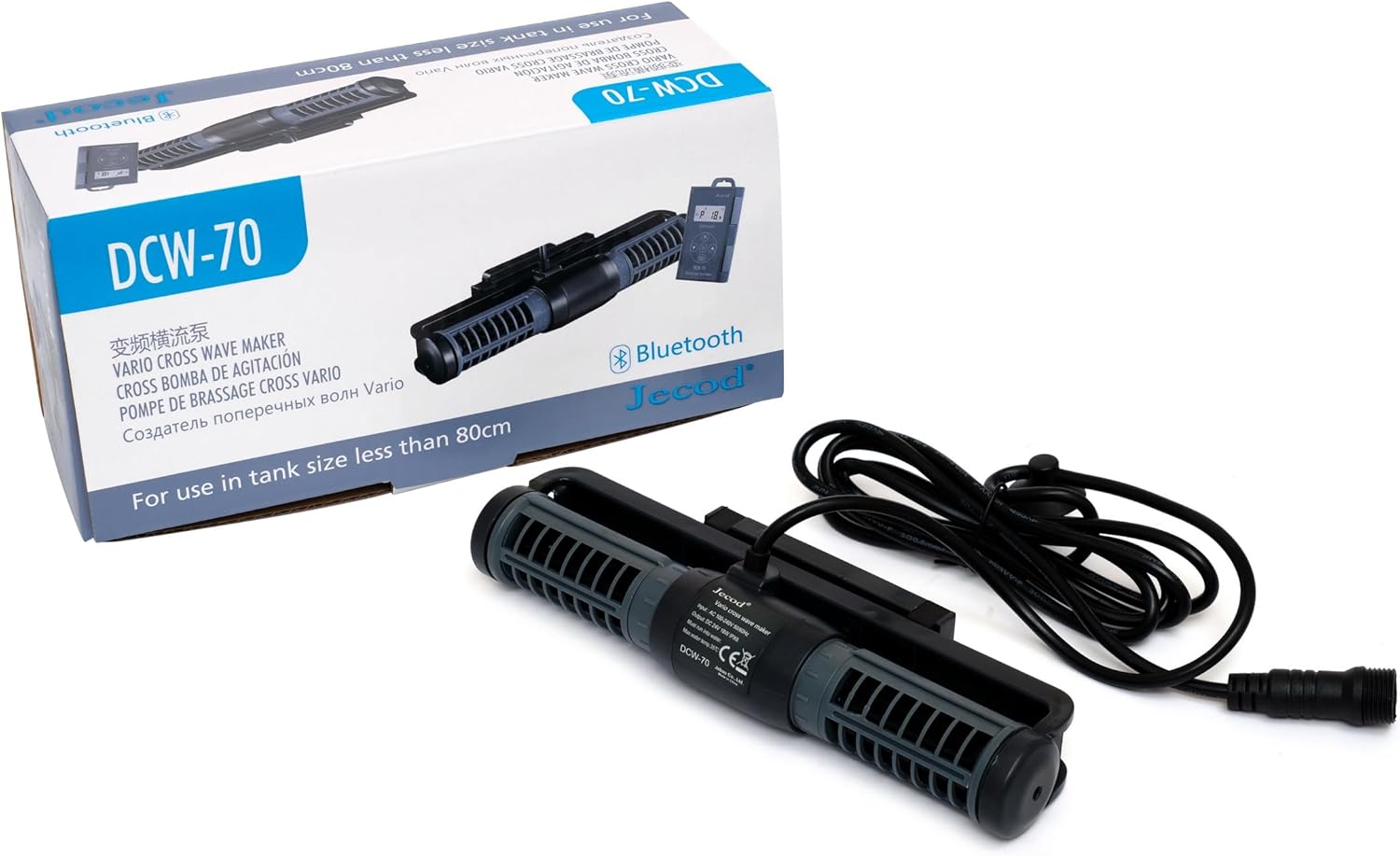
Figure 1: The Jecod Jebao DCW-70 wave maker pump, its controller, and original packaging.
Inkluderede komponenter
Før installationen påbegyndes, skal du sørge for, at alle komponenter er til stede og ubeskadigede.
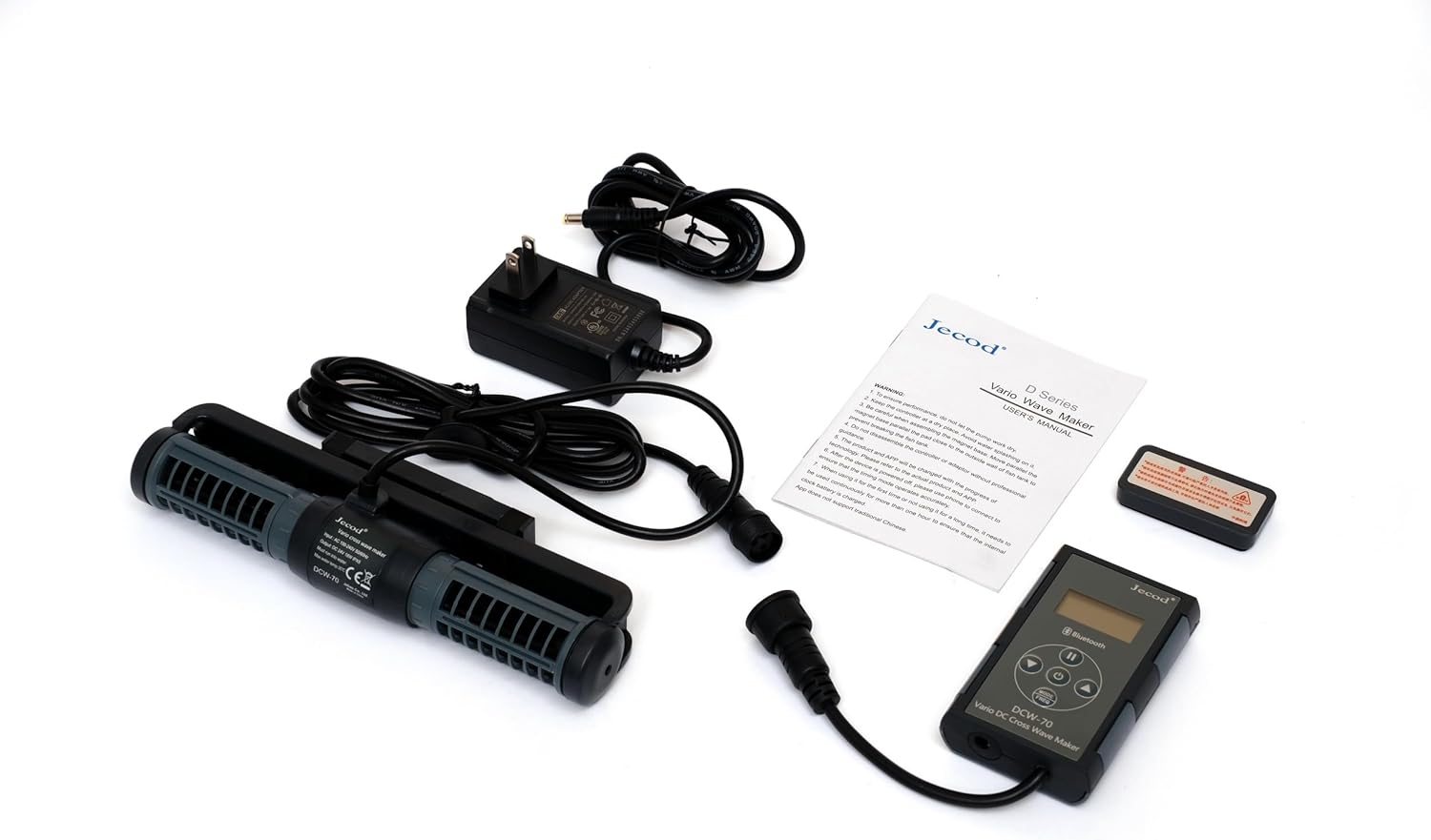
Figure 2: All components included with the DCW-70 pump: the wave maker pump unit, the control unit, the power adapter, and the user manual.
- Jecod Jebao DCW-70 Wave Maker Pump Unit
- Control Unit with LCD Display
- Power Adapter (100V-240V 50/60Hz, DC 24V 18W)
- Brugermanual
Opsætning og installation
- Placering: Position the wave maker pump inside your aquarium. The pump is fully submersible. Ensure it is placed in an area that allows for optimal water circulation without disturbing substrate or delicate aquatic life. The 3D rotation angle allows for precise water flow direction.

Figure 3: The pump unit with its magnetic mounting bracket for secure attachment to aquarium glass.
- Montering: Use the integrated magnetic mount to secure the pump to the aquarium glass. Place the pump unit inside the tank and align the external magnet on the outside of the glass. Ensure a firm and stable attachment.
- Controllerforbindelse: Connect the pump unit's cable to the control unit. Ensure the connection is secure and watertight.
- Strømtilslutning: Connect the power adapter to the control unit, then plug the power adapter into a standard electrical outlet (100V-240V, 50/60Hz).
- Første gang tændt: Once connected, the control unit's LCD display will illuminate. The pump will perform a brief self-test.
Betjeningsvejledning
Manuel kontrol
The control unit allows for direct adjustment of pump settings. Refer to the buttons on the controller for mode selection, flow intensity adjustment, and on/off functions. The LCD display will show current settings.
Bluetooth APP kontrol
For advanced control and programming, download the official Jecod/Jebao app from your device's app store (available for iOS and Android). Follow these steps to connect and operate:
- Download app: Søg efter "Jecod" or "Jebao" in the App Store (iOS) or Google Play Store (Android) and install the official application.
- Aktiver Bluetooth: Sørg for, at Bluetooth er aktiveret på din mobilenhed.
- Parring: Open the app. The app will automatically search for nearby DCW pumps. Select your DCW-70 from the list to pair. A quick, one-second connection is typical.
- Kontroltilstande: Within the app, you can select various wave-making modes, adjust flow rates (925 to 1850 GPH for DCW-70), set schedules, and configure master/slave modes for multiple pumps.

Figure 4: Illustration of the Bluetooth connectivity and typical water flow patterns created by the wave maker pump within an aquarium environment.
- 3D Water Direction: Manually adjust the pump's orientation on its mount to direct the water flow as desired within the tank.
Opretholdelse
Regular maintenance ensures optimal performance and longevity of your Jecod Jebao DCW-70 pump.
- Rensning: Periodically remove the pump from the aquarium and disassemble it carefully to clean the impeller and pump housing. Use a soft brush and clean water to remove any algae, detritus, or mineral buildup. Do not use harsh chemicals.
- Inspektion af impeller: Inspect the impeller for any signs of wear or damage. A worn impeller can reduce performance and increase noise. Replace if necessary.
- Kabel og forbindelser: Check all cables and connections for fraying, kinks, or corrosion. Ensure all connections remain secure and dry (outside the tank).
- Vandstand: The pump features automatic power-off protection upon no water. Ensure the pump is always fully submerged during operation to prevent dry running and potential damage. If the pump stops, check the water level first.
Fejlfinding
| Problem | Mulig årsag | Løsning |
|---|---|---|
| Pump not turning on / No power |
|
|
| Reduced flow / Weak output |
|
|
| Overdreven støj eller vibrationer |
|
|
| Problemer med Bluetooth-forbindelse |
|
|
Specifikationer
| Attribut | Detalje |
|---|---|
| Mærke | Jebao |
| Modelnummer | DCW-70 |
| Farve | Sort |
| Materiale | Rustfrit stål, plast |
| Stil | Nedsænkelig |
| Strømkilde | Elektrisk med ledning |
| Voltage | 24 volt (DC) |
| Varens vægt | 1.9 pund |
| Pakkedimensioner | 10.5 x 5 x 4 tommer |
| Assumed Flow Rate (DCW-70) | 925 til 1850 GPH |
Garanti og support
For warranty information, technical support, or service inquiries, please contact Jebao customer service directly or refer to the official Jebao webwebstedet. Behold din købskvittering som købsbevis.
While specific warranty terms are not detailed here, extended protection plans may be available for purchase from retailers. Please consult your point of purchase for details on additional protection options.
For the latest product information and updates, visit the official Jebao webwebsted: www.jebao.com
Ask a question about this manual
Ask about setup, troubleshooting, compatibility, parts, safety, or missing instructions. Manuals+ will review the question and use this page’s manual context to help answer it.