
1. Introduktion
Thank you for choosing the Xiaomi Dust Mite Vacuum Cleaner 2. This handheld vacuum is specifically designed for effective removal of dust mites and allergens from various textile surfaces. Featuring a powerful 12000 Pa suction, a UV disinfectant lamp, and a 4-stage cyclonic filtration system, it ensures a deep and hygienic clean. The integrated 50°C hot air drying function helps minimize residual moisture, making it ideal for mattresses, pillows, and upholstery. Its lightweight design (1.6 kg) ensures ease of use for daily cleaning.
2. Sikkerhedsinstruktioner
Læs venligst alle sikkerhedsinstruktioner omhyggeligt, inden du bruger apparatet, for at forhindre personskade eller beskadigelse.
- Brug ikke støvsugeren på våde overflader eller til at opsuge væsker.
- Opbevar apparatet utilgængeligt for børn.
- Always unplug the vacuum cleaner from the power outlet before performing any cleaning or maintenance.
- Brug ikke støvsugeren, hvis netledningen eller stikket er beskadiget.
- Sørg for, at luftventilerne ikke er blokerede under drift for at forhindre overophedning.
- Brug kun tilbehør og tilbehør anbefalet af producenten.
- Do not expose the UV lamp directly to eyes or skin.
3. Produktkomponenter
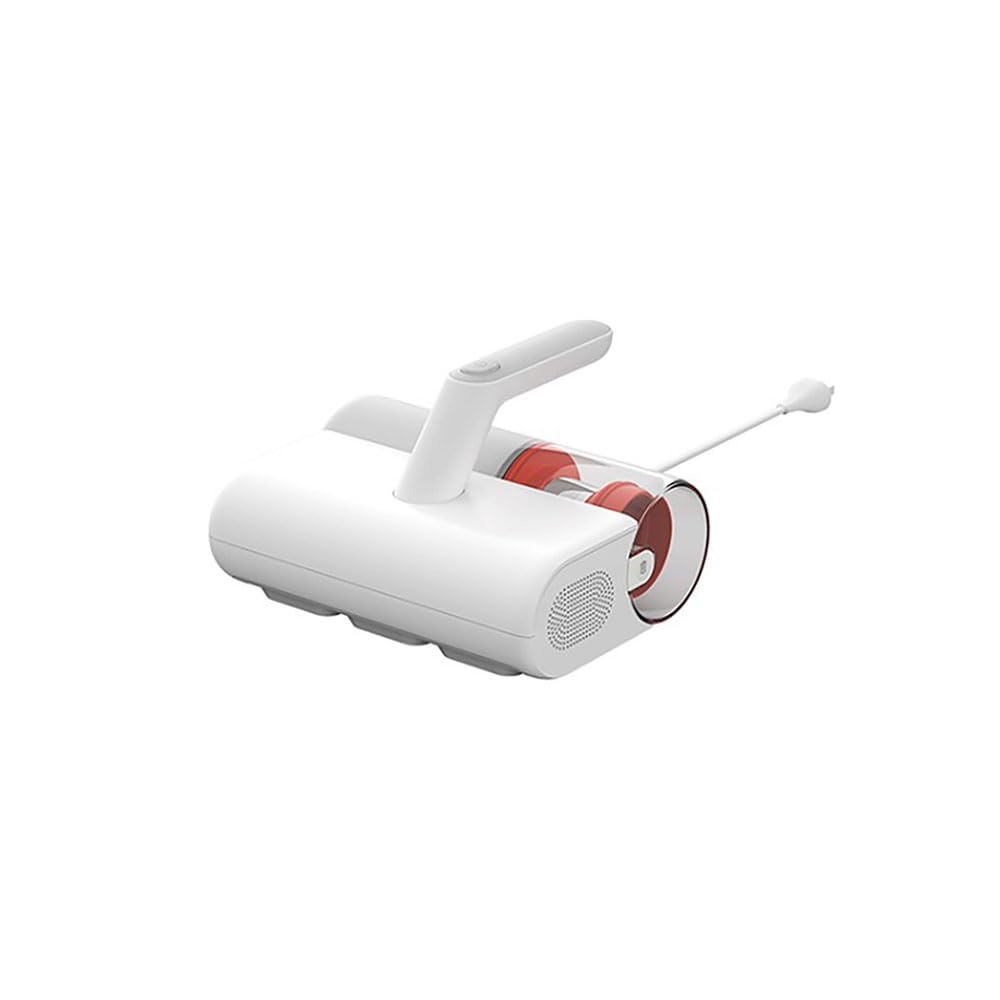
Familiarize yourself with the main parts of your Xiaomi Dust Mite Vacuum Cleaner 2:
- Hovedenhed: Contains the motor, handle, and control buttons.
- Dust Collection Bin: Transparent, bagless container for collected dust and debris.
- HEPA-filter: High-efficiency particulate air filter, located within the dustbin.
- UV-C Sterilization Lamp: Located on the underside, activates upon contact with a surface.
- Rullebørste: Rotating brush on the underside for agitating surfaces.
- Strømledning: Til tilslutning af enheden til en stikkontakt.
4. Opsætning
Følg disse trin før første brug:
- Pak alle komponenter ud, og fjern al emballage.
- Ensure the dust collection bin and HEPA filter are correctly installed in the main unit. Refer to the markings for proper alignment.
- Connect the power cord securely to the vacuum cleaner and then to a suitable electrical outlet.
5. Betjeningsvejledning
To use your Xiaomi Dust Mite Vacuum Cleaner 2:
- Sæt støvsugeren i en stikkontakt.
- Place the vacuum cleaner directly onto the surface you wish to clean (e.g., mattress, sofa, pillow).
- Press the power button located on the handle to turn on the device. The UV lamp will activate automatically when the vacuum is in contact with a surface.
- Move the vacuum cleaner slowly and steadily over the surface in overlapping strokes to ensure thorough cleaning. The hot air function will simultaneously help dry the surface.
- Efter rengøring skal du trykke på tænd/sluk-knappen igen for at slukke enheden.
- Tag støvsugeren ud af stikkontakten.
This image shows the Xiaomi Dust Mite Vacuum Cleaner 2 being used to clean upholstery, demonstrating its handheld operation.
6. Vedligeholdelse
Regelmæssig vedligeholdelse sikrer optimal ydeevne og forlænger din støvsugers levetid.
6.1. Emptying the Dust Collection Bin
- Sørg for, at støvsugeren er taget ud af stikkontakten.
- Locate the release button for the dustbin and detach it from the main unit.
- Åbn skraldespanden, og tøm dens indhold i en skraldespand.
- Tør om nødvendigt indersiden af støvspanden af med enamp kluden, og lad den lufttørre helt, før den sættes på igen.
6.2. Rengøring af HEPA-filteret
- With the dustbin removed, carefully take out the HEPA filter.
- Gently tap the filter over a waste bin to remove loose dust and debris.
- For a deeper clean, rinse the HEPA filter under running water. Sørg for, at filteret er helt tørt, før det monteres igen. Tørring kan tage op til 24 timer.
6.3. Cleaning the UV-C Sterilization Lamp
- Sørg for, at støvsugeren er taget ud af stikkontakten.
- Gently wipe the surface of the UV lamp with a clean, dry, soft cloth. Do not use liquids or abrasive cleaners.
6.4. Rengøring af rullebørsten
- Sørg for, at støvsugeren er taget ud af stikkontakten.
- Undersøg regelmæssigt rullebørsten for sammenfiltrede hår eller snavs.
- Carefully remove any obstructions using scissors or a brush.
7. Fejlfinding
Hvis du støder på problemer, kan du se følgende almindelige problemer og løsninger:
- Ingen strøm:
- Check if the power cord is securely plugged into both the vacuum cleaner and the wall outlet.
- Sørg for, at stikkontakten fungerer ved at teste den med et andet apparat.
- Lavt sug:
- The dust collection bin may be full. Empty it.
- The HEPA filter may be clogged. Clean or replace it as per maintenance instructions.
- Check for any blockages in the suction nozzle or roller brush area.
- UV Lamp Virker ikke:
- Ensure the vacuum cleaner is powered on and in direct contact with the surface being cleaned. The UV lamp has a safety mechanism that prevents it from operating when not in contact with a surface.
- Tjek om UV lamp area is clean and free from obstructions.
- Usædvanlig støj:
- Turn off and unplug the vacuum. Inspect the roller brush and suction path for any foreign objects that may be causing the noise.
Hvis problemet fortsætter efter at have prøvet disse løsninger, bedes du kontakte kundesupport.
8. Specifikationer
| Modelnummer | BHR8276EU |
| Mærke | XIAOMI |
| Sugekraft | 12000 Pa |
| Nominel effekt | 350 W |
| Skraldespandskapacitet | 0.3 liter |
| Vægt | 1.6 kg |
| Filtertype | HEPA-filter (vaskbart) |
| Særlige funktioner | UV-C Sterilization Lamp, Hot Air Drying (50°C), Bagless, Lightweight, Hypoallergenic |
| Strømkilde | Elektrisk med ledning |
| Voltage | 12 volt |
9. Garanti og support
Garanti: This product comes with a two-year warranty against manufacturing defects from the date of purchase. Please retain your proof of purchase for warranty claims.
Kundesupport: For any questions, technical assistance, or warranty claims, please contact Xiaomi customer service through their official webwebstedet eller de kontaktoplysninger, der følger med din købsdokumentation.