
Indledning
This manual provides essential information for the safe and effective use of your DOSS Extreme Boom Pro D100 Bluetooth Speaker. Please read it thoroughly before operating the device and retain it for future reference.
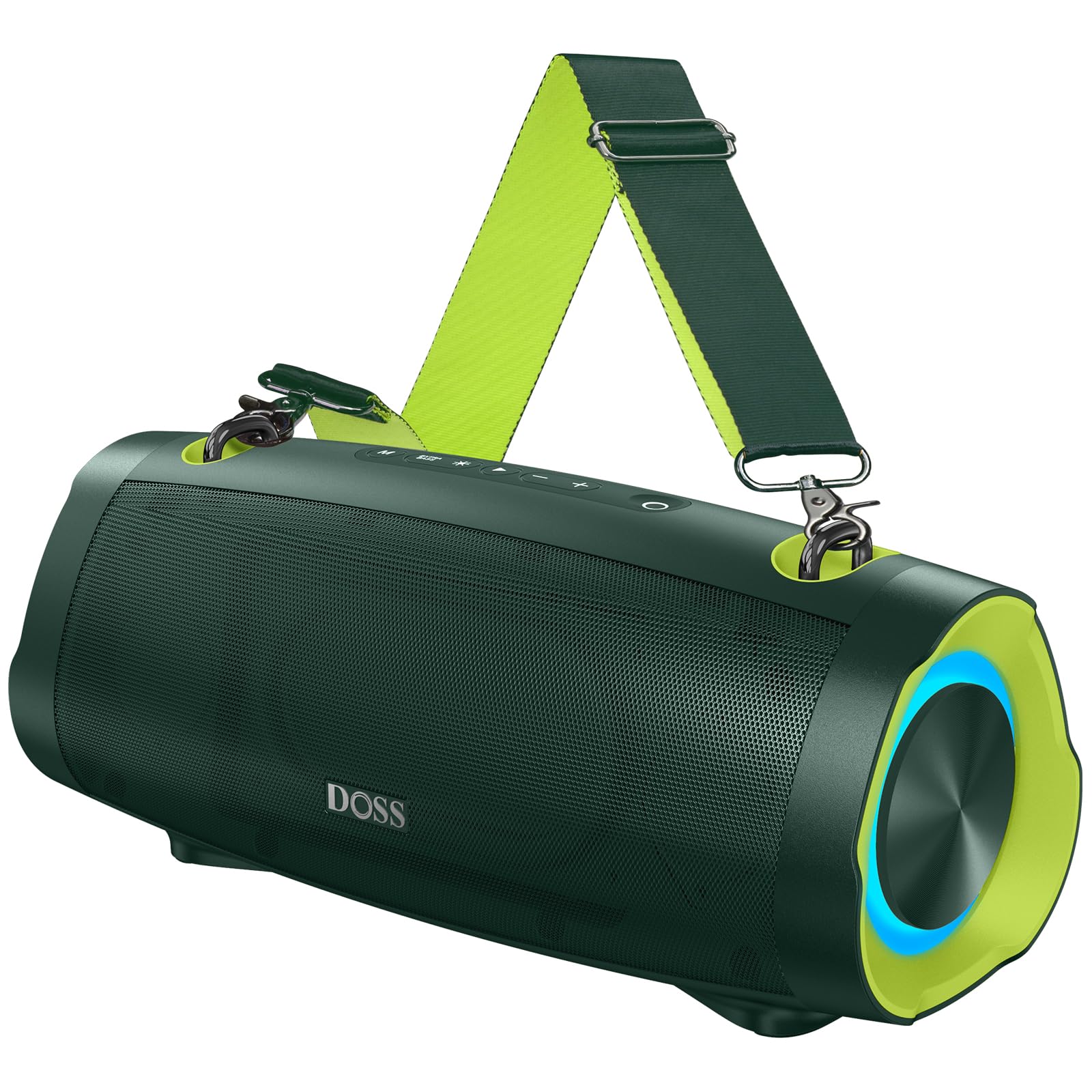
Image: The DOSS Extreme Boom Pro D100 Bluetooth Speaker, showcasing dens robuste design.
Produktegenskaber
- Kraftig lyd: Experience 70W of bold sound (140W Peak) with a 40W full-range driver and two 15W tweeters, enhanced by three advanced DSP technologies.
- Forbedret bas: Dual passive radiators provide deeper bass with a dedicated Extra Bass button.
- Bærbart design: Features a durable, adjustable, and detachable shoulder strap for easy transport.
- True Wireless Stereo (TWS): Connect two speakers wirelessly for an immersive stereo sound experience.
- Forlænget spilletid: Op til 24 timers batterilevetid.
- Indbygget Power Bank: Charge your devices directly from the speaker.
- IPX6 Vandtæt: Designed to withstand water splashes and jets.
- Dynamisk lysshow: Integrated lights synchronize with music rhythm.
Hvad er der i æsken
Tjek venligst indholdet af din pakke:
- DOSS Extreme Boom Pro D100 Bluetooth Speaker
- USB-C ladekabel
- Ekstra lydkabel
- Aftagelig skulderrem
- Brugermanual
Produkt overview
Gør dig bekendt med højttalerens betjeningselementer og porte.

Image: Top panel controls including Power, Volume, Play/Pause, Mode, Extra Bass, and Light buttons.

Billede: En eksploderet view illustrating the internal speaker components, including the full-range driver and tweeters.
Opsætning og drift
1. Tænd/sluk
Tryk og hold tænd/sluk-knappen (O) i 2 sekunder for at tænde eller slukke for højttaleren.
2. Bluetooth-parring
To connect your DOSS Extreme Boom Pro D100 to a Bluetooth device:
- Tænd højttaleren. Den vil automatisk gå i Bluetooth-parringstilstand, hvilket indikeres af en blinkende blå LED.
- Aktiver Bluetooth på din enhed (smartphone, tablet osv.) og søg efter tilgængelige enheder.
- Select "Extreme Boom Pro D100" from the list. A confirmation sound indicates successful pairing.
Video: Demonstrates how to power on the speaker and connect it via Bluetooth to a mobile device.
3. Ægte trådløs stereo (TWS) parring
For an enhanced stereo experience, you can pair two DOSS Extreme Boom Pro D100 speakers:
- Sørg for, at begge højttalere er tændt og ikke er forbundet til nogen Bluetooth-enhed.
- On one speaker (this will be your main speaker), press and hold the 'Extra Bass' button until you hear a prompt. The LED on the main speaker will flash slowly.
- On the second speaker, press and hold the 'Extra Bass' button. The LED on the second speaker will flash quickly.
- The speakers will automatically connect to each other. A confirmation sound will indicate successful TWS pairing. The main speaker's LED will flash slowly, and the second speaker's LED will be solid.
- Connect your device to the main speaker via Bluetooth as described in the Bluetooth Pairing section.
Video: Illustrates the steps for pairing two DOSS Extreme Boom Pro D100 speakers for True Wireless Stereo sound.

Image: Two DOSS Extreme Boom Pro D100 speakers positioned for a True Wireless Stereo setup.
4. Lydstyrkekontrol
Tryk på knappen '+' for at øge lydstyrken og på knappen '-' for at sænke lydstyrken.
5. Extra Bass Function
Press the 'Extra Bass' button to activate or deactivate the enhanced bass mode.
Video: Shows how to activate the Extra Bass feature on the speaker.
6. Dynamisk lysshow
Tryk på lysknappen (※) to cycle through different light modes or turn the lights off.
Video: Demonstrates how to change the dynamic light modes on the speaker.

Image: The speaker displaying its dynamic light show in an outdoor setting.
7. Auto-Power Off Function
The speaker has an auto-power off feature to conserve battery. You can activate or deactivate this function:
- Press and hold the 'M' (Mode) button and the 'Power' button simultaneously.
- If the LED flashes red, auto-power off is removed (deactivated).
- If the LED flashes green, auto-power off is activated.
Video: Explains how to remove or activate the auto-power off feature on the speaker.
8. Nulstil funktion
If you encounter issues, you can reset the speaker:
- Press and hold the 'Power' button and the 'Volume Down (-)' button simultaneously.
- A confirmation sound will indicate a successful reset.
Video: Demonstrates the process of resetting the speaker.
Opladning og Power Bank funktion
The DOSS Extreme Boom Pro D100 features a built-in power bank to charge your external devices.
- Opladning af højttaleren: Connect the provided USB-C cable to the speaker's charging port and a suitable USB power adapter (not included). The charging indicator will show the charging status.
- Bruger som en Power Bank: Connect your device's charging cable to the speaker's USB-A output port. The speaker will begin charging your device.

Image: The speaker being used to charge a smartphone in an outdoor setting, highlighting its power bank capability.
Specifikationer
| Mærke | DOSS |
| Modelnummer | Extreme Boom Pro D100 |
| Højttaler Maksimal udgangseffekt | 140 watt (peak) / 70 watt (RMS) |
| Forbindelsesteknologi | Bluetooth |
| Lydudgangstilstand | Stereoanlæg |
| Højttaler type | Udendørs |
| Yderligere funktioner | Bass Boost, Dynamic Light Show, Power Bank |
| Farve | Green (variant shown in product images) |
| Batteriets gennemsnitlige levetid | 24 timer |
| Vandtæt vurdering | IPX6 |
| Kontrolmetode | Røre |
| Varedimensioner (D x B x H) | 12.17" D x 5.39" B x 5.43" H |
| Varens vægt | 2 kilo |
| Kompatible enheder | Laptop, MP3 Player, Projector, Smartphone, Tablet, Television |
| Batterikapacitet | 10400 mioamp Timer |
| Batteriopladningstid | 5 timer |
Fejlfinding
If you encounter issues with your speaker, please refer to the following common solutions:
- Ingen strøm: Ensure the speaker is fully charged. Connect it to a power source and allow it to charge for at least 30 minutes before attempting to power on.
- Problemer med Bluetooth-forbindelse:
- Sørg for, at højttaleren er i parringstilstand (blinkende blå LED).
- Ensure your device's Bluetooth is enabled and within range (up to 33 feet/10 meters).
- Glem højttaleren fra din enheds Bluetooth-liste, og forsøg at parre den igen.
- Try resetting the speaker as described in the Setup and Operation section.
- Ingen lyd:
- Kontroller lydstyrkeniveauerne på både højttaleren og din tilsluttede enhed.
- Ensure the speaker is correctly paired via Bluetooth or connected via the auxiliary cable.
- TWS-parringsfejl: Ensure both speakers are not connected to any other Bluetooth device before attempting TWS pairing. Follow the TWS pairing steps carefully.
- Vandeksponering: While the speaker is IPX6 waterproof, prolonged submersion is not recommended. If exposed to water, ensure all ports are dry before charging.
Ved vedvarende problemer bedes du kontakte kundesupport.
Opretholdelse
To ensure the longevity and optimal performance of your DOSS Extreme Boom Pro D100 speaker:
- Rensning: Brug en blød, tør klud til at rengøre højttalerens yderside. Brug ikke slibende rengøringsmidler eller opløsningsmidler.
- Opbevaring: Opbevar højttaleren et køligt, tørt sted væk fra direkte sollys og ekstreme temperaturer.
- Batteripleje: To maintain battery health, charge the speaker fully at least once every three months if not in regular use.
- Vandbeskyttelse: Always ensure the charging port cover is securely closed when near water to maintain IPX6 water resistance.
Garanti og support
Your DOSS Extreme Boom Pro D100 Bluetooth Speaker comes with a 1 års producentgaranti, covering quality-related concerns from the date of purchase.
For any product issues or support inquiries, please contact us:

Image: A customer support representative with contact details.
Telefon: 1-833-275-3677
E-mail: support@dossav.com
We are committed to providing 24-hour prompt assistance and support.