
1. Introduktion
The Edifier V80 Hybrid Active Noise Cancelling Headphones are designed to provide a superior audio experience with advanced noise cancellation technology and comfortable wear. This manual provides essential information for setting up, operating, and maintaining your headphones.
- Hybrid ANC & Clear Calls: Block out unwanted noise with hybrid active noise cancellation featuring multiple modes. The built-in mic with AI noise cancellation technology ensures crystal-clear calls.
- Hi-Res Audio: 40mm dynamic driver with a titanium-coated composite diaphragm delivers high-fidelity sound, certified for Hi-Res audio in wired mode.
- Bluetooth 5.4 og multipunktforbindelse: Seamless audio streaming and stable dual-device connection, allowing instant switching between music, videos, and calls on two devices simultaneously.
- 45H Playtime & Fast Charging: Get up to 45 hours of playtime with ANC off (26 hours with ANC on) and 8 hours of use from just 15 minutes of charging. Enjoy 0.06s low latency for immersive gaming.
- Comfortable & User-Friendly Design: Lightweight, foldable, and comfortable design with soft ear cushions. Compatible with the EDIFIER ConneX app for personalized settings, EQ presets, and more.
2. Produktet er slutview
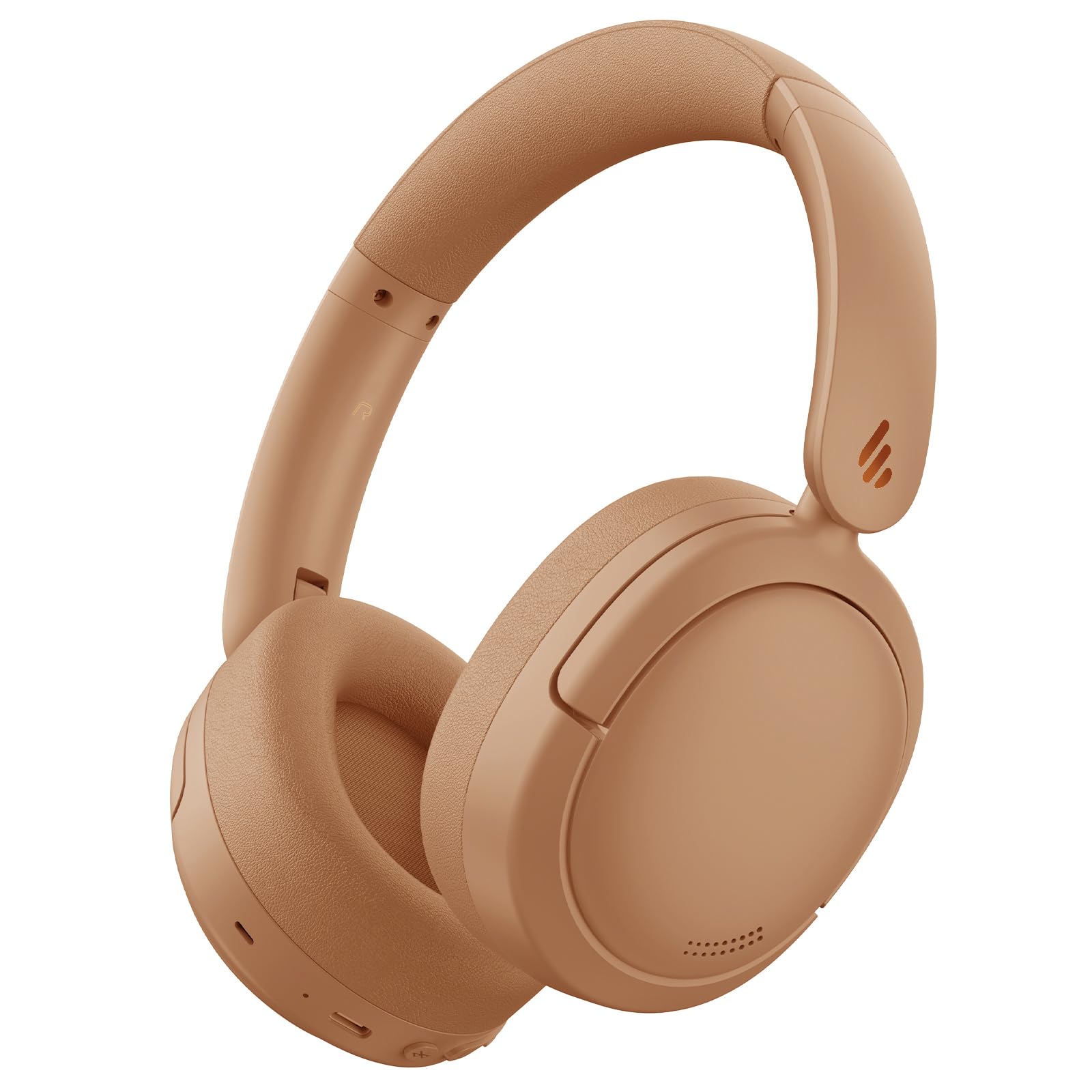
Figure 1: Edifier V80 Hybrid Active Noise Cancelling Headphones in Brown.

Figur 2: Overview of Edifier V80 headphones highlighting Hybrid ANC, Hi-Res Audio, Bluetooth V5.4, Ultra-Low Latency Gaming, 45 hours playtime, 10 mins fast charging, and clear calls.
Nøglefunktioner
- Hybrid Active Noise Cancellation (ANC): Reduces ambient noise by up to 44dB, offering High Noise Cancellation Mode and Ambient Sound Mode. Features a built-in microphone with AI noise cancellation for clear calls.
- Hi-Res Audio: Equipped with 40mm dynamic drivers and titanium-coated composite diaphragms for high-fidelity sound, certified for Hi-Res audio when used in wired mode.
- Bluetooth 5.4: Giver stabil og effektiv trådløs forbindelse.
- Multipoint forbindelse: Allows simultaneous connection to two devices, enabling seamless switching between audio sources.
- Lang batterilevetid: Up to 45 hours of playback with ANC off, and 26 hours with ANC on.
- Hurtig opladning: 15 minutes of charging provides up to 8 hours of playtime.
- Spil med lav latenstid: Offers an ultra-low latency of 0.06s for an immersive gaming experience.
- Komfortabelt design: Lightweight, foldable, and portable with soft, protein-like leather ear cushions and an adjustable headband for extended wear.
- EDIFIER ConneX-appen: Customize settings, EQ presets, and manage noise control modes via the dedicated mobile application.
3. Opsætning
3.1 Opladning af hovedtelefonerne
Before first use, fully charge your headphones. Use the provided USB-C charging cable to connect the headphones to a power source. A full charge provides up to 45 hours of playtime (ANC off) or 26 hours (ANC on). A quick 15-minute charge can provide up to 8 hours of use.

Figure 3: Edifier V80 headphones connected for fast charging, indicating 15 minutes of charge provides 8 hours of playtime.
3.2 Bluetooth -parring
- Sørg for, at hovedtelefonerne er opladet.
- Press and hold the power button (usually the play/pause button) until the indicator light flashes, indicating pairing mode.
- On your device (smartphone, tablet, laptop), enable Bluetooth and search for "Edifier V80".
- Select the headphones to connect. Once connected, the indicator light will show a steady blue.
3.3 Multipunktforbindelse
The Edifier V80 supports connecting to two Bluetooth devices simultaneously. After pairing with the first device, put the headphones back into pairing mode and connect to the second device. The headphones will intelligently switch between devices for calls and media playback.

Figure 4: Edifier V80 headphones demonstrating multipoint connection, seamlessly switching between a laptop and a smartphone.
3.4 EDIFIER ConneX-appen
Download the EDIFIER ConneX app from your device's app store to unlock full customization options, including EQ presets, noise control settings, and more. Download the EDIFIER ConneX App

Figure 5: Screenshot showing the EDIFIER ConneX app interface for personalized settings.
4. Betjeningsvejledning
4.1 Styringer
Hovedbetjeningselementerne er placeret på den højre ørekop:
- Tænd/afspil/pause-knap: Press and hold to power on/off. Press once to play/pause music or answer/end calls.
- Lydstyrke op (+): Øg volumen.
- Skrue ned for lyden (-): Sænk volumen.
- ANC knap: Cycle through noise control modes (Hybrid ANC, Ambient Sound, ANC Off).
- 3.5 mm lydstik: For wired connection (Hi-Res Audio certified in this mode).
- USB-C-port: Til opladning.
4.2 Støjkontroltilstande
Press the ANC button to switch between the following modes:
- Hybrid ANC: Actively reduces ambient noise for an immersive listening experience.
- Omgivende lydtilstand: Giver dig mulighed for at høre dine omgivelser, mens du lytter til lyd, hvilket er nyttigt for at øge opmærksomheden i travle miljøer.
- ANC slukket: Disables noise cancellation, extending battery life.

Figure 6: Visual representation of the three noise control modes: High Noise Cancellation, Ambient Sound Mode, and Noise Cancellation Off.
4.3 Sammenklappeligt design
The headphones feature a foldable design for easy storage and portability. Gently fold the earcups inwards to make them compact for travel or storage in a bag.

Figure 7: Edifier V80 headphones demonstrating their foldable design for convenient storage.
5. Medieintegration
5.1 Produktbilleder

Figure 8: A woman wearing Edifier V80 headphones, illustrating the enhanced hybrid active noise cancellation feature with up to 44 dB noise suppression.

Figur 9: En detaljeret view of the 40mm dynamic driver with a titanium-coated composite diaphragm, highlighting its Hi-Res Audio certification for wired connections.
5.2 Officielle produktvideoer
Video 1: This 30-second video from the Edifier Online Store provides a brief overview of the Edifier V80 Active Noise Cancelling Bluetooth Headphones, showcasinderes design og nøglefunktioner.
Video 2: This 1-minute 14-second video from the Edifier Online Store offers a more detailed look at the V80 Hybrid Active Noise Cancelling Bluetooth Headphones, highlighting their comfort, sound quality, and noise cancellation capabilities.
6. Specifikationer
| Feature | Detalje |
|---|---|
| Modelnavn | V80 |
| Støjkontrol | Hybrid støjreduktion |
| Forbindelsesteknologi | Trådløs (Bluetooth 5.4) |
| Bluetooth rækkevidde | 10 meter |
| Audio driver størrelse | 40 millimeter |
| Frekvensrespons | 20 Hz - 40 kHz |
| Batterilevetid | 45 timer (ANC slukket), 26 timer (ANC tændt) |
| Opladningstid | 15 minutter i 8 timers spilletid |
| Hovedtelefonstik | 3.5 mm Jack |
| Lydforsinkelse | 60 millisekunder |
| Varens vægt | 0.43 kilo (15.1 ounce) |
| Materiale | Kunstlæder |
| Inkluderede komponenter | Headphones, USB-C Charging Cable, 3.5mm Audio Cable |
7. Vedligeholdelse
7.1 Rengøring
Regularly clean your headphones to ensure optimal performance and hygiene. Use a soft, dry cloth to wipe the earcups and headband. For stubborn dirt, a slightly damp cloth can be used, but ensure no moisture enters the ports or speaker grilles. Avoid harsh chemicals or abrasive materials.
7.2 Opbevaring
When not in use, store the headphones in a cool, dry place away from direct sunlight and extreme temperatures. Utilize the foldable design to minimize space and protect them from damage.
8. Fejlfinding
8.1 Parringsproblemer
- Sørg for, at hovedtelefonerne er i parringstilstand (blinkende indikatorlampe).
- Tjek, at Bluetooth er aktiveret på din enhed.
- Flyt hovedtelefonerne tættere på din enhed.
- Hvis den tidligere har været parret, så prøv at glemme enheden på din telefon og parre den igen.
8.2 Ingen lyd
- Kontroller lydstyrkeniveauet for hovedtelefoner og enhed.
- Sørg for, at hovedtelefonerne er korrekt tilsluttet via Bluetooth eller et 3.5 mm kabel.
- Restart both the headphones and your audio device.
8.3 Opladningsproblemer
- Kontroller, at USB-C-kablet er korrekt tilsluttet til både hovedtelefonerne og strømkilden.
- Prøv et andet USB-C-kabel eller strømadapter.
- Ensure the charging port on the headphones is clean and free of debris.
9. Garanti og support
Edifier products typically come with a limited warranty. Please refer to the warranty card included in your product packaging or visit the official Edifier website for detailed warranty information and support options. For technical assistance, product registration, or to find authorized service centers, please visit www.edifier.com.