
Produkt overview
The Yinhing Y02 USB Conference Speaker and Microphone is designed for clear and efficient communication in various settings, including video calls, online meetings, and remote learning. This device combines an omnidirectional microphone with a built-in speaker, offering a plug-and-play experience for PC computers and laptops.
Key features include 360° omnidirectional audio pickup, advanced noise-canceling technology, and an intuitive touch panel for volume control and call management.

Billede: Top-down view of the Yinhing Y02 USB Conference Speaker and Microphone, highlighting its compact and circular design.
Pakkens indhold
- 1 x Yinhing Y02 Conference Microphone (with integrated speaker)
- 1 x USB Cable (attached)
- 1 x Brugermanual (engelsk)
Opsætningsinstruktioner
- Tilslut til computer: Find en ledig USB-port på din pc eller bærbare computer.
- Plug and Play: Insert the USB cable from the Y02 device into the USB port. The device is designed for plug-and-play functionality, requiring no driver installations.
- Systemgenkendelse: Your operating system (Windows, macOS, etc.) should automatically detect and configure the device as an audio input (microphone) and output (speaker) device.
- Bekræft lydindstillinger:
- Open your computer's sound settings.
- Select "Yinhing Y02" or a similar name as your default microphone and speaker device.
- Adjust input and output volume levels as needed.
- Softwarekompatibilitet: The Y02 is compatible with most meeting and chatting software (e.g., Webex, Chrome, GoToMeeting, FaceTime, Skype, Hangouts, Zoom). Ensure the Y02 is selected as the audio device within your preferred application's settings.

Image: The Yinhing Y02 device demonstrating compatibility with popular communication software like Webex, Chrome, GoToMeeting, FaceTime, Skype, Hangouts, and Zoom.
Betjeningsvejledning
Berøringspanelkontroller
The Y02 features an intuitive touch panel for easy control of audio settings during calls or media playback.

Image: Close-up of the Y02 touch panel, indicating controls for microphone volume increase/decrease, speaker volume increase/decrease, and microphone mute.
- Mikrofon mute: Touch the central microphone icon to mute or unmute the microphone. An indicator light may change to show mute status.
- Mikrofonlydstyrke: Touch the microphone icons with '+' or '-' symbols to adjust the microphone input sensitivity.
- Højttalervolumen: Touch the speaker icons with '+' or '-' symbols to adjust the speaker output volume.
- Quick Call Interruption: The microphone mute button can also serve as a quick way to interrupt a call or pause audio transmission.
Omnidirectional Audio Pickup
The Y02 utilizes 360° omnidirectional audio pickup technology, allowing it to capture sound from all directions within an effective radius of 3 meters (approximately 9.8 feet). This makes it ideal for group discussions in conference rooms.

Image: Diagram illustrating the 360-degree omnidirectional audio pickup capability of the Y02 microphone.
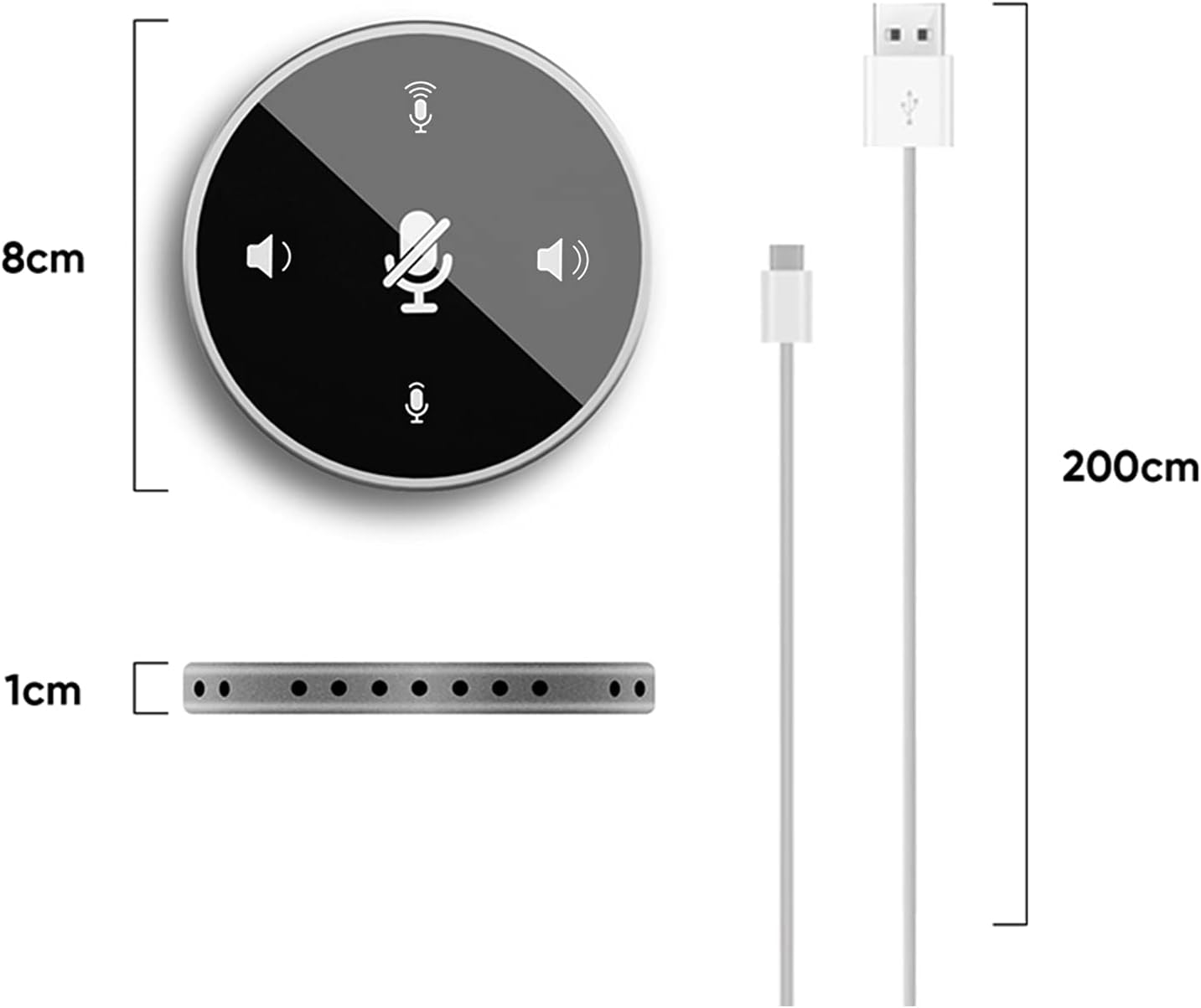
Image: The Y02 device placed in the center of a meeting table, demonstrating its effective sound pickup radius of 3 meters, suitable for multiple participants.
Noise-Canceling Technology
Equipped with advanced noise-canceling technology, the Y02 filters out ambient background noise to ensure clear and stable sound quality, facilitating efficient communication without distractions.

Image: A visual representation comparing audio waveforms "BEFORE" and "AFTER" noise-canceling technology, showing a reduction in background noise.
Indbygget højttaler
The integrated speaker unit provides clear audio output for conference calls, presentations, or even music playback, enhancing the overall user experience.

Billede: Eksploderet view of the Y02, highlighting the built-in speaker and its components for high-fidelity sound quality.
Opretholdelse
- Rensning: Brug en blød, tør klud til at rengøre enheden. Undgå at bruge flydende rengøringsmidler eller slibende materialer.
- Opbevaring: Opbevar enheden et køligt, tørt sted væk fra direkte sollys og ekstreme temperaturer.
- Håndtering: Håndter enheden forsigtigt for at undgå skader fra fald eller stød.
- Kabelpleje: Do not bend or crimp the USB cable excessively to avoid internal wire damage.
Fejlfinding
| Problem | Mulig årsag | Løsning |
|---|---|---|
| Enheden genkendes ikke af computeren. | USB connection issue, faulty USB port, or system driver conflict. |
|
| No sound from speaker or microphone not picking up audio. | Incorrect audio settings, muted device, or low volume. |
|
| Poor sound quality (echo, static, low volume). | Environmental interference, incorrect placement, or software settings. |
|
Specifikationer

Image: Diagram showing the approximate dimensions of the Yinhing Y02 device (8cm diameter, 1cm thickness) and its 200cm USB cable length.
| Feature | Detalje |
|---|---|
| Model | Y02 |
| Farve | Black (as per this variant) |
| Forbindelse | USB, Plug and Play |
| Sampling Rate | 48KHz |
| Højttalerkraft | 3W |
| Mikrofondirektivitet | Omnidirektionel (360°) |
| Udgangsimpedans | 75Ω |
| Følsomhed | -40dB ± 2dB |
| Effective Pickup Distance | 300 cm (3 meter) |
| Signal-støjforhold | >36dB |
| Trådlængde | 2m |
| Varens vægt | 6.7 ounce |
| Pakkedimensioner | 6.46 x 3.31 x 1.34 tommer |
| Kompatible enheder | Laptop, PC Computers |
Garanti og support
For warranty information or technical support, please refer to the documentation included with your purchase or contact Yinhing customer service through their official website or the retailer where the product was purchased. Please have your model number (Y02) and purchase details ready when contacting support.
Bemærk: Specifikke garantivilkår kan variere afhængigt af region og forhandler.