
1. Introduktion
Thank you for choosing the NPET CR87 Mechanical Gaming Keyboard. This compact 87-key keyboard is designed for both gaming and typing, offering a responsive experience with hot-swappable red switches and customizable RGB lighting. This manual provides detailed instructions for setup, operation, maintenance, and troubleshooting to ensure optimal performance and longevity of your device.
2. Pakkens indhold
Kontroller venligst, at alle varer er til stede i din pakke:
- NPET CR87 Mechanical Gaming Keyboard
- USB-C til USB-A-kabel
- Keycap aftrækker
- Extra 3 Red Switches
3. Opsætning
3.1 Tilslutning af tastaturet
The NPET CR87 keyboard uses a detachable USB-C cable for connectivity. Simply plug the USB-C end into the port on the keyboard and the USB-A end into an available USB port on your computer (Windows/macOS). No additional drivers are required for basic functionality.

Video: Demonstrates connecting the USB-C cable to the NPET CR87 keyboard and adjusting the foot supports.
3.2 Justering af tastaturhøjde
Tastaturet har to-stage adjustable feet on the underside to customize the typing angle for ergonomic comfort. Flip out the desired level of feet to raise the keyboard.

Image: The underside of the NPET CR87 keyboard, highlighting the double kickstand feet for height adjustment.
3.3 Hot-swapping-switche
The CR87 keyboard is equipped with 3-pin hot-swappable sockets, allowing you to easily change switches without soldering. Use the provided keycap puller and switch puller for this process.
- Gently pull off the keycap using the keycap puller.
- Brug afbrydertrækkeren til forsigtigt at gribe fat i afbryderen og trække den lige op.
- Juster stifterne på den nye kontakt med hullerne på printkortet, og tryk godt ned, indtil den klikker på plads.
- Udskift tastaturdækslet.

Billede: Et nærbillede view of the NPET CR87 keyboard with several keycaps removed, revealing the hot-swappable red switches underneath. Note: Only supports 3-pin switches.

Image: A visual guide demonstrating the process of removing and replacing mechanical switches on the keyboard, emphasizing the hot-swappable feature.
4. Betjeningsvejledning
4.1 RGB-lysstyring
The NPET CR87 features immersive RGB lighting with 19+ dynamic effects and 3 brightness levels. Use the Function (Fn) key combinations to customize your lighting experience:
- Fn + PrtSc: Cycle through 20 preset RGB lighting modes.
- Fn + Pil op: Increase brightness (3 levels).
- Fn + pil ned: Decrease brightness (3 levels).
- Fn + venstre pil: Reducer belysningshastigheden.
- Fn + højre pil: Øg belysningshastigheden.
- Fn + Esc: Turn off/on RGB lighting.
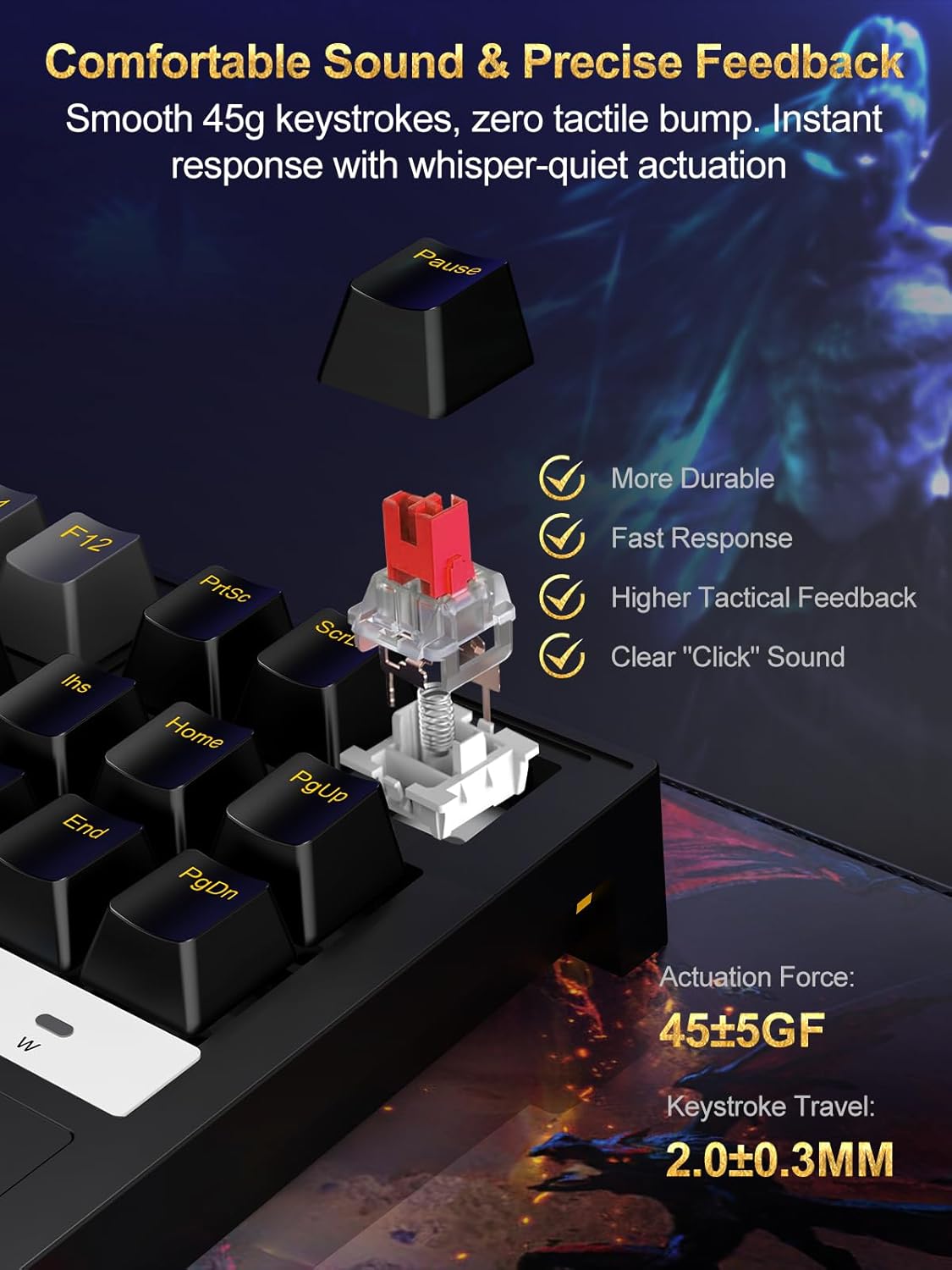
Image: The 87-key RGB gaming keyboard showcasing its customizable backlight with various colors and effects.

Image: A diagram illustrating the Function (Fn) key combinations for adjusting RGB modes, brightness, and speed on the keyboard.
5. Nøglefunktioner
5.1 Compact 87-Key Layout
The tenkeyless (TKL) 87-key design saves approximately 20% of desk space compared to full-sized keyboards, providing more room for mouse movement, which is beneficial for gaming.

Image: The compact 75% mechanical gaming keyboard held in a hand, illustrating its portability and space-saving design.
5.2 Anti-Ghosting with N-Key Rollover
Full N-key rollover ensures that every keystroke is registered accurately, even when multiple keys are pressed simultaneously. This prevents input lag and ghosting, crucial for fast-paced gaming and efficient typing.
5.3 Durable and Ergonomic Design
The keyboard features a reinforced polymer frame with IP56 dust and water resistance, offering enhanced durability. Doubleshot ABS keycaps provide long-lasting legends, and the 6° incline promotes natural wrist alignment for extended use.
5.4 Linear Red Switches
The pre-lubed 45g red switches offer a smooth, linear keystroke with minimal resistance and quiet actuation. This provides precise feedback and a comfortable typing experience, ideal for both gaming and office work.

Billede: En detaljeret view of a red mechanical switch, highlighting its smooth 45g keystrokes and precise feedback. Specifications for actuation force and keystroke travel are visible.
6. Vedligeholdelse
To ensure the longevity and optimal performance of your NPET CR87 keyboard, follow these maintenance tips:
- Regelmæssig rengøring: Brug en blød børste eller trykluft til at fjerne støv og snavs mellem tasterne.
- Rengøring af tastatur: For deeper cleaning, remove keycaps using the provided puller and wash them with mild soap and water. Ensure they are completely dry before reattaching.
- Spildhåndtering: Due to its IP56 rating, the keyboard offers some resistance to dust and water. In case of a spill, immediately unplug the keyboard, wipe off any liquid, and allow it to air dry completely before reconnecting.
- Kabelpleje: Undgå skarpe bøjninger eller for meget træk i USB-C-kablet for at forhindre skader.
7. Fejlfinding
If you encounter any issues with your NPET CR87 keyboard, please refer to the following common solutions:
- Tastaturet reagerer ikke:
- Sørg for, at USB-C-kablet er korrekt tilsluttet til både tastaturet og din computer.
- Prøv at tilslutte tastaturet til en anden USB-port på din computer.
- Test tastaturet på en anden computer for at udelukke et systemspecifikt problem.
- RGB-belysning virker ikke/forkert:
- Trykke Fn + Esc to ensure the lighting is not turned off.
- Skift mellem lystilstande ved hjælp af Fn + PrtSc.
- Juster lysstyrken ved hjælp af Fn + Pil op/ned.
- Specifikke taster virker ikke:
- Fjern forsigtigt tastaturdækslet og kontakten med de medfølgende værktøjer.
- Inspect the switch for any visible damage or debris. Clean if necessary.
- Try replacing the faulty switch with one of the spare switches provided.
- Input Lag or Ghosting:
- Ensure the keyboard is directly connected to a USB port on your computer, avoiding USB hubs if possible.
- Kontroller, at din computers operativsystem og drivere er opdaterede.
8. Specifikationer
| Feature | Detalje |
|---|---|
| Produktdimensioner | 16.81 x 6.5 x 1.97 tommer |
| Varens vægt | 1.96 pund |
| Varemodelnummer | ECCACR87-US |
| Mærke | NPET |
| Farve | Sort |
| Forbindelsesteknologi | USB (Type-C detachable) |
| Særlige funktioner | RGB, Hot-swappable Switch, Detachable Type-C cable |
| Kompatible enheder | Laptop, spillekonsol, pc |
| Støv/vandtæthed | IP56 |
| Switch Type | Linear Red Switches (45g actuation) |
9. Garanti og support
9.1 Garantioplysninger
NPET products are designed and manufactured to the highest quality standards. This product is covered by a limited warranty from the date of purchase against defects in materials and workmanship. Please retain your proof of purchase for warranty claims.
The warranty does not cover damage caused by accident, abuse, misuse, natural disaster, or unauthorized modification or repair. For detailed warranty terms and conditions, please refer to the official NPET webwebsted eller kontakt kundesupport.
9.2 Kundesupport
If you have any questions, require technical assistance, or need to make a warranty claim, please contact NPET Customer Support through the following channels:
- E-mail: support@npet.com (example email, please refer to actual product documentation for correct contact)
- Webwebsted: Visit the NPET Store on Amazon
- Telefon: (Please refer to actual product documentation for correct contact number)
Vores supportteam er tilgængeligt for at hjælpe dig med eventuelle produktrelaterede spørgsmål.