
Wagner Stern WT8700
Wagner Stern IntelliBrush Series WT8700 Electric Toothbrush User Manual
Model: WT8700
Indledning
Thank you for choosing the Wagner Stern IntelliBrush Series Electric Toothbrush. This manual provides essential information for the safe and effective use of your new electric toothbrush. Please read it thoroughly before first use and retain it for future reference.
Pakkens indhold
- 1 x Wagner Stern IntelliBrush Series Electric Toothbrush Handle
- 8 x DuPont-engineered Brush Heads
- 1 x Luxury Travel Case
- 1 x USB Wireless Charging Base
- 1 x Brugermanual (dette dokument)
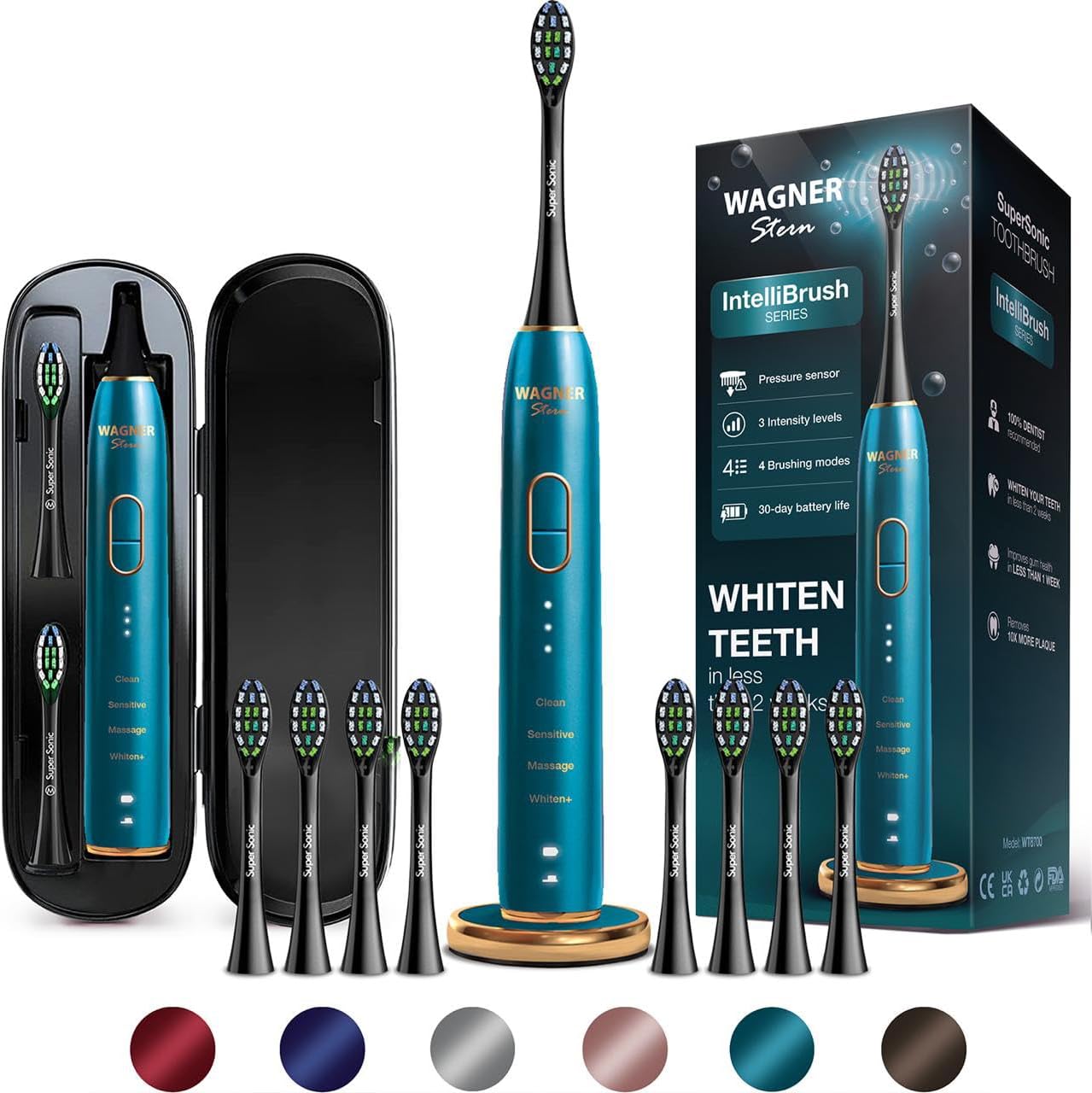
Billede: The Wagner Stern IntelliBrush Series electric toothbrush handle, eight brush heads, a travel case, and the wireless charging base.
Produkt overview
Familiarize yourself with the components of your IntelliBrush Series toothbrush:
- Børstehoved: Features W-shaped DuPont bristles for effective cleaning.
- Tandbørstehåndtag: Contains the motor, battery, and control electronics.
- Tænd/sluk-knap: Used to turn the toothbrush on/off and switch between brushing modes.
- Tilstandsindikatorlys: Display the currently selected brushing mode (Clean, Sensitive, Massage, Whiten+).
- Intensity Indicator Lights: Show the selected intensity level (3 levels).
- Pressure Sensor LED: Illuminates when excessive pressure is applied during brushing.
- Opladningsbase: For wireless charging of the toothbrush handle.

Billede: En detaljeret view of the IntelliBrush Series toothbrush, highlighting its various components and features such as the power button, mode indicators, intensity levels, and wireless charging base.
Opsætning
1. Montering af børstehovedet
Juster børstehovedet med metalskaftet på tandbørstehåndtaget. Tryk børstehovedet godt ned, indtil det klikker på plads. Sørg for, at det er sikkert fastgjort før brug.
2. Første opladning
Before first use, charge the toothbrush for at least 12 hours. Place the toothbrush handle onto the USB wireless charging base. The indicator lights will show charging status. A full charge provides up to 180 days of use.

Billede: The IntelliBrush Series toothbrush handle placed on its wireless charging base, illustrating the charging process.
Betjeningsvejledning
1. Tænd/sluk
Press the Power/Mode button once to turn the toothbrush on. Press and hold the Power/Mode button for 2 seconds to turn it off.
2. Selecting Brushing Modes
With the toothbrush on, press the Power/Mode button repeatedly to cycle through the 4 available modes:
- Ren: Standardtilstand til daglig plakfjerning.
- Følsom: Skånsom tilstand til følsomme tænder og tandkød.
- Massage: Gently stimulates gums for improved circulation.
- Whiten+: Designed for effective stain removal and whitening.
3. Justering af intensitetsniveauer
Each mode has 3 adjustable intensity levels. After selecting a mode, press the intensity adjustment button (usually located below the power button) to cycle through low, medium, and high intensity. The corresponding indicator lights will illuminate.
4. Smart Timer and QuadPacer
The toothbrush features a built-in 2-minute smart timer, recommended by dental professionals. It also includes a 30-second interval timer (QuadPacer) that signals when to move to the next quadrant of your mouth, ensuring a thorough clean.
5. Tryk sensor
The integrated pressure sensor protects your teeth and gums from excessive brushing force. If you press too hard, the toothbrush will automatically stop vibrating, and the Pressure Sensor LED will light up. Reduce pressure to resume normal operation.

Billede: A user holding the IntelliBrush Series toothbrush, illustrating the pressure sensor feature which prevents damage from excessive brushing force.
6. Børsteteknik
Apply a small amount of toothpaste to the brush head. Place the bristles against your teeth at a slight angle towards the gumline. Move the brush slowly from tooth to tooth, allowing the sonic vibrations to clean. Do not scrub. The QuadPacer will guide you through each quadrant of your mouth.
Opretholdelse
1. Rengøring af tandbørsten
- Efter hver brug skylles børstehovedet grundigt under rindende vand, mens tandbørsten stadig er på, for at fjerne eventuelle rester af tandpasta eller snavs.
- Remove the brush head and rinse the metal shaft area.
- Tør håndtaget af med adamp klæde. Nedsænk ikke håndtaget i vand.
2. Udskiftning af børstehoveder
For optimal hygiene and cleaning performance, replace your brush head every 3 months, or sooner if the bristles become frayed. Replacement brush heads are available for purchase.
3. Opladning
When the battery is low, the charging indicator light will flash. Place the toothbrush on the wireless charging base. Ensure the base is connected to a USB power source. The indicator lights will show charging progress. A full charge can last up to 180 days.
Fejlfinding
| Problem | Mulig årsag | Løsning |
|---|---|---|
| Tandbørsten tænder ikke. | Batteriet er afladet. | Oplad tandbørsten i mindst 12 timer. |
| Tandbørsten oplader ikke. | Charging base not connected or faulty. Toothbrush not properly placed on base. | Ensure the USB charging base is securely connected to a working USB power source. Place the toothbrush handle firmly on the charging base. |
| Vibrationen er svag eller ujævn. | Low battery. Brush head not securely attached. | Recharge the toothbrush. Ensure the brush head is firmly clicked into place. |
| Pressure Sensor LED lights up frequently. | For meget tryk under børstning. | Reduce the pressure applied to your teeth and gums. Allow the sonic vibrations to do the work. |
Specifikationer
- Model: WT8700
- Vibrationer pr. minut (VPM): Op til 50,000
- Batteritype: Lithium-ion
- Batterilevetid: Op til 180 dage på en enkelt opladning
- Opladning: USB Wireless Charging
- Børstetilstande: 4 (Clean, Sensitive, Massage, Whiten+)
- Intensitetsniveauer: 3 pr. tilstand
- Timer: 2-minute Smart Timer with 30-second QuadPacer
- Særlige funktioner: Pressure Sensor, Brush Replacement Alert LED
- Dimensioner: 5.3 x 1.5 x 8.9 tommer (Produkt)
- Vægt: 14.11 ounce
Sikkerhedsoplysninger
- Kvælningsfare: Keep brush heads and small parts out of reach of children.
- Brug ikke dette produkt til andre formål end mundhygiejne.
- Consult your dentist before using this product if you have severe gum disease or have undergone oral surgery.
- Do not attempt to disassemble or repair the toothbrush. Contact customer support for assistance.
- Hold opladningsbasen væk fra vand.
Garanti og support
The Wagner Stern IntelliBrush Series Electric Toothbrush is covered by a 1 års udskiftningsgaranti fra købsdatoen. Denne garanti dækker fejl i materialer og udførelse ved normal brug.
For warranty claims, technical support, or any questions regarding your product, please contact Wagner Stern customer service. Refer to the contact information provided with your purchase or visit the official Wagner Stern webwebsted.
Ask a question about this manual
Ask about setup, troubleshooting, compatibility, parts, safety, or missing instructions. Manuals+ will review the question and use this page’s manual context to help answer it.