1. Produktet er slutview
This RONGJI car radio is an advanced 9-inch IPS touch screen multimedia system designed for Opel Astra H models from 2004 to 2014. It operates on an Android OS with an Octa-Core CPU, 4GB RAM, and 32GB ROM, providing a responsive and smooth user experience. Key features include built-in Wireless/Wired Car-Play and Android Auto, Bluetooth for hands-free calling and music streaming, FM/AM radio with RDS, a powerful DSP for enhanced audio, integrated WiFi, and GPS navigation capabilities.
The unit features a 1280*720 high-resolution capacitive touch screen, supporting split-screen functionality for simultaneous display of two applications. It also supports steering wheel controls for convenient operation while driving.
2. Pakkens indhold
Bekræft, at alle komponenterne nedenfor er inkluderet i din pakke. Hvis der mangler eller er beskadigede dele, bedes du kontakte kundesupport.
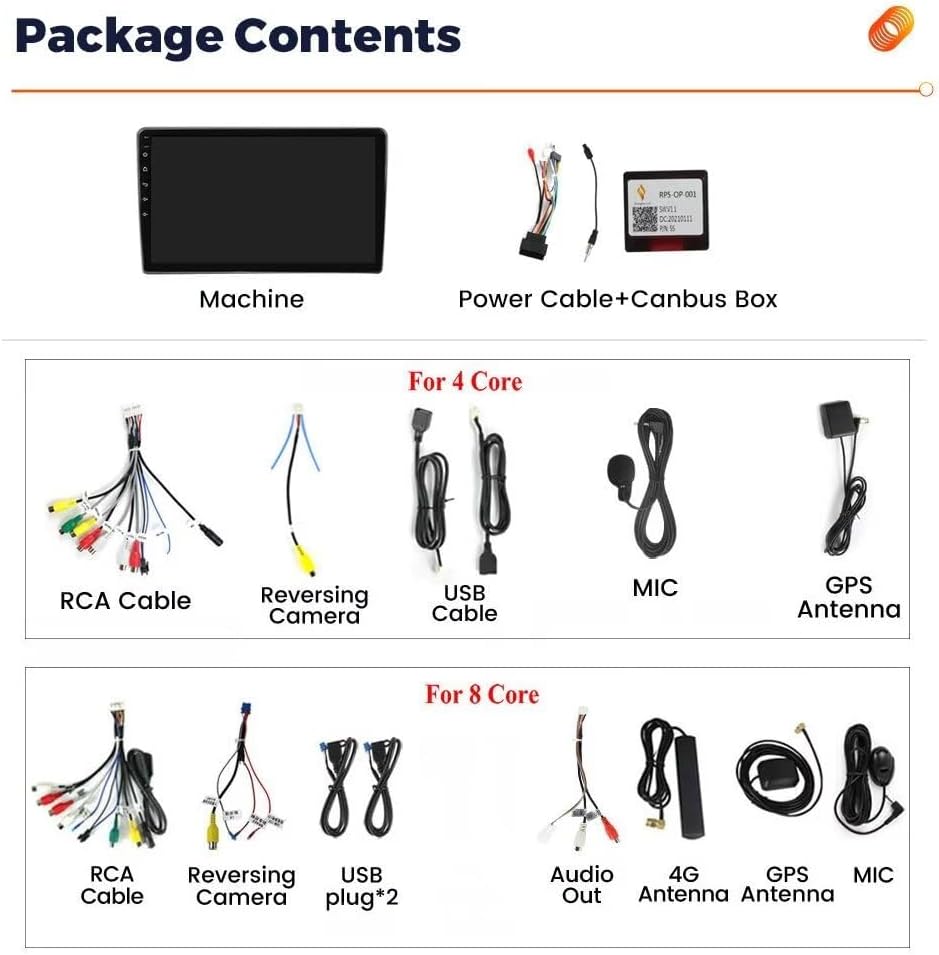
This image displays the various components included in the package. It shows the main head unit, power cable with Canbus box, RCA cables, reversing camera cable, USB cables, external microphone, GPS antenna, and for 8-core models, an additional 4G antenna and extra audio output cables.
- Main Head Unit (9-inch IPS Touch Screen)
- Strømkabel + Canbus-boks
- RCA-kabelsæt
- Indgangskabel til bakkamera
- USB Cables (x2 for 8-Core models)
- Ekstern mikrofon
- GPS antenne
- 4G Antenna (for 8-Core models)
3. Opsætning og installation
Before beginning installation, ensure your vehicle is compatible with this unit. This car radio is specifically designed for Opel Astra H models manufactured between 2004 and 2014. It is recommended to compare your car's dashboard photo with the product images to confirm compatibility. If unsure, consult a professional installer or contact customer support with photos of your dashboard and the back of your OEM radio.
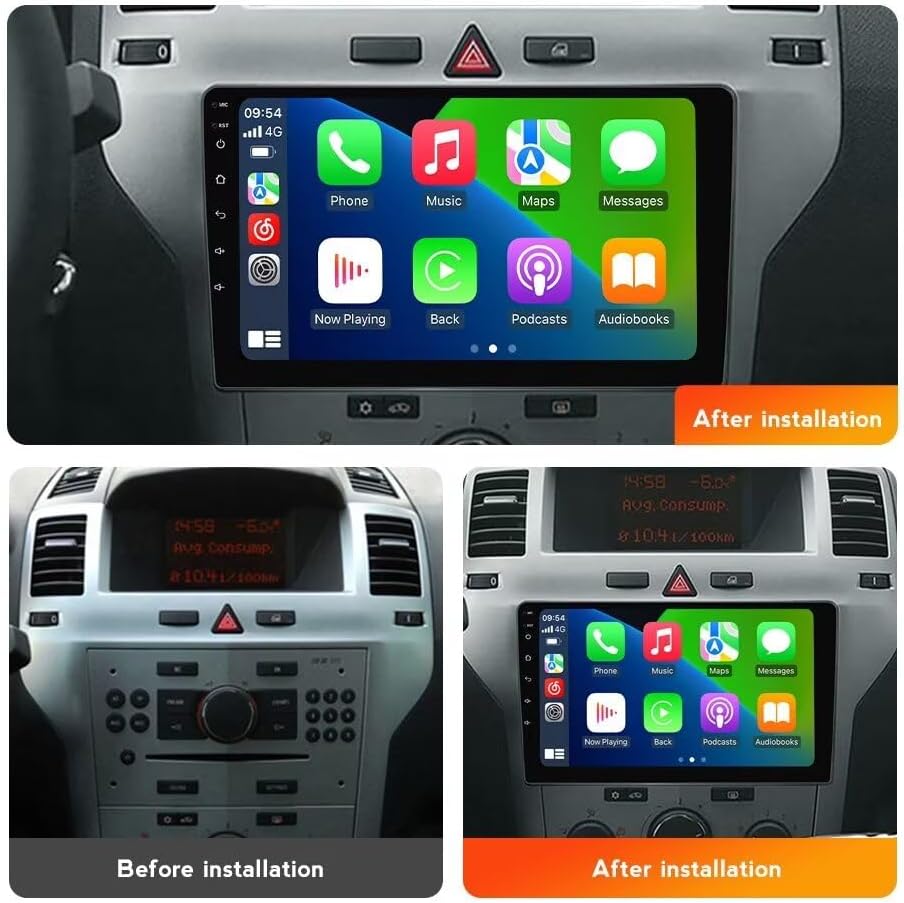
This image illustrates the visual transformation of the car's dashboard. The 'Before installation' view shows the original car radio, while the 'After installation' view displays the new 9-inch IPS touch screen car radio seamlessly integrated into the dashboard.
3.1 Basic Installation Steps:
- Afbryd batteriet: Før alt elektrisk arbejde skal bilens negative batteripol afbrydes for at undgå kortslutninger.
- Remove OEM Radio: Fjern forsigtigt den eksisterende bilradio og instrumentbrætbeklædningen. Se bilens servicehåndbog for specifikke instruktioner.
- Tilslut ledningsnet: Connect the provided power cable and Canbus box to the vehicle's wiring harness. Ensure all connections are secure.
- Tilslut ydre enheder: Attach the GPS antenna, external microphone, USB cables, and reversing camera cable (if applicable) to the corresponding ports on the new head unit. Position the GPS and 4G antennas in locations with clear signal reception.
- Test funktionalitet: Før instrumentbrættet samles helt igen, skal du midlertidigt tilslutte batteriet og tænde for enheden for at teste grundlæggende funktioner som strøm, lyd og berøringsskærmens respons.
- Sikker enhed: Monter den nye hovedenhed sikkert i åbningen på instrumentbrættet.
- Saml dashboardet igen: Genmonter alle instrumentbrætbeklædningsdele.
- Gentilslut batteri: Tilslut køretøjets negative batteripol igen.
Ratbetjening (SWC): This unit supports digital steering wheel controls. After installation, you may need to configure the SWC settings in the unit's system menu to map the buttons correctly.
4. Betjeningsvejledning
4.1 CarPlay og Android Auto
The unit features built-in Wireless and Wired Car-Play and Android Auto. This allows for intuitive access to calls, music, navigation, and other apps from your smartphone, enhancing driving safety and convenience.

This image illustrates the user interfaces for Car-Play and Android Auto as displayed on the car radio. It shows how both wired and wireless connections are supported for these smartphone integration features.
- Kablet forbindelse: Connect your smartphone to the unit via a USB cable.
- Trådløs forbindelse: Enable Bluetooth and Wi-Fi on your smartphone and pair it with the car radio. Follow the on-screen prompts to initiate Car-Play or Android Auto.
4.2 Bluetooth (BT)
The integrated Bluetooth module supports hands-free calling, phone book synchronization, and audio streaming. The unit has a built-in microphone, and an external microphone is also provided for clearer call quality.
- Parring: Go to the Bluetooth settings on the car radio, enable Bluetooth, and search for available devices on your smartphone. Select the car radio's name to pair.
- Håndfri opkald: Once paired, you can make and receive calls directly from the car radio's interface.
- Musikstreaming: Play audio from your smartphone through the car's speakers via Bluetooth.
4.3 FM/AM-radio med RDS
Enjoy stable radio frequency reception with the built-in FM/AM tuner and RDS (Radio Data System) support. You can search for channels automatically or manually.

This image displays two main features: the FM/AM radio interface, showing frequency tuning and station presets, and the DSP Processor interface, which allows for detailed audio equalization and sound effect adjustments.
- Automatisk søgning: Access the radio application and select the automatic search function to scan and save available stations.
- Manuel indstilling: Juster frekvensen manuelt for at finde bestemte stationer.
- Presets: Gem dine yndlingsstationer for hurtig adgang.
4.4 GPS-navigation
The unit includes a built-in GPS module and an external GPS antenna for accurate navigation. You can use online maps (with internet connection) or download offline maps for navigation without mobile data.

This image highlights the GPS navigation capabilities, showing a map display with real-time traffic and positioning. It also illustrates the WiFi support, indicating how the unit can connect to the internet for online services and app downloads.
- Onlinekort: Connect to Wi-Fi and use pre-installed or downloaded navigation apps.
- Offlinekort: Within the navigation app, download maps for your desired regions to use without an internet connection.
4.5 Wi-Fi-forbindelse
The built-in Wi-Fi receiver allows you to connect the car radio to your home Wi-Fi network or a mobile hotspot. This enables access to online content, app downloads, and real-time services.
- Tilslutning til Wi-Fi: Go to the system settings, select Wi-Fi, and choose your desired network. Enter the password if required.
- App downloads: Access the app store to download various applications.
4.6 Opdelt skærmfunktion
The unit supports split-screen functionality, allowing you to display two applications simultaneously on the 9-inch screen. This can be useful for navigation while listening to music or browsing.

This image demonstrates the split-screen feature, showing two applications (e.g., web browser and music player) running side-by-side. It also illustrates the steering wheel control interface, highlighting how physical buttons on the steering wheel can be used to control the unit.
- Aktivering af delt skærm: Typically, this can be done by long-pressing the recent apps button or dragging an app to one side of the screen.
4.7 DSP Processor (Equalizer)
The built-in DSP (Digital Signal Processor) allows for advanced audio customization. You can adjust various frequencies to achieve optimal sound quality tailored to your preferences.
- Accessing DSP: Navigate to the audio settings or a dedicated DSP app on the unit.
- Justering af indstillinger: Use the equalizer to fine-tune bass, treble, and mid-range frequencies. Pre-set sound modes may also be available.
5. Vedligeholdelse
To ensure the longevity and optimal performance of your RONGJI car radio, follow these maintenance guidelines:
- Rengøring af skærm: Brug en blød, fnugfri klud lidt damprengøres med vand eller en skærmrens, der er specielt designet til elektronik. Undgå skrappe kemikalier eller slibende materialer.
- Softwareopdateringer: Periodically check for available software updates through the unit's system settings. Updates can improve performance, add new features, and fix bugs.
- Undgå ekstreme temperaturer: Udsæt ikke enheden for ekstrem varme eller kulde i længere perioder, da dette kan påvirke dens elektroniske komponenter.
- Kabelforbindelser: Sørg for, at alle kabler er korrekt tilsluttet og ikke er klemt eller beskadiget.
6. Fejlfinding
Hvis du støder på problemer med din bilradio, kan du se følgende almindelige fejlfindingstrin:
- Ingen strøm:
- Kontroller alle strømtilslutninger og sikringer.
- Sørg for, at køretøjets batteri er korrekt tilsluttet og opladet.
- Ingen lyd:
- Verify volume settings are not muted or too low.
- Kontroller højttalerledningernes forbindelser.
- Sørg for, at den korrekte lydkilde er valgt.
- Berøringsskærm reagerer ikke:
- Restart the unit (turn off the car ignition and restart).
- Perform a system reset if available in the settings (this may erase user data).
- GPS-signaltab:
- Sørg for, at GPS-antennen er korrekt tilsluttet og har en klar view af himlen.
- Tjek GPS-indstillingerne i navigationsapplikationen.
- Problemer med Bluetooth-forbindelse:
- Sørg for, at Bluetooth er aktiveret på både bilradioen og din smartphone.
- Slet tidligere parringer, og forsøg at parre enhederne igen.
- Genstart begge enheder.
- Car-Play/Android Auto Not Working:
- Prøv et andet USB-kabel til kabelforbindelser.
- Sørg for, at din telefons operativsystem er opdateret.
- Check Car-Play/Android Auto settings on both the unit and your phone.
Hvis disse trin ikke løser problemet, bedes du kontakte kundesupport for yderligere assistance.
7. Specifikationer
| Feature | Specifikation |
|---|---|
| Skærmstørrelse | 9 tommer |
| Display Type | IPS LCD |
| Berøringsskærmtype | Kapacitiv |
| Operativsystem | Android |
| CPU | Octa Core |
| Hukommelse (RAM) | 4 GB |
| Lager (ROM) | 32 GB |
| Opløsning | 1280*720 |
| Forbindelsesteknologi | Bluetooth, WiFi |
| Særlige funktioner | Built-in Car-Play & Android Auto, GPS Navigation, FM/AM Radio with RDS, DSP Processor, Steering Wheel Control, Split Screen Function |
| Type køretøjstjeneste | Car (Opel Astra H 2004-2014) |
| Stemmekommando | Mikrofon, berøringsskærm |
| Korttype | Verdensomspændende (online/offline) |