
1. Introduktion
This manual provides essential information for the safe and effective use of your Sony Alpha ILCE-7M3 Full-Frame 24.2MP Mirrorless Digital SLR Camera. Please read this manual thoroughly before operating the camera and retain it for future reference.
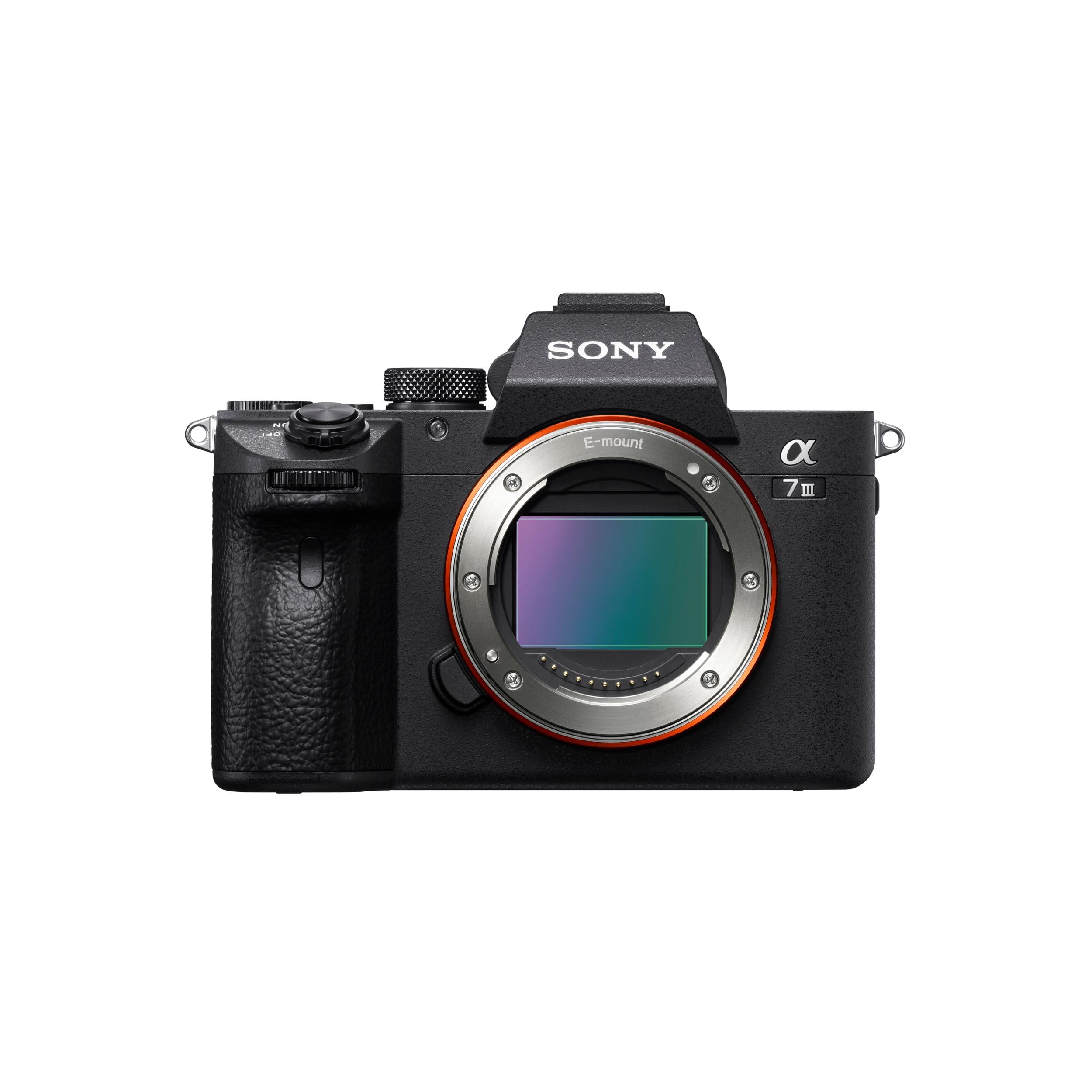
Figure 1: Sony Alpha ILCE-7M3 Camera Body
2. Indhold i kassen
Bekræft, at alle nedenstående varer er inkluderet i din kamerapakke:
- Genopladeligt batteri NP-FZ100
- AC adapter
- Strømledning
- Skulderrem
- Kropshætte
- Tilbehør til sko
- Okularkop
- Micro USB kabel
3. Opsætningsvejledning
3.1. Opladning af batteriet
- Insert the NP-FZ100 rechargeable battery into the AC adapter.
- Tilslut netledningen til AC-adapteren og derefter til en stikkontakt.
- Afgiften lamp on the AC adapter will indicate charging status. Charge until the lamp slukker.
3.2. Isætning af batteri og hukommelseskort
- Open the battery insertion slot cover located at the bottom of the camera.
- Insert the charged NP-FZ100 battery with the correct orientation until it locks into place.
- Open the memory card slot cover (the camera has two available memory slots).
- Insert a compatible memory card into the slot until it clicks. Ensure the card is facing the correct direction.
- Luk begge dæksler forsvarligt.
3.3. Montering af et objektiv
The Sony Alpha ILCE-7M3 uses a Sony E-mount. Align the white index on the lens with the white index on the camera body, then rotate the lens clockwise until it clicks into place.
3.4. Kamera overview

Figur 2: Forside og top View af kamera
- 1. ON/OFF (Power) switch/Shutter button
- 2. Front dial
- 3. Infrared remote sensor
- 4. Linseudløserknap
- 5. Wi-Fi/Bluetooth-antenne (indbygget)
- 6. Mikrofon
- 7. AF illuminator/Self-timer lamp

Figure 3: Rear and Top View af kamera
- 1. Eyepiece Cup
- 2. Viewfinder
- 3. C3-knap (brugerdefineret knap 3)
- 4. MENU-knap
- 5. Skærm (Til berøringsbetjening: berøringspanel/berøringsplade)
- 6. Øjensensor
- 7. MOVIE (Film)-knap
- 8. Til optagelse: AF-ON (AF On)-knap
- 9. Rear dial
- 10. Til optagelse: AEL-knap
- 11. Multi-selector
- 12. Til optagelse: Fn-knap (funktion).
- 13. Kontrolhjul
- 14. Adgang lamp
- 15. Til optagelse: C4-knap (brugerdefineret knap 4)
- 16. (Playback) button

Figur 4: Top og side View af kamera
- 1. Multi Interface Sko*
- 2. Funktionsvælger
- 3. C2-knap (brugerdefineret knap 2)
- 4. C1-knap (brugerdefineret knap 1)
- 5. Exposure compensation dial
- 6. Battery insertion slot
- 7. Hul til stativ
*For detaljer om kompatibelt tilbehør til multiinterface-skoen og Multi/Micro USB-terminalen, besøg Sonys hjemmeside. webeller kontakt din Sony-forhandler eller et lokalt autoriseret Sony-serviceværksted. Tilbehør til tilbehørsskoen kan også bruges. Funktion med tilbehør fra andre producenter garanteres ikke.

Figur 5: Side View of Camera Ports
- 1. (mikrofon) stik
- 2. Kroge til skulderrem
- 3. (Headphones) jack
- 4. HDMI mikrostik
- 5. USB Type-C terminal
- 6. Opladning lamp
- 7. Multi/Micro USB-terminal*
- 8. (N mark)
*For detaljer om kompatibelt tilbehør til multiinterface-skoen og Multi/Micro USB-terminalen, besøg Sonys hjemmeside. website or consult your Sony dealer or local authorized Sony service facility. Operations with other manufactures' accessories are not guaranteed.
4. Betjeningsvejledning
4.1. Tænd/sluk
For at tænde eller slukke kameraet skal du skubbe til TÆND/SLUK-knappen, der er placeret omkring udløserknappen.
4.2. Grundlæggende fotografering
Select your desired shooting mode using the Mode dial. Available modes include Automatic, Manual, Aperture Priority, Shutter Priority, Program, and Custom. Press the shutter button halfway to focus, then press fully to capture an image.

Figure 6: High-Resolution Image Capture
4.3. Autofocus (AF) System
The ILCE-7M3 features a wider, faster, and more steadfast AF performance, including 4D FOCUS and tenacious AF/AE tracking. It supports Real-Time Eye Auto Focus for humans and Real Time Animal Eye AF, revolutionizing portraiture and wildlife photography.

Figure 7: Eye AF in Action
4.4. Kontinuerlig optagelse
Capture fast-moving subjects with continuous shooting at up to 10 frames per second (fps) with tenacious AF/AE tracking. This allows for capturing critical moments in sports or action photography.

Figure 8: Capturing Action with Continuous Shooting
4.5. Videooptagelse
The camera supports 4K HDR video recording with high resolution, wide dynamic range, and a wide color gamut. Video capture resolution is 2160p, with frame rates of 24, 30, and 60 fps, using the XAVC format.

Figure 9: Realistic Movies with 4K HDR
4.6. Billedstabilisering
Benefit from 5-axis optical in-body image stabilization, which compensates for camera shake, allowing for sharper images and smoother video, especially in low light or with longer focal lengths.
4.7. Image Quality and Low Light Performance
The camera features a back-illuminated 24.2MP full-frame sensor and the enhanced BIONZ X™ Image Processing System, delivering stunning image quality with natural gradations and reduced noise, even in high-resolution images captured in low light conditions.

Figure 10: Enhanced BIONZ X™ Image Processing

Figure 11: Low Noise in High-Resolution Images
4.8. Forbindelse
The camera includes built-in Wi-Fi/Bluetooth for easy sharing and remote control. It also features USB Type-C, HDMI micro, microphone, and headphone jacks for versatile connectivity options. One-touch sharing and smooth PC tethering are supported.
4.9. Tilpasning
The ILCE-7M3 offers a customized menu system and programmable C1, C2, C3, and C4 buttons, allowing users to tailor camera controls to their specific shooting preferences.
5. Vedligeholdelse
5.1. Rengøring af kameraet
- Brug en blød, tør klud til at rengøre kamerahuset.
- For the lens and sensor, use specialized cleaning tools and solutions designed for camera optics. Avoid touching the sensor directly.
- Brug ikke organiske opløsningsmidler såsom alkohol eller fortynder til at rengøre kameraet.
5.2. Batteripleje
- Opbevar batteriet på et køligt, tørt sted, når det ikke er i brug.
- Undgå at aflade batteriet helt i længere perioder.
- Oplad batteriet regelmæssigt, selvom det ikke er i brug, for at forlænge dets levetid.
5.3. Opbevaring
When storing the camera for an extended period, remove the battery and memory card. Store the camera in a dry, dust-free environment, preferably with a desiccant to prevent mold and mildew.
6. Fejlfinding
Hvis du støder på problemer med dit kamera, kan du bruge følgende almindelige løsninger:
- Kameraet tænder ikke: Sørg for, at batteriet er fuldt opladet og korrekt isat. Kontroller, om tænd/sluk-knappen er i 'ON'-positionen.
- Kan ikke tage billeder: Verify that a memory card is inserted and has sufficient free space. Check the selected shooting mode and focus settings.
- Billederne er slørede: Ensure the lens is clean. Check focus settings and image stabilization. Use a higher shutter speed or tripod in low light.
- Batteriet aflades hurtigt: Reduce screen brightness, turn off Wi-Fi/Bluetooth when not in use, and limit continuous shooting. Ensure the battery is not old or damaged.
For more complex issues, consult the comprehensive online help guide available on the Sony support webwebstedet eller kontakt Sonys kundesupport.
7. Specifikationer
| Modelnavn | ILCE |
| Fotosensor opløsning | 24.2 MP |
| Fotosensor størrelse | Fuld ramme (35 mm) |
| Sensortype | CMOS |
| Billedstabilisering | 5-axis optical in-body image stabilization |
| Kompatible monteringer | Sony E |
| Kontinuerlig optagelseshastighed | 10 FPS |
| Videooptagelsesopløsning | 2160p (4K) |
| Videooptagelsesformat | XAVC |
| Display Type | Vipbar LCD |
| Tilgængelige hukommelsespladser | 2 |
| Battericelletype | Lithium Ion (NP-FZ100) |
| Varens vægt | 650 gram |
| Forbindelse | USB, Wi-Fi, Bluetooth, HDMI micro, Microphone, Headphones |
| Oprindelsesland | Thailand |

Figure 12: Camera Dimensions and Key Specifications
8. Garantioplysninger
This Sony Alpha ILCE-7M3 camera comes with a 2 års fabriksgaranti from the date of purchase. Please retain your proof of purchase for warranty claims. The warranty covers manufacturing defects under normal use. It does not cover damage caused by misuse, accidents, unauthorized repairs, or normal wear and tear.
9. Kundesupport
For technical assistance, service, or inquiries, please contact Sony customer support:
- Importørens kontaktoplysninger: Sony India Private Limited, A-18, Mohan Co-operative Industrial Estate, Mathura Road, New Delhi 110044, Indien
- Gratis: 1800-103-7799
- E-mail: Sonyindia.care@ap.sony.com
- Fabrikantens kontaktoplysninger: Sony Imaging Products & Solutions Inc., 1-7-1 Konan, Minato-KU, Tokyo 108-0075, Japan
Du kan også besøge den officielle Sony-support webwebsted for de nyeste drivere, firmwareopdateringer og detaljerede ofte stillede spørgsmål.