
1. Introduktion
Thank you for choosing the RUJIXU Large Digital Kitchen Scale. This precision instrument is designed for accurate weighing in various settings, from home kitchens to commercial environments. With a maximum capacity of 30kg (66lb) and multiple functions including tare, unit conversion, price computing, and counting, this scale offers versatility and reliability. Please read this manual thoroughly before use to ensure proper operation and longevity of your device.
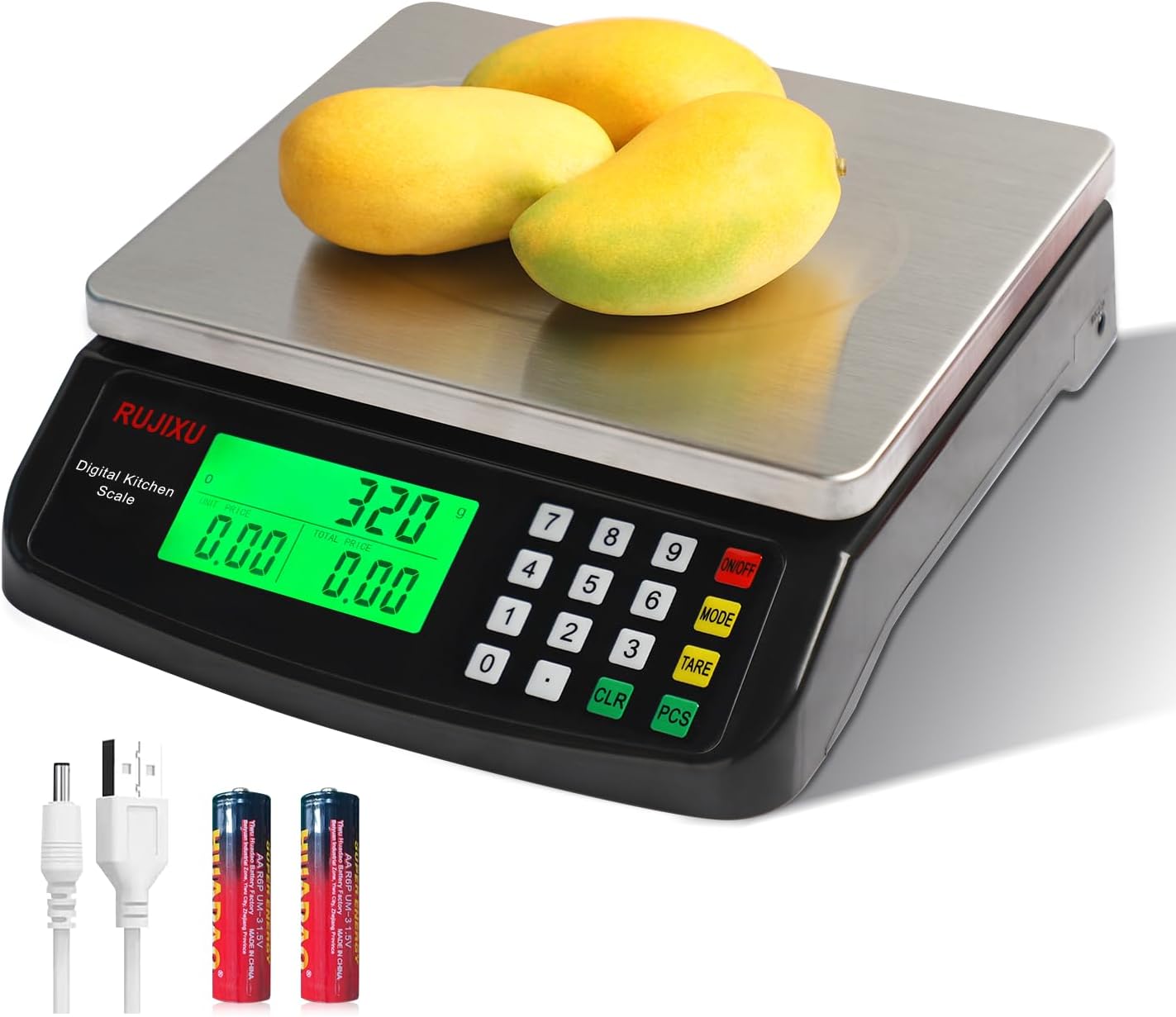
Image 1.1: RUJIXU Large Digital Kitchen Scale (Model DT-580)
2. Produktkomponenter og funktioner
2.1 Nøglefunktioner
- Høj kapacitet: Weighs items from 3g up to 30kg (66lb).
- Flere enheder: Supports grams (G), kilograms (KG), pounds (LB), and ounces (OZ).
- Tara funktion: Allows subtraction of container weight for net measurements.
- Counting Function (PCS): Enables counting of small, identical items.
- Price Computing: Calculates price based on weight and unit price input.
- LCD baggrundsbelyst skærm: Provides clear and easy-to-read measurements, even in varying light conditions.
- Holdbar konstruktion: Features a stainless steel platform and ABS plastic frame.
- Dobbelt strømforsyning: Operates with an AC power adapter or 2x 1.5V AA batteries (not included).
- Auto-sluk: Automatically shuts off after 120 seconds of inactivity to conserve power.
2.2 Dimensioner

Image 2.1: Scale Dimensions
The scale features a stainless steel weighing surface measuring approximately 7 inches by 8.7 inches (18cm by 22cm). The overall product dimensions are 9.8 x 9 x 2.5 inches (24.9 x 22.9 x 6.4 cm).
3. Opsætning
3.1 Udpakning
Carefully remove all components from the packaging. Ensure that the scale, AC power adapter, and user manual are present.
3.2 Strømforsyning
The scale can be powered by either the included AC power adapter or two 1.5V AA batteries (not included).
- AC strøm: Connect the AC power adapter to the scale's power input port and then plug it into a standard electrical outlet.
- Batteristrøm: Open the battery compartment on the underside of the scale and insert two 1.5V AA batteries, observing the correct polarity.
Note: The two power sources cannot be used simultaneously. If both are connected, the scale will prioritize AC power.

Image 3.1: Power Supply Modes
3.3 Placering
Place the scale on a firm, flat, and stable surface to ensure accurate readings. Avoid placing it near strong electromagnetic fields, vibrations, or extreme temperature changes.
4. Betjening
4.1 Tænd/sluk
- For at tænde vægten skal du trykke på ON/OFF button. The display will light up and show "0.000".
- For at slukke vægten skal du trykke på og holde ON/OFF -knappen i et par sekunder, indtil displayet slukker.
4.2 Enhedsskift
The scale supports four units of measurement: grams (G), kilograms (KG), pounds (LB), and ounces (OZ).
- Tryk på knappen med vægten tændt MODE knappen for at gennemgå de tilgængelige enheder. Den valgte enhed vises på LCD-skærmen.

Image 4.1: Unit Switching
4.3 Tara funktion
Tarafunktionen giver dig mulighed for at trække vægten af en beholder fra, så du kun måler nettovægten af dens indhold.
- Place the empty container on the weighing platform. The display will show the container's weight.
- Tryk på TARA knappen. Displayet nulstilles til "0.000".
- Læg de varer, du ønsker at veje, i beholderen. Displayet viser nu kun vægten af varerne.

Image 4.2: Tare Function Steps
4.4 Tællefunktion (PCS)
The PCS function is useful for counting small, identical items such as screws, coins, or beads.
- Turn on the scale and ensure it reads "0.000".
- Tryk og hold på PCS button for approximately 5 seconds. The display will show a sampstørrelse (f.eks. "25").
- Use the number pad to enter the quantity of items you will use as a sample (e.g., "10", "20", "50", "100").
- Placer sample quantity of items on the platform.
- Tryk på PCS knappen igen for at bekræfteampVægten er nu kalibreret til optælling.
- Fjern sample and place the bulk quantity of items you wish to count on the platform. The display will show the total count.
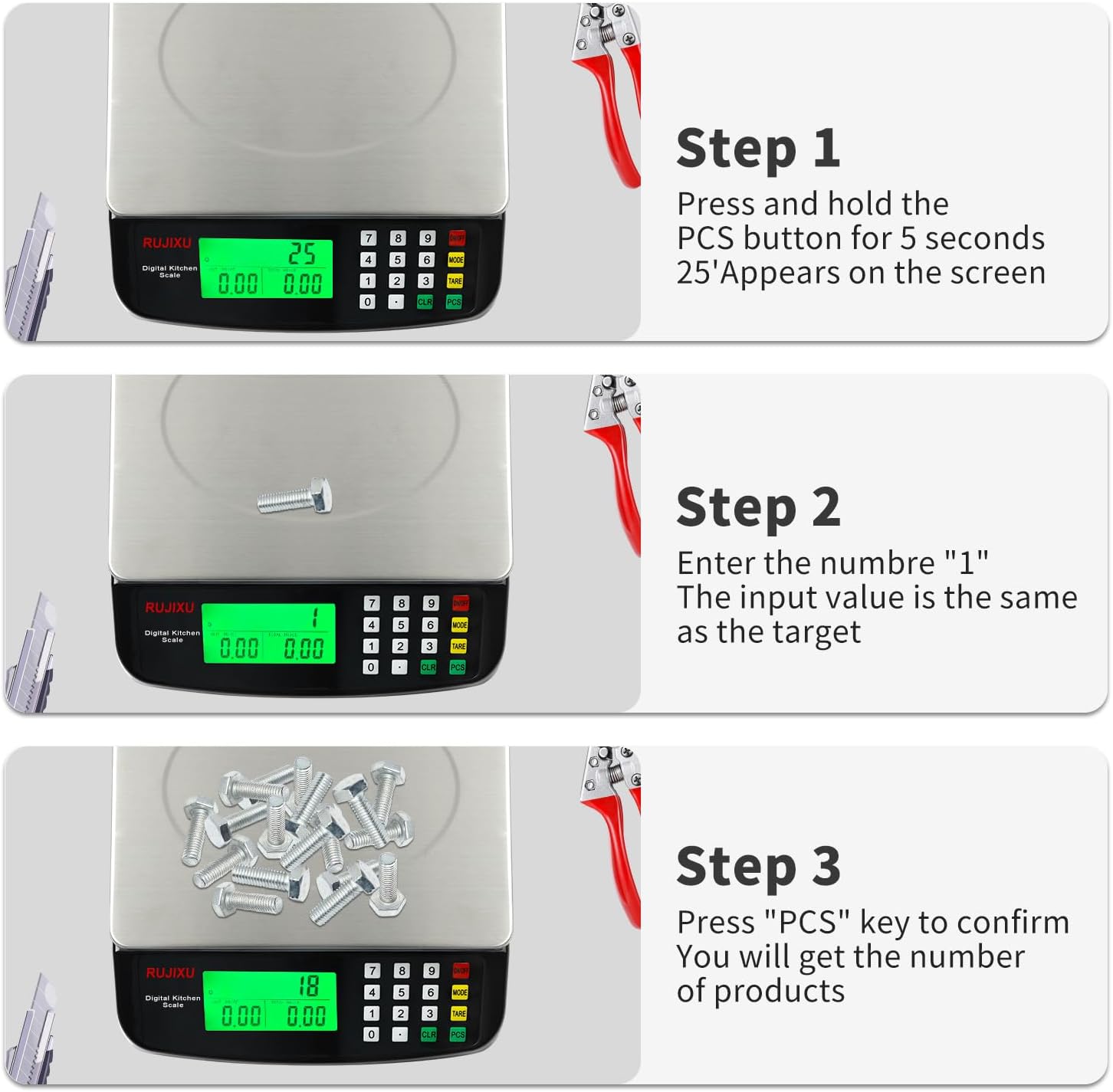
Image 4.3: Counting Function Steps
4.5 Price Computing Function
This function allows you to calculate the total price of items based on their weight and a set unit price.
- Turn on the scale and ensure it reads "0.000".
- Place the item(s) to be weighed on the platform. The scale will display the weight.
- Using the number pad, enter the unit price (e.g., price per KG or LB).
- Vægten beregner og viser automatisk den samlede pris.

Image 4.4: Price Computing in Use
4.6 Automatisk slukning
To conserve battery life, the scale is equipped with an automatic shut-off feature. If no operation is performed for approximately 120 seconds, the scale will power down.
5. Vedligeholdelse
5.1 Rengøring
The stainless steel platform and ABS plastic body are designed for easy cleaning.
- Tør vægtens overflade af med en blød kludamp klæde.
- For stubborn stains, a mild detergent can be used.
- Do not immerse the scale in water or use abrasive cleaners, as this can damage the electronic components.
- Sørg for, at vægten er helt tør før opbevaring eller næste brug.

Image 5.1: Food-Grade Stainless Steel Platform
5.2 Opbevaring
Opbevar vægten et køligt, tørt sted væk fra direkte sollys og ekstreme temperaturer. Fjern batterierne, hvis den opbevares i en længere periode, for at forhindre lækage.
6. Fejlfinding
- Skalaen tænder ikke:
- Check if the AC adapter is securely plugged in.
- If using batteries, ensure they are inserted correctly with the right polarity and are not depleted. Replace if necessary.
- Unøjagtige aflæsninger:
- Sørg for, at vægten er placeret på en flad, stabil og jævn overflade.
- Avoid placing the scale near sources of vibration or drafts.
- Make sure no objects are touching the scale or platform during weighing.
- Recalibrate the scale if possible (refer to specific instructions if available, otherwise, turn off and on).
- Ensure the weight limit (30kg/66lb) is not exceeded.
- Skærmen er svag eller ulæselig:
- Check battery level if operating on batteries.
- Ensure the scale is not in direct sunlight or extremely bright conditions that might wash out the display. The LCD is designed for full view, but extreme glare can still affect visibility.
- "EEEE" or "O-Ld" error message:
- This indicates an overload. Remove items from the platform immediately to prevent damage.

Image 6.1: Improved LCD Display Visibility
7. Specifikationer
| Feature | Detalje |
|---|---|
| Produkt model | DT-580 |
| Enhed | G, KG, LB, OZ |
| Max vægtkapacitet | 30 kg / 66 lb |
| Minimum vægt | 2g-3g |
| Præcisionsmåling | 1g |
| Funktioner | Tare function, Price Calculator, Accurate Counting |
| Skærm | Fuld view LCD display (7.5x3.8cm) |
| Auto-Off | 120 seconds automatic shut-off when no operation |
| Anbefalede anvendelser | Food baking, market business, cooking meal |
| Food Scale Size | 24 × 21.6 × 6.5 cm (9.8 x 9 x 2.5 tommer) |
| Stainless Weighing Surface | 21.6 × 17.5 cm (8.5 x 6.9 inches) |
| Varens vægt | 1.16 kg (2.55 lb) |
| Food Scale Material | ABS plast og rustfrit stål |
| Strømforsyning | AC6V Power Adapter, 2x 1.5V AA battery (Batteries not included) |
| Pakken inkluderer | 1x Kitchen Scale, 1x Power Adapter, 1x User Manual |

Billede 7.1: Tabel med produktspecifikationer