Indledning
This manual provides detailed instructions for the safe and effective use of your ThermoLife 3-in-1 Red Light Therapy Knee Massager. This device combines red light therapy, heat, and vibration massage to support joint health and recovery. Please read this manual thoroughly before first use and retain it for future reference.
Vigtige sikkerhedsoplysninger
- Consult a physician before use if you have pre-existing medical conditions, are pregnant, or have electronic implants.
- Do not use on open wounds, swollen areas, or areas with skin irritation.
- Opbevares utilgængeligt for børn.
- Enheden må ikke nedsænkes i vand, og den må ikke anvendes i meget fugtige omgivelser.
- Brug kun det medfølgende ladekabel.
- Afbryd brugen, hvis du oplever ubehag eller bivirkninger.
Pakkens indhold
Bekræft at alle varer er til stede i pakken:
- 1x ThermoLife Knee Brace
- 1 x controller
- 1x trådløs fjernbetjening
- 1x Mini Red Light (660nm wavelength)
- 1x Extended Strap
- 1x USB opladningskabel
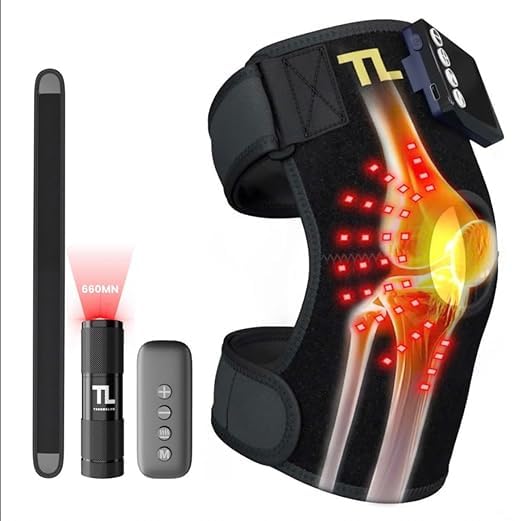
Billede: Overview of the ThermoLife 3-in-1 Red Light Therapy Knee Massager and its included accessories.
Opsætning og første brug
1. Opladning af enheden
Before initial use, fully charge the ThermoLife Knee Massager. The device includes a built-in 2500mAh battery.
- Connect the provided USB charging cable to the charging port on the controller.
- Tilslut den anden ende af USB-kablet til en kompatibel USB-strømadapter (medfølger ikke) eller en USB-port på computeren.
- The charge indicator on the controller will show charging status. A full charge typically provides 1-2 hours of use, depending on selected settings.
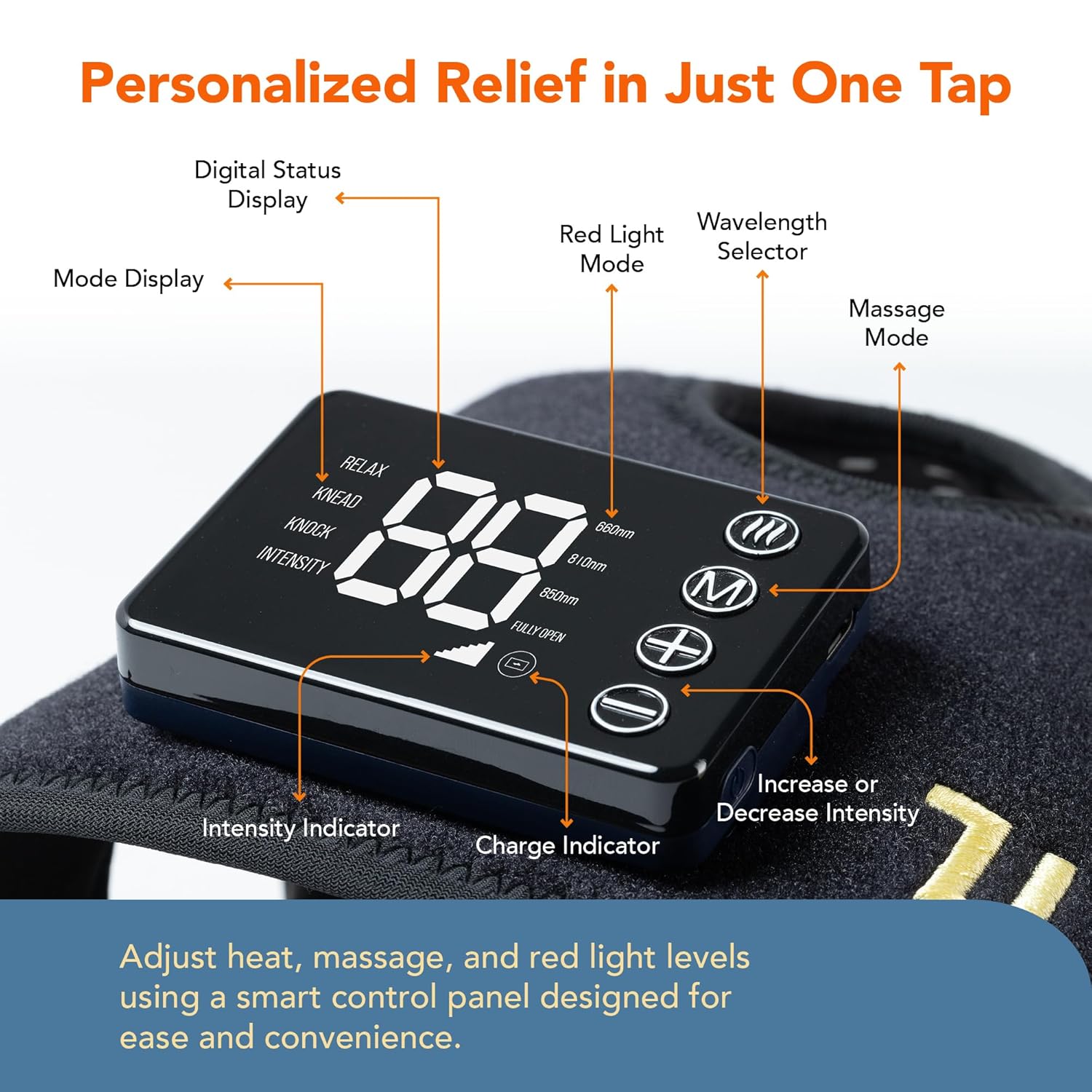
Image: The wireless design of the ThermoLife knee massager, highlighting its built-in battery and portability.
2. Wearing the Knee Brace
The brace is designed for use on knees, shoulders, and elbows. Use the adjustable Velcro strap to secure it comfortably.
- Position the brace over the desired joint (knee, shoulder, or elbow).
- Wrap the Velcro straps around the limb and secure them firmly but not too tightly, ensuring comfortable circulation.
- Ensure the red light panel is positioned directly over the area requiring therapy.

Image: The ThermoLife knee massager being worn on a knee, demonstrating its fit and application.
Betjeningsvejledning
The ThermoLife Knee Massager features a smart touchscreen control panel and a wireless remote for easy operation.
Kontrolpanel overview
Billede: Detaljeret view of the control panel, indicating various functions and indicators.
- Digital Status Display: Shows current settings and remaining time.
- Mode Display: Indicates selected massage mode (Relax, Knead, Knock).
- Rødt lys tilstand: Activates red light therapy.
- Wavelength Selector: Cycles through 660nm, 810nm, 850nm, or combined wavelengths.
- Massagetilstand: Selects vibration massage pattern.
- Intensitetsindikator: Displays current intensity level.
- Opladningsindikator: Viser batteriniveau.
- Increase/Decrease Intensity Buttons: Adjusts heat and vibration levels.
Brug af enheden
- Tænd/sluk: Press and hold the power button on the controller or remote to turn the device on or off.
- Select Red Light Therapy: Press the Red Light Mode button to activate. Use the Wavelength Selector to choose between 660nm, 810nm, 850nm, or a combination.
- 660nm (Visible Red Light): Primarily absorbed by the skin, aids in surface inflammation reduction and skin appearance.
- 810nm (Near-Infrared Light): Penetrates muscles and connective tissues, improving flexibility and accelerating muscle repair.
- 850nm (Near-Infrared Light): Deepest penetration, reaching joints, tendons, and bone tissue for chronic pain relief and deep inflammation reduction.
- Adjust Heat Therapy: The device features three-zone heating. Use the intensity adjustment buttons to select your desired heat level.
- Choose Vibration Massage: Press the Massage Mode button to cycle through available vibration patterns (Relax, Knead, Knock). Adjust the intensity using the increase/decrease buttons. There are three intensity levels.
- Automatisk timer: The device is equipped with a 30-minute automatic timer for each session.

Image: Explanation of how different red light wavelengths penetrate tissues for various therapeutic effects.
Using the Mini Red Light
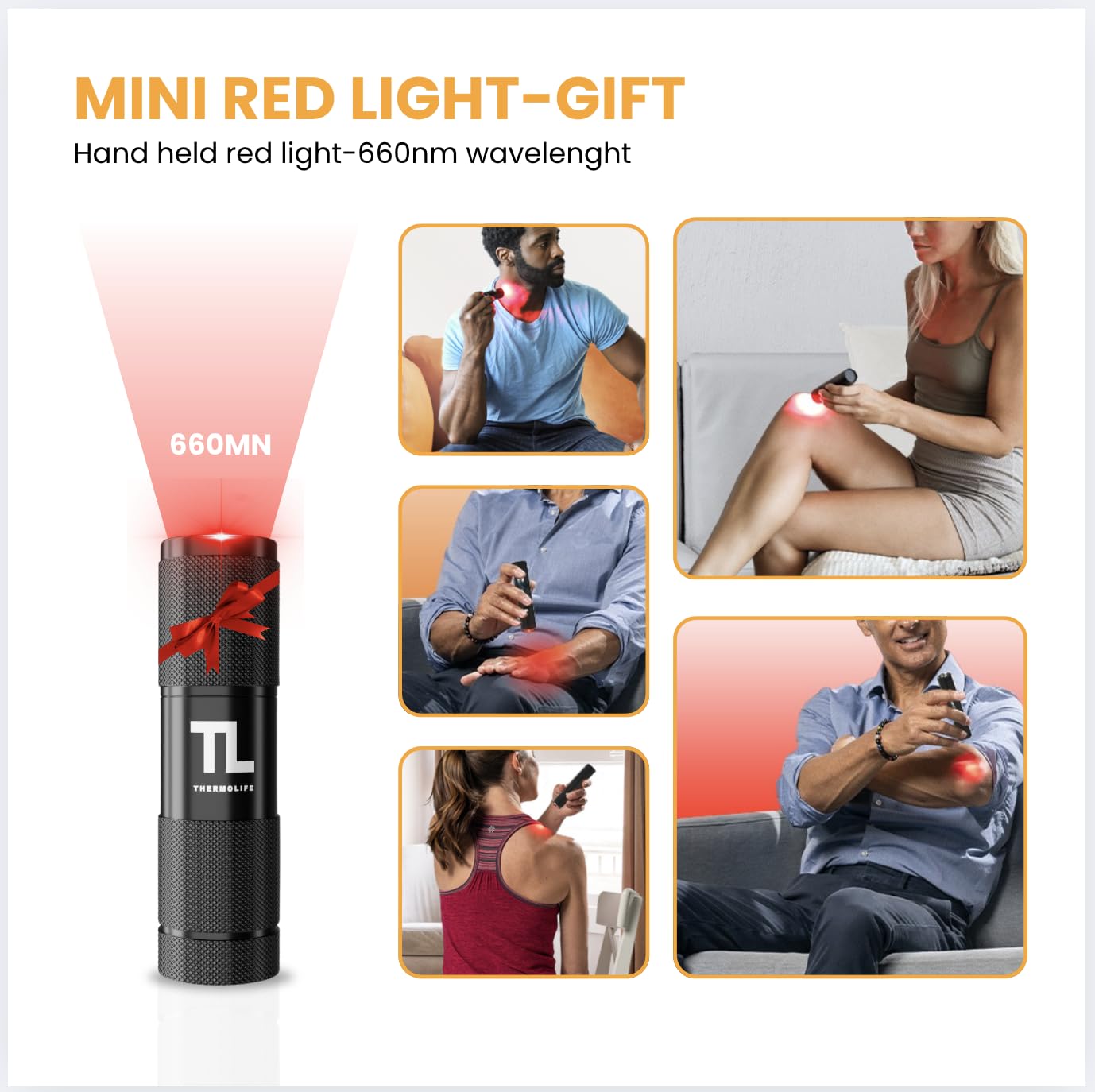
The included mini red light provides targeted 660nm red light therapy for smaller areas or specific points.
- To activate, press the power button on the mini red light.
- Direct the light beam onto the desired area for a few minutes per session.
- Turn off after use to conserve battery.

Image: The mini red light in use, demonstrating its versatility for targeted application.
Pleje og vedligeholdelse
- Rensning: Wipe the surface of the knee brace and controller with a soft, damp klæde. Brug ikke slibende rengøringsmidler eller nedsænk i vand.
- Opbevaring: Opbevar enheden på et køligt, tørt sted væk fra direkte sollys, når det ikke er i brug.
- Batteripleje: To prolong battery life, avoid fully discharging the device frequently. Charge regularly, even if not used for extended periods.
Fejlfinding
| Problem | Mulig årsag | Løsning |
|---|---|---|
| Enheden tændes ikke. | Batteriet er afladet. | Oplad enheden helt ved hjælp af det medfølgende USB-kabel. |
| Red light therapy not activating. | Red light mode not selected or device malfunction. | Ensure the Red Light Mode button is pressed. If the issue persists after charging, contact customer support. |
| Vibration or heat not working. | Mode not selected or intensity set to zero. | Select the desired massage/heat mode and increase intensity using the +/- buttons. |
| Device does not automatically turn off after 30 minutes. | Timer fejlfunktion. | Manually turn off the device by pressing and holding the power button. Contact customer support if this issue is consistent. |
| Trådløs fjernbetjening svarer ikke. | Remote battery depleted or out of range. | Ensure the remote is within operating range. Check or replace remote battery if applicable. |
Produktspecifikationer
- Model: B0DG5LRLFM
- Mærke: ThermoLife
- Red Light Wavelengths: 660nm, 810nm, 850nm
- Vibrationstilstande: 4
- Vibrationsintensitetsniveauer: 3
- Varmeindstillinger: Adjustable, 3-zone heating
- Batteri: Indbygget 2500mAh litium-ion
- Brugstid: 1-2 timer pr. fuld opladning
- Automatisk timer: 30 minutter
- Produktdimensioner: 30.35 x 10.6 x 0.5 tommer
- Produktvægt: 1.32 pund
- Farve: Sort
- Specifikke anvendelser: Arthritis, Knee relaxation and comfort, Shoulder, Elbow
Garanti og support
The ThermoLife 3-in-1 Red Light Therapy Knee Massager is backed by a et års garanti fra købsdatoen. Derudover en 90 dages returret tilbydes.
For warranty claims, technical support, or any questions regarding your device, please contact ThermoLife customer service:
- Webwebsted: ThermoLife Official Store (til generel information)
- E-mail: support@thermolife.com (placeholder, as no specific email was provided)
- Telefon: 1-800-XXX-XXXX (placeholder, as no specific phone number was provided)
Please have your purchase receipt and model number (B0DG5LRLFM) ready when contacting support.