
Indledning
This manual provides detailed instructions for the Cillso H97 Wireless Earbuds. Please read this manual carefully before using the product to ensure proper operation and to maximize your user experience. Keep this manual for future reference.

Image: The Cillso H97 Wireless Earbuds in their charging case, displaying the digital battery indicator.
Pakkens indhold
- Cillso H97 Wireless Earbuds (Left and Right)
- Opladningsetui
- USB-C ladekabel
- Brugermanual
Opsætning
1. Opladning af øretelefoner og etuiet
Before first use, fully charge the earbuds and the charging case. Connect the provided USB-C cable to the charging port on the case and to a 5V/1A or 5V/2A power adapter. The digital display on the case will indicate the charging status.
- Opladningstid: Cirka 1.5 timer for en fuld opladning.
- Batterilevetid: Up to 8 hours of playback per charge, and up to 40 hours total with the charging case.
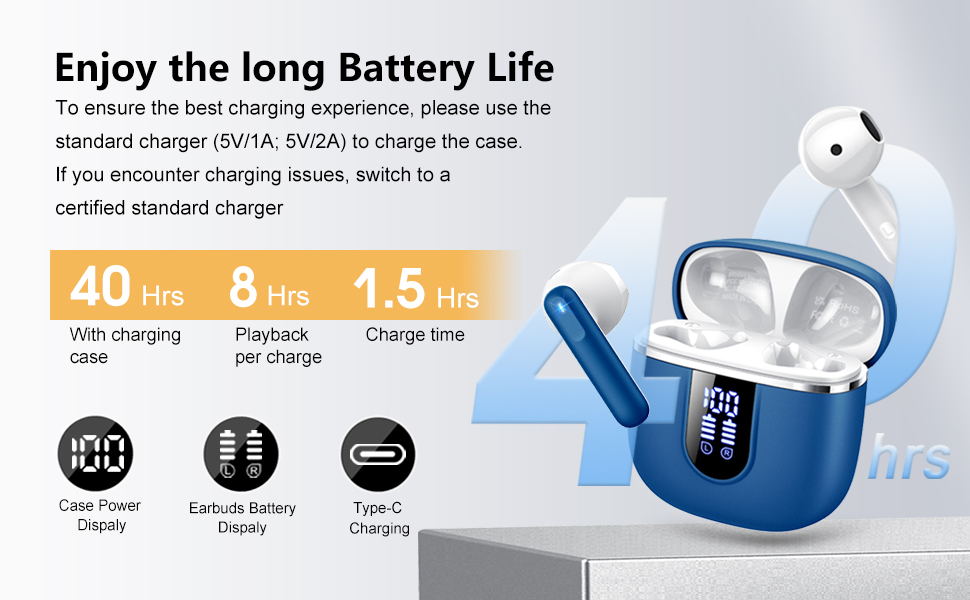
Image: Diagram illustrating the 40-hour total battery life, 8-hour single playback, and 1.5-hour charge time, along with the USB-C charging port and digital display.
The charging case is equipped with Over Current Protection (OCP) technology to prevent damage from prolonged high current. If the current exceeds the power limit, the power source will be cut off to protect the circuitry and device.

Image: Illustration explaining Over Current Protection (OCP) technology in the charging case.
2. Parring med en Bluetooth-enhed
- Åbn opladningsetuiet. Ørepropperne går automatisk i parringstilstand.
- Aktiver Bluetooth på din enhed (smartphone, tablet, bærbar computer).
- Søg efter "H97" in the list of available Bluetooth devices and select it to connect.
- Når der er oprettet forbindelse, hører du en bekræftelseslyd, og ørepropperne er klar til brug.
The H97 earbuds feature Bluetooth 5.4 for a more stable connection, longer transmission range, lower power consumption, and reduced latency.

Image: Visual representation of Bluetooth 5.4 technology, highlighting benefits like stable connection, longer range, lower power consumption, and lower latency.
3. Sådan tager du ørepropperne på
Gently insert the earbuds into your ears, ensuring a comfortable and secure fit. The rounded tips are designed for in-ear comfort. Adjust them until the sound quality is optimal and they feel stable.

Image: Diagram showing the recommended angle for inserting the earbud into the ear for a secure fit.
Betjeningsvejledning
Tryk på kontrolelementer
The H97 earbuds feature sensitive touch sensors for easy control of various functions:
| Handling | Fungere |
|---|---|
| Double tap the left/right MFB button | Afspil/pause musik |
| One tap the left/right MFB button | Besvar/afslut opkald |
| Long press the right/left MFB button for 2s | Næste/Forrige nummer |
| One tap the left/right MFB button (during call) | Volume Up/Down (specific mapping not detailed, typical for single tap) |
| Triple tap MFB button | Activate Voice Assistant (common function) |

Image: Visual guide to the smart touch controls on the earbuds for playback and call management.
Lydfunktioner
The H97 earbuds deliver a high-quality audio experience:
- Hi-Fi stereolyd: Featuring 13mm diameter speakers with crystal clear treble, vibrant mid-range, and powerful bass.
- 3D Bass Stereo: Enhanced bass for an immersive listening experience.
- Krystalklare opkald: Equipped with 4 ENC (Environmental Noise Cancelling) microphones to filter out background noise and suppress wind noise, ensuring clear communication.

Image: Diagram illustrating the 13mm speaker driver and triple-layer composite diaphragm for enhanced bass and sound quality.

Image: Illustration detailing the 4-microphone design for crystal-clear calls, including feedback and talk mics, and anti-wind noise features.
Kompatibilitet
The Cillso H97 Wireless Earbuds are compatible with a wide range of Bluetooth-enabled devices, including:
- Smartphones (Android, iOS)
- Tabletter
- Bærbare computere
- Desktop Computers (with Bluetooth adapter)

Image: Icons representing compatibility with phones, tablets, laptops, and desktops, shown alongside the earbuds and a smartphone playing music.
Opretholdelse
Rengøring og pleje
The H97 earbuds are IP7 waterproof, offering protection against water, sweat, and rain. However, proper care is still recommended:
- Wipe the earbuds and charging case with a soft, dry cloth after each use, especially after workouts.
- Undgå at bruge slibende rengøringsmidler eller opløsningsmidler.
- Sørg for, at opladningsporten er tør, før du tilslutter opladningskablet.
- Opbevar øretelefonerne i deres opladningsetui, når de ikke er i brug for at beskytte dem og holde dem opladet.

Image: A person wearing the earbuds with water splashing, illustrating the IPX7 waterproof feature, along with icons for dust prevention, sweatproof, and nano material.
Bedste praksis for opkrævning
- Always use the provided USB-C cable or a certified standard charger (5V/1A or 5V/2A) to charge the case.
- If you encounter charging issues, try switching to a different certified standard charger.
- Udsæt ikke opladningsetuiet eller ørepropperne for ekstreme temperaturer.
Fejlfinding
Fælles problemer og løsninger
| Problem | Mulig løsning |
|---|---|
| Ørepropper parrer eller opretter ikke forbindelse |
|
| Kun én øretelefon virker |
|
| Lav lydstyrke eller dårlig lydkvalitet |
|
| Ladeetui oplader ikke |
|
Specifikationer
| Feature | Detalje |
|---|---|
| Modelnummer | H97 |
| Mærke | Cillso |
| Bluetooth version | 5.4 |
| Lydteknologi | 3D Bass Stereo, Hi-Fi Stereo Sound |
| Højttaler størrelse | 13 mm diameter |
| Mikrofoner | 4 ENC støjreducerende mikrofoner |
| Batterilevetid (ørepropper) | Op til 8 timer (enkelt opladning) |
| Samlet spilletid | Op til 40 timer (med opladningsetui) |
| Opladningsport | USB-C |
| Opladningsindgang | 5V/1A or 5V/2A recommended |
| Vandtæt vurdering | IP7 |
| Kompatible enheder | Smartphones, Tablets, Laptops, Bluetooth Devices |
| Frekvensområde | 20 Hz - 20,000 Hz |
| Ørestykke form | Afrundede spidser |
| Produktdimensioner | 0.79 x 0.79 x 0.79 inches (earbud dimensions, case dimensions are 48.9mm x 53.4mm) |
| Varens vægt | 0.352 ounce |

Image: Visual representation of the earbuds and charging case dimensions, emphasizing their lightweight and pocket-sized design.
Garanti og support
Oplysninger vedrørende produktgaranti og kundesupport var ikke tilgængelige i de angivne data. Se venligst produktemballagen eller producentens officielle webwebstedet for detaljer om garantidækning og hvordan du kontakter kundesupport.
Sikkerhedsoplysninger
- Du må ikke skille ørepropperne eller opladningsetuiet ad eller ændre dem.
- Hold produktet væk fra ekstreme temperaturer, direkte sollys og fugt.
- Undgå at tabe eller udsætte produktet for stærke stød.
- Opbevares utilgængeligt for børn og kæledyr.
- Bortskaf produktet ansvarligt i henhold til lokale regler.