
1. Introduktion
Tak for købetasing the LONPOO Mini Hi-Fi Amplivligere AMP-615B. This 2-channel stereo amplifier er designet til at levere lyd af høj kvalitet amplification for your passive speakers, offering versatile connectivity options including Bluetooth 5.3, Optical, Coaxial, USB, and AUX inputs. This manual provides detailed instructions for setup, operation, and maintenance to ensure optimal performance and longevity of your device.
2. Sikkerhedsinstruktioner
- Strømkilde: Sørg for amplifier is connected to a power supply within the specified voltage range (AC 100-240V ~ 50/60Hz).
- Ventilation: Bloker ikke ventilationsåbningerne. Sørg for tilstrækkelig luftgennemstrømning omkring enheden for at forhindre overophedning.
- Fugtighed: Behold amplifier away from water, moisture, and high humidity environments. Do not operate with wet hands.
- Varme: Undgå at placere enheden i nærheden af varmekilder såsom radiatorer, varmeregistre, komfurer eller andre varmeproducerende apparater.
- Rensning: Tag stikket ud af stikkontakten før rengøring. Brug en tør, blød klud. Brug ikke flydende rengøringsmidler eller sprayrengøringsmidler.
- Service: Forsøg ikke selv at servicere dette produkt. Overlad al service til kvalificeret servicepersonale.
- Placering: Placer enheden på en stabil, plan overflade for at forhindre den i at falde.
3. Pakkens indhold
Carefully unpack the box and ensure all items listed below are present and in good condition. If any item is missing or damaged, please contact your retailer.

The package includes the LONPOO Mini Hi-Fi Amplifier, a remote control for convenient operation, an AC power cord, an optical cable for digital audio, and a quick start guide.
- 1x LONPOO Mini Hi-Fi Amplivligere (AMP-615B)
- 1x fjernbetjening
- 1x netledning
- 1x optisk kabel
- 1x Brugermanual (Hurtigstartguide)
4. Produktet er slutview
4.1 Frontpanel

The front panel features Treble and Bass controls, a multi-function knob for volume and input selection, AUX IN, USB input, IR receiver, and an indicator light.
- DISKANT-kontrol: Justerer lydniveauer for højfrekvente lyde.
- BAS kontrol: Justerer lavfrekvente lydniveauer.
- Multi-Function Knob (VOLUME +/- / MODE / POWER ON/OFF):
- Rotate: Adjusts volume.
- Short Press: Cycles through input modes (Bluetooth, AUX, USB, Coaxial, Optical).
- Long Press: Powers the unit On/Off.
- AUX-indgang (3.5 mm): Audio input for devices with a 3.5mm audio jack.
- USB-indgang: Til afspilning af lyd files from a USB flash drive (supports MP3, WAV formats).
- IR (infrarød) modtager: Modtager signaler fra fjernbetjeningen.
- Indikatorlys: Displays the current status/input mode:
- Red: Standby (Power Off)
- Blue: Bluetooth Input
- Green: AUX Input
- Yellow: Coaxial Input
- Light Blue: Optical Input
4.2 Bagpanel
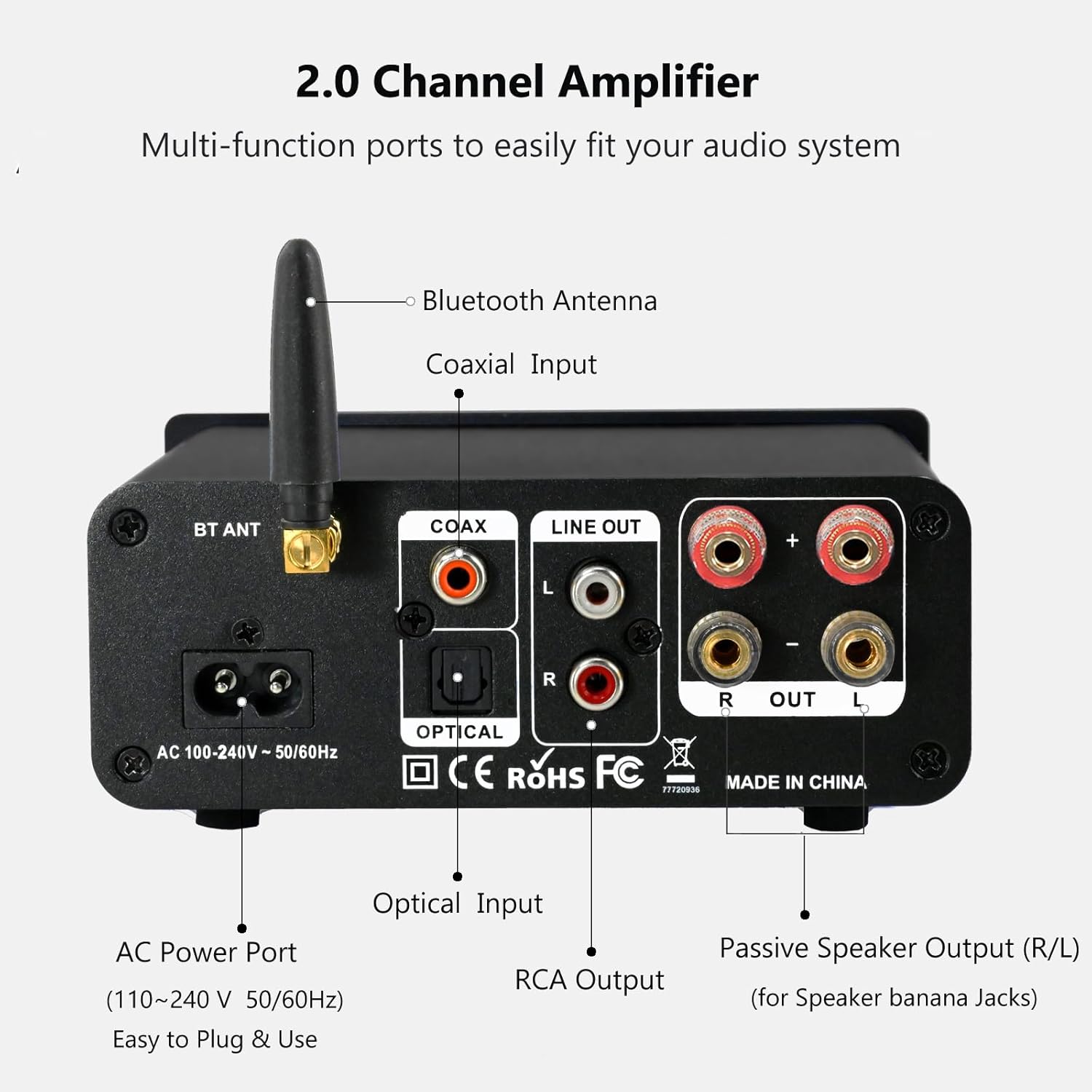
The rear panel provides connections for the Bluetooth antenna, Coaxial and Optical inputs, RCA Line Out, passive speaker outputs, and the AC power port.
- BT ANT (Bluetooth Antenna): Connect the included Bluetooth antenna for optimal wireless range and stability.
- COAX (Coaxial Input): Digital audio input for devices with a coaxial output.
- OPTICAL (Optical Input): Digital audio input for devices with an optical (Toslink) output.
- LINE OUT (RCA L/R): Analog audio output for connecting to powered speakers or a subwoofer.
- PASSIVE SPEAKER OUTPUT (R/L): Connect passive speakers using banana plugs or bare speaker wire.
- AC POWER PORT: Connect the supplied AC power cord (100-240V ~ 50/60Hz).
5. Opsætning
5.1 Tilslutning af højttalere

The LONPOO Mini Hi-Fi Amplifier seamlessly integrates with your home audio setup, providing clear sound to passive bookshelf speakers.
- Passive højttalere: Connect your passive bookshelf speakers to the PASSIVE SPEAKER OUTPUT (R/L) terminals on the rear panel. Ensure correct polarity (+ to + and - to -) for each speaker. You can use banana plugs or strip the speaker wire ends and insert them into the terminals.
- Powered Speakers/Subwoofer: If you wish to connect powered speakers or a subwoofer, use an RCA cable to connect them to the LINE OUT (RCA L/R) porte på bagpanelet.
5.2 Tilslutning af lydkilder
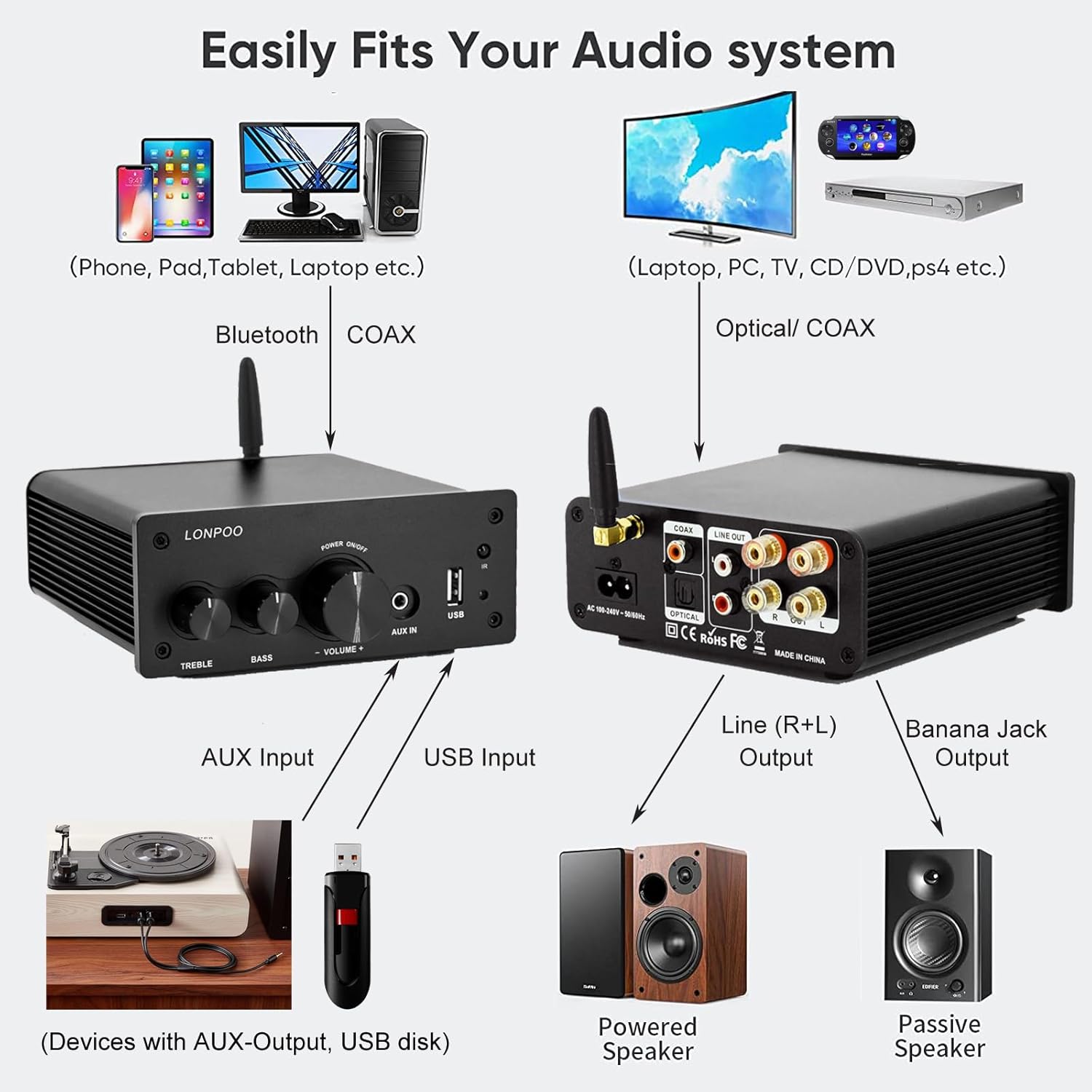
This diagram illustrates how the amplifier connects to a wide range of audio sources and output devices, including phones, PCs, TVs, CD players, powered speakers, and passive speakers.
- Bluetooth: Ensure the Bluetooth antenna is connected to the BT ANT havn.
- AUX-indgang: Connect your smartphone, tablet, or other audio device using a 3.5mm audio cable to the AUX IN porten på frontpanelet.
- USB-indgang: Indsæt et USB-flashdrev, der indeholder MP3- eller WAV-lyd files ind i USB-indgang porten på frontpanelet.
- Optisk indgang: Connect your TV, CD player, or game console with an optical output to the OPTISK port on the rear panel using the provided optical cable.
- Koaksial indgang: Connect your TV, DVD player, or other audio source with a coaxial output to the COAX port på bagpanelet.
5.3 Strømtilslutning
Tilslut det medfølgende netkabel til AC POWER PORT på bagpanelet af amplifier, then plug the other end into a wall outlet.
6. Betjeningsvejledning
6.1 Tænd/sluk
For at tænde for ampløfter, langt tryk de Multifunktionsknap on the front panel. The indicator light will illuminate. To power off, langt tryk the knob again.
6.2 Indgangsvalg
To select an audio input source, kort tryk de Multifunktionsknap. Each short press will cycle through the available inputs: Bluetooth, AUX, USB, Coaxial, and Optical. The Indikatorlys will change color to reflect the active input mode (refer to Section 4.1 for color codes).
6.3 Lydstyrkejustering
Drej på Multifunktionsknap med uret for at øge lydstyrken og mod uret for at sænke den.
6.4-tonekontrol
Brug DISKANT og BASS knobs on the front panel to adjust the high and low frequencies of the audio output according to your preference.
6.5 Bluetooth -parring

Connect your smartphone or other Bluetooth-enabled devices wirelessly to the amplifier for convenient audio streaming.
- Sørg for, at Bluetooth-antennen er korrekt tilsluttet.
- Tænd for amplifier and select the Bluetooth input mode (the indicator light will turn blue).
- Søg efter tilgængelige Bluetooth-enheder på din Bluetooth-aktiverede enhed (f.eks. smartphone, tablet).
- Select "LONPOO AMP-615" from the list to pair.
- Når det er parret, vil amplifier will play a confirmation sound, and you can stream audio wirelessly.
6.6 USB-afspilning

De amplifier supports direct audio input via 3.5mm AUX and USB, allowing for plug-and-play functionality with various devices.
Indsæt et USB-flashdrev i USB-indgang port. The amplifier will automatically detect and begin playing supported audio files (MP3, WAV). Use the remote control for playback functions like play/pause, next/previous track.
6.7 Fjernbetjening
Den medfølgende fjernbetjening muliggør bekvem betjening af amplifier from a distance. Functions include:
- Tænd/sluk
- Lydstyrke op/ned
- Stum
- Input Source Selection (BT, AUX, USB, COAX, OPT)
- USB Playback Controls (Play/Pause, Next/Previous Track)
7. Fejlfinding
If you encounter any issues with your LONPOO Mini Hi-Fi Amplifier, please refer to the following troubleshooting guide:
| Problem | Mulig årsag | Løsning |
|---|---|---|
| Ingen lydudgang |
|
|
| Dårlig lydkvalitet (forvrængning, lav lydstyrke) |
|
|
| Problemer med Bluetooth-forbindelse |
|
|
| Optical/Coaxial audio dropouts or no sound |
|
|
| Brummende eller summende lyd |
|
|
8. Specifikationer
| Modelnummer | AMP-615 |
| Udgangseffekt | 100W + 100W (200W i alt) |
| Kanaler | 2.0 Stereo |
| Bluetooth version | 5.3 |
| Indgange | Bluetooth, Optical, Coaxial, USB, 3.5mm AUX |
| Udgange | RCA Line Out (L/R), Passive Speaker Output (Banana Jack compatible) |
| Strømforsyning | AC 100-240V ~ 50 / 60Hz |
| Dimensioner (B x H x D) | 132 mm x 55 mm x 140 mm (ca. 5.19 x 2.16 x 5.51 tommer) |
| Vægt | 1.09 kg (ca. 2.4 lbs) |
| Inkluderede komponenter | Hi-Fi Amplifier, AC Cable, Remote Control, Optical Cable |
9. Vedligeholdelse
- Rensning: Afbryd strømmen før rengøring. Brug en blød, tør klud til at tørre ydersiden af ampBrug ikke slibende rengøringsmidler eller opløsningsmidler.
- Opbevaring: Hvis du opbevarer ampHvis apparatet ikke bruges i en længere periode, skal du afbryde forbindelsen til strømforsyningen og opbevare det et køligt og tørt sted.
- Kabelstyring: Sørg for, at alle kabler er pænt organiseret og ikke er under spænding for at forhindre skader.
10. Garanti og support
This product comes with a standard manufacturer's warranty. For specific warranty details, please refer to the documentation provided with your purchase or contact your retailer. For technical support, troubleshooting assistance, or inquiries regarding spare parts, please contact LONPOO customer service or your authorized dealer. Information regarding spare parts availability is currently unavailable.