
Navihood L3
Navihood L3 GPS Cykelcomputer Brugermanual
Model: L3
1. Introduktion
Denne manual indeholder omfattende instruktioner til opsætning, betjening og vedligeholdelse af din Navihood L3 GPS-cykelcomputer. L3 er designet til at forbedre din cykeloplevelse ved at tilbyde præcis datasporing, navigation og tilslutningsmuligheder.

Billede: Forside view af Navihood L3 GPS-cykelcomputerens skærm, der viser data om hastighed, højde, stigning og effekt.
2. Pakkens indhold
Bekræft at alle varer er til stede i pakken:
- Navihood L3 GPS-cykelcomputer
- Cykelcomputerholder
- Gummibånd (til montering af beslag)
- USB-opladerkabel (ikke eksplicit angivet, men underforstået til genopladelig enhed)
3. Produktfunktioner
- 2.6" antirefleksskærm: Klar synlighed under forskellige lysforhold med automatisk baggrundsbelysning.
- IPX7 vandtæt bedømmelse: Designet til at modstå regn og våde forhold.
- Præcis GPS-positionering: Anvender flere satellitsystemer (GPS, GLONASS, Galileo, QZSS, Beidou) til hurtig og præcis positionssporing.
- ANT+ og Bluetooth 5.0-forbindelse: Understøtter eksterne sensorer såsom pulsmålere, hastighedssensorer, kadencesensorer og effektmålere.
- Tilpasset datavisning: Navihood APP tillader tilpasning af op til 9 sider med 70 datatyper.
- Lang batterilevetid: Op til 35 timers drift på en enkelt opladning.
- Stor lagerkapacitet: Gemmer op til 2500 kilometer køredata.
- Brudsikker bagbund: Højstyrkebase i aluminiumslegering for sikker montering.
- Ergonomiske knapper: Tre knapper for nem betjening under kørsel.
- Sikkerhedslys til natkørsel: Klar gul lys for forbedret synlighed.
- Smart træningsalarmlys: Visuel feedback i realtid om træningsstatus (inden for/over målet).

Billede: Nærbillede af Navihood L3 cykelcomputeren, der viser dens brudsikre bagplade i aluminiumslegering og monteringsmekanisme.
4. Opsætning
4.1 Montering af enheden
- Fastgør cykelcomputerbeslaget til dit styr eller din frempind med de medfølgende gummibånd. Sørg for, at det er sikkert fastgjort og placeret for optimal viewing.
- Juster Navihood L3-cykelcomputeren med holderen, og drej den med uret, indtil den klikker på plads.

Billede: Diagram, der illustrerer Navihood L3's brug af flere satellitsystemer (GPS, Galileo, QZSS, GLONASS, Beidou) til præcis positionering.
4.2 Første opstart og GPS-registrering
- Tryk og hold tænd/sluk-knappen nede (normalt den midterste knap) for at tænde enheden.
- Ved første brug, eller efter en længere periode med inaktivitet, kan det tage op til 30 sekunder (koldstart) for enheden at modtage GPS-signaler. Efterfølgende starter (varmstart) tager typisk omkring 2 sekunder.
- Sørg for at du er i et åbent område med klar view af himlen for hurtigere GPS-registrering.
4.3 Opladning af enheden
Tilslut det medfølgende USB-opladerkabel til opladningsporten på enheden og til en standard USB-strømadapter eller en computers USB-port. En fuld opladning giver op til 35 timers brug.
5. Betjeningsvejledning
5.1 Knapfunktioner
Navihood L3 har tre ergonomiske knapper placeret i bunden af enheden:
- Venstre knap: Bruges typisk til at navigere tilbage, annullere eller få adgang til menuer.
- Midterste knap: Tænd/sluk, start/stop optagelse, bekræft valg.
- Højre knap: Naviger fremad, rul gennem datasider, eller bekræft valg.
5.2 Skærmvisning og tilpasning
Den 2.6-tommer antirefleksskærm viser forskellige cykeldata. Du kan tilpasse datafelterne og siderne ved hjælp af Navihood-appen.
- Download appen "Navihood" fra din enheds appbutik (Google Play eller Apple App Store).
- Par din L3 cykelcomputer med appen via Bluetooth.
- I appen kan du tilpasse op til 9 visningssider og vælge mellem 70 forskellige datatyper, der skal vises på din enhed. Dette inkluderer at tilføje, slette, flytte eller sortere datafelter.

Billede: Illustration af Navihood L3's brugerdefinerbare display med 9 sider og forskellige datatyper, sammen med skærmbilleder af Navihood-mobilapplikationen til konfiguration.
5.3 Sensorparring (ANT+ og Bluetooth)
L3 understøtter eksterne sensorer til mere omfattende datasporing:
- Sørg for, at din eksterne sensor (f.eks. pulsmåler, hastighedsmåler, kadencemåler, effektmåler) er aktiv og inden for L3's rækkevidde.
- Naviger til sensorparringsmenuen på din L3-enhed (se vejledningen på skærmen eller Navihood-appen for specifikke trin).
- Vælg "Søg efter "Sensorer" og vælg den ønskede sensor fra listen.
- Når sensordataene er parret, vises de på dine brugerdefinerede skærme.
5.4 Datasynkronisering og -deling
Efter din cykeltur kan du synkronisere dine data med Navihood-appen og dele dem med populære cykelplatforme:
- Åbn Navihood-appen på din smartphone, og sørg for, at din L3 er forbundet via Bluetooth.
- Appen synkroniserer automatisk dine turdata.
- Fra appen kan du uploade dine aktiviteter til platforme som Strava, TrainingPeaks, Komoot og Google Fit. Enheden understøtter også automatisk generering af 3D-sporvideoer til deling.
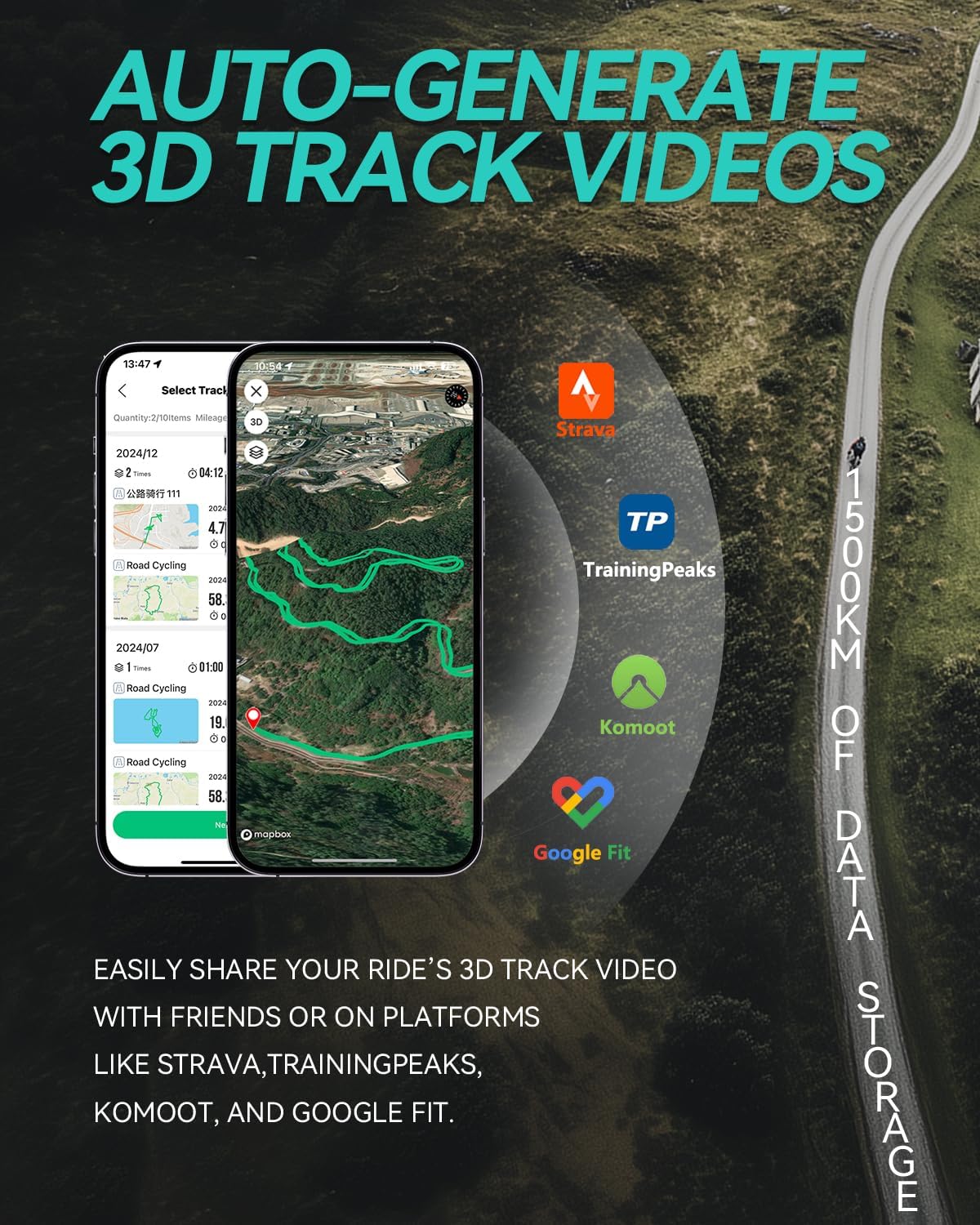
Billede: Skærmbillede af en mobilapp, der viser en 3D-rutevideo af en cykelrute med logoer fra Strava, TrainingPeaks, Komoot og Google Fit, der angiver datadelingsmuligheder.
5.5 Smarte træningsalarmer og sikkerhedslys
- Smart træningsalarmlys: Enheden har en advarselslampe, der giver visuel feedback i realtid om din træningsstatus. Den kan indikere, om du er inden for din træningszone (f.eks. grønt lys) eller har overskredet den (f.eks. rødt lys), baseret på forudindstillede grænser for målinger som puls eller effekt.
- Sikkerhedslys til natkørsel: Enheden er integreret med et klart gult lys for at forbedre din synlighed for modkørende og sidetrafik under natkørsel.

Billede: Nærbillede af Navihood L3 cykelcomputeren, der viser en grøn advarselslampe, der angiver "inden for målet" for træning, med ikoner for puls, hastighed, kadence og effekt.

Billede: Navihood L3 cykelcomputeren monteret på et cykelstyr under natkørsel med dens klare gule sikkerhedslampe tændt.
6. Vedligeholdelse
- Rensning: Tør enheden af med en blød, damp klæde. Undgå at bruge slibende rengøringsmidler eller opløsningsmidler.
- Vandtæthed: Enheden er vandtæt i henhold til IPX7, hvilket betyder, at den kan modstå nedsænkning i op til 1 meters vanddybde i 30 minutter. Den er dog ikke designet til langvarig brug under vand. Sørg for, at dækslet til opladningsporten er forsvarligt lukket for at opretholde vandtætheden.
- Opbevaring: Opbevar enheden et køligt og tørt sted, når den ikke er i brug. Undgå ekstreme temperaturer.
- Batteripleje: For optimal batterilevetid bør du undgå at aflade batteriet helt ofte. Oplad enheden regelmæssigt, især hvis du opbevarer den i længere perioder.

Billede: Navihood L3 cykelcomputeren delvist nedsænket i vand, hvilket illustrerer dens IPX7-vandtæthedsevne.
7. Fejlfinding
| Problem | Mulig løsning |
|---|---|
| Enheden tænder ikke. | Sørg for, at batteriet er opladet. Tilslut til en strømkilde, og prøv igen. |
| GPS-signal ikke modtaget. | Gå til et åbent område med en klar view af himlen. Vent et par minutter på signaloptagelse. |
| Ekstern sensor forbinder ikke. | Sørg for, at sensoren er aktiv, og at batteriet er opladet. Kontroller, om sensoren er inden for rækkevidde. Forsøg at parre igen via enhedens menu eller Navihood-appen. |
| Data synkroniseres ikke med appen. | Sørg for, at Bluetooth er aktiveret på din smartphone og L3. Åbn Navihood-appen, og kontroller forbindelsen. Genstart begge enheder, hvis det er nødvendigt. |
| Skærmen er svær at læse. | Skærmen har en automatisk baggrundsbelysningsfunktion. Sørg for, at enheden ikke er i direkte genskin. Juster skærmindstillingerne via Navihood-appen, hvis tilgængelig. |
8. Specifikationer
| Feature | Detalje |
|---|---|
| Model | L3 |
| Mærke | Navihood |
| Skærmstørrelse | 2.6 tommer |
| Display Type | LCD |
| Forbindelse | Bluetooth 5.0, ANT+ |
| GPS systemer | GPS, GLONASS, Galileo, QZSS, Beidou |
| Vandtæt vurdering | IPX7 |
| Batterilevetid | Op til 35 timer |
| Datalagring | Op til 2500 km køredata |
| Dimensioner | 8.1 x 4.57 x 2.08 cm |
| Vægt | 45 g |
| Materiale | ABS (hoveddel), aluminiumslegering (bagside) |

Billede: Visuel sammenligning af Navihood L3 cykelcomputerens tykkelse (16.3 mm) og vægt (45 g) i forhold til en mønt og et æg, der fremhæver dens kompakte design.
9. Garanti og support
For garantioplysninger og teknisk support henvises til den officielle Navihood-software. webwebstedet eller kontakt deres kundeservice direkte. Gem din købskvittering som købsbevis i tilfælde af garantikrav.
Ask a question about this manual
Ask about setup, troubleshooting, compatibility, parts, safety, or missing instructions. Manuals+ will review the question and use this page’s manual context to help answer it.