
1. Introduktion
Tak for købetasing the STN-28 Colorful Cat Ear Luminous Bluetooth Headset. This headset combines wireless audio technology with a unique luminous cat ear design, offering a comfortable and immersive listening experience. This manual provides essential information on how to set up, operate, and maintain your new headset.
2. Sikkerhedsoplysninger
- Udsæt ikke headsettet for ekstreme temperaturer, fugtighed eller ætsende stoffer.
- Undgå at tabe headsettet eller udsætte det for kraftige stød.
- Du må ikke selv skille headsettet ad eller forsøge at reparere det. Dette vil ugyldiggøre garantien.
- Rengør headsettet med en blød, tør klud. Brug ikke skrappe kemikalier eller slibende materialer.
- Langvarig lytning ved høj lydstyrke kan forårsage høreskader. Juster lydstyrken til et sikkert niveau.
3. Pakkens indhold
- STN-28 Wireless Headset Body
- USB opladningskabel
- Brugervejledning (dette dokument)
4. Produktet er slutview og kontroller
Gør dig bekendt med headsettets komponenter og kontrolknapper.
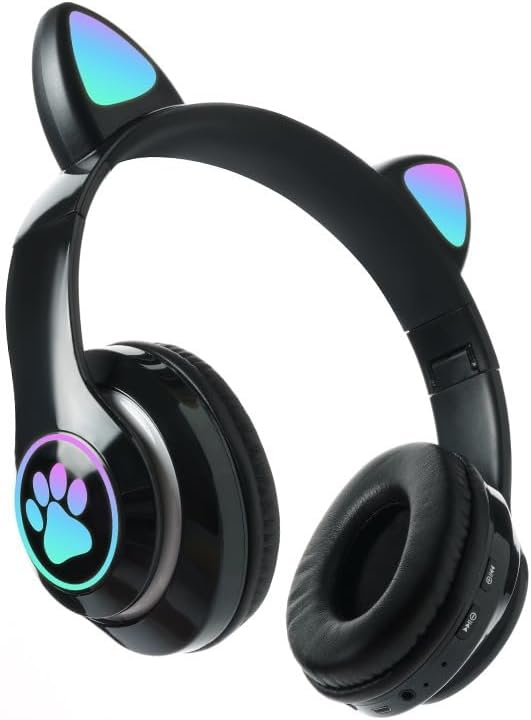
Billede: Forside view of the STN-28 headset in black, showcasing the luminous cat ears and paw print design on the earcups.

Image: Two STN-28 headsets, one in purple and one in pink, displayed on a wooden stand, highlighting their colorful design and cat ear feature.
Control Buttons (Typical Layout - Refer to your specific model for exact placement):
- Power knap: Tænd/sluk, afspil/pause, besvar/afslut opkald.
- Lydstyrke op (+): Øg lydstyrken, Næste nummer (langt tryk).
- Skrue ned for lyden (-): Skru ned for lydstyrken, Forrige nummer (langt tryk).
- Mode-knap (M): Switch between Bluetooth and TF Card mode.
- USB opladningsport: Til opladning af headsettet.
- TF-kortslot: Insert external TF card for music playback.
- LED-indikatorlys: Shows power, connection, and charging status.
5. Opsætning
5.1 Opladning af headsettet
- Connect the USB charging cable to the headset's USB charging port.
- Tilslut den anden ende af kablet til en USB-strømkilde (f.eks. en computers USB-port eller en USB-vægadapter).
- The LED indicator light will show a red light during charging.
- A full charge takes approximately 2 hours. The red light will turn off when fully charged.
Note: Ensure the headset is fully charged before first use for optimal battery life.
5.2 Tænd/sluk
- For at tænde: Press and hold the Power button for a few seconds until the LED indicator lights flash red and blue.
- For at slukke: Press and hold the Power button for a few seconds until the LED indicator light turns off.
5.3 Bluetooth -parring
- Sørg for, at headsettet er fuldt opladet og slukket.
- Press and hold the Power button until the LED indicator lights flash red and blue alternately. This indicates the headset is in pairing mode.
- Aktiver Bluetooth på din enhed (smartphone, tablet, bærbar computer), og søg efter tilgængelige enheder.
- Select "STN-28" or "LX-B39C" from the list of found devices.
- Once successfully paired, the LED indicator light on the headset will flash blue slowly.
Note: The headset supports Bluetooth 5.0+EDR for stable and efficient connection.
6. Betjeningsvejledning
6.1 Musikafspilning (Bluetooth-tilstand)
- Afspil/pause: Tryk kort på afbryderknappen.
- Lydstyrke op: Tryk kort på "+"-knappen.
- Skrue ned for lyden: Tryk kort på "-" knappen.
- Næste nummer: Tryk længe på "+"-knappen.
- Forrige nummer: Tryk længe på "-" knappen.
6.2 Telefonopkald
- Besvar opkald: Tryk kort på tænd/sluk-knappen, når et indgående opkald ringer.
- Afslut opkald: Tryk kort på tænd/sluk-knappen under et opkald.
- Afvis opkald: Tryk længe på tænd/sluk-knappen, når et indgående opkald ringer.
6.3 TF-kortafspilning
- Indsæt et TF-kort (MicroSD) med MP3-lyd files ind i TF-kortåbningen.
- The headset will automatically switch to TF card playback mode, or you may need to short press the "M" (Mode) button to switch.
- Use the Play/Pause, Volume Up/Down, and Next/Previous Track buttons as described in section 6.1.
6.4 Luminous Cat Ear Feature
The cat ears and paw print on the earcups feature luminous accents. This feature is typically activated automatically when the headset is powered on. There is no specific control mentioned for this feature, implying it's always on when the headset is active.
7. Vedligeholdelse og pleje
- Rensning: Wipe the headset regularly with a soft, dry, lint-free cloth. Do not use liquid cleaners or sprays.
- Opbevaring: Når headsettet ikke er i brug, skal det opbevares køligt og tørt, væk fra direkte sollys og ekstreme temperaturer.
- Batteripleje: For at forlænge batteriets levetid bør du undgå at aflade batteriet helt ofte. Oplad headsettet regelmæssigt, selvom det ikke er i brug i længere perioder.
- Vandtæthed: The headset is listed as "Waterproof". While it offers protection against water, avoid submerging it in water or exposing it to heavy rain for prolonged periods to prevent damage.
8. Fejlfinding
| Problem | Mulig årsag | Løsning |
|---|---|---|
| Headsettet tænder ikke. | Lavt batteri. | Charge the headset fully (approx. 2 hours). |
| Kan ikke parres med enheden. | Headsettet er ikke i parringstilstand; Bluetooth er slået fra på enheden; enheden er for langt væk. | Ensure headset is flashing red/blue; enable Bluetooth on device; keep devices within 10 meters. Try forgetting the device on your phone and re-pairing. |
| Ingen lyd eller lav lydstyrke. | Lydstyrken på headsettet eller enheden er for lav; headsettet er ikke tilsluttet. | Increase volume on both headset and connected device. Ensure headset is properly paired. |
| TF-kort afspiller ikke. | Kortet er ikke isat korrekt; understøttes ikke file format; headset not in TF card mode. | Reinsert TF card; ensure files are MP3; press 'M' button to switch to TF card mode. |
9. Specifikationer
| Model | STN-28 / LX-B39C |
| Bæremetode | Head-mounted folding |
| Bluetooth version | Bluetooth 5.0+EDR |
| Understøttede Bluetooth-tilstande | A2DP 1.2, AVRCP 1.0, HSP, HSF 1.5 |
| Batterikapacitet | 400mAh Polymer A-grade Lithium Battery |
| Speaker Size / Impedance | 40mm / 32Ω |
| Transmission Range | ≤10 meters (33 feet) |
| Opladningstid | Ca. 2 timer |
| Musik afspilningstid | ≤6 timer |
| Taletid | ≤6 timer |
| Standby tid | 200 timer |
| Frekvensområde | 20 Hz - 20,000 Hz |
| Vandmodstandsniveau | Vandtæt |
| Kontroltype | Media Control, Touch (via buttons) |
| Særlige funktioner | Luminous Cat Ears, TF Card Playback |
10. Garanti og support
This product comes with a standard manufacturer's warranty. For specific warranty terms, conditions, and duration, please refer to the warranty card included with your purchase or contact the retailer where you purchased the product.
For technical support or inquiries, please contact your retailer or the manufacturer directly. Keep your purchase receipt as proof of purchase for warranty claims.