
STN28
STN-28 Colorful Cat Ear Luminous Wireless Bluetooth Headset User Manual
Model: LX-B39C | Brand: Generic
Indledning
This manual provides detailed instructions for the operation, maintenance, and troubleshooting of your new STN-28 Colorful Cat Ear Luminous Wireless Bluetooth Headset. Please read this manual thoroughly before using the product to ensure proper function and longevity.
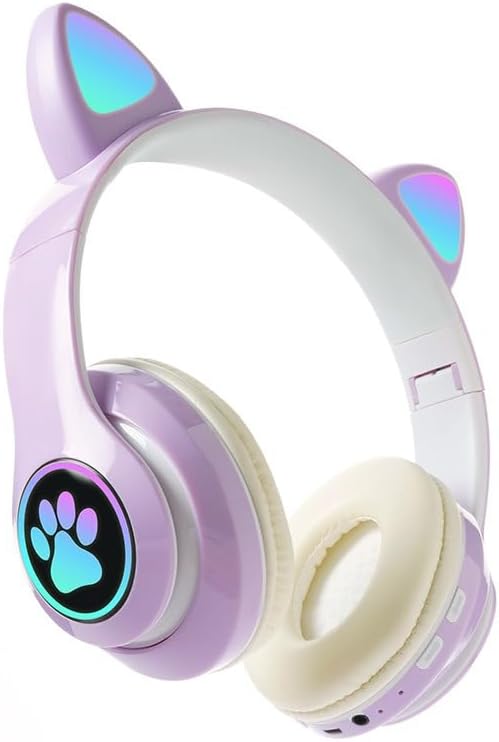
Image: The STN-28 Colorful Cat Ear Luminous Wireless Bluetooth Headset in light purple, featuring glowing cat ears and a paw print design on the ear cup.
Produktegenskaber
- Stilfuldt design: Features unique cat ear design with luminous accents.
- Trådløs forbindelse: Bluetooth 5.0+EDR for seamless pairing.
- Komfortabel pasform: Padded ear cups and adjustable headband.
- Lydkontrol: Integrated buttons for music, volume, and calls.
- Transportabel: Lightweight and foldable head-mounted design.
- TF-kortafspilning: Supports playing songs from an external TF card.
Pakkens indhold
Tjek venligst pakken for følgende varer:
- STN-28 Wireless Headset Body
- USB opladningskabel
- Brugervejledning (dette dokument)
Opsætning
Opladning af headsettet
Before first use, fully charge the headset. Connect the provided USB charging cable to the headset's USB charging port and to a compatible USB power source (e.g., computer USB port, USB wall adapter).
- The indicator light will show red during charging.
- Opladningstiden er cirka 2 timer.
- The red light will turn off once the headset is fully charged.
The headset is equipped with a rechargeable 3.7V/400MAH polymer A-grade lithium battery with overcharge and over-discharge protection.
Tænd/sluk
- For at tænde: Press and hold the power button until the indicator lights flash red and blue.
- For at slukke: Tryk på tænd/sluk-knappen, og hold den nede, indtil indikatorlamperne slukker.
Betjeningsvejledning
Bluetooth-parring
- Sørg for, at headsettet er fuldt opladet og slukket.
- Press and hold the power button for approximately 3-5 seconds until the indicator lights flash red and blue alternately. This indicates the headset is in pairing mode.
- Aktiver Bluetooth på din enhed (smartphone, tablet, computer) og søg efter tilgængelige enheder.
- Select "STN-28" or "LX-B39C" from the list of found devices.
- Once successfully paired, the indicator light on the headset will flash blue slowly.
- The headset supports Bluetooth 5.0+EDR and modes A2DP 1.2, AVRCP 1.0, HSP, HSF 1.5.
The transmission range is up to 10 meters (33 feet) in an open environment.
Musikafspilning og opkaldsstyring
The headset features integrated controls for media and calls. Specific button functions may vary slightly, but generally include:
- Afspil/pause: Tryk enkelt gang på multifunktionsknappen.
- Næste nummer: Tryk længe på "+"-knappen.
- Forrige nummer: Tryk længe på "-" knappen.
- Lydstyrke op: Tryk kort på "+"-knappen.
- Skrue ned for lyden: Tryk kort på "-" knappen.
- Besvar/afslut opkald: Tryk én gang på multifunktionsknappen under et indgående opkald.
- Afvis opkald: Tryk længe på multifunktionsknappen under et indgående opkald.

Billede: En detaljeret view of the headset's right ear cup, highlighting the control buttons for media playback and calls, as well as the charging port and TF card slot.
TF-kortafspilning
The headset supports playing audio files directly from an external TF (microSD) card. Insert a TF card with your desired music into the designated slot on the headset. The headset will automatically switch to TF card playback mode.
Opretholdelse
- Rengør headsettet regelmæssigt med en blød, tør klud. Brug ikke slibende rengøringsmidler eller opløsningsmidler.
- Undgå at udsætte headsettet for ekstreme temperaturer, fugtighed eller direkte sollys.
- Opbevar headsettet et køligt og tørt sted, når det ikke er i brug.
- Forsøg ikke at skille eller reparere headsettet selv, da dette vil ugyldiggøre garantien.
- Hold opladningsporten fri for støv og snavs.
Fejlfinding
| Problem | Mulig årsag | Løsning |
|---|---|---|
| Headsettet tænder ikke. | Lavt batteri. | Oplad headsettet i mindst 2 time. |
| Kan ikke parres med enheden. | Headsettet er ikke i parringstilstand; Bluetooth er slået fra på enheden; enheden er for langt væk. | Ensure headset is flashing red/blue; enable Bluetooth on device; move device closer (within 10M). |
| Ingen lyd under afspilning. | Lydstyrken er for lav; headsettet er ikke tilsluttet; forkert lydudgang er valgt på enheden. | Increase headset/device volume; re-pair headset; check device's audio settings. |
| Dårlig lydkvalitet eller afbrydelser. | Interference; device too far; low headset battery. | Move away from sources of interference; move closer to device; charge headset. |
Specifikationer
| Feature | Detalje |
|---|---|
| Model | LX-B39C (STN-28) |
| Bæremetode | Head-mounted, Folding |
| Bluetooth version | 5.0+EDR |
| Understøttede Bluetooth-tilstande | A2DP 1.2, AVRCP 1.0, HSP, HSF 1.5 |
| Batterikapacitet | 400mAh Polymer Lithium-batteri |
| Højttalerstørrelse/impedans | 40mm / 32Ω |
| Modtagelse af følsomhed | -84dBm |
| Max sendeeffekt | 6dBm |
| Transmission Range | ≤10 meter |
| Opladningsport | USB |
| Opladningstid | Ca. 2 timer |
| Musik afspilningstid | Op til 6 timer |
| Taletid | Op til 6 timer |
| Standby tid | 200 timer |
| Støjkontrol | Aktiv støjreduktion |
| Kontrolmetode | Touch / Media Control Buttons |
| Farve | Lys lilla |
| Øreplacering | Over Ear |
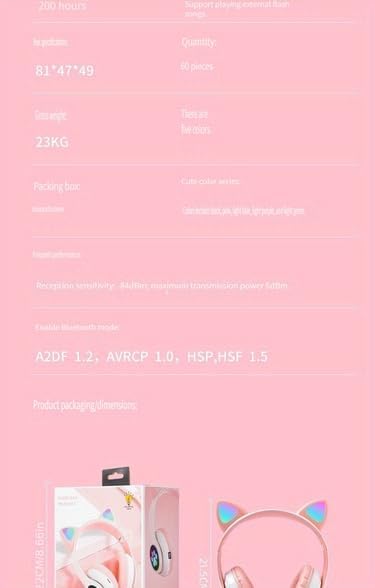
Image: A visual representation of the headset's dimensions and some technical specifications, including model number and battery capacity.
Garanti og support
For warranty information or technical support, please refer to the retailer where you purchased this product. Keep your proof of purchase for any warranty claims.
Manufacturer: Shantou Chaoyang District Gurao Lanxin Electronics Factory