
1. Introduktion
This manual provides detailed instructions for the setup, operation, and maintenance of your ZERFUN D-300 4-Channel UHF Rechargeable Wireless Microphone System. This professional system includes four rechargeable handheld cardioid microphones and a metal receiver box, designed for various applications such as home karaoke, meetings, parties, and public speaking events.
Key features include independent volume, echo, treble, and bass control on microphones, an LCD display on the receiver, frequency lock, and versatile output options (XLR, 1/4-inch, 1/8-inch).
2. Pakkens indhold
Kontroller venligst, at alle nedenstående varer er inkluderet i din pakke:
- ZERFUN Rechargeable Wireless Microphone x 4
- D-300 Receiver Box x 1
- Strømadapter x 1
- 6.35mm to 6.35mm Cable x 1
- 3.5mm to 3.5mm Cable x 1
- Audio Cable x 1 (RCA to 3.5mm)
- Microphone Charging Cable x 2
- Mikrofonvindskærm x 4
- Antiskid Ring x 4
- Brugervejledning x 1

Figure 2.1: ZERFUN D-300 System Package Contents
3. Produktet er slutview
The ZERFUN D-300 system consists of a receiver unit and four handheld wireless microphones. The receiver features an LCD display for monitoring channel and frequency information, along with individual volume and ID lock controls for each microphone channel.
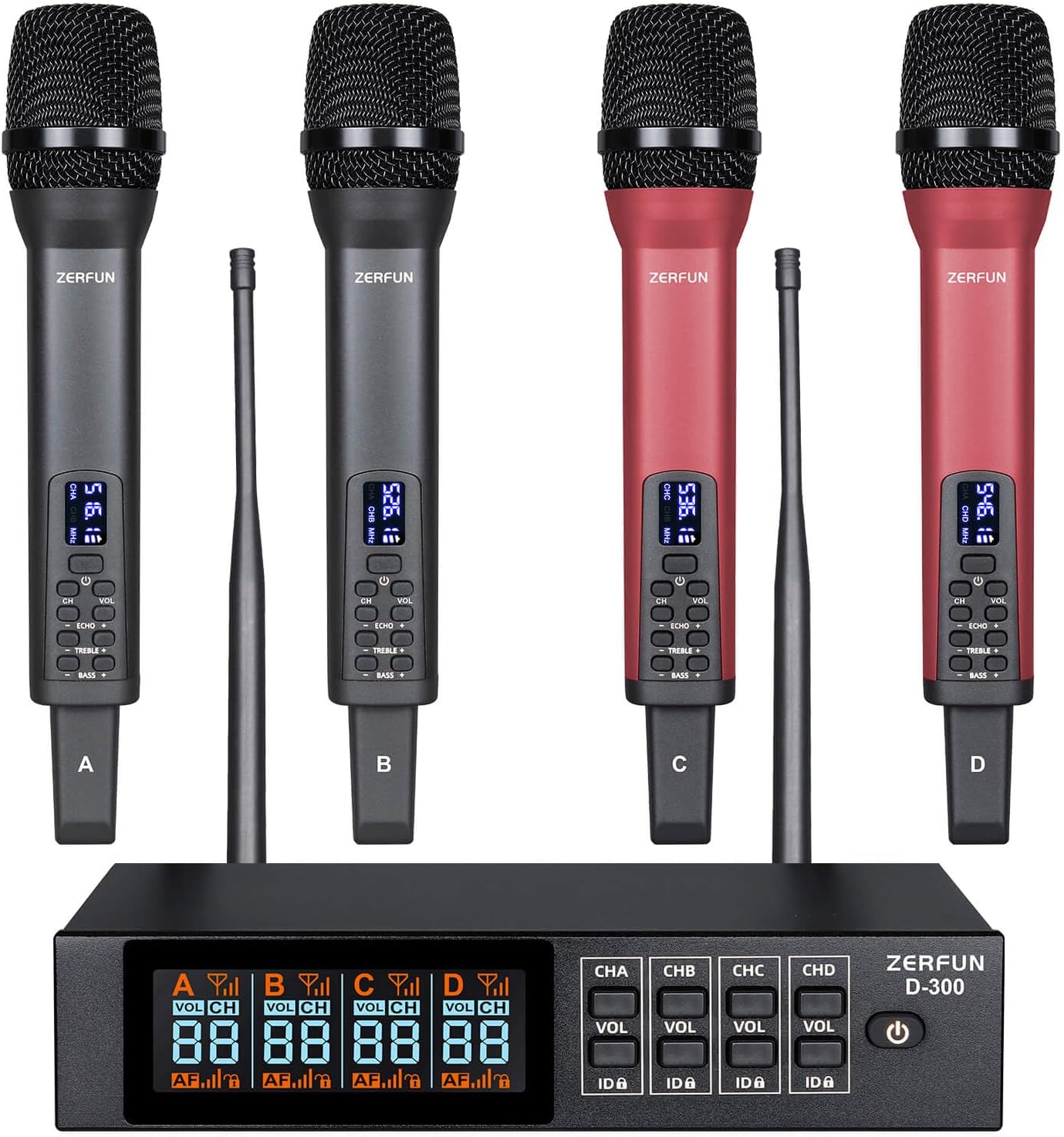
Figure 3.1: ZERFUN D-300 Wireless Microphone System
3.1 Modtagerenhed
The receiver unit is the central hub for the wireless microphones. It displays real-time information for each channel and provides controls for managing microphone settings.

Figure 3.2: Receiver Front Panel Details
- Microphone Volume State Indicator: Shows the current volume level for each microphone.
- Microphone Channel Display: Indicates the active channel (A, B, C, D).
- Microphone Audio Level Indicator: Visual representation of the audio input level.
- Microphone Signal Indicator: Displays the strength of the wireless signal.
- Microphone Channel State Indicator: Shows the operational status of the channel.
- Microphone Lock Display: Indicates if the frequency is locked.
- Microphone Volume Adjust Button (VOL): Adjusts the output volume for the corresponding channel.
- Microphone Lock Button (ID▲): Locks or unlocks the frequency for the corresponding channel.
- Afbryderen: Turns the receiver unit on or off.
3.2 håndholdte mikrofoner
The system includes four rechargeable handheld microphones with individual controls for sound customization.

Figur 3.3: Mikrofonkontroller
- VOL Control (±15 Level): Justerer mikrofonens udgangslydstyrke.
- CHANNEL Control (±50 Channel): Selects the operating channel.
- ECHO Control (±15 Level): Justerer ekkoeffekten.
- TREBLE Control (±12 Level): Justerer diskantresponsen.
- BASS Control (±12 Level): Justerer lavfrekvensresponsen.

Figur 3.4: Mikrofonens funktioner
- Steel Mesh Head: Durable protection for the microphone capsule.
- Cardioid Dynamic Pickup: Unidirectional pickup pattern to isolate vocals from background noise.
- Klar LED-skærm: Shows channel and frequency information.
- USB-C opladningsport: For convenient recharging of the built-in battery.
4. Opsætningsvejledning
4.1 Strømforsyning til modtageren
- Connect the provided power adapter to the DC12V input on the receiver's rear panel.
- Sæt strømadapteren i en passende stikkontakt.
- Press the Power Switch on the receiver's front panel to turn on the unit. The LCD display will illuminate.
4.2 Charging Microphones
Each microphone contains a built-in rechargeable battery. Use the provided microphone charging cables to recharge them.
- Connect the charging cable to the USB-C port on the microphone.
- Connect the other end of the charging cable to a USB power source (e.g., computer, USB wall adapter).
- Opladningstiden er cirka 3-4 timer for en fuld opladning.
- A fully charged microphone provides 8-10 hours of working time.
4.3 Tilslutning til lydenheder
The ZERFUN D-300 receiver offers multiple output options for connecting to various audio equipment.

Figure 4.1: Receiver Output Options
4.3.1 XLR Outputs (Individual Channels)
For professional setups requiring individual control over each microphone, use the balanced XLR outputs.
- Connect an XLR cable (not included) from each of the four balanced XLR outputs (BALANCED-1, BALANCED-2, BALANCED-3, BALANCED-4) on the receiver's rear panel to the corresponding input channels on your audio mixer or amplivligere.
- Ensure the audio mixer/amplifier is powered off before making connections.

Figure 4.2: Connecting via XLR to Audio Mixer
Optimal opstartsrækkefølge:
- Audio mixer
- Lyd Amplivligere
- Højttaler
- Modtager
- Mikrofon
Optimal nedlukningsrækkefølge:
- Mikrofon
- Modtager
- Højttaler
- Lyd Amplivligere
- Audio mixer
4.3.2 Mixed 1/4-inch or 1/8-inch Output
For simpler setups, the receiver provides a mixed output for all channels.
- Connect the provided 6.35mm to 6.35mm cable (1/4-inch) or 3.5mm to 3.5mm cable (1/8-inch) from the MIC OUT port on the receiver's rear panel to the microphone input on your amplifier, karaoke machine, or speaker.
- Ensure the input port on your device is specifically labeled for microphone input.
Optimum Boot Order (for TV/Speaker connection):
- TV
- Lyd Amplivligere
- Højttaler
- Modtager
- Mikrofon
Optimum Shutdown Order (for TV/Speaker connection):
- Mikrofon
- Modtager
- Højttaler
- Lyd Amplivligere
- TV
4.4 Frequency Synchronization
The system supports 50 compatible frequencies on each channel (4 x 50) for interference-free reception. The UHF frequencies range within 500 - 599 MHz, compliant with FCC regulations.
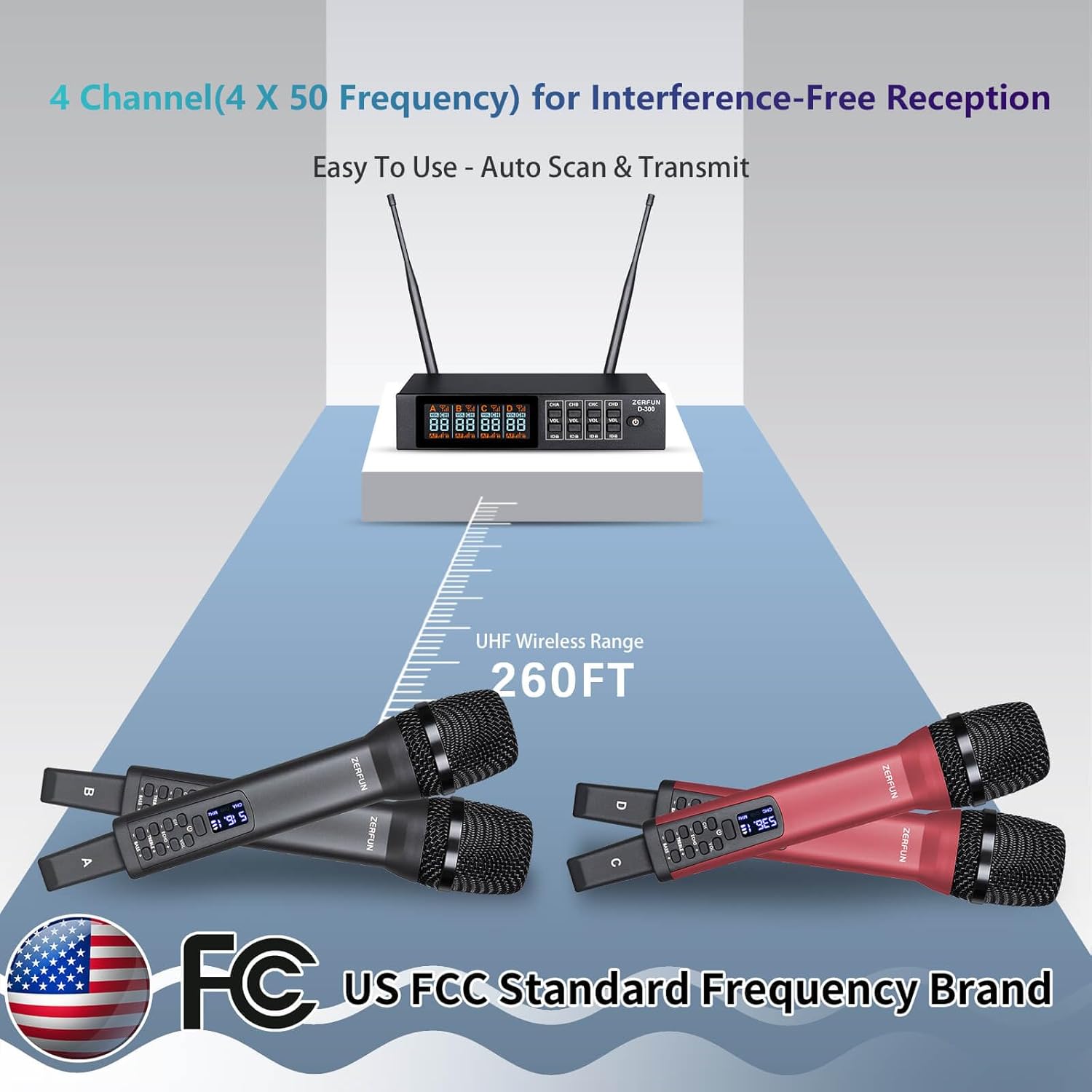
Figure 4.3: UHF Wireless Range and Frequency
The system features auto-scan and transmit setup for easy synchronization. Refer to the receiver's LCD display and microphone LED display to ensure they are on the same channel and frequency. Use the 'ID▲' button on the receiver to lock the frequency for a specific channel, preventing accidental changes.
5. Betjeningsvejledning
5.1 Mikrofonbetjening
- Tænd/sluk: Press and hold the power button on the microphone to turn it on or off. The LED display will show the current channel and frequency.
- Lydstyrkejustering: Use the 'VOL +' and 'VOL -' buttons to adjust the microphone's output volume (±15 levels).
- Kanalvalg: Use the 'CH' button to cycle through available channels. Ensure the microphone channel matches the desired receiver channel.
- Ekkokontrol: Use the 'ECHO +' and 'ECHO -' buttons to add or reduce the echo effect (±15 levels).
- Diskantkontrol: Use the 'TREBLE +' and 'TREBLE -' buttons to adjust the high-frequency response (±12 levels).
- Baskontrol: Use the 'BASS +' and 'BASS -' buttons to adjust the low-frequency response (±12 levels).
5.2 Betjening af modtageren
- Kanalvolumenkontrol: Use the 'VOL' buttons for each channel (CHA, CHB, CHC, CHD) to adjust the overall output volume for that specific microphone channel.
- Frekvenslås: Press the 'ID▲' button for a specific channel to lock its frequency. This prevents accidental changes during use. Press again to unlock.
- Overvågning: Observe the LCD display for microphone signal strength, audio levels, and channel status.
6. Vedligeholdelse
- Rensning: Brug en blød, tør klud til at rengøre receiveren og mikrofonerne. Undgå at bruge flydende rengøringsmidler eller opløsningsmidler.
- Opbevaring: Opbevar systemet et køligt, tørt sted væk fra direkte sollys og ekstreme temperaturer, når det ikke er i brug.
- Batteripleje: Recharge microphones regularly, even if not frequently used, to maintain battery health. Avoid fully discharging batteries for extended periods.
- Antenner: Ensure receiver antennas are securely attached and positioned for optimal signal reception.
7. Fejlfinding
| Problem | Mulig årsag | Løsning |
|---|---|---|
| Ingen lyd fra mikrofonen | Mikrofonen er ikke tændt Microphone battery low Microphone not paired with receiver Modtagerens lydstyrke er for lav Audio cable not connected correctly Connected device (mixer/amp) input volume too low | Ensure microphone is powered on Charge microphone battery Verify microphone and receiver are on the same channel/frequency Increase receiver channel volume Kontroller alle lydkabelforbindelser Increase input volume on connected audio device |
| Interferens eller statisk støj | Andre trådløse enheder i nærheden Opererer for langt fra modtageren Forhindringer mellem mikrofon og modtager Frequency conflict | Flyt dig væk fra andre trådløse enheder Reduce distance between microphone and receiver (max 260 ft) Sørg for frit udsyn Change microphone channel/frequency |
| Modtagerens display virker ikke | Modtageren er ikke tændt Problem med strømadapter | Ensure receiver is powered on Check power adapter connection and functionality |
| Microphone controls unresponsive | Microphone frozen Batteri problem | Power cycle the microphone (turn off and on) Ensure microphone battery is charged |
8. Specifikationer
| Feature | Detalje |
|---|---|
| Modelnummer | D-300 |
| Mærke | ZERFUN |
| Forbindelsesteknologi | UHF |
| Antal kanaler | 4 (with 50 compatible frequencies per channel) |
| UHF frekvensområde | 500 - 599 MHz (FCC compliant) |
| Wireless Range | Op til 260 fod |
| Mikrofon formfaktor | Håndholdt |
| Polar mønster | Envejs (kardioid) |
| Mikrofonbatteritype | Built-in Rechargeable Lithium Ion |
| Mikrofonens arbejdstid | 8-10 Hours (fully charged) |
| Mikrofonens opladningstid | 3-4 timer |
| Receiver Material | Metal |
| Output Stik | 4 x XLR (balanced), 1 x 1/4-inch (mixed), 1 x 1/8-inch (mixed) |
| Anbefalede anvendelser | Karaoke, Singing, Meetings, Parties, DJ, Church, Weddings |
| Kompatible enheder | Amplifier, Audio Interface, Audio Mixer, Karaoke Machine, Speaker |
9. Garanti og support
Genuine ZERFUN Wireless Microphone products come with supportive 24-Hours After-Sales Customer Service and a 12-month Manufacturer Assurance. For any inquiries or assistance, please contact ZERFUN customer support.