
1. Introduktion
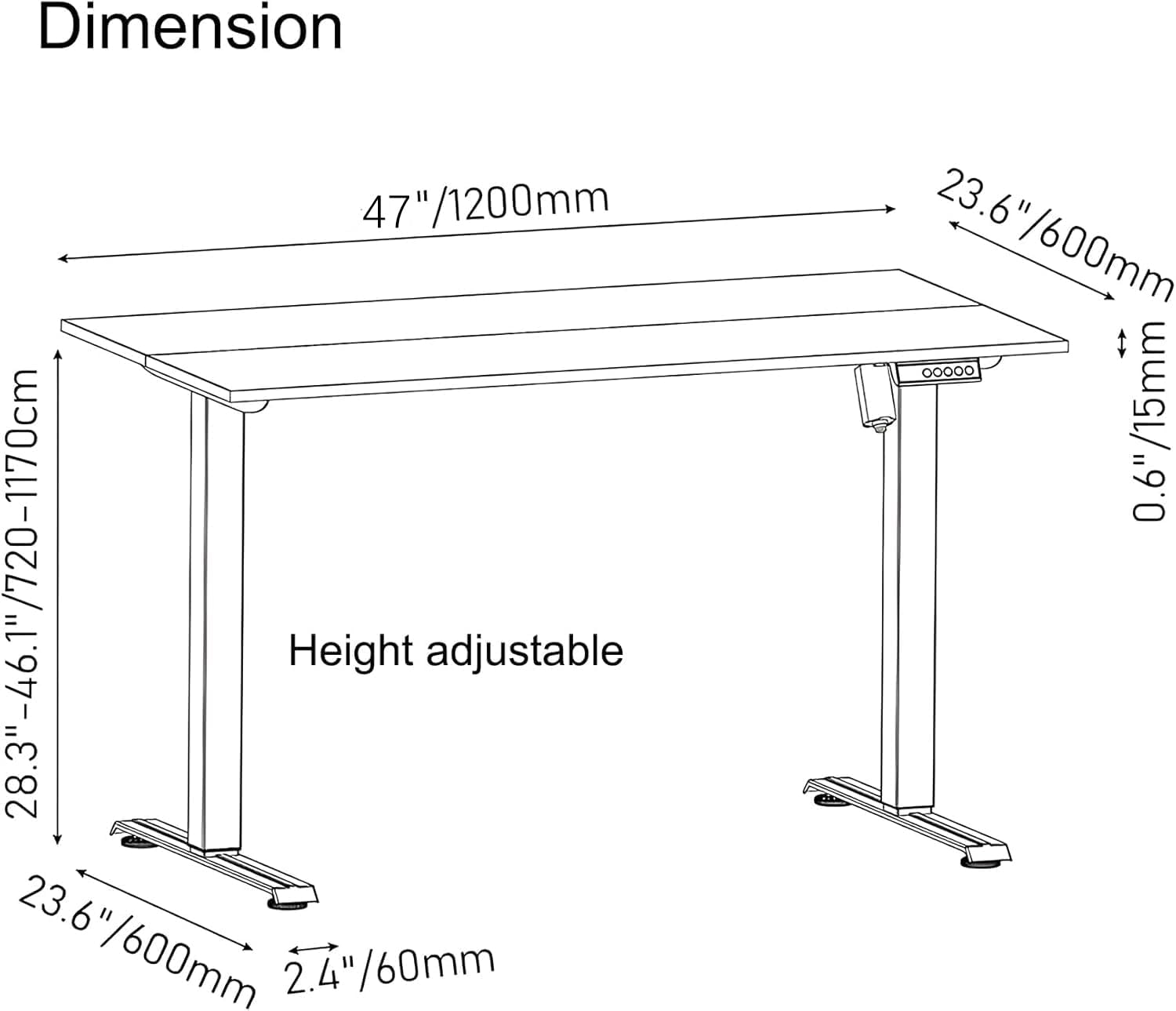
Thank you for choosing the PrimeCables Electric Adjustable Standing Desk. This manual provides essential information for the safe and efficient assembly, operation, and maintenance of your new desk. Designed for ergonomic comfort and versatility, this desk features a 3-memory controller, a spacious 47x24 inch splice board, and a robust heavy-duty steel frame, allowing for height adjustments from 28.3 to 46.1 inches. Please read this manual thoroughly before use and retain it for future reference.
2. Sikkerhedsoplysninger
Af hensyn til din sikkerhed og for at forhindre skader på produktet, bedes du overholde følgende:
- Always ensure the desk is within its specified height and weight limits. The maximum weight capacity is 110 lbs (50 kg).
- Do not force the desk to move if it encounters an obstacle. The desk is equipped with obstruction detection; if activated, remove the obstruction before resuming operation.
- Keep the work surface clear of objects that could fall and cause injury or damage during height adjustments.
- Use the anti-slip foot pads on uneven floors to maintain stability and prevent wobbling.
- Hold børn og kæledyr væk fra skrivebordet under drift.
- Ensure all screws and connections are securely tightened before and after assembly. Regularly check for loose parts.
- Sid eller stå ikke på skrivebordsrammen.
- Undgå at placere væsker direkte på kontrolpanelet eller i nærheden af elektriske komponenter.
- If any unusual noise or malfunction occurs, immediately unplug the desk and contact customer support.
3. Monteringsvejledning
Follow these steps carefully to assemble your PrimeCables Electric Adjustable Standing Desk. It is recommended to assemble the desk on a soft surface like a carpet or foam to prevent scratches.
3.1 Udpakning og komponentkontrol
Carefully unpack all components and lay them out. Verify that all parts listed in the packing list are present and undamaged. If any components are missing or damaged, please contact customer support.
Billede 3.1: All components of the PrimeCables standing desk laid out for assembly, including the desktop, legs, crossbar, motor, and control panel.
3.2 Rammesamling
Begin by assembling the desk frame. Attach the crossbar to the leg columns using the provided screws and tools. Ensure all connections are firm but do not fully tighten until all parts are aligned.
Video 3.2: An animated guide demonstrating the step-by-step assembly of the Acrolix Standing Desk frame, including attaching legs and crossbars. This video is relevant for general frame assembly of electric standing desks.
Video 3.3: An animated guide demonstrating the assembly process for the ERGOMAKER Adjustable Standing Desk, showing how to connect the frame components and motor. This video is relevant for general frame assembly of electric standing desks.
3.3 Attaching the Desktop
Once the frame is assembled, carefully place the splice board desktop onto the frame. Align the pre-drilled holes on the desktop with the mounting points on the frame. Secure the desktop using the provided screws. Ensure the splice board is correctly aligned to form a seamless surface.
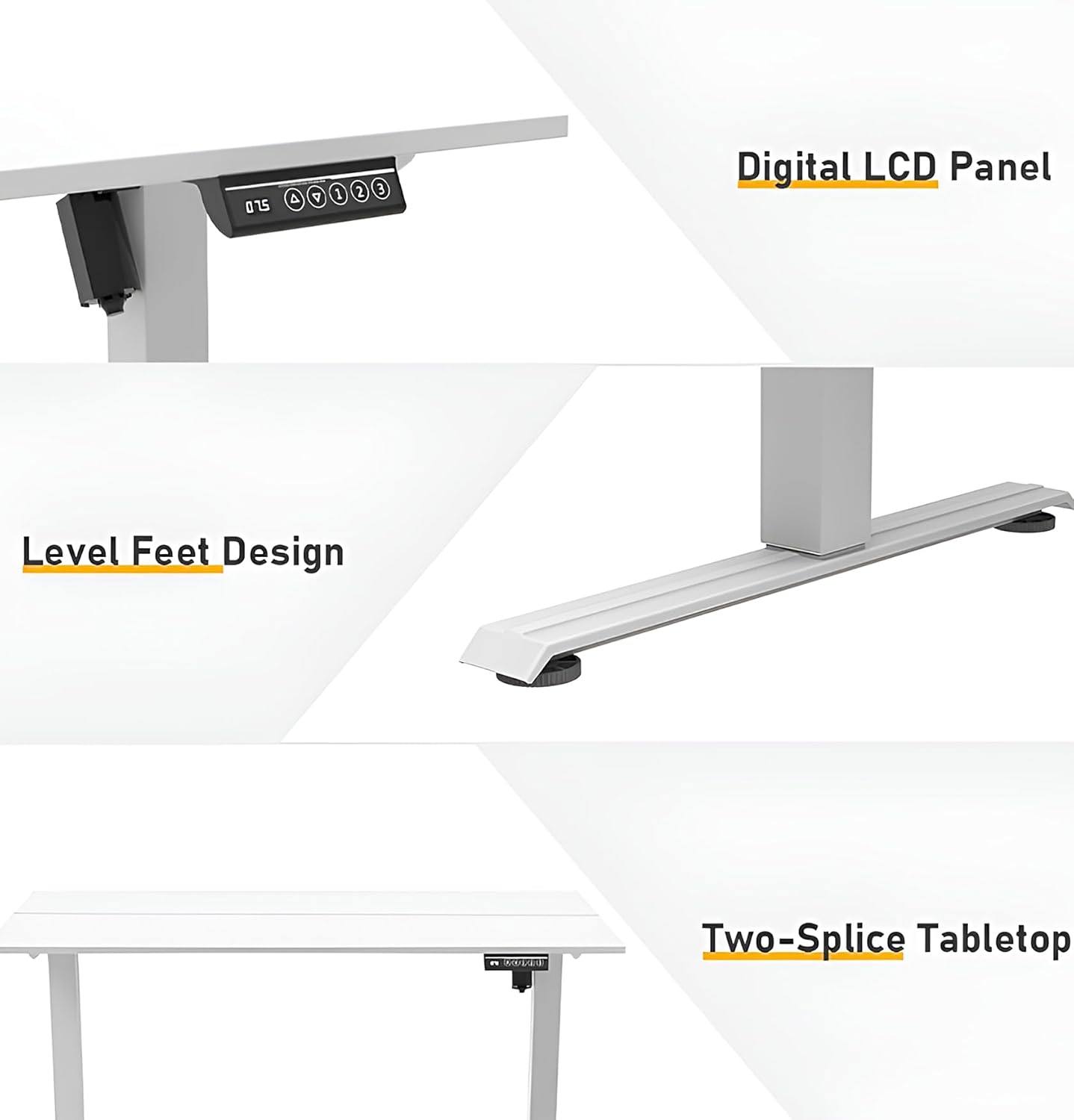
Billede 3.4: The PrimeCables Electric Adjustable Standing Desk featuring a two-piece splice board desktop, providing a spacious work surface.
3.4 Installing the Control Panel and Wiring
Mount the 3-memory controller to the underside of the desktop in the designated area. Connect the motor and control panel cables according to the instructions. Use cable management clips (if provided) to keep wires tidy and prevent entanglement.

Billede 3.5: Et nærbillede view of the 5-button control panel with 3 memory presets and a digital display, mounted on the underside of the desk.
Video 3.6: En kort videovisningasing the features of IMGadgets Electric Standing Desks, including the control panel and height adjustment. This video is relevant for understanding the control panel and its functions.
4. Betjeningsvejledning
Your PrimeCables Electric Adjustable Standing Desk is designed for ease of use. Familiarize yourself with the control panel functions.
4.1 Grundlæggende højdejustering
- Up Adjustment: Press and hold the "Up" arrow button (▲) to raise the desk to your desired height. The real-time height will be displayed on the digital screen.
- Down Adjustment: Press and hold the "Down" arrow button (▼) to lower the desk to your desired height.
- Release the button once the desired height is reached. The desk has a lifting speed of 18mm/s for smooth transitions.
Billede 4.1: The 5-button control panel with up/down arrows and memory presets, showing the digital height display.
4.2 Hukommelsesforudindstillinger
The control panel features 3 memory presets (1, 2, 3) to save and recall your preferred sitting and standing heights.
- Sådan gemmer du en højde: Adjust the desk to your desired height. Press the "M" button, then press one of the number buttons (1, 2, or 3) within 3 seconds. The display will show "S-" followed by the number, indicating the height is saved.
- Sådan genkalder du en gemt højde: Tryk blot på den tilsvarende talknap (1, 2 eller 3). Skrivebordet flytter sig automatisk til den gemte højde.
4.3 Detektion af obstruktion
The desk is equipped with an obstruction detection system. If the desk encounters an obstacle during adjustment, it will stop and retract slightly to prevent damage. Remove the obstruction before attempting to adjust the height again.
5. Vedligeholdelse
Regelmæssig vedligeholdelse sikrer dit hæve- og sænkebords lange levetid og optimal ydeevne.
- Rensning: Tør skrivebordet og rammen af med en blød kludamp klud. Undgå skrappe kemikalier eller slibende rengøringsmidler, der kan beskadige overfladen.
- Kabelstyring: Periodically check that all cables are securely routed and not pinched or tangled.
- Skruefasthed: Kontrollér alle skruer og bolte hver par måneder for at sikre, at de er stramme. Efterspænd om nødvendigt for at opretholde stabiliteten.
- Vægtfordeling: Fordel vægten jævnt over skrivebordet for at undgå belastning af løftemekanismen.
6. Fejlfinding
Hvis du støder på problemer med dit skrivebord, kan du se følgende almindelige fejlfindingstrin:
| Problem | Mulig årsag | Løsning |
|---|---|---|
| Skrivebordet bevæger sig ikke. | Power cable disconnected, motor error, overload. | Check power connections. Reduce weight on the desk. Perform a reset (see below). |
| Skrivebordet bevæger sig ujævnt eller laver usædvanlige lyde. | Loose screws, uneven weight distribution, motor issue. | Check and tighten all screws. Redistribute weight. Contact support if issue persists. |
| Digitalt display viser en fejlkode. | Specific error detected by the control system. | Refer to the specific error code in the full manual (if available) or perform a reset. |
| Obstruction detection activates frequently. | Obstacles in the path of movement, sensitive setting. | Ensure clear path for desk movement. Check if any cables are interfering. |
6.1 Nulstillingsprocedure
If the desk is not functioning correctly, a reset may resolve the issue:
- Press and hold the "Up" (▲) and "Down" (▼) arrow buttons simultaneously for 5 seconds.
- Release the buttons when the indicator light turns red (or as per specific model instructions) to enter reset mode.
- The tabletop will automatically lower to its lowest position, then bounce back slightly (3-5 mm).
- The indicator light will turn blue, indicating the reset procedure is complete.
Video 6.1: An animated guide demonstrating the reset procedure for an Acrolix Standing Desk, which is a common procedure for many electric standing desks. This video shows pressing up and down buttons simultaneously to initiate the reset.
7. Specifikationer
| Feature | Detalje |
|---|---|
| Mærke | PrimeCables |
| Modelnummer | Cab-PC-08485-WH |
| Produktdimensioner | 120 x 60 x 117 cm (47 x 24 x 46.1 tommer) |
| Højdejusterbart område | 72 cm til 117 cm (28.3" til 46.1") |
| Varens vægt | 20.5 kg (45.2 lbs) |
| Materiale | Alloy Steel frame, Wood top |
| Farve | Hvid |
| Særlige funktioner | Adjustable Height, Adjustable foot pads, Electric, Ergonomic, Splice Board, 3-Memory Controller, Obstruction Detection, Dual-Stage Lift System, Whisper-quiet dual motors (≤50dB) |
| Vægt kapacitet | 110 lbs (50 kg) |
| Løftehastighed | 18 mm/s |

Billede 7.1: A detailed diagram showing the dimensions and adjustable height range of the PrimeCables Electric Adjustable Standing Desk.
8. Garanti og support
PrimeCables is committed to providing high-quality products. For warranty information, technical support, or any questions regarding your Electric Adjustable Standing Desk, please refer to the contact information provided with your purchase documentation or visit the official PrimeCables website. Please have your model number (Cab-PC-08485-WH) ready when contacting support.