
1. Introduktion
This user manual provides detailed instructions for the operation, maintenance, and safety of your Walfront LED Work Light. This versatile and portable work light is designed for various applications, offering bright illumination and convenient features such as USB charging capabilities and adjustable light modes. Please read this manual thoroughly before using the product to ensure proper and safe operation.
2. Sikkerhedsinstruktioner
For at sikre sikker drift og forhindre skader, bedes du overholde følgende sikkerhedsforanstaltninger:
- Batteriadskillelse: It is recommended to separate the battery from the LED light when not in use to extend battery life and prevent accidental activation.
- Håndteres med forsigtighed: The LED light is a delicate electronic device. Handle it with care to avoid dropping or impacting it, which may cause damage.
- Vandtæthed: The light features an IP67 rating, indicating resistance to water splashes and rain. However, avoid submerging the device in water.
- Overbelastningsbeskyttelse: The device is equipped with overload, overcurrent, overheating, and low voltage protection. Do not attempt to bypass these safety features.
- Batterikompatibilitet: Only use compatible PARKSIDE X20V TEAM 20V PAP20A1, PAP20A3, PAP20B1, PAP20B3 batteries. Using incompatible batteries may cause damage or safety hazards.
- Opladningssikkerhed: When using the USB charging ports, ensure that the connected devices are compatible and do not exceed the specified output (5V 2A).
- Opbevaring: Opbevar arbejdslampen et køligt og tørt sted, væk fra direkte sollys og ekstreme temperaturer.
3. Produktet er slutview
Familiarize yourself with the components and features of your LED Work Light.
3.1 Komponenter
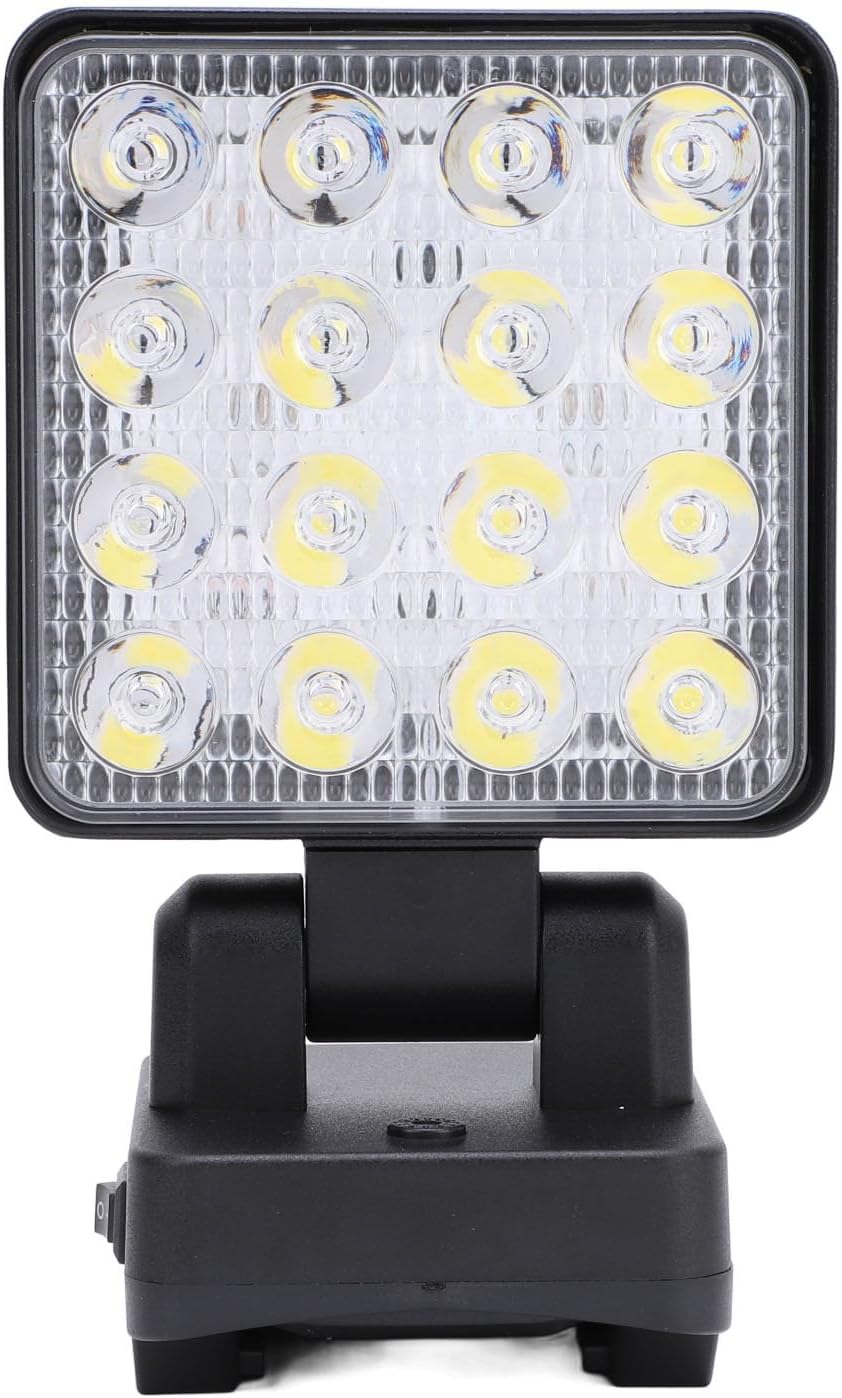
Figur 3.1: Forside view of the Walfront LED Work Light, highlighting the bright LED array and the sturdy base.

Figur 3.2: Nærbillede views of the work light's features, including the power switch, USB-A and USB-C charging ports, and the integrated carrying handle.
- LED-array: High-lumen LED panel for bright illumination.
- Roterbart hoved: Allows 90° vertical and 330° horizontal rotation for precise light positioning.
- Afbryderen: On/Off button and mode selector.
- USB-A udgangsport: Til opladning af eksterne enheder.
- USB Type-C Output Port: Til opladning af eksterne enheder.
- Batterirum: Located at the base, compatible with PARKSIDE X20V TEAM 20V batteries.
- Bærehåndtag: Integrated at the top for easy portability and hanging.
3.2 Nøglefunktioner
- Flexible and Rotatable: The light head can rotate 90° up and down, and 330° horizontally, providing versatile lighting angles.
- Trådløst design: Compatible with PARKSIDE X20V TEAM 20V batteries (not included), offering portability without power cord restrictions.
- IP67 Vandtæthed: Designed to withstand rain and splashes, suitable for various environments.
- Multi-Functional Charging: Equipped with USB-A and Type-C charging interfaces to power mobile devices.
- Bærbar og alsidig: Features a handle for easy carrying and hanging, ideal for construction sites, outdoor activities, camping, hiking, and vehicle maintenance.
- Justerbare lystilstande: Three distinct lighting gears: Dim Light, Bright Light, and Flashing Light.
4. Specifikationer
| Attribut | Detalje |
|---|---|
| Varetype | LED arbejdslys |
| Mærke | Walfront |
| Modelnummer | WALFRONT2369idgef0 |
| Materiale | Acrylonitril Butadien Styren (ABS) |
| Magt | 11-15W |
| Lysstrøm | 1200-1500LM |
| Udgang (USB) | USB Type-C 5V 2A, USB-A 5V 2A |
| Justerbare gear | 1st Gear (Dim Light), 2nd Gear (Bright Light), 3rd Gear (Flashing Light) |
| Gældende batteri | For PARKSIDE X20V TEAM 20V (PAP20A1, PAP20A3, PAP20B1, PAP20B3) - Battery Not Included |
| Varens vægt | 14.5 ounces (ca. 411 g) |
| Pakkedimensioner | 7.09 x 4.33 x 3.54 tommer (ca. 18 x 11 x 9 cm) |
| Farve | #311 (Black) |
| Vandmodstandsvurdering | IP67 |

Figur 4.1: Produktmål til reference.
5. Opsætning
This section guides you through the initial setup of your LED Work Light.
5.1 Batteriinstallation
- Sørg for, at arbejdslampen er slukket, før du monterer eller fjerner batteriet.
- Find batterirummet i bunden af arbejdslampen.
- Align your compatible PARKSIDE X20V TEAM 20V battery (PAP20A1, PAP20A3, PAP20B1, or PAP20B3) with the battery slot.
- Skub batteriet ind i batterirummet, indtil det klikker sikkert på plads.
- To remove the battery, press the release button (if present on your battery) and slide the battery out.
Note: The battery is not included with the LED Work Light and must be purchased separately.
6. Betjeningsvejledning
Learn how to operate your LED Work Light and utilize its various functions.
6.1 Powering On/Off and Adjusting Light Modes

Figure 6.1: Illustration of the three adjustable light modes.
- Tænd: Locate the master switch on the base of the light. Flip the switch to the "On" position.
- 1st Gear (Dim Light): After turning on the master switch, press the mode button once to activate the dim light setting.
- 2nd Gear (Bright Light): Press the mode button a second time to switch to the bright light setting.
- 3rd Gear (Flashing Light): Press the mode button a third time to activate the flashing light setting.
- Sluk: To turn off the light from any mode, long press the mode button. Alternatively, flip the master switch to the "Off" position.
6.2 Adjusting Light Angle

Figure 6.2: The light head can be rotated for optimal illumination.
- The light head can be manually rotated 90° vertically (up and down) and 330° horizontally (side to side) on its base.
- Gently adjust the light head to direct the beam precisely where needed. Avoid forcing the rotation beyond its designed limits.
6.3 Brug af USB-opladningsporte
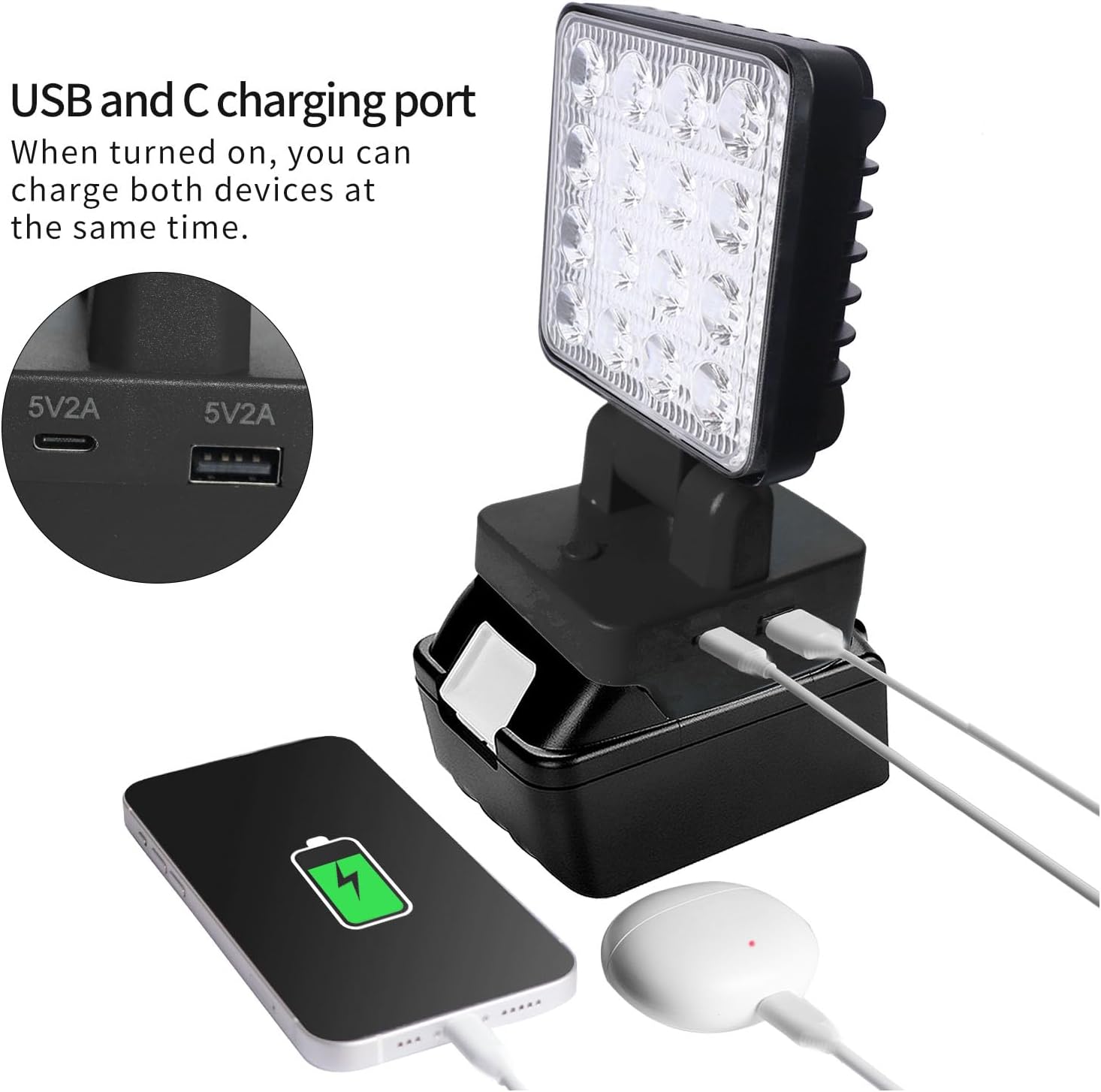
Figure 6.3: The work light can charge two devices simultaneously via its USB-A and USB-C ports.
- The LED Work Light can function as a power bank to charge your mobile devices.
- Locate the USB-A and USB Type-C output ports on the side of the light's base.
- Connect your device's charging cable to the appropriate USB port on the work light.
- Ensure the work light is powered on for the charging function to be active.
- The output for both ports is 5V 2A. Do not connect devices that require higher power input.
7. Vedligeholdelse
Proper maintenance ensures the longevity and optimal performance of your LED Work Light.
- Rensning: Tør overfladen af lyset af med en blød, damp cloth. Do not use abrasive cleaners or solvents, as they may damage the ABS material.
- Opbevaring: When not in use for extended periods, remove the battery and store the work light in a cool, dry place, away from direct sunlight and extreme temperatures.
- Batteripleje: Følg batteriproducentens anvisninger for opladning og opbevaring for at maksimere batteriets levetid.
- Inspektion: Periodically inspect the light for any signs of damage, such as cracks in the housing or frayed wires. Do not use the light if it appears damaged.
8. Fejlfinding
If you encounter issues with your LED Work Light, refer to the following common problems and solutions:
| Problem | Mulig årsag | Løsning |
|---|---|---|
| Lyset tændes ikke. | Batteriet er ikke installeret korrekt. Batteriet er afladet. Master switch is off. | Sørg for, at batteriet klikker sikkert på plads. Oplad eller udskift batteriet. Flip the master switch to the "On" position. |
| Lyset er svagt eller flimrer. | Lav batteriopladning. Forkert tilstand valgt. | Oplad batteriet. Cycle through the light modes to select the desired brightness. |
| USB-opladning virker ikke. | Work light is off. Enhedens kabel er defekt. Device requires more than 5V 2A. | Ensure the work light is powered on. Prøv et andet USB-kabel. Confirm your device's charging requirements. |
| Light head does not rotate smoothly. | Obstruktion eller skade. | Check for any debris or obstructions. Do not force rotation. If damaged, discontinue use. |
9. Pakkens indhold
Følgende varer er inkluderet i din pakke:
- 1 x Walfront LED Work Light
Note: Compatible PARKSIDE X20V TEAM 20V batteries (PAP20A1, PAP20A3, PAP20B1, PAP20B3) are sold separately and are not included in this package.
10. Garanti og support
For information regarding warranty coverage, technical support, or service inquiries, please refer to the warranty card included with your product or contact Walfront customer service through the retailer where the product was purchased. Please have your model number (WALFRONT2369idgef0) and purchase date ready when contacting support.
For additional resources and product information, you may visit the official Walfront store page on Amazon: Walfront Store