
AWEI H22
AWEI Smart Watch H22 Brugermanual
Model: H22
Indledning
This manual provides detailed instructions for the setup, operation, and maintenance of your AWEI Smart Watch H22. Please read this manual thoroughly to ensure proper use and to maximize the features of your device. The AWEI H22 is a 1.39-inch smartwatch designed for both men and women, offering fitness tracking, call functionality, and compatibility with Android and iOS devices.
1. Opsætning
1.1 Hvad er der i æsken
- AWEI Smart Watch H22
- Ladekabel
- Brugervejledning (dette dokument)
1.2 Opladning af enheden
Before initial use, fully charge your AWEI Smart Watch H22. Connect the charging cable to the watch's charging port and a standard USB power adapter (not included). A full charge typically takes approximately 2.5 hours. The watch is equipped with a 400mAh Lithium Polymer battery.
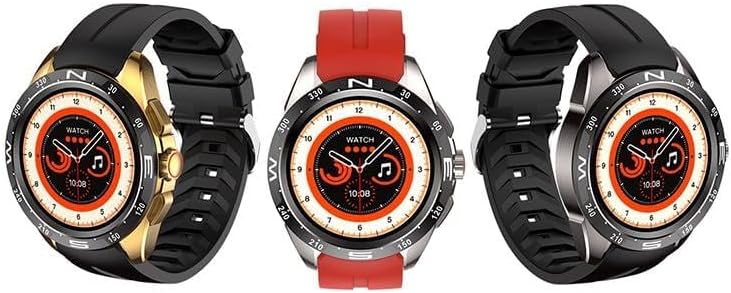
Image: The AWEI Smart Watch H22, showcasing its round display and various strap/bezel color options. This image illustrates the physical appearance of the device.
1.3 Appinstallation og parring
- Download appen: Søg efter the official AWEI smartwatch application in your smartphone's app store (compatible with iOS 9.0 and above, and Android 6.0 and above).
- Aktiver Bluetooth: Sørg for, at Bluetooth er aktiveret på din smartphone.
- Åbn appen: Launch the AWEI app and follow the on-screen instructions to create an account or log in.
- Par uret: Within the app, navigate to the device pairing section. The app will search for available devices. Select "AWEI H22" from the list to initiate pairing.
- Bekræft parring: A pairing request may appear on your watch screen. Confirm the pairing on both your watch and smartphone.
Note: For optimal ydeevne skal du sørge for, at din smartphones operativsystem er opdateret.
2. Betjeningsvejledning
2.1 Grundlæggende navigation
- Berøringsskærm: Stryg til venstre/højre, op/ned for at navigere gennem menuer og funktioner. Tryk for at vælge.
- Sideknap(per): Typically, a short press returns to the previous screen or watch face. A long press may power on/off or access a quick menu. Refer to the watch's on-screen prompts for specific button functions.
- Wrist Flip: Enable the "wrist flip to light up screen" feature in the app settings to automatically activate the display when you raise your wrist.
2.2 Nøglefunktioner
- Heart Rate Monitoring: Få adgang til pulsfunktionen på uret for at måle din aktuelle puls.
- Overvågning af ilt i blodet: Use the blood oxygen feature to check your SpO2 levels.
- Multisportstilstande: The watch supports various sports modes including Running, Walking, Hiking, Basketball, Badminton, Boating, Climbing, Fitness, Cycling, Football, Yoga, and more. Select a mode before starting an activity to track relevant metrics like exercise time and calories burned.
- Besvar/foretag opkald: Once paired via Bluetooth, you can answer incoming calls directly from your watch or dial numbers.
- Musik kontrol: Styr musikafspilning på din smartphone (afspil, pause, spring numre over) direkte fra uret.
- Fjernfotografering: Brug dit ur som fjernbetjent udløser til dit smartphonekamera.
- Tilpassede urskiver: Change watch faces from a selection of cloud-based options or upload your own photos via the app.
- Stillesiddende påmindelse: Set reminders to encourage movement after periods of inactivity.
- Kvindelig fysiologisk cyklusregistrering: Monitor and track your physiological cycle through the app.
- Vækkeur: Set alarms directly on the watch or through the companion app.
3. Vedligeholdelse
3.1 Rengøring
Rengør regelmæssigt dit ur og din rem med en blød, tør klud. Brug om nødvendigt en let fugtig klud.amp en klud med en mild sæbe, og tør derefter af. Undgå skrappe kemikalier eller slibende materialer.
3.2 Vandtæthed
The AWEI Smart Watch H22 has an IP68 waterproof rating. This means it is resistant to dust and can withstand immersion in water up to 1.5 meters for 30 minutes. It is suitable for daily use, such as washing hands, face, or during sweaty activities. However, it is not recommended for use in hot water (e.g., hot showers, saunas) or seawater, as this can compromise the waterproof seals.
3.3 Pleje af batterier
- Undgå at aflade batteriet helt ofte.
- Oplad uret regelmæssigt, selvom det ikke er i konstant brug, for at opretholde batteriets sundhed.
- Opbevar uret et køligt og tørt sted, når det ikke er i brug i længere perioder.
4. Fejlfinding
| Problem | Mulig løsning |
|---|---|
| Uret tænder ikke. | Sørg for, at uret er fuldt opladet. Tilslut det til opladeren i mindst 30 minutter. |
| Kan ikke parres med smartphone. |
|
| Inaccurate heart rate/blood oxygen readings. |
|
| Notifikationer ikke modtaget. |
|
5. Specifikationer
| Feature | Detalje |
|---|---|
| Modelnummer | H22 |
| Skærmstørrelse | 1.39 tommer |
| Batterikapacitet | 400 mAh (litiumpolymer) |
| Opladningstid | Ca. 2.5 timer |
| Forbindelse | Bluetooth |
| Operativsystemkompatibilitet | iOS 9.0+ / Android 6.0+ |
| Vandmodstandsvurdering | IP68 |
| Særlige funktioner | Heart rate, blood oxygen, female physiological cycle, sedentary reminder, customizable dial, wrist flip screen, time display, remote photo, music control, alarm clock, multiple sports mode detection. |
6. Garanti og support
Your AWEI Smart Watch H22 comes with a et års garanti fra købsdatoen. Denne garanti dækker fabrikationsfejl ved normal brug. Den dækker ikke skader forårsaget af misbrug, ulykker, uautoriserede ændringer eller manglende overholdelse af instruktionerne i denne manual.
For technical support, warranty claims, or any questions regarding your device, please contact AWEI customer service. Refer to the contact information provided with your product packaging or visit the official AWEI webwebsted for supportdetaljer.
Gem venligst din købsbevis af garantihensyn.