
1. Introduktion
Thank you for choosing the ECLIPSE AVN-LBS01 Car Navigation System. This manual provides essential information for the proper installation, operation, and maintenance of your device. Please read this manual thoroughly before using the product to ensure safe and optimal performance. Keep this manual in a safe place for future reference.
2. Sikkerhedsoplysninger
Always observe the following safety precautions to prevent injury, damage to the device, or damage to your vehicle.
- Kørselssikkerhed: Brug ikke navigationssystemet eller view the screen while driving. Always pull over to a safe location before making adjustments or inputting destinations.
- Installation: Installation should be performed by a qualified professional to avoid electrical shorts, damage to vehicle wiring, or improper mounting. Ensure all connections are secure.
- Strømforsyning: This unit is designed for a 12V DC negative ground electrical system. Do not connect it to any other voltage eller polaritet.
- Ventilation: Sørg for tilstrækkelig ventilation omkring enheden. Bloker ikke ventilationsåbningerne.
- Rensning: Brug en blød, tør klud til rengøring. Brug ikke slibende rengøringsmidler eller opløsningsmidler.
3. Pakkens indhold
Kontroller, at alle dele er til stede i pakken, før du fortsætter installationen.
- ECLIPSE AVN-LBS01 Main Unit
- GPS antenne
- Mikrofon
- Hovedledningsnet
- Various Connection Cables (e.g., RCA, USB, Steering Wheel Control)
- Monteringsskruer og tilbehør

Billede 3.1: Various wiring harnesses and connectors included with the ECLIPSE AVN-LBS01 car navigation system. This image shows a comprehensive set of cables for power, audio, video, and data connections, essential for integrating the unit into a vehicle's electrical system.

Billede 3.2: GPS antenna and microphone for the ECLIPSE AVN-LBS01 car navigation system. The GPS antenna is crucial for accurate location tracking, while the microphone enables hands-free communication and voice commands.
4. Opsætning og installation
Proper installation is crucial for the performance and safety of your car navigation system. It is highly recommended that installation be performed by a professional.
4.1. Main Unit Overview

Billede 4.1: Front view of the ECLIPSE AVN-LBS01 car navigation system. This image displays the 7V screen, control buttons (TILT, MENU, Current Location), and the overall aesthetic of the unit when installed in a dashboard.

Billede 4.2: Top view of the ECLIPSE AVN-LBS01 car navigation system showing the product label. The label indicates the model number AVN-LBS01(R), manufacturing origin (Made in China), power requirement (12V), and serial number (FDI202203118595). It also includes information regarding Bluetooth trademark ownership.
4.2. Bagpaneltilslutninger
The rear panel of the AVN-LBS01 unit provides various ports for connecting power, antennas, and external devices.

Billede 4.3: Bag view of the ECLIPSE AVN-LBS01 car navigation system showing connection ports. Key ports include MIC (microphone input), GPS (GPS antenna input), TV (TV antenna input), and various multi-pin connectors for power, speakers, and other vehicle interfaces.
4.3. Ledningsforbindelser
Connect the main wiring harness and other cables as follows:
- Strøm og jord: Connect the yellow wire (constant 12V), red wire (accessory 12V), and black wire (ground) to the corresponding vehicle wiring.
- Højttalerudgange: Tilslut højttalerledningerne til bilens højttalere, og sørg for korrekt polaritet.
- GPS-antenne: Tilslut GPS-antennen til den dedikerede GPS-port på bagsiden af enheden. Placer antennen et sted med frit lys. view af himlen.
- Mikrofon: Connect the microphone to the MIC input port. Route the microphone cable to a suitable location for clear voice pickup.
- Vehicle Signals: Connect the SPEED (vehicle pulse), REVERSE, and PARKING wires to the corresponding vehicle signals. The parking brake connection is a safety feature that may restrict certain functions while the vehicle is in motion.
- Andre forbindelser: Connect any additional cables for steering wheel controls, external amplifiers, or video inputs/outputs as required.
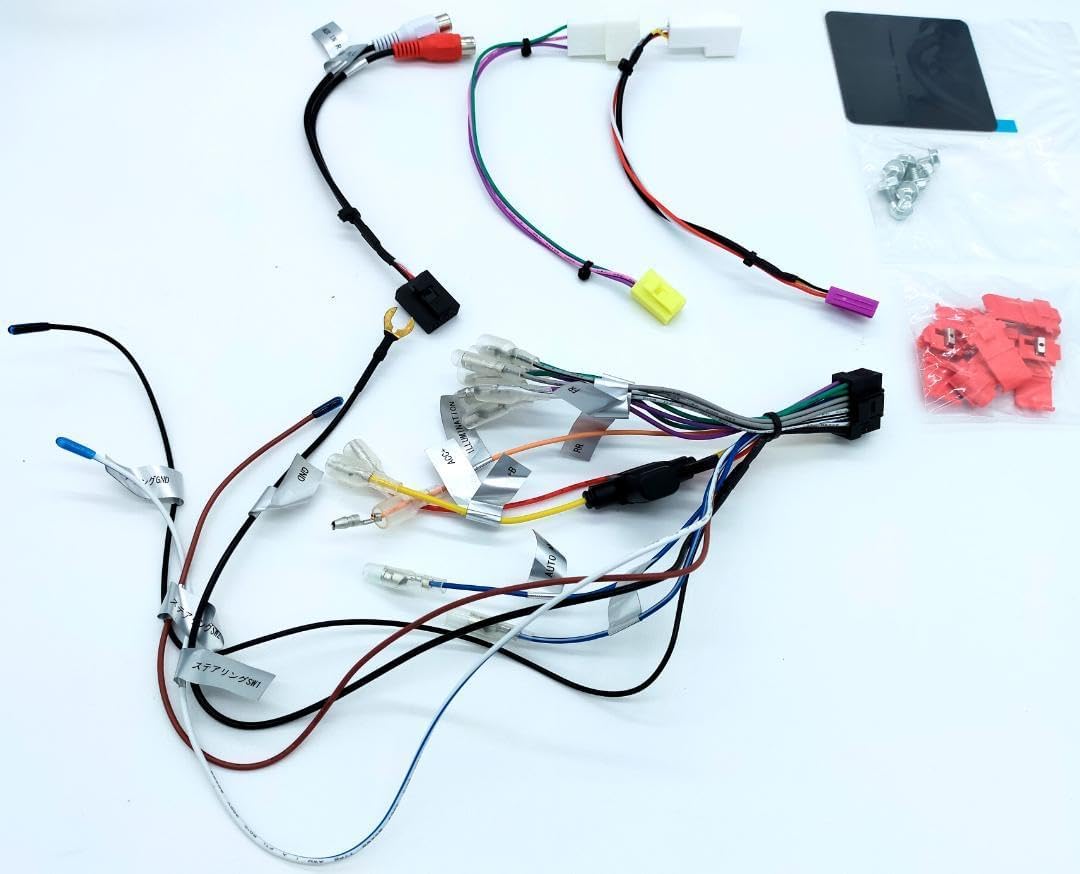
Billede 4.4: Detaljeret view of the main wiring harness for the ECLIPSE AVN-LBS01 car navigation system. This image highlights various labeled wires such as SPEED (vehicle pulse), REVERSE, and PARKING, which are critical for proper navigation and safety feature operation.
4.4. Montering af enheden
Secure the main unit into the vehicle's dashboard opening using the provided mounting brackets and screws. Ensure the unit is firmly seated and does not obstruct any vehicle controls or airbags.

Billede 4.5: Side view of the ECLIPSE AVN-LBS01 car navigation system showing mounting points. This perspective illustrates the screw holes and chassis design for secure installation within a vehicle's dashboard.

Billede 4.6: Modsatte side view of the ECLIPSE AVN-LBS01 car navigation system showing mounting points. Similar to Image 4.5, this view provides additional detail on the chassis structure and mounting options.
5. Betjeningsvejledning
This section covers the basic operation of your ECLIPSE AVN-LBS01 car navigation system.
5.1. Tænd/sluk
To power on the unit, turn your vehicle's ignition to the ACC or ON position. The unit will typically power on automatically. To power off, turn the ignition to the OFF position.
5.2. Display Controls
The unit features a 7V type touchscreen display. Use the physical buttons for quick access to common functions.
- TILT Button: Press this button to adjust the screen angle for optimal viewing and to reduce glare.
- MENU knap: Press to access the main menu, where you can select various functions such as navigation, audio, video, and settings.
- +/- knapper: Typically used for volume control or zooming in/out on the map.
- Current Location Button: Press to quickly display your current position on the map.

Billede 5.1: Vinklet top-front view of the ECLIPSE AVN-LBS01 car navigation system showing the tilt mechanism. This image demonstrates how the screen can be adjusted for better visibility, highlighting the 'TILT' button on the front panel.
5.3. Navigationsfunktioner
The AVN-LBS01 comes with 2022 Autumn Edition map data. Access navigation features through the main menu.
- Destinationsindtastning: Use the touchscreen keyboard to enter addresses, points of interest (POIs), or coordinates.
- Rutevejledning: Follow on-screen directions and voice prompts for turn-by-turn navigation.
- Kort View: Skift mellem 2D- og 3D-kort views, zoom levels, and display options.
- Trafikinformation: If supported, the system may display real-time traffic updates to help avoid congestion.
5.4. Afspilning af lyd/video
The unit supports various audio and video playback options. Refer to the on-screen menu for available sources (e.g., radio, USB, Bluetooth audio, external AV input).
6. Vedligeholdelse
Regular maintenance ensures the longevity and optimal performance of your navigation system.
- Rengøring af skærm: Tør forsigtigt skærmen af med en blød, fnugfri klud. Ved genstridige pletter, tør let afampRengør kluden med vand eller et skærmsikkert rengøringsmiddel. Spray ikke rengøringsmiddel direkte på skærmen.
- Rengøring af enhed: Use a dry, soft cloth to wipe the exterior of the unit. Avoid using harsh chemicals or abrasive materials.
- Softwareopdateringer: Kontroller jævnligt producentens website or contact support for available map data and software updates.
7. Fejlfinding
If you encounter issues with your AVN-LBS01, refer to the following common problems and solutions.
| Problem | Mulig årsag | Løsning |
|---|---|---|
| Ingen strøm | Løs strømforbindelse, sprunget sikring, bilens tænding er afbrudt. | Check power wiring, inspect vehicle fuses, ensure ignition is on. |
| Intet GPS-signal | GPS antenna not connected, antenna obstructed, driving in an area with poor satellite reception. | Sørg for, at GPS-antennen er korrekt tilsluttet og har en klar view af himlen. Flyt til et åbent område. |
| Touchscreen reagerer ikke | System freeze, dirty screen, calibration issue. | Restart the unit (turn vehicle ignition off and on). Clean the screen. If issue persists, consult a professional. |
| Ingen lyd | Lydstyrken er for lav, lydløs aktiveret, problem med højttalerledningerne. | Increase volume, check mute settings, verify speaker connections. |
If the problem persists after trying these solutions, please contact customer support or a qualified service technician.
8. Specifikationer
| Feature | Detalje |
|---|---|
| Modelnummer | AVN-LBS01 |
| Display Type | 7V Type Touchscreen |
| Kortdata | 2022 Autumn Edition |
| Strømforsyning | 12V DC (negativ jord) |
| Fremstillingsoprindelse | Fremstillet i Kina |
| ASIN | B0DCW68M8N |
| Varenummer | m49798662797 |
| Serienummer | FDI202203118595 |
| Bluetooth | Bluetooth® word mark and logos are registered trademarks owned by Bluetooth SIG, Inc. |
9. Garanti og support
For warranty information, please refer to the warranty card included with your product or contact your retailer. For technical support, product inquiries, or service, please contact the authorized ECLIPSE service center or your point of purchase. Keep your purchase receipt and serial number handy when contacting support.