
Indledning
Welcome to the user manual for your new realme C65 5G smartphone. This guide provides essential information to help you set up, operate, maintain, and troubleshoot your device. Please read this manual carefully to ensure optimal performance and longevity of your realme C65 5G.
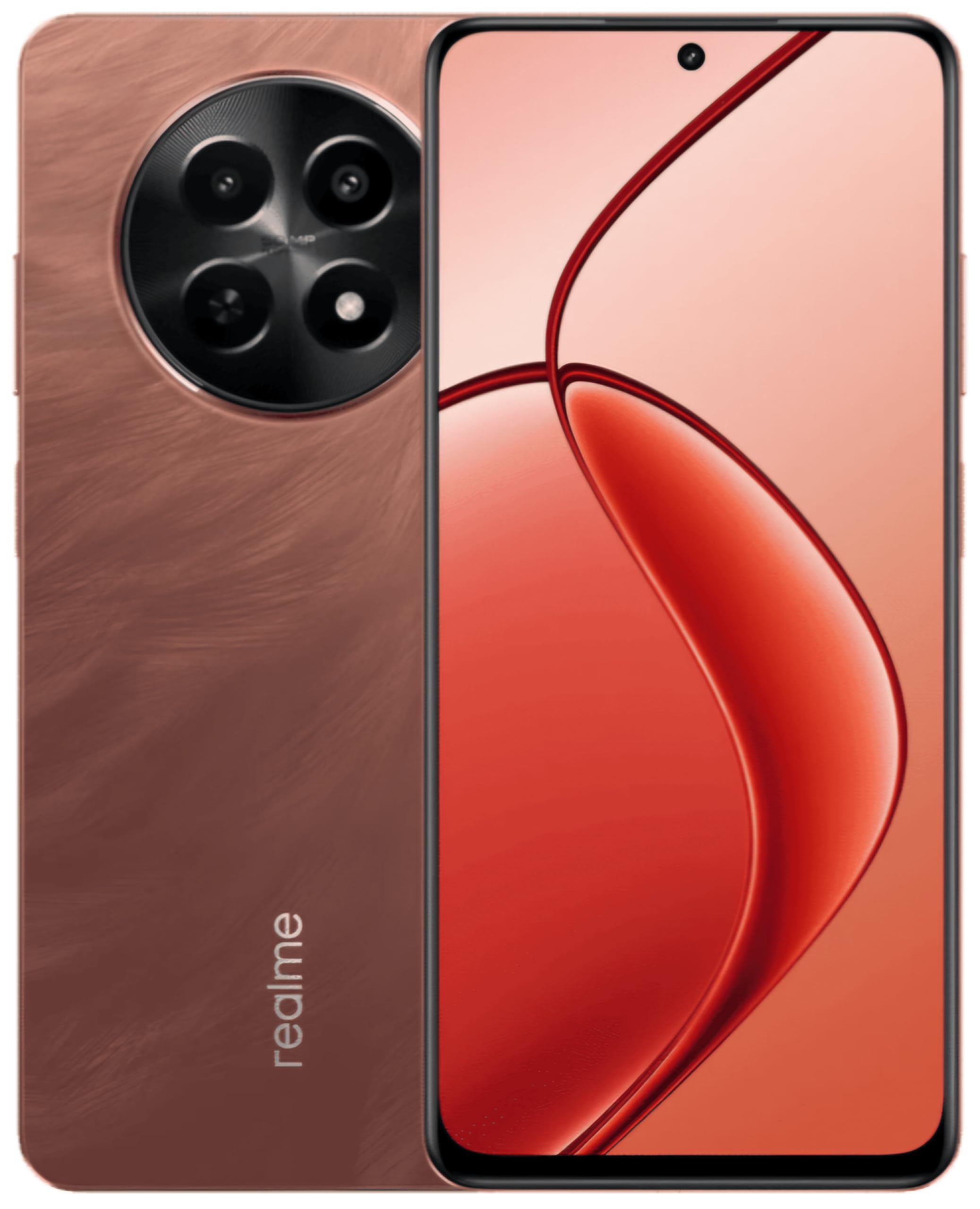
This image displays the realme C65 5G smartphone, highlighting its vibrant Speedy Red finish and the design of its screen and camera setup.
1. Opsætningsvejledning
1.1. Indsættelse af SIM- og hukommelseskort
Your realme C65 5G supports a single Nano SIM card and a microSD card for expandable storage up to 2 TB.
- Find SIM-kortbakken på siden af din enhed.
- Sæt SIM-kortudkastningsværktøjet i det lille hul ved siden af bakken, og skub forsigtigt, indtil bakken springer ud.
- Place your Nano SIM card into the designated slot with the gold contacts facing down. If using a microSD card, place it in its respective slot.
- Skub forsigtigt bakken tilbage i telefonen, indtil den flugter med enhedens kabinet.
1.2. Tænd din enhed
Press and hold the Power button (usually on the right side) until the realme logo appears on the screen. The device will then boot up.
1.3. Indledende opsætning
Follow the on-screen prompts to complete the initial setup process. This includes selecting your language, connecting to a Wi-Fi network, setting up your Google account, and configuring security features like fingerprint recognition.
2. Betjeningsvejledning
2.1. Grundlæggende navigation
Your realme C65 5G uses a touch-sensitive display for navigation. Swipe up from the bottom to go to the home screen, swipe left or right to switch between home screens, and swipe down from the top for notifications and quick settings.
2.2. Kamerabrug
The realme C65 5G features a 50MP rear camera and an 8MP front camera.
- Åbn Kamera-appen fra din startskærm eller appskuffe.
- Vælg den ønskede tilstand (Foto, Video, Portræt osv.).
- Tryk på udløserknappen for at tage et billede eller starte/stoppe videooptagelse.
- Brug skærmknapperne til at zoome, skifte mellem forreste og bageste kamera og anvende filtre.
2.3. Forbindelse
- Wi-Fi: Gå til Indstillinger > Netværk og internet > Wi-Fi for at oprette forbindelse til tilgængelige netværk.
- Bluetooth: Gå til Indstillinger > Forbundne enheder > Bluetooth for at parre med andre Bluetooth-enheder.
- Mobildata (5G/4G): Ensure your SIM card is active and mobile data is enabled in Quick Settings or Network & internet settings.
- USB: Connect your phone to a computer using a USB cable for file overførsel eller opladning.
2.4. Fingeraftryksgenkendelse
The device features fingerprint recognition for secure unlocking. Set up your fingerprint by going to Settings > Security > Fingerprint. Follow the instructions to register your fingerprint(s).
3. Vedligeholdelse
3.1. Rengøring af din enhed
Use a soft, lint-free cloth to clean the screen and body of your phone. Avoid using harsh chemicals or abrasive materials. For ports, use a soft brush to gently remove dust.
3.2. Softwareopdateringer
Regularly check for and install software updates to ensure your device has the latest features, security patches, and performance improvements. Go to Settings > About phone > Software update.
3.3. Batteripleje
Your realme C65 5G is equipped with a 5000 mAh battery. To maximize battery life:
- Undgå ekstreme temperaturer.
- Lad ikke batteriet aflades helt for ofte.
- Brug den originale oplader og det kabel, der fulgte med din enhed.
- Administrer brugen af baggrundsapps og skærmens lysstyrke.
4. Fejlfinding
4.1. Enheden tændes ikke
Ensure the battery is charged. Connect the phone to its charger and wait a few minutes before attempting to power it on again. If it still doesn't turn on, try holding the Power button for an extended period (10-15 seconds).
4.2. Apps der går ned eller fryser
Try force-closing the app and reopening it. If the issue persists, clear the app's cache and data (Settings > Apps > [App Name] > Storage > Clear cache/Clear data). As a last resort, uninstall and reinstall the app.
4.3. Problemer med netværksforbindelse
Check if Airplane Mode is off. Restart your device. Verify your SIM card is properly inserted. If using Wi-Fi, restart your router. For mobile data, ensure your plan is active and you have signal coverage.
4.4. Fingeraftrykssensoren virker ikke
Ensure your finger is clean and dry. Re-register your fingerprint in the settings. If the issue continues, try restarting your device.
5. Specifikationer
| Feature | Specifikation |
|---|---|
| Model | Realme C65 5G |
| VÆDDER | 8 GB |
| Intern opbevaring | 128 GB (Expandable up to 2 TB via microSD) |
| Processor | Mediatek Dimensity 6300 |
| Vise | 6.67 inch HD+ LCD (1604 x 720 Pixels) |
| Bagkamera | 50 MP |
| Forreste kamera | 8 MP |
| Batterikapacitet | 5000 mAh |
| SIM-korttype | Enkelt nano-SIM-kort |
| Biometrisk sikkerhed | Fingeraftryksgenkendelse |
| Vandmodstand | Vandtæt |
| Hovedtelefonstik | 3.5 mm |
| Cellulær teknologi | 5G, 4G |
| Trådløs forbindelse | Wi-Fi, Bluetooth, LTE |
6. Garantioplysninger
For detailed warranty information, please refer to the warranty card included in your product packaging or visit the official realme webGarantibetingelserne kan variere afhængigt af region og købsdato.
7. Kundesupport
If you encounter issues not covered in this manual or require further assistance, please contact realme customer support. You can find contact details on the official realme webwebstedet eller via supportsektionen i din enheds indstillinger.
For online ressourcer, besøg realme-butik på Amazon.
8. Officielle produktvideoer
No relevant official product videos with 'Seller' as creator type and m3u8 format were found in the provided product data for embedding.