
Indledning
This manual provides detailed instructions for the installation, operation, and maintenance of your Compustar CS935-AS 1-Way AP Alarm & Starter Kit G17. Please read this manual thoroughly before using the product to ensure proper function and safety. This system is designed to enhance vehicle security and convenience with features like remote start, keyless entry, and a robust alarm system.
Hvad er inkluderet
The Compustar CS935-AS kit includes the following components:
- 2 x 1WG17R-AM 1-Way G17 AM Remotes
- 1 x ANT-AP 1-Way AP Antenna
- 1 x CM900-AS Remote Start & Security Control Module
- 1 x Shock Sensor II Dual-Stage Impact and Tilt Sensor
- 1 x Theft-Deterrent LED Blue Security LED
- 1 x 10⁵+dB Alarm Siren

Figure 1: Compustar 1-Way G17 AM Remote. This remote features buttons for lock, unlock, trunk release, and remote start on its side.

Figure 2: Compustar CM900-AS Remote Start & Security Control Module. This is the central processing unit for the alarm and remote start system.
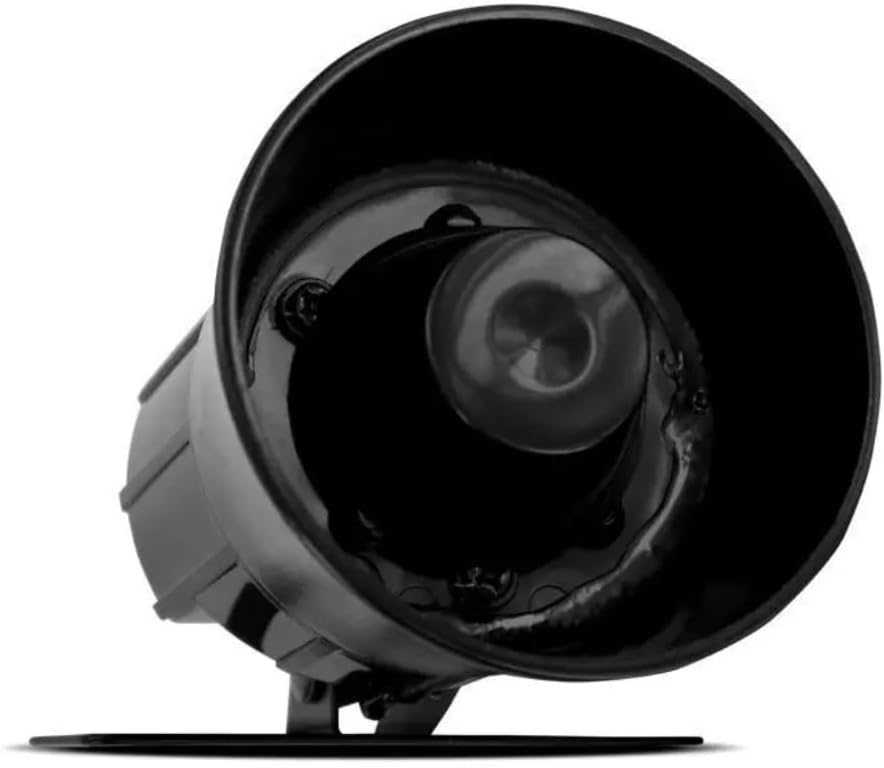
Figure 3: Compustar 105+dB Alarm Siren. This component emits a loud sound when the alarm is triggered.
Specifikationer
| Feature | Detalje |
|---|---|
| Mærke | Compustar |
| Modelnummer | CS935-AS |
| Kompatible enheder | Cars, Trucks, SUVs, and Vans (may require additional vehicle-specific parts) |
| Støjniveau (sirene) | 105 decibel |
| Fjernbetjening inkluderet | Yes (2 x 1-Way Remotes) |
| Sikkerhedsfunktioner | Dual-Stage Shock/Impact Sensor, Tilt Sensor, Starter-Kill, Alarm Siren |
| Forbindelse | 1-Way AP Antenna |
| Varens vægt | 10 pund |
| UPC | 840127710624 |
Opsætning og installation
Installation of the Compustar CS935-AS system typically requires professional expertise due to complex vehicle wiring and module programming. It is recommended to have this system installed by an authorized Compustar dealer.
The system may require additional parts specific to your vehicle for full functionality. Ensure all necessary components are acquired before beginning installation.
For programming the Blade module and controller, refer to the following video:
Video 1: Idatalink BLADE Remote Start/Security Bypass Module Flashing. This video demonstrates the process of flashing and updating the Blade module and Compustar controller using a computer and the ADS-USB cable. It covers creating an account, connecting hardware, selecting vehicle details, and configuring features.
Betjeningsvejledning
The Compustar 1-Way G17 AM Remote provides convenient control over your vehicle's security and remote start functions. All control buttons are located on the side of the remote.
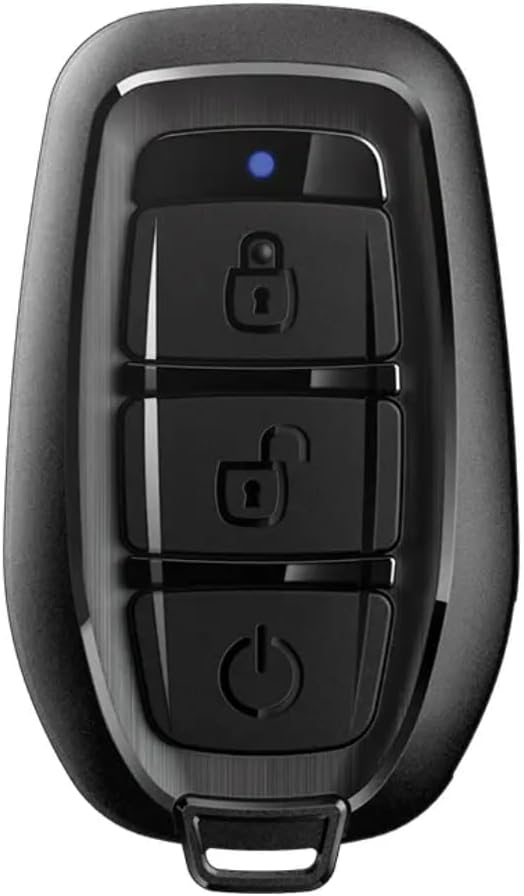
Figur 4: Forside view of the Compustar 1-Way G17 AM Remote, showing the display and side buttons.
Fjernbetjeningsfunktioner:
- Lås/arm: Tryk på 🔒 (lock) button once. The remote will display "LOCK" or "ARM" and chirp to confirm the command.
- Lås op/deaktiver: Tryk på 🔓 (unlock) button once. The remote will display "UNLOCK" or "DISARM" and chirp to confirm.
- Trunk Release: Tryk og hold på 🚗 (trunk) button for three full seconds. The remote will display "TRUNK" or "OPEN" to confirm.
- Fjernstart: Tryk og hold på ⏵ (remote start) button for three full seconds. The remote will display "REMOTE START" and then "START" with a spinning icon to indicate successful engine start. The display will also show the remaining run time.
Driving Away After Remote Start:
- Unlock the vehicle using the remote.
- Ind i køretøjet.
- Insert the key into the ignition and turn it to the "ON" or "RUN" position (two clicks forward).
- Apply the brake pedal. The remote start system will disengage, and the vehicle will now be operating under key control.
Note: If the brake pedal is pressed before the key is turned to the "ON" position, the vehicle may shut off. In this case, simply start the vehicle with the key as normal.
For a visual demonstration of the remote's basic operation, please watch the following video:
Video 2: Compustar Prime T9 Operation. This video demonstrates the basic functions of a Compustar remote, including locking, unlocking, trunk release, and remote engine start. It also shows the process of taking over the vehicle after a remote start.
Opretholdelse
To ensure the longevity and optimal performance of your Compustar CS935-AS system, consider the following maintenance tips:
- Fjernbetjenings batteri: Replace the remote control battery as needed. Refer to the remote's specific instructions for battery type and replacement procedure.
- Systemtjek: Periodically test all functions of your alarm and remote start system to ensure they are working correctly.
- Professionel inspektion: It is recommended to have your system inspected by an authorized Compustar dealer annually, especially if you experience any issues or after any vehicle service.
- Rensning: Keep the remote control clean and dry. Avoid exposing the control module or antenna to excessive moisture or extreme temperatures.
Fejlfinding
If you encounter issues with your Compustar CS935-AS system, try the following basic troubleshooting steps:
- Fjernbetjeningen reagerer ikke: Check the remote control battery. If the battery is low or dead, replace it. Ensure you are within the operating range of the system.
- Fejl ved fjernstart: Ensure all vehicle doors, hood, and trunk are closed. Check if the vehicle is in park (for automatic transmissions) or if the reservation mode is properly set (for manual transmissions). Verify that the vehicle's battery is charged.
- Alarmudløsning tilfældigt: Dual-stage shock/impact sensor sensitivity might be too high. Consult an authorized installer to adjust the sensor settings.
- No Confirmation from Remote: This could indicate a range issue or interference. Try operating the remote closer to the vehicle.
For persistent issues, contact your authorized Compustar dealer for professional diagnosis and repair.
Garanti og support
Your Compustar CS935-AS system comes with the following warranty coverage:
- Remote Warranty: 1-Year Remote Warranty
- Systemgaranti: Limited Lifetime System Warranty
- Producentgaranti: 1 års producentgaranti
Please retain your proof of purchase for warranty claims. Warranty terms and conditions may vary. For detailed warranty information or technical support, please contact your authorized Compustar dealer or visit the official Compustar webwebsted.