
1. Introduktion
Tak for købetasing the RCA SP550BT Portable Speaker. This manual provides important information regarding the setup, operation, and maintenance of your new speaker. Please read it thoroughly before use and keep it for future reference.
The RCA SP550BT is a versatile portable speaker featuring 50W output, Bluetooth connectivity, USB playback, FM radio, AUX input, True Wireless Stereo (TWS) function, LED lights, and a microphone input for an enhanced audio experience.
2. Pakkens indhold
Tjek venligst pakken for følgende varer:
- RCA SP550BT Portable Speaker
- Fjernbetjening
- Strømkabel
- Brugervejledning (dette dokument)
3. Produktet er slutview
Familiarize yourself with the main components and features of your RCA SP550BT speaker.

Figur 3.1: Front view of the RCA SP550BT portable speaker. This image displays the speaker in an upright position, highlighting the top control panel and the three prominent speaker cones with red illumination.

Figur 3.2: Side view of the RCA SP550BT portable speaker. This perspective shows the depth of the speaker and the integrated handle for portability.

Figur 3.3: Vandret view of the RCA SP550BT portable speaker. This image illustrates the speaker's design when placed on its side, emphasizing the speaker grille and LED lighting.
3.1 Fjernbetjening
Den medfølgende fjernbetjening muliggør bekvem betjening af højttaleren på afstand.
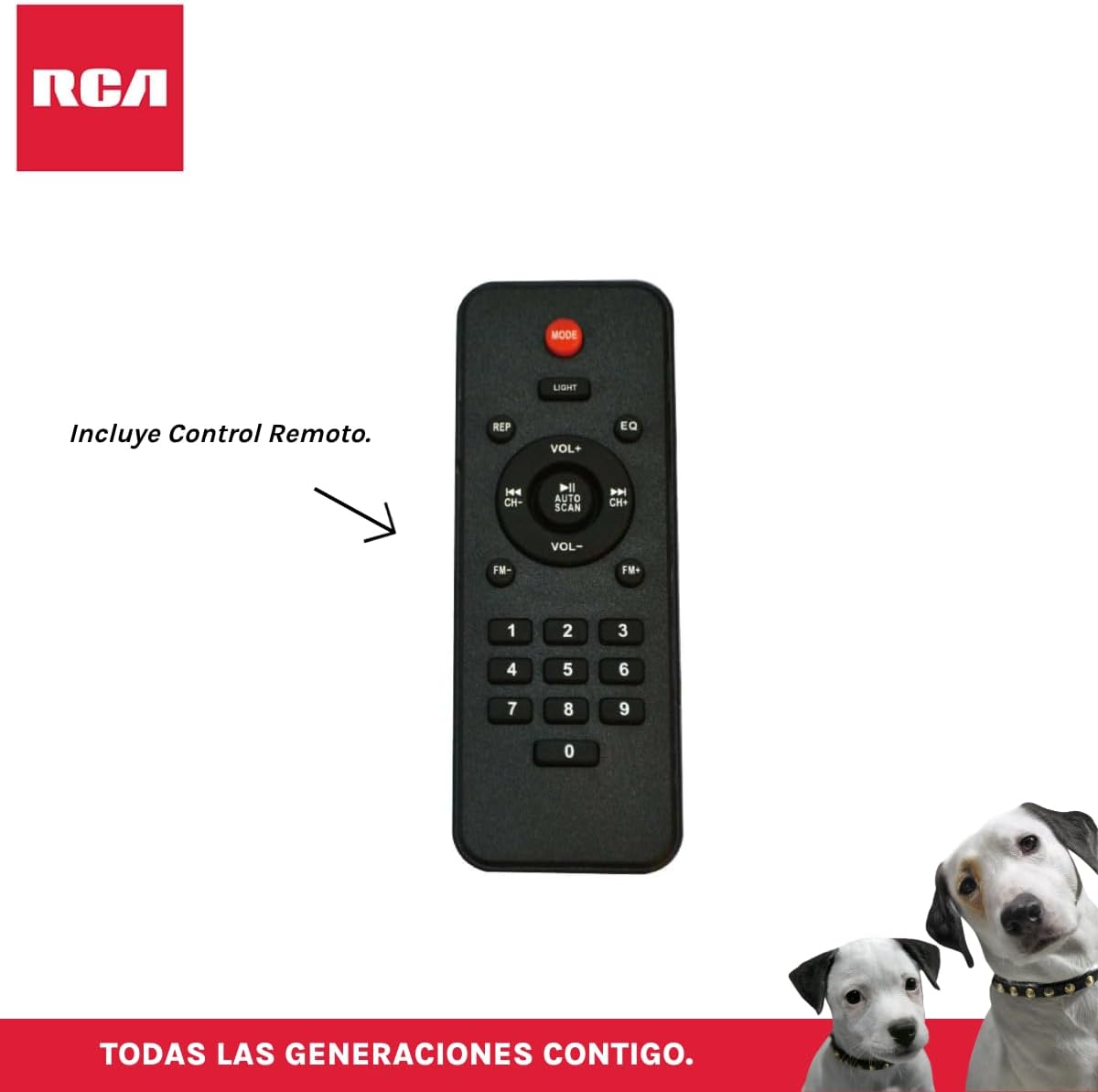
Figur 3.4: RCA SP550BT Remote Control. This image displays the full layout of the remote control, including buttons for power, mode selection, volume adjustment, track navigation, equalizer settings, and a numeric keypad.
4. Opsætning
4.1 Strømtilslutning
- Sørg for, at højttaleren er placeret på en stabil, flad overflade.
- Connect the power cable to the speaker's power input port.
- Plug the other end of the power cable into a standard electrical outlet (AC 100-240V, 50/60Hz).
- Tryk på tænd/sluk-knappen på højttaleren eller fjernbetjeningen for at tænde den.
5. Betjeningsvejledning
5.1 Tænd/sluk
- For at tænde højttaleren skal du trykke på MAGT button on the control panel or the remote control.
- For at slukke for højttaleren skal du trykke på MAGT knappen igen.
5.2 Valg af tilstand
Tryk på MODE button on the control panel or remote control to switch between Bluetooth, USB, FM, and AUX input modes.
5.3 Bluetooth -parring
- Tænd højttaleren, og vælg Bluetooth-tilstand ved hjælp af MODE button. The display will show "BLUE" and a pairing indicator will flash.
- Aktiver Bluetooth på din mobile enhed (smartphone, tablet osv.).
- Søg efter "RCA SP550BT" in your device's Bluetooth list and select it to pair.
- Once paired, the speaker will emit a confirmation sound, and the Bluetooth indicator will stop flashing.
- Du kan nu afspille lyd fra din enhed via højttaleren.
5.4 USB-afspilning
- Insert a USB flash drive (FAT32 format, max 32GB) containing MP3 audio files i USB-porten.
- Højttaleren skifter automatisk til USB-tilstand og begynder at afspille det første nummer. Hvis ikke, skal du trykke på MODE knappen for at vælge USB-tilstand.
- Brug AFSPIL/PAUSE, TIDLIGERE, og NÆSTE buttons on the control panel or remote to control playback.
5.5 FM radio
- Turn on the speaker and select FM mode using the MODE knap.
- Tryk og hold på AFSPIL/PAUSE knap (eller AUTO SCAN på fjernbetjeningen) for automatisk at scanne og gemme tilgængelige FM-stationer.
- Brug TIDLIGERE og NÆSTE knapperne til at navigere gennem de gemte stationer.
5.6 AUX-indgang
- Tilslut en ekstern lydenhed (f.eks. MP3-afspiller, bærbar computer) til højttalerens AUX-indgang med et 3.5 mm lydkabel (medfølger ikke).
- Vælg AUX-tilstand ved hjælp af MODE knap.
- Styr afspilning og lydstyrke fra din tilsluttede enhed.
5.7 TWS (ægte trådløs stereo) funktion
The TWS function allows you to connect two RCA SP550BT speakers wirelessly for a stereo sound experience.
- Ensure both SP550BT speakers are powered on and in Bluetooth mode, but not yet paired with any device.
- På en af højttalerne skal du trykke på og holde TWS button (if available, or a dedicated TWS pairing button) until you hear a confirmation tone. The speakers will attempt to pair with each other.
- Once successfully paired, one speaker will act as the master (left channel) and the other as the slave (right channel).
- Now, pair your mobile device with the master speaker via Bluetooth as described in section 5.3.
5.8 LED lys
Tryk på LYS button on the control panel or remote control to cycle through different LED light modes or to turn them off.
5.9 Brug af mikrofon
Connect a wired microphone (not included) to the microphone input port on the speaker. Adjust the microphone volume using the dedicated knob (if available) or the main volume control.
6. Vedligeholdelse
- Rensning: Brug en blød, tør klud til at rengøre højttalerens yderside. Brug ikke slibende rengøringsmidler eller opløsningsmidler.
- Opbevaring: Når højttaleren ikke er i brug i længere perioder, skal den opbevares køligt og tørt, væk fra direkte sollys og ekstreme temperaturer.
- Vandeksponering: Denne højttaler er ikke vandtæt. Undgå at udsætte den for vand eller overdreven fugt.
7. Fejlfinding
Hvis du støder på problemer med din højttaler, kan du se følgende almindelige problemer og løsninger:
| Problem | Mulig årsag | Løsning |
|---|---|---|
| Ingen strøm | Power cable not connected; Power outlet not working; Speaker off. | Check power cable connection; Try a different outlet; Press the POWER button. |
| Ingen lyd | Lydstyrken er for lav; Forkert tilstand valgt; Enheden er ikke tilsluttet korrekt. | Skru op for lydstyrken; Vælg den korrekte inputtilstand (Bluetooth, USB, AUX); Genopret forbindelse til enheden. |
| Bluetooth-parring mislykkes | Speaker not in pairing mode; Device Bluetooth off; Speaker already paired. | Ensure speaker is in Bluetooth pairing mode; Turn on device Bluetooth; Disconnect from other devices. |
| USB-afspilning virker ikke | USB drive format incompatible; Corrupt files; USB drive not inserted correctly. | Sørg for, at USB er i FAT32-format; Kontroller file integrity; Reinsert USB drive. |
| Dårlig modtagelse af FM-radio | Svagt signal; Interferens. | Relocate speaker; Extend antenna (if applicable). |
8. Specifikationer
| Feature | Specifikation |
|---|---|
| Model | SP550BT |
| Mærke | RCA |
| Højttaler udgangseffekt | 50 watt (maksimum) |
| Forbindelsesteknologi | Bluetooth, USB, AUX |
| Trådløs teknologi | Bluetooth |
| Lydudgangstilstand | Stereoanlæg |
| Højttaler type | Bærbar, Udendørs |
| Monteringstype | Bordplademontering |
| Kontrolmetode | Fjernbetjening |
| Højttaler størrelse | 6.5 tommer |
| Bashøjttaler diameter | 6.5 tommer |
| Batterikapacitet | 4400 mioamp Timer |
| Strømkilde | El-kabel |
| Kompatible enheder | Bærbar computer, MP3-afspiller, smartphone, tablet |
| GTIN / UPC | 044476152061 |
9. Garanti og support
This product comes with a limited warranty. Please refer to the warranty card included in your package for specific terms and conditions. For technical support or service inquiries, please contact RCA customer service through their official webwebstedet eller de kontaktoplysninger, der er angivet med dit køb.
Note: Warranty terms may vary by region. Keep your proof of purchase for warranty claims.