
HFBTE 2024080707dara
Brugermanual til HFBTE AC DC-magnetometer
Brand: HFBTE | Model: 2024080707dara
Indledning
This Gaussmeter is a portable and multifunctional magnetic field measuring instrument, equipped with a Hall sensor with high sensitivity and low drift. It is applied for measuring the flux density of DC constant magnetic field and AC magnetic field.
Funktioner
- Range: 2mT ~ 3000 mT.
- Nøjagtighed: 2 %.
- Switching AC or DC mode.
- Unit switch: G, mT, A/m.
- N/S polarity display.
- Relativ måletilstand.
- Max. hold function.
- Alarm of exceeding the upper / lower limit.
- Supporting backlight.
- Battery remaining power display.
- Axial probe and Radial probe.
- USB interface.
Opsætning
Udpakning og første inspektion

Figure 1: The TM5120B Gaussmeter, including the main unit, probes, and user manual, as packaged in its box.
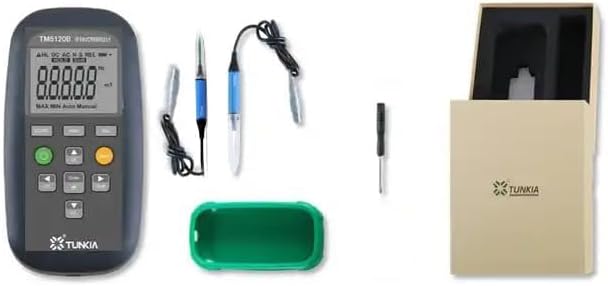
Figure 2: All components of the TM5120B Gaussmeter laid out, showing the main unit, axial probe, radial probe, and user manual.
Tilslutning af sonden
Video 1: Demonstration of how to connect the probe to the TM5120B Gaussmeter unit. Ensure the probe is aligned with the slot and inserted directly.
To begin using the Gaussmeter, first ensure the device is powered off. Carefully align the connector of the desired Hall probe (either axial or radial) with the corresponding slot on the main unit. Gently push the connector directly into the slot until it is securely seated. Avoid forcing the connection to prevent damage to the pins.
Betjeningsvejledning
Funktionstast overview
Video 2: Detailed explanation of the various function keys on the TM5120B Gaussmeter, including DC/AC mode switching, HOLD function, REL (relative measurement), backlight control, and unit switching.
The TM5120B Gaussmeter features an intuitive button layout for easy operation. Below is a guide to its primary function keys:
- DC/AC Key: Toggles between Direct Current (DC) and Alternating Current (AC) magnetic field measurement modes.
- HOLD-tast: Pressing this key automatically saves and displays the maximum magnetic field value measured. Press again to cancel the hold function and resume live readings.
- REL (Relative) Key: This button allows you to set the current magnetic field strength at the probe's location to zero. This is useful for measuring relative changes in magnetic fields. Press again to cancel the magnetic field zero state setting.
- Confirmation Button / Backlight Key: Press this key to turn on the display backlight for improved visibility in low-light conditions. Pressing it again will turn off the backlight.
- Right Click / Unit Switching Key: Use this key to cycle through different measurement units: milliTesla (mT), Gauss (G), Oersted (Oe), and kiloAmpere per meter (kA/m).
- Cross-key Area (Up, Down, Left, Right): These directional buttons, in conjunction with the central confirmation button, enable advanced functions such as setting maximum/minimum alarms and configuring automatic shutdown. Refer to the full user manual for detailed operation of these advanced settings.
At udføre en Sample Test
Video 3: Demonstration of how to perform a sample test using the TM5120B Gaussmeter, including preparing the probe and using the HOLD function to capture maximum values.
To measure a magnetic field:
- Forbered sonden: Gently rotate the probe cover to open it and expose the Hall sensor.
- Placer sonden: Use the "TEST" surface of the probe to position it as close as possible to the magnetic field source or test sample.
- Measure and Hold: While measuring, you can use the HOLD key function to capture and display the maximum magnetic field value detected on the sample surface. The AC magnetic field detection method is consistent with DC magnetic field operation.

Figure 3: Diagram illustrating the axial Hall probe and its orientation relative to a magnetic field for measurement.

Figure 4: Diagram illustrating the radial Hall probe and its orientation relative to a magnetic field for measurement.

Figure 5: The TM5120B Gaussmeter shown with the axial probe connected and ready for use.

Figure 6: The TM5120B Gaussmeter shown with the radial probe connected and ready for use.
Ansøgninger
The HFBTE AC DC Magnetometer is designed for a wide range of applications requiring precise magnetic field measurement. These include:
- Magnetic Material analysis
- Machine Components inspection
- Measurement of DC Constant Magnetic Fields
- Measurement of Space AC Magnetic Fields
- Do-ironing Separator performance evaluation
- Environmental Magnetic Field assessment

Figur 7: Visuelt eksempelamples of typical applications for the Gaussmeter, including magnetic materials, machine components, DC constant magnetic fields, space AC magnetic fields, do-ironing separators, and environmental magnetic fields.
Tekniske specifikationer
| Specifikation | Værdi |
|---|---|
| Måleområde | 2mT ~ 3000mT |
| Accuracy (Class 2) | DC: ±2%, AC: ±5% |
| Frekvensområde | DC, 40Hz~500Hz |
| Temperaturkoefficient | ± 0.1% / K |
| Nul afdrift | ± 0.1 mT/h |
| Vis ciffer | 5 |
| Strømforsyning | 3 AA batteries (NOT INCLUDED) or USB charging |
| Driftstemperatur | 0~50℃ |
| Opbevaringstemperatur | -20°C~70°C |
| Driftsfugtighed | 40%~80% R·H, non-condensing |
| Opbevaring Fugtighed | <95% R·H, non-condensing |
| Vægt | Cirka 350 g |
| Interface | Hall probe input interface, USB interface |
| Overordnede dimensioner | 90mm(W) ×40 mm(D) × 165 mm(H) |
Note: Calibration only covers 2.5T.
Opretholdelse
To ensure the longevity and accuracy of your HFBTE AC DC Magnetometer, follow these maintenance guidelines:
- Rensning: Use a soft, dry cloth to clean the main unit and probes. Do not use abrasive cleaners or solvents, as they may damage the device.
- Opbevaring: When not in use, store the Gaussmeter and its probes in a dry, cool place, away from direct sunlight and extreme temperatures. Ensure the probe covers are in place to protect the sensitive Hall sensors.
- Udskiftning af batteri: If the battery remaining power display indicates low power, replace the 3 AA batteries promptly to maintain optimal performance.
- Probepleje: Handle the Hall probes with care. Avoid bending or subjecting them to excessive force, as this can damage the internal sensor.
- Kalibrering: Regular calibration is recommended to ensure measurement accuracy, especially after prolonged use or if accuracy is critical for your application. Refer to the full user manual for information on calibration procedures or contact customer support.
Fejlfinding
This section provides solutions to common issues you might encounter with your HFBTE AC DC Magnetometer. For problems not listed here, please contact customer support.
| Problem | Mulig årsag | Løsning |
|---|---|---|
| Enheden tænder ikke. | Lave eller døde batterier; forkert batteriinstallation. | Check battery orientation. Replace with fresh AA batteries. |
| Upræcise aflæsninger. | Probe not properly connected; probe damaged; device needs calibration; strong external magnetic interference. | Ensure probe is securely connected. Inspect probe for visible damage. Perform zero adjustment using the REL key. Move away from other magnetic sources. Consider professional calibration if issues persist. |
| Skærmen er svag eller ulæselig. | Backlight is off; low battery. | Press the Confirmation/Backlight key to turn on the backlight. Replace batteries if the issue persists. |
| Cannot switch between AC/DC modes or units. | Button malfunction; temporary software glitch. | Ensure buttons are pressed firmly. Try restarting the device by powering it off and on. |
Garanti og support
Information regarding product warranty and specific support contact details is not available in the provided product data. Please refer to the physical user manual included with your product or visit the official HFBTE website for comprehensive warranty terms and customer support information.
For general inquiries or technical assistance, you may try contacting the seller directly via the Amazon platform or searching for HFBTE customer service online.
HFBTE Store Link: Visit the HFBTE Store on Amazon
Ask a question about this manual
Ask about setup, troubleshooting, compatibility, parts, safety, or missing instructions. Manuals+ will review the question and use this page’s manual context to help answer it.