
WOOPKER AK45
WOOPKER AK45 Stereo Amplivligere brugervejledning
Model: AK45
1. Introduktion
The WOOPKER AK45 is a versatile 2-channel stereo amplifier designed for home audio systems. It features multiple input options including Bluetooth 5.0, AUX, USB, SD card, and FM radio, making it suitable for various audio sources and environments. This manual provides detailed instructions for setting up and operating your AK45 amplifner for at sikre optimal ydeevne.

Image 1.1: The WOOPKER AK45 Stereo Amplifier with its included remote control. This image displays the front panel controls and the compact design of the amplivligere.
2. Hvad er der i æsken
Kontroller venligst, at alle varer er til stede i pakken:
- WOOPKER AK45 Stereo Amplifier x 1
- Fjernbetjening x 1
- Strømkabel x 1
- FM Antenna x 1
- Brugervejledning x 1

Image 2.1: Visual representation of the items included in the WOOPKER AK45 amplifier package. This includes the amplifier unit, remote control, power cable, FM antenna, and user manual.
3. Produktet er slutview
3.1 Frontpanel

Billede 3.1: Detaljeret view af AK45 amplifier's front panel, highlighting the various controls and input ports such as USB, SD Card slot, display, microphone inputs, and adjustment knobs.
- Afbryderen: Drejer amplivligere til eller fra.
- USB-port: Til tilslutning af USB-flashdrev til lydafspilning.
- SD/MMC-kortslot: For inserting SD or MMC cards for audio playback.
- Vise: Viser aktuel tilstand, sporinformation eller FM-frekvens.
- Diskant-knap: Justerer højfrekvent lydudgang.
- Basknap: Justerer lavfrekvent lydudgang.
- Mic/Vol Knob: Justerer mikrofonens lydstyrke.
- MIC1/MIC2-indgange: 6.35 mm stik til tilslutning af mikrofoner.
- Mode knap: Cycles through input sources (Bluetooth, AUX, USB, SD, FM).
- Navigationsknapper: For track control (previous/next), play/pause, and FM station tuning.
- Lydstyrkeknap: Main volume control for overall audio output.
3.2 Bagpanel
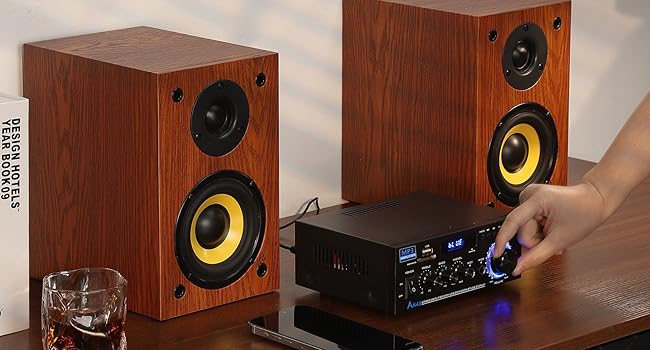
Billede 3.2: Bagside view af AK45 amplifier, illustrating the speaker output terminals, RCA audio input, FM antenna connection, DC 12V input, and AC power input.
- FM ANT: Tilslutning til FM-antennen.
- LYDINDGANG (RCA): Red and white RCA jacks for connecting external audio devices (e.g., CD player, DVD player, TV).
- HØJTTALERS UDGANG: Terminals for connecting passive speakers (4-16 Ohms impedance).
- DC 12V/5A strømindgang: For connecting a 12V DC power adapter (if applicable).
- AC strømindgang: For connecting the main AC power cable (AC90-240V, 50-60Hz).
4. Opsætning
4.1 Højttalertilslutning
AK45 amplifier is designed for passive speakers with an impedance of 4-16 Ohms. Follow these steps to connect your speakers:
- Identify the positive (+) and negative (-) terminals on your speakers and on the amplifier. Positive terminals are typically red, and negative terminals are black.
- Press the clasp on the ampliferens højttalerudgangsterminaler.
- Insert the bare speaker wires into the corresponding terminals. Ensure a secure connection and that no stray wire strands are touching other terminals.
- Connect the right speaker to the 'RIGHT' output and the left speaker to the 'LEFT' output.

Image 4.1: Visual guide for connecting passive speakers to the rear panel of the AK45 amplifier, illustrating the correct polarity for left and right channels.
4.2 Strømtilslutning
Connect the provided AC power cable to the AC Power Input on the rear panel of the amplifier, then plug it into a standard wall outlet. If using a DC 12V power source, connect it to the DC 12V/5A input.
4.3 FM-antennetilslutning
Connect the included FM antenna to the 'FM ANT' port on the rear panel for improved FM radio reception.
5. Betjeningsvejledning
5.1 Tænd/sluk
Flip the 'POWER' switch on the front panel to the 'ON' position to power on the amplifier. Flip it to 'OFF' to power down.
5.2 Indgangsvalg
Press the 'MODE' button on the front panel or the remote control to cycle through available input sources: Bluetooth (BT), AUX, USB, SD Card, and FM Radio. The selected mode will be displayed on the front panel screen.
5.3 Bluetooth -parring
- Skift til amplifier to 'BT' mode using the 'MODE' button. The display will show 'BLUE' and flash, indicating it's ready for pairing.
- Aktiver Bluetooth på din mobilenhed (smartphone, tablet osv.) og søg efter tilgængelige enheder.
- Select 'BT' from the list of devices to pair. Once connected, the 'BLUE' indicator on the amplifier will stop flashing.
- Begynd at afspille lyd fra din enhed.
Note: Maintain a distance of less than 30 feet (10 meters) between the amplifier and your Bluetooth device for optimal connection. For TV or PC devices, keep the distance within 15 feet (5 meters).
Video 5.1: A demonstration of connecting speakers, powering on the AK45 amplifier, and pairing a mobile device via Bluetooth. This video also shows the amplifier playing music through connected speakers.
5.4 USB/SD-kortafspilning
Insert a USB flash drive or SD/MMC card containing audio files into the respective port/slot on the front panel. The amplifier will automatically switch to USB or SD mode and begin playback. Use the navigation buttons on the front panel or remote control to manage playback.
5.5 FM-radiofunktion
In FM mode, use the navigation buttons to scan for radio stations. Press and hold the 'Play/Pause' button to auto-scan and save available stations. Use the 'Previous/Next' buttons to cycle through saved stations.
5.6 Brug af mikrofon
Connect up to two microphones to the 'MIC1' and 'MIC2' input jacks on the front panel. Adjust the microphone volume using the 'MIC/VOL' knob. The amplifier supports karaoke functions.

Image 5.2: The AK45 amplifier connected to two microphones, demonstrating its capability for karaoke or dual microphone use.
5.7 Lydjusteringer
Use the 'TREBLE', 'BASS', and 'MIC/VOL' knobs on the front panel to fine-tune the audio output to your preference. The main 'VOLUME' knob controls the overall sound level.
5.8 Brug af fjernbetjening
The included remote control allows for convenient operation from a distance. Ensure the plastic isolation sheet is removed from the battery compartment before first use. The remote can control power, mode selection, volume, track navigation, and EQ settings.
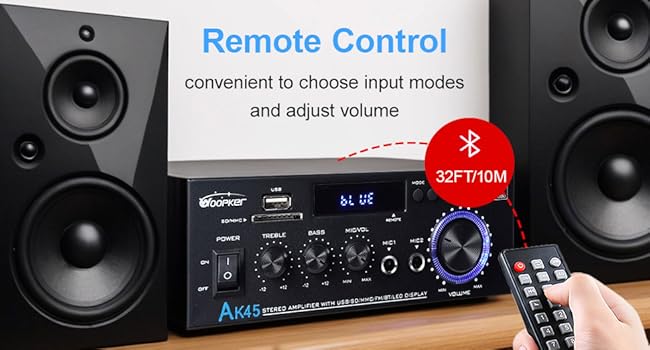
Image 5.3: The AK45 amplifier with its remote control, illustrating the convenience of remote operation for input mode selection and volume adjustments.
6. Specifikationer
| Feature | Specifikation |
|---|---|
| Modelnummer | AK45 |
| Mærke | WOOPKER |
| Strømudgang | 40W + 40W (Rated), 300W + 300W (Max) |
| Bluetooth version | 5.0 |
| Forbindelsesteknologi | AUX, USB, SD Card, Bluetooth |
| Kompatible enheder | Smartphone, Tablet, PC, TV, MP3 Player, CD Player, DVD Player, Projector |
| Lydudgangstilstand | Stereo (2.0 kanal) |
| Højttalerimpedans | 4-16 ohm |
| Varens vægt | 9.6 ounce |
| Pakkedimensioner | 8.58 x 8.11 x 3.82 tommer |
| Strømindgang | AC90-240V, 50-60Hz / DC 12V/5A |
7. Fejlfinding
If you encounter issues with your AK45 ampLifier, se følgende almindelige problemer og løsninger:
- Ingen strøm:
- Sørg for, at strømkablet er korrekt tilsluttet til begge ampstrømforsyning og en fungerende stikkontakt.
- Check if the power switch on the front panel is in the 'ON' position.
- Ingen lyd:
- Verify that speakers are correctly connected to the 'SPEAKERS OUTPUT' terminals with correct polarity.
- Kontroller lydstyrkeniveauet på begge amplifier og din lydkildeenhed.
- Sørg for, at den korrekte inputtilstand (Bluetooth, AUX, USB, SD, FM) er valgt.
- If using AUX, ensure the audio cable is securely connected to both the amplifier's 'AUDIO INPUT' and your source device.
- Problemer med Bluetooth-parring:
- Sørg for at amplifier is in 'BT' mode and the 'BLUE' indicator is flashing.
- Ensure your device's Bluetooth is enabled and it's within the recommended range (30 feet/10 meters).
- Prøv at ophæve parringen og parre enheden igen.
- USB/SD Card Not Playing:
- Sørg for, at USB-drevet eller SD-kortet er isat korrekt.
- Kontroller, at lyden fileer i et understøttet format.
- Prøv et andet USB-drev eller SD-kort.
- Dårlig FM-radiomodtagelse:
- Sørg for, at FM-antennen er korrekt tilsluttet.
- Adjust the position of the FM antenna for better signal reception.
8. Vedligeholdelse
To ensure the longevity and optimal performance of your AK45 ampLifier, følg disse vedligeholdelsesretningslinjer:
- Rensning: Brug en blød, tør klud til at rengøre ydersiden af ampBrug ikke flydende rengøringsmidler eller slibende materialer.
- Ventilation: Sørg for ampVentilatoren placeres et godt ventileret område for at forhindre overophedning. Ventilationsåbningerne må ikke blokeres.
- Opbevaring: Når den ikke er i brug i længere perioder, skal den opbevares ampOpbevar apparatet på et køligt, tørt sted væk fra direkte sollys og ekstreme temperaturer.
- Håndtering: Undgå at tabe eller udsætte ampbeskytter mod kraftige påvirkninger.
- Sluk: Sluk altid for amplifier before connecting or disconnecting any cables or accessories.
9. Garanti og support
WOOPKER is committed to providing quality products and customer satisfaction. For any inquiries or support needs, please refer to the following:
- Kundesvar: We aim to provide quick responses to customer inquiries within 24 hours.
- Returpolitik: Products can be returned for an exchange or refund within 30 days of purchase.
- Teknisk support: Lifetime technical customer support is available for your product.

Billede 9.1: En overview of WOOPKER's customer support commitments, including response times, return policy, and technical support availability.
Ask a question about this manual
Ask about setup, troubleshooting, compatibility, parts, safety, or missing instructions. Manuals+ will review the question and use this page’s manual context to help answer it.