
1.Overview
The BIGBIG WON Rainbow 2 Pro is a versatile wireless gaming controller designed for multiple platforms, including PC (Windows 10 & 11), Nintendo Switch, Android (7.0+), and iOS (14.0+). It offers various connection methods and advanced features to enhance your gaming experience.
Video 1.1: En introduktionsvideoasing the BIGBIG WON Rainbow 2 Pro controller's design and key functionalities.
2. Produktfunktioner
- Flere tilslutningsmetoder: Connect via 2.4G wireless dongle, Bluetooth, or USB cable.
- Multi-platform kompatibilitet: Supports Nintendo Switch, Windows 10 & 11, Android 7.0+, and iOS 14.0+.
- Højpræcisionskontroller: Features ALPS joysticks with 0 deadzone and 12-bit axis resolution, along with Hall-effect triggers for precise input.
- Adaptive Calibration: Automatic joystick center point sampling to reduce drift.
- Bevægelseskontrol: "GYROCON+" technology enables motion aiming on PC (not compatible with Switch).
- Knapper, der kan tilpasses: Includes 2 custom back buttons and 2 top buttons, all remappable.
- Lydstøtte: Integrated 3.5mm audio jack for use with 2.4G wireless connection.
- High Polling Rates: 200Hz for 2.4G wireless and 1000Hz for wired connections.
- RGB belysning: Customizable RGB effects.
- BIGBIG WON ELITE App: Supports in-game customization for button mapping, deadzone, sensitivity, motion control parameters, and macro programming.

Billede 2.1: An illustration highlighting the key features of the Rainbow 2 Pro controller, including motion control, Hall Effect triggers, extra buttons, polling rates, trigger-stop switch, adaptive calibration, 2.4G wireless audio, 0 deadzone joystick, app customization, and 12-bit axis resolution.

Billede 2.2: The BIGBIG WON Rainbow 2 Pro controller displayed with its RGB lighting active, resting on a magnetic charging stand. This image emphasizes the aesthetic and charging capabilities.
3. Opsætning og tilslutning
3.1. Connecting to PC (Windows 10 & 11)
- Kablet forbindelse: Tilslut controlleren til din pc med et USB-C-kabel. PC'en burde automatisk registrere og installere de nødvendige drivere.
- 2.4G trådløs forbindelse: Insert the 2.4G wireless dongle into an available USB port on your PC. Turn on the controller. The controller and dongle should pair automatically.
- Bluetooth-forbindelse: Ensure your PC has Bluetooth enabled. Put the controller into Bluetooth pairing mode (refer to controller button combinations in section 4.1). On your PC, go to Bluetooth settings and select the Rainbow 2 Pro to pair.
3.2. Forbindelse til Nintendo Switch
- Trådløs parring: On your Switch, navigate to "Controllers" > "Change Grip/Order". Put the Rainbow 2 Pro into Switch pairing mode (refer to controller button combinations in section 4.1). The Switch should detect and pair with the controller.
- Opvågningsfunktion: The controller supports one-click wake-up for the Switch console.
3.3. Connecting to Android/iOS Devices
- Bluetooth-parring: Enable Bluetooth on your Android (7.0+) or iOS (14.0+) device. Put the controller into Bluetooth pairing mode. Select the Rainbow 2 Pro from the list of available devices to pair.
- App-forbindelse: For full customization, download the BIGBIG WON ELITE App from your device's app store. Android phones require Bluetooth and location services to be enabled for app connection.

Billede 3.1: The Rainbow 2 Pro controller shown connected to a PC and a Nintendo Switch, with a smartphone displaying the BIGBIG WON ELITE App for real-time customization. This illustrates the multi-platform compatibility and app integration.
4. Betjeningsvejledning
4.1. Basic Controls and Button Layout
The Rainbow 2 Pro features standard gamepad buttons (A, B, X, Y), an 8-way D-pad, two ALPS joysticks, Hall-effect triggers (LT, RT), shoulder buttons (LB, RB), and additional customizable buttons (M1, M2, M3, M4) on the back and top.
- Tænd/sluk: Press and hold the central BIGBIG WON button.
- Modeskift: Hold the central button and press A for PC mode, B for Switch mode, etc. (Refer to the sticker on the back of the controller for specific combinations).
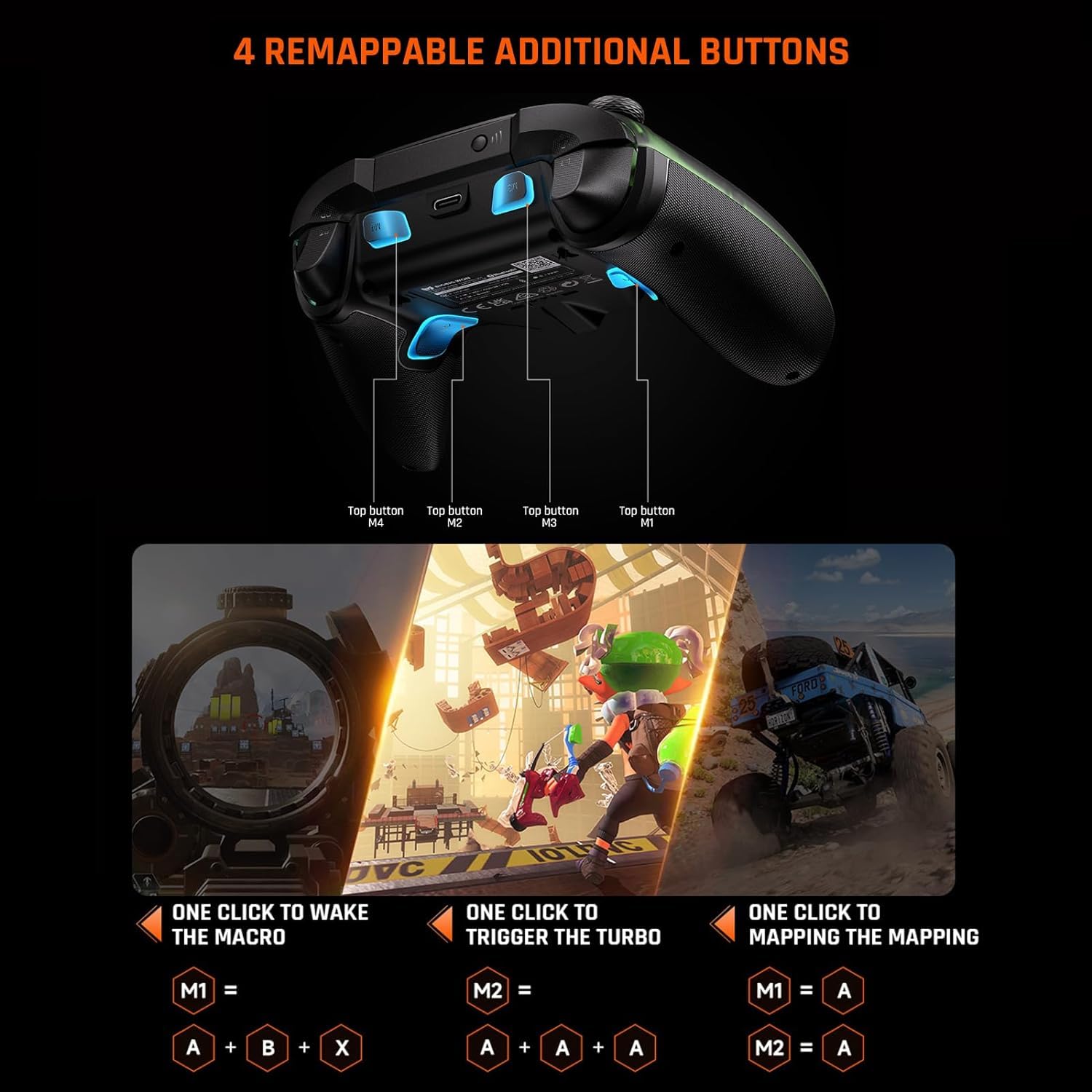
Billede 4.1: An image displaying the underside of the Rainbow 2 Pro controller, highlighting the four remappable additional buttons (M1, M2, M3, M4) located on the back and top of the grips.
4.2. Joystick and Trigger Functionality
- ALPS-joysticks: Provide precise control with 0 deadzone. Adaptive calibration automatically adjusts the center point to prevent drift.
- Udskiftelige joysticks: The controller comes with 3 sets of joysticks (short, middle, high) to match different gaming preferences.
- Hall-Effect Triggers: Offer 256 levels of precise input.
- Trigger-Stop Switch: Adjust the trigger travel distance for different game types. A short pull is ideal for FPS games (e.g., APEX), while a long pull is suitable for racing games (e.g., Forza Horizon 5).

Billede 4.2: A detailed diagram illustrating the internal components of the ALPS joystick and the three interchangeable joystick caps (short, middle, high) that can be used to customize the feel and response.

Billede 4.3: Et tværsnit view of the Hall-effect trigger mechanism, demonstrating its precise control. Below, two images show the trigger-stop switch set for a short pull (FPS games) and a long pull (racing games).
4.3. Bevægelseskontrol
The controller incorporates "GYROCON+" technology for motion aiming. This feature is supported on PC platforms but not on Nintendo Switch.

Billede 4.4: A user operating the Rainbow 2 Pro controller for motion aiming in a PC game, demonstrating the "GYROCON+" technology in action.
4.4. BIGBIG WON ELITE App Customization
The BIGBIG WON ELITE App allows for extensive customization of your controller settings in real-time.
- Knapkortlægning: Reassign functions to any button, including the additional M buttons.
- Joystick/Trigger Deadzone & Sensitivity: Fine-tune the response of joysticks and triggers.
- Motion Control Parameters: Adjust sensitivity and other settings for motion aiming.
- Makro programmering: Create and assign complex button sequences to simplify in-game actions.
- RGB-effekter: Customize the controller's RGB lighting.
Download the app from your device's respective app store. For Android users, ensure Bluetooth and location functions are enabled on your phone to connect to the app.

Billede 4.5: Multiple smartphone screens displaying various customization interfaces within the BIGBIG WON ELITE App, including sensitivity adjustments, deadzone settings, macro programming, and button mapping.
5. Vedligeholdelse
- Rensning: Brug en blød, tør klud til at rengøre controlleren. Undgå at bruge skrappe kemikalier eller slibende materialer.
- Opbevaring: Opbevar controlleren et køligt, tørt sted væk fra direkte sollys og ekstreme temperaturer.
- Batteripleje: The controller includes a Lithium Ion battery. For optimal battery life, avoid fully discharging the battery frequently. Charge the controller regularly, especially if it will be stored for an extended period.
- Adaptive Calibration: The controller features adaptive calibration for joysticks. If you experience minor drift, the system will automatically sample the center point to correct it. Manual calibration is generally not required.
6. Fejlfinding
| Spørgsmål | Mulig årsag | Løsning |
|---|---|---|
| Controller not connecting wirelessly | Low battery, incorrect mode, pairing issue, dongle not recognized. | Charge the controller. Ensure the correct connection mode (2.4G or Bluetooth) is selected. Re-pair the controller with the dongle or device. Try a different USB port for the dongle. |
| Joystick-drift eller unøjagtig indtastning | Calibration issue, physical obstruction. | The controller has adaptive calibration; allow it to self-correct. Ensure no debris is around the joystick base. If issues persist, check for firmware updates via the BIGBIG WON ELITE App. |
| Knapperne reagerer ikke | Softwarefejl, fysisk skade. | Restart the controller and the connected device. Check for any physical obstructions. If specific buttons are unresponsive, contact support. |
| Audio jack not working | Incorrect connection method, headset issue. | The 3.5mm audio jack function is supported when using a 2.4G wireless connection. Ensure your headset is properly plugged in and functional. |
| App not connecting to controller | Bluetooth/location services off (Android), pairing issue. | For Android, ensure Bluetooth and location services are enabled. Ensure the controller is in Bluetooth pairing mode and paired with your phone. |
7. Specifikationer
- Model: Rainbow 2 Pro
- Fabrikant: STORT VAND
- Forbindelse: 2.4G trådløs, Bluetooth, USB-C kablet
- Afstemningsfrekvens: 200Hz (2.4G Wireless), 1000Hz (Wired)
- joystick: ALPS, 0 Deadzone, 12-bit Axis Resolution, Adaptive Calibration, 3 Interchangeable Sets
- Udløsere: Hall-Effect, 256 Levels, Trigger-Stop Switch
- D-pad: 8-vejs
- Yderligere knapper: 4 Remappable (2 back, 2 top)
- Bevægelseskontrol: GYROCON+ (PC only)
- Lyd: 3.5mm Jack (supported with 2.4G connection)
- Batteri: 1 Lithium Ion (inkluderet)
- Kompatibilitet: PC (Windows 10/11), Nintendo Switch, Android (7.0+), iOS (14.0+)
- Dimensioner: 7.52 x 5 x 2.99 tommer
- Vægt: 1.1 pund
- Første tilgængelige dato: 5. august 2024

Billede 7.1: A graph illustrating the polling rates of the Rainbow 2 Pro controller (200Hz for 2.4G, 1000Hz for wired) compared to a regular controller's 125Hz, emphasizing the higher responsiveness.
8. Garanti og support
For warranty information and technical support, please refer to the official BIGBIG WON webwebstedet eller kontakt deres kundeservice direkte. Gem din købskvittering til garantikrav.